


About Fruit Madness
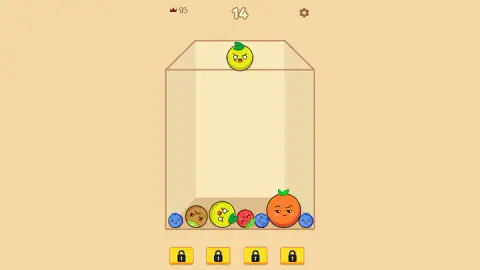
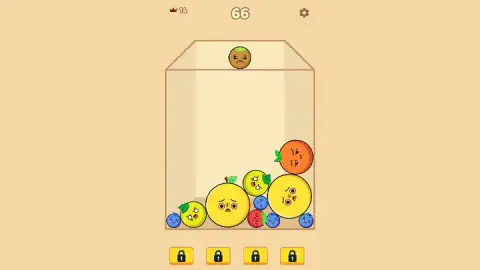
Most drop-and-merge puzzles put the score and the record side by side and let you forget which is which. Fruit Madness separates them sharply. The big number in the middle of the top bar moves with every merge. The small crown on the left, your best, does not move at all while you play. In our first round it sat at 14 the whole way while the score beside it climbed past 60.
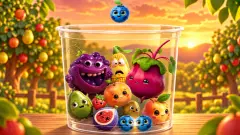
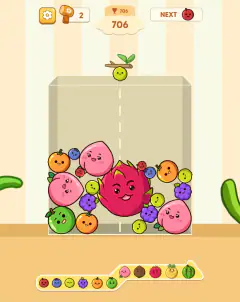
Underneath that is a familiar rule. A fruit with a face waits at the rim of a glass box. You let it go, it drops, rolls and settles. When two identical fruits touch, they vanish and a bigger fruit appears where they met. The game is about where you put the small ones, because the box only gets fuller and the only way to make room is to turn two fruits into one.
Fruit Madness is listed under the developer Denis Mikhaylov. It was published in October 2025. We played it for about ten minutes with a mouse, over two rounds. We did not fill the box, open the settings or unlock a booster, and we say below where our play stops and the game's own description takes over.
Five small fruits at the rim, one big yellow one at the bottom
The fruits handed to you are the small end of the ladder. In ten minutes of drops, what waited at the rim was always one of five: a blueberry, a strawberry, a kiwi, a yellow-green lemon with a leaf, or an orange. Nothing bigger ever appeared there.
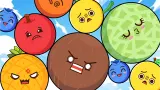
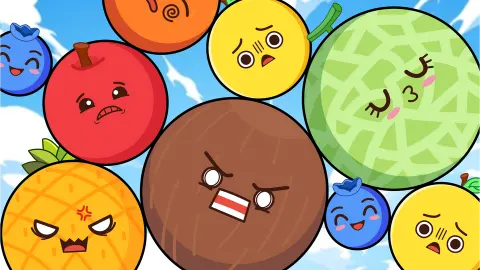
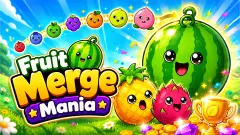
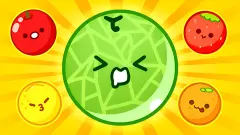
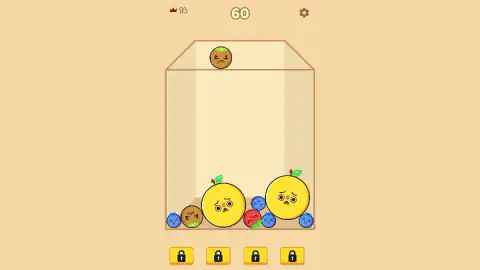
Everything larger has to be built. By the time our score reached 60, the box held two big round yellow fruits with worried faces, each wider than an orange. They were the largest fruit we made. The cover art shows what lies further up: a red apple, a brown coconut and a green melon. We never saw any of them inside the box.
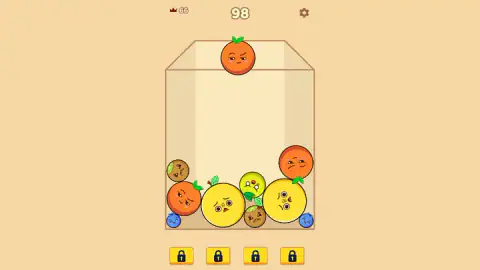
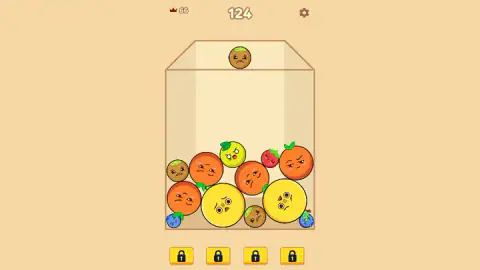
The score climbs in small steps: in our second round it went from 98 to 102, then to 124. Nothing in what we saw suggests a timer. The pace is yours: the next fruit waits on the rim until you let go.
The crown keeps your record, and it only updates later
The top bar holds three things: a crown with a small number on the left, the live score in large digits in the middle, and a gear for settings on the right.
The crown is your best score, and in our session it did not update during play. In the first round it read 14 while the live score climbed past it all the way to 66.
After the page was reloaded, a new round started and the crown read 66. So your best is kept between visits in the same browser, and you only see it change once you start again.
That is worth knowing because it removes a common worry. If you think you have beaten your record and the crown has not moved, the game has not forgotten it.
Four padlocks under the box
Below the glass sit four yellow buttons, each with a dark padlock. They stayed locked for our whole session, from the first fruit to 124 points.
The game's description says these are boosters: one makes a fruit bigger, one makes a fruit smaller, one clears a whole group from the box. It also says you get four at the start of each round and one more for every 500 points. We cannot confirm any of it. We never saw a padlock open, and our best round ended well short of 500. If you know what unlocks them, the slots are under the glass from the very first drop.
Two of a kind make one bigger: where the rule comes from
The idea Fruit Madness uses has a short, well-documented history. In January 2021 a Chinese company, Meadow Science, released a browser game called Merge Big Watermelon (合成大西瓜). Fruits dropped into a container, pairs fused into the next fruit, and the aim was to keep going until a watermelon appeared.
In April 2021 a Japanese version, the Suika Game (suika means watermelon), shipped as a built-in game on popIn Aladdin, a ceiling-mounted projector. The company behind it, later called Aladdin X, brought it to the Nintendo Switch in Japan in December 2021 and worldwide in October 2023. That year it became the most downloaded game on Japan's eShop.
The Suika Game has eleven fruits, from cherry to watermelon, and you are only ever handed the five smallest. Everything bigger has to be merged. The round ends when a fruit goes over the line at the top of the container.
Fruit Madness is a separate game by a different developer, with its own fruits and faces. What it shares is the core design: small fruits are given to you, big ones are earned, and the box only ever fills up. That is why the advice is always the same: put each fruit where its twin can reach it.
Who Fruit Madness is for
It suits anyone who likes a calm puzzle with no clock. Nothing moves until you let go, there is almost nothing to read, and a nine-year-old can learn it from the first two drops. It is laid out in portrait, so it fits a phone held upright. Players who want levels, goals or a story will not find them here: in what we played, there is one box, one score and one record to beat.
The ad breaks are worth mentioning. Several times in our ten minutes, a notice reading Ad break in… dimmed the screen and paused the game. The box was waiting underneath each time.
More drop-and-merge puzzles
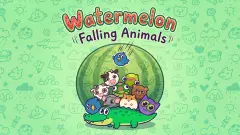
Watermelon Game uses the same glass-box idea with a cloud that drops the fruit. Poofruits: Merge the Fruit swaps the glass for a wooden basket, and Merge Fruit Characters adds a Fruit Book to fill. Watermelon: Falling Animals keeps the rule and replaces the fruit with eleven animals. More are in puzzle games.
Screenshots
How to play Fruit Madness
- Press Let's Play. On the cover screen, under a picture of fruits with angry and sleepy faces, a purple button starts the game.
- Look at the rim. The fruit you are about to drop sits on the top edge of the glass box, in the middle.
- Aim and let go. Move left or right with the mouse or a finger, then release. The fruit falls straight down and settles against whatever is below.
- Pair them up. Two identical fruits that touch fuse into the next fruit up, and the score in the middle of the top bar rises.
- Keep the box from filling. Every unmerged fruit takes space. The round is about lasting.
Tips from our session:
- Drop on purpose, not down the middle. We sent nearly everything straight down the centre, and you can see the result in our captures: the two biggest fruits ended up side by side at the bottom, with small fruits wedged around them and the next layer piling on top.
- Keep the small fruits on one side. Blueberries and strawberries get trapped in the gaps between round fruits. The blueberries that rolled into the bottom corners of our box stayed there for the rest of the round.
- Watch what waits at the rim. The rim only ever gave us five small fruits. Oranges turned up there often in our session, so leave space next to the one already in the box.
- Ignore the crown mid-round. It shows your best from before, not now. The live score is the large number.
Controls
| Move the mouse or your finger left and right | Aims the fruit waiting at the rim of the box, according to the game's instructions |
|---|---|
| Release the click or lift your finger | Drops the fruit. It falls, rolls and settles against whatever is already in the box |
| Gear (top right) | Opens the settings. We did not open it |
| Four yellow buttons under the box | Booster slots. All four showed a padlock for our whole session |
Features
- A glass box seen slightly from above, and fruits with faces that fall into it one at a time
- Two identical fruits that touch fuse into one larger fruit
- Only small fruits are handed to you: blueberry, strawberry, kiwi, lemon and orange were all we saw at the rim
- A live score in the middle of the top bar and a crown with your best score on the left
- The best score survived a page reload in our session
- Four booster slots under the box, locked in everything we played
Game details
- Developer
- Denis Mikhaylov
- Release date
- October 2025
- Last updated
- August 10, 2026
- Added here
- September 2025
- Technology
- HTML5 (2D physics)
- Platforms
- Browser (desktop, mouse), Browser (mobile & tablet, touch)
- Saved progress
- Saving, when available, is managed by this game. Mava cannot confirm your level.
FAQ
How do you play Fruit Madness?
A fruit with a face waits at the top of a glass box. You aim it left or right with the mouse or a finger and let go, and it drops into the box. When two identical fruits touch, they fuse into one bigger fruit and your score goes up. The aim is a high score before the box fills up.
Which fruits are in Fruit Madness?
The fruits you are handed are small ones: in our session the blueberry, strawberry, kiwi, a yellow-green lemon and the orange. Merging them produced a big round yellow fruit, the largest we built. The game's cover also shows a red apple, a coconut and a green melon, which we never reached in the box.
What does the crown number mean in Fruit Madness?
The small crown at the top left shows your best score, and the big number in the middle is the score of the round you are playing. The crown did not move while we played: it stayed at 14 while our score climbed to 66. After a page reload it read 66.
Does Fruit Madness save your high score?
It did for us. Our first round reached 66, and when the page was reloaded the crown at the top showed 66 as the best score. That was in the same browser; clearing your browser data would likely reset it.
How do you use boosters in Fruit Madness?
There are four booster buttons under the box, but all four showed a padlock for our whole session, up to 124 points. The game's description says you get four boosters each round and another every 500 points, to grow a fruit, shrink one or clear a group. We did not reach 500 or see one unlock.
How do you lose in Fruit Madness?
We never filled the box, so we did not see the end screen. In drop-and-merge puzzles of this kind the round ends when the pile rises over the top of the container, and every fruit you do not merge takes up space. Keeping small fruits together is what stops the pile growing.
Are there ads in Fruit Madness?
Yes. During our ten minutes several Ad break in notices appeared that dimmed the screen and paused the game. The box and the score were still there underneath when play resumed.
Who made Fruit Madness and is it free?
Fruit Madness is listed under the developer Denis Mikhaylov. It is free to play in the browser and is laid out in portrait, so it fits a phone. It was published in October 2025.