








About Safari Merge
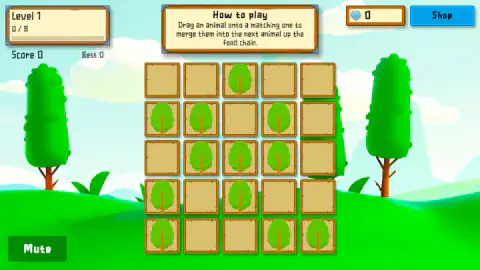
The instructions tell you to drag an animal onto a matching one. Start a game of Safari Merge and there is no animal anywhere. There are only empty wooden tiles, and small green trees that begin appearing on them, one about every two seconds. Those trees are what you merge. The first animal is something you have to make.
Two trees become a rabbit, a point goes on the score, and one tile comes free. By then another tree is on its way, and that race is the game. On Easy, an empty board reached Game Over in just under a minute each time we made almost no merges.
We should be blunt about how far we got, which is hardly anywhere. We took five Easy boards through to Game Over: four scored 0 and the last scored 1. We made a single rabbit. We never saw a second animal, a combo or a gem, so this page covers the opening of the game and the screens around it. The listing promises 18 creatures along a food chain, and we can only vouch for one.
The game is by sanktim, according to the game's listing, and it has been available since August 2026.
What one merge gets you
We can report this exactly, because it happened once. The rabbit landed on the tile we dropped on, and the panel above the board changed to a card headed Rabbit, which told us that a mother rabbit can have several litters in a single year. The listing says each new animal brings a fact like this.
The score went to 1 and the best score changed with it. When that board ended, the panel read New Best, +1 XP and Best Combo: none. So the game does keep track of combos, though we never made one.
The bar at the top left also moved, from 0 / 8 to 1 / 8 under the words Level 1. It looks like a target for the board, but the bar and the best score were both still there on our next board, so it reads as experience you carry between games. What reaching 8 gives you, we do not know. The gem counter stayed at 0.
Why one merge every two seconds only holds the line
Each merge turns two pieces into one, so it clears a single tile. Trees arrived about every two seconds on Easy, which means you need a merge that often just to stay level, and more than that to gain room.
This is our own arithmetic from the opening of the game. We cannot say whether the pace changes as your score climbs. The instructions say matching pieces merge, so we would expect each lone rabbit to hold its tile until a second one joins it, but we did not get that far. What we can say is that time spent looking around is expensive. Start dragging when the first two trees land.
Easy and Medium are different boards
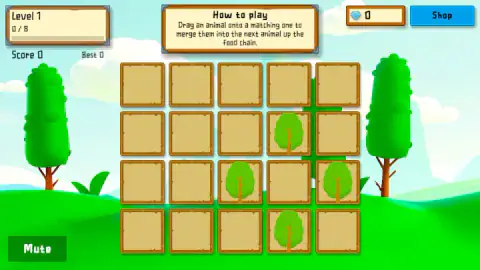
Easy gives you five rows of five tiles. Medium has four rows of five, with larger tiles, so it starts with less room for the same job. Trees seemed to come at about the same pace there, with 17 on the board after half a minute. We left that board before it ended, and we never started Hard.
The Game Over panel and the shop
Game Over offers three buttons: Restart, a greyed-out Need 1 Gem, and a video button called Free Revive (Watch Ad). We only pressed Restart, so we cannot tell you how much of the board a revive clears.
The shop has two tabs, and we only opened Backgrounds. It holds twelve scenes: the sunny hills you start with, plus eleven priced from 20 to 220 gems, rising by 20 each. Buying all of them would take 1,320 gems. Choosing one you cannot afford shows how many more you need. We never owned a second one, so we can only assume they change the view and not the game.
Who it is for
It suits someone after a short, repeatable game with one idea to learn. The trees are easy to tell apart from the empty tiles and there is little to read, though a young player may need telling that the "animal" in the instructions is a tree at first.
It does not suit anyone looking for a calm merge game. The board fills whether you move or not, and it does not wait for you to work out the rules. Whether it grows into more than this, we cannot judge from where we stopped.
More to play
sanktim also made the ski game Yeti Run and the ice-fishing Deep Freeze Fishing. For the same drag-onto-a-match idea, Merge Combo uses stacks of number cubes, and Jurassic Merge: Dino Evolution turns matched dinosaurs into fighters. More in our puzzle games.
Screenshots
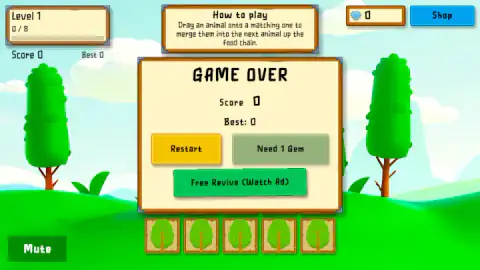
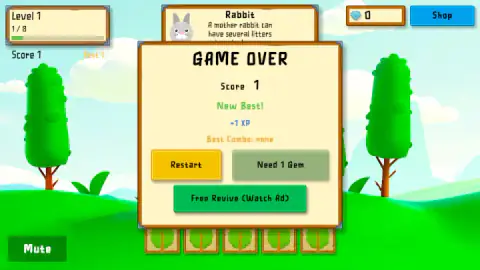
Taken by opening the game ourselves and letting it run — not supplied by the publisher, and not the same picture every other site shows.
How to play Safari Merge
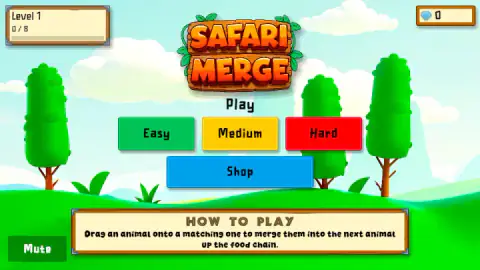
- Pick a difficulty. Easy, Medium and Hard sit under the title, and pressing one starts a board straight away.
- Grab a tree as soon as two appear. The listing calls this first piece grass. On screen it is a round green crown on a thin trunk with small branches, so we call it a tree.
- Drop it on another tree. They do not have to touch. Our one merge went from the top left corner down to the fourth row.
- Keep the board from filling. Two seconds before one of our endings, 24 of the 25 tiles were taken. We saw no timer and no finish line, only the score to beat.
- Restart if you want another go. It takes you back to the title screen, so you choose a difficulty again.
Tips from our run:
- Ignore the How to play panel. We took it for a pop-up and kept trying to close it, with clicks and with Enter, while whole boards filled up behind our efforts. It has no close button and covers no tiles. It is simply part of the screen.
- Do not bother shuffling. A tree dragged to an empty tile moves there, which frees nothing. Any two trees will merge wherever they are, so tidying gains you nothing at this stage.
- Let go on a tile. Our one drag that ended in the gap between two tiles left the tree where it started.
Controls
| Drag and release | Drops a piece on another tile. On a matching piece it merges; on an empty tile it simply moves there |
|---|---|
| Easy, Medium, Hard | Starts a new board at that difficulty from the title screen |
| Shop button | Opens the backgrounds and tiles, from the title screen or during a board |
| Mute button | Sits at the bottom left of the screen |
Features
- A new tree about every two seconds on Easy, on a board that starts empty
- 25 tiles on Easy and 20 larger ones on Medium
- Two trees merge from any distance, not only side by side
- A card with an animal fact when you make a rabbit
- Score, best score and an experience bar, and the last two carried over to our next board
- Twelve backgrounds in the shop, one owned from the start and the rest priced from 20 to 220 gems
Game details
- Developer
- sanktim
- Release date
- August 2026
- Last updated
- October 1, 2026
- Added here
- June 2026
- Technology
- HTML5
- Platforms
- Browser (desktop, mouse), Browser (mobile & tablet, touch)
- Saved progress
- Saving, when available, is managed by this game. Mava cannot confirm your level.
FAQ
How do you play Safari Merge?
Choose Easy, Medium or Hard, then drag one small tree onto another as they appear on the board. The two become a rabbit, you score a point, and a tile comes free. New trees keep arriving, and the game ended for us when the board filled up.
Why are there no animals at the start of Safari Merge?
The instructions talk about dragging an animal, but the board starts empty and then fills with little trees. Those are the pieces you merge. The first animal, a rabbit, is what you get from two trees.
Do the pieces have to be next to each other in Safari Merge?
No. Our one merge dragged a tree from the top left corner down to the fourth row, across several other tiles, and it worked. Dragging a tree to an empty tile only moves it, which frees no space.
How long does a game of Safari Merge last?
On Easy, an empty board reached Game Over in just under a minute each time we made almost no merges. Each merge clears only one tile, so you need about one every two seconds to hold the board level. We did not get far enough to see whether the pace changes later.
How do you close the How to play box in Safari Merge?
You do not need to. It is a fixed panel above the board with no close button, and it covers no tiles. When we made a rabbit, a card about the animal took its place. Start dragging straight away.
What are gems for in Safari Merge, and how do you get them?
They buy backgrounds in the shop, from 20 to 220 gems, and one gem is the price on a button on the Game Over panel. We stayed at 0: our one merge earned none, so we cannot say where gems come from.
Can you continue after Game Over in Safari Merge?
The panel offers Restart, a Need 1 Gem button that was greyed out with no gems, and Free Revive (Watch Ad). We only pressed Restart, which goes back to the title screen. We cannot say what the other two do to the board.
Who made Safari Merge, and can you play it on a phone?
The game is credited to sanktim and lists the game for PC, Android and iOS, in landscape and portrait. We played on a computer with the mouse; the listing describes tap and drag for touch.