











About The Flowers Merge and Sell Bouquets
Most drop-and-merge games tell you the order with size: a small fruit becomes a slightly bigger fruit, and you can guess the ladder before you have climbed it. The Flowers Merge and Sell Bouquets takes that hint away. Its first five flowers are all about the same size, so nothing on screen says that a red rose outranks a blue anemone. You learn it by dropping.
The game sits inside a tall white arch, like a garden doorway with ivy up one side. Behind it there is a painted wooden cottage with its windows lit, and a lawn under a blue sky. A flower waits at the top of the arch, you choose where it falls, and two identical flowers that touch turn into one flower of the next kind.
The second half of the title is the part that took us two visits to find. A customer appears in the archway with a speech bubble, a flower and a line of text: «I'd like a bouquet of these flowers:». Under it a counter reads 1 / 3, and under that a dark SELL button with a coin marked 10 beside it. That is a round: gather three of the flower that was asked for, then sell.
The game is credited to Mirra Games and has been available since February 2026.
Two visits in, we have never filled a single order. The second run lasted ten minutes and ended where it started. The customer wanted daisies, and the counter stayed on one of three from our first drop to our last. Working out why that is so much harder than it sounds is the most useful thing we can hand you.
The order card, and the trap inside it
The envelope is the whole game, and it is easy to ignore. Ours carried an exclamation mark and sat quietly under the coin counter while we merged for the fun of merging. The tutorial asks twice for it to be opened, which, after watching ten minutes go nowhere, reads less like hand-holding and more like a warning.
Open it and the tone of the screen changes. The garden darkens, a customer in a suit stands in the ivy arch, and the request is one flower and a number. A second tutorial sign turns up mid-level with its own instruction, «Change the flower if necessary», and an OK button: that is the game naming the small swap tool at the top right, the one with a flower and a curved arrow on it.
Everything after that is arithmetic you have to do in your head, because the game does not do it for you. Three daisies have to exist at the same time, and the only way to make a daisy is to spend two of something lower. A pile full of daisies is not progress towards a daisy order; it is three merges waiting to happen by accident.
The merge order is not written anywhere
The game never labels its flowers and never lists them, so the names below are ours and the ladder is our reading of what the pile looked like before and after a drop. Our second session, spent on a level with an order on screen, never gave us a clean look at a single merge, so we have not been able to check it again.
| Two of these | Appear to make one of these |
|---|---|
| Pink gerbera | Blue anemone |
| Blue anemone | Red rose |
| Red rose | Cream dahlia |
| Cream dahlia | Large pink peony |
| Large pink peony | Sunflower |
Each merge pays, and the higher ones pay more. Our coins went from 28 to 100 over ten minutes of play without a single bouquet sold, so merging alone earns.
The white daisy is still the open question. It was in the pile from the start, it was handed to us to drop, and in two sessions we have never once watched two daisies become anything. Our second session was a daisy order, which means we dragged daisy onto daisy for minutes on end and the counter never moved off one of three. Either we never quite got them touching, or daisies answer to a different rule. We do not know, and we would rather say so.
Levels behind padlocks, and a counter that stops at 35
The way in is a title card with a sunflower and a purple Let's Play! button, then a screen offering PLAY and Instructions, then a map. The map is a line of numbered circles. The first has daisies drawn on it and is open; the ones after it are closed with padlocks. So this is not an endless pile with a high score at the end of it: it is a set of rounds, each with a customer and an order.
Beside a small album icon in the corner there is a counter that reads out of 35. It is not the level number, because it showed 5 of 35 while the map had only the first level unlocked. It moved up by one when a kind of flower we had not made before turned up in the pile, twice in our session. We take it for a collection of blooms, and we have seen seven of the thirty-five.
What still beats us
Two buttons at the top right have gone unpressed across both visits: the pruning shears, and the swap tool the tutorial told us about. We have never sold a bouquet, so we cannot tell you whether the coin marked 10 is what a sale pays. We found nothing to spend coins on. And we have never seen the second level.
That is an unusual amount of game left over after ten minutes, and it is not because the game is large. It is because the one thing it asks of you cuts directly against the one thing it is fun to do.
Who it suits
It suits someone who likes a merge game with nothing chasing them: no clock, no move limit, a garden that is pleasant to sit in, and a ladder long enough to give a reason to come back.
It suits less a player who wants the rules stated up front. The merge order has to be learned by trial, the daisy is still a puzzle to us after two visits, and the order card punishes exactly the habit that the rest of the game rewards.
More flower and merge games
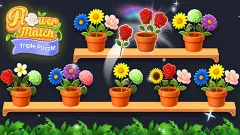
Connecting Flowers: Garden Merge is the nearest relative, with flowers in a tall frame and upgrades for each bloom. Flower Merge - Triple Puzzle asks for three identical flowers too, but hands them to you on a board instead of dropping them. Watermelon Game and Melon Maker: Fruit Game are the fruit version, where size does tell you the order, and Fruit Merge: Juicy Drop Game adds a farm to build with what you earn. The rest are under puzzle games.
Screenshots
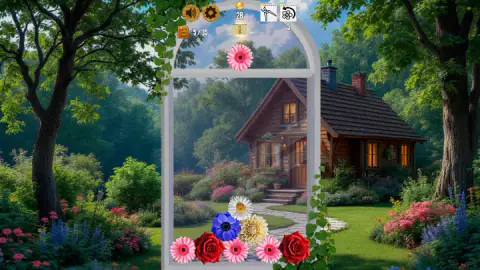


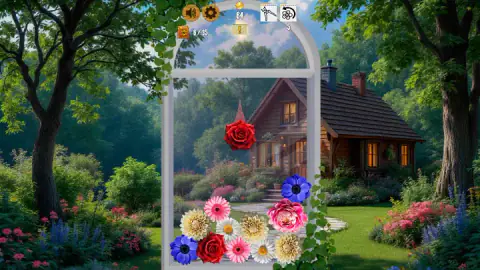
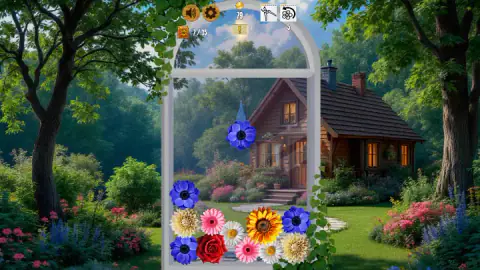
Taken by opening the game ourselves and letting it run — not supplied by the publisher, and not the same picture every other site shows.
How to play The Flowers Merge and Sell Bouquets
- Open the mail. A yellow tutorial card points a drawn hand at the envelope above the frame: «Click on the mail to view your new bouquet order». That card names the flower the customer wants and how many you still owe.
- Look at the flower in the arch. It is the one about to fall. We were handed gerberas, anemones, roses and white daisies, and never anything higher.
- Move it sideways with the mouse and let go. It drops and settles on the pile. The pile shifts as things land, so a flower rarely stays exactly where you aimed it.
- Make two of a kind touch. They vanish, one flower of the next kind takes their place, and coins land on the counter.
- Press SELL once the order is full, and a new one arrives.
What we picked up while playing:
- Do not merge the flower you were asked for. This is the trap, and we fell into it for most of our session. A merge eats two flowers and gives back one of something else. If the order wants three daisies, pairing two daisies leaves you with no daisies at all and one flower you did not need.
- So the order is a brake, not a target. Merging is how you manufacture the requested bloom in the first place; once it exists, the skill is leaving it alone while you build the next one somewhere else in the pile.
- The keyboard does nothing. Arrow keys, A, Enter and Escape, in both visits. This is a mouse and touch game.
- There is no hurry. No clock, no move counter. The flower waits in the arch for as long as you need it to.
- Aim low and to the side. Pairs that end up far apart at the bottom are hard to bring back together: two of our roses sat in opposite corners with other flowers wedged between them.
- Click away and the game stops, behind a grey card reading «Click to keep playing». There is also an ad slot, and we cannot tell you how often it fires, because no advertisement played for us.
Controls
| Mouse move | Carries the flower waiting at the top of the arch from side to side |
|---|---|
| Release the mouse button | Lets the flower fall onto the pile; two identical flowers that touch become one of the next kind |
| Mail icon above the frame | Opens the order card with the flower a customer wants and how many you have gathered |
| SELL button | Hands over a finished bouquet. A coin marked 10 sits beside it; we never filled an order to press it |
| Swap button (a flower with a curved arrow) | The game's own tutorial names it: "Change the flower if necessary". We did not use it |
| Keyboard | Arrow keys, A, Enter and Escape did nothing in either of our two visits |
Features
- A merge puzzle inside a tall white arch, with a lit wooden cottage and a garden painted behind it
- Orders from customers: one flower, a counter out of three, and a SELL button underneath
- A merge ladder you have to learn, because the first five flowers are all about the same size
- Numbered levels on a map, with everything past the first one behind a padlock
- A counter out of 35 beside a small album: it rose from 5 to 7 as new kinds of bloom turned up
- No clock and no move counter anywhere on screen
- Made by Mirra Games, listed since February 2026
Game details
- Developer
- Mirra Games
- Release date
- February 2026
- Last updated
- August 10, 2026
- Added here
- November 2025
- Technology
- HTML5
- Platforms
- Browser (desktop, mouse), Browser (mobile & tablet, touch)
- Saved progress
- Saving, when available, is managed by this game. Mava cannot confirm your level.
FAQ
How do you play The Flowers Merge and Sell Bouquets?
A flower appears at the top of a tall arched frame. You move it sideways with the mouse and let go to drop it onto the pile below. Two identical flowers that touch become one flower of the next kind, and each merge pays a few coins. A customer's card tells you which flower to gather and how many.
How do you sell bouquets in the game?
An envelope above the frame means an order has arrived, and the game's tutorial tells you to click it. The card shows a customer, the line "I'd like a bouquet of these flowers:", the flower wanted, a counter reading 1 of 3 and a SELL button. Gather three of that flower and the button hands the bouquet over.
Why can I not finish an order?
Because merging the flower you were asked for destroys it. Two identical flowers become one flower of a different kind, so pairing your daisies when the customer wants daisies leaves you further away than before. You have to make daisies and then leave them alone.
What is the merge order of the flowers?
Our reading, from watching the pile before and after: two pink gerberas make a blue anemone, two anemones make a red rose, two roses make a cream dahlia, and above those come a large pink peony and a sunflower. The game never labels or lists them, so treat this as our notes rather than its rules.
How many flowers are there in The Flowers Merge and Sell Bouquets?
A counter beside a small album icon reads out of 35. It is not the level number, because it showed 5 of 35 while we were still on the first level. It moved up by one each time a new kind of bloom appeared in our pile, reaching 7 of 35.
Does the game have levels?
Yes. A map of numbered circles opens after the title screen, with the first level unlocked and showing daisies on it and the next ones closed with padlocks. We never cleared the first one, so we cannot say how the rest differ.
Is there a timer or a move limit?
No clock and no move counter appear on screen. The flower waits at the top of the arch until you release it, so you can take as long as you like over each drop. The game does pause itself with a card reading "Click to keep playing" the moment you click away.
Who made The Flowers Merge and Sell Bouquets?
The game is credited to Mirra Games. It was published on 2 February 2026 and last updated on 10 August 2026. It runs in the browser on desktop, and the listing also gives phones and tablets.