









About Swap The Pictures
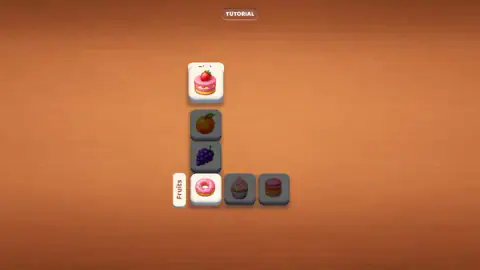
The first board of Swap The Pictures holds a donut, a cupcake, a stack of macarons, an orange, a bunch of grapes and a slice of strawberry cake. Two labels sit beside them, Pink and Fruits. Five of those pictures are easy. The cake is the puzzle: it is pink, and it has a strawberry on top.
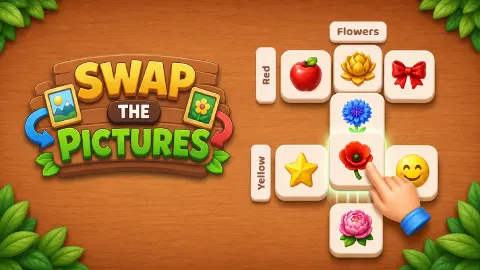
That one tile is the whole idea. The pictures are laid out as a column and a row that share a single square, the way two words share a letter in a crossword. The column has a label and so does the row. The shared square has to satisfy both, exactly as a crossword letter has to work across and down.
You do not type or spell anything. You trade tiles in pairs until each line holds only pictures that fit its label. The game is credited to Drivix Games and was published on 31 August 2026.
How far this page goes: we have finished the tutorial, watched it hand over to the title screen, and played Level 1 until thirteen of its thirty moves were gone. We left that board unfinished, so we still cannot tell you what the game does when a level ends.
The tutorial: an L-shaped board and three trades
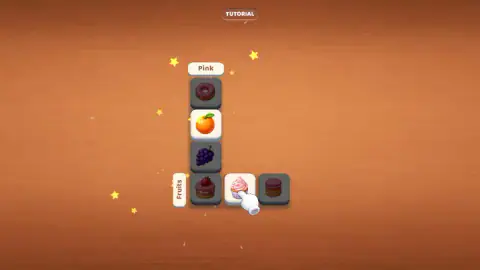
The tutorial board is an L: four tiles running down under Pink, then two more to the right of the bottom one, with Fruits written sideways beside them. Six tiles, and the corner belongs to both lines.
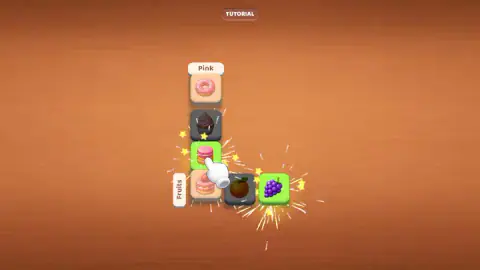
It is dealt wrong on purpose and it comes out in exactly three trades. The strawberry cake has to come down to the corner, because it is the only picture that is both pink and fruit. The grapes at the top of the column change places with the donut in the row. The orange changes places with the macarons. Each trade is announced: the two tiles flash and a spray of yellow stars comes off them.
| Line | Label | Pictures when it is done |
|---|---|---|
| Column | Pink | Donut, macarons, cupcake, strawberry cake |
| Row | Fruits | Strawberry cake, grapes, orange |
The cake appears in both lines because it is the corner. Nothing here counts moves and nothing can be lost. When the last trade lands the board dims, Tutorial Completed! comes up in orange across it, and a green Continue! button appears underneath. That button leads to the title screen: the logo on a wooden sign, a seaside street of palms and painted shopfronts, a gear in one corner, a coin counter reading 250 in the other, and a green Play.
Level 1: the picture that has to be a cat and a chair
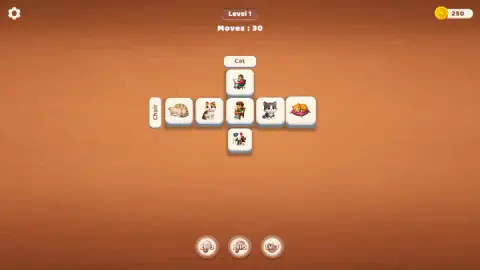
Play opens Level 1, and the board changes shape. It is a cross now: a row of five crossing a column of five, nine pictures in all, with the tile in the middle belonging to both. The column is labelled Cat. The row is labelled Chair.
Four of the nine are cats and nothing else: a tabby asleep, a grey-and-white one sitting up, a calico, a ginger one curled on a cushion. Four are people sitting down: a boy with a teddy bear on a wooden chair, a man at a drawing desk, a man with a camera in a folding chair, a woman knitting. The ninth is a cat asleep in an orange armchair.
That ninth picture is the level. It is the only one that answers both labels, so it is the only one that can hold the crossing. We have opened Level 1 twice and those same nine pictures arrived in a different order each time, so there is no opening position to memorise. What does not change is where the armchair cat has to end up.
One trap is worth naming. The ginger cat is lying on a cushion, not a chair. It looks for a second as though it might count for both lines. It does not.
Green means right, pink means wrong
The board tells you where you stand without using a word. A picture that is where it belongs sits on a green square; one that is not sits on plain white. When a trade lands, the two tiles you moved flash: green with yellow stars if they have arrived somewhere they fit, pink with a burst of sparks if they have not.
The armchair cat is the exception that proves the rule, and it is the most useful thing on the board. Park it anywhere in the Cat column and it stays white, even though it plainly is a cat. It only turns green when it reaches the crossing. The same logic runs the other way: put a plain chair-sitter on the crossing and it flashes pink, although the identical picture would be green two squares along the row.
The counter is honest about what it charges. Moves : 30 drops only when two pictures actually change places. Lifting a tile and putting it back, clicking a label, pressing the badges under the board — none of that costs anything, and ours held steady through four attempts in a row.
That leaves room to think, and we needed it. We worked the counter down to 17, left five squares green, and still had two trades to make.
The coin counter never moved off 250. Nothing we did on Level 1 earned a coin or spent one.
What we still cannot tell you
Three round badges sit under the board, stamped Lvl 3, Lvl 5 and Lvl 7, the first with a light bulb drawn on it. They are greyed out, they stayed greyed out, and pressing them did nothing. They read as helpers that unlock at those levels, and we have not reached them.
We never ran the counter to zero and never finished a board, so we cannot describe either. We did not open the gear menu, we never found out what the 250 coins buy, and we cannot tell you how many levels there are.
Who it suits
It suits anyone who likes sorting things into groups and enjoys the small argument of whether a picture counts. There is no clock on the boards we have seen, only a move count, so you can stare as long as you like. Because the tiles are drawings and the labels are single words, it asks for very little reading.
It suits less someone who wants a long chain of deductions. A nine-tile board with two labels is a quick thought, at least on Level 1 — the hard part is spotting the double picture, and after that it is tidying up.
More puzzles about what belongs together
Connect Associations does the grouping with words: find four that share a theme. Word Associations Solitaire deals the words out as cards. CrossTile is the nearest to a real crossword, built from letter fragments you drag together. Picture Shift keeps the pictures and drops the categories: slide the blocks until the image is whole. The rest are under puzzle games.
Screenshots
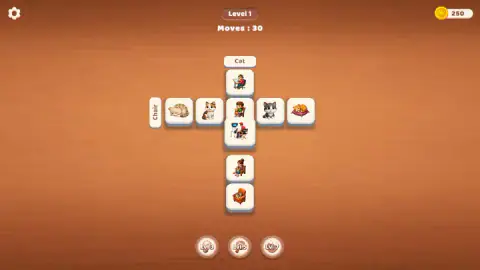
Taken by opening the game ourselves and letting it run — not supplied by the publisher, and not the same picture every other site shows.
How to play Swap The Pictures
- Read the two labels. One sits above the column, one sits to the left of the row, written sideways.
- Click a tile. It lifts off the board.
- Click a second tile. The two change places, wherever they are on the board.
- Fill each line with pictures that fit its label. The tile on the crossing has to fit both.
- Watch the counter. Level 1 starts at Moves : 30 and counts down.
What we picked up while playing:
- Find the double picture first. Every board we have seen has exactly one tile that fits both labels, and it is the only picture that can hold the crossing. Until it gets there, nothing else can be settled.
- Distance is free. We traded a tile at the end of the row with the one in the middle, two squares away, and the game took it. Nothing has to be adjacent.
- A bad trade costs exactly what a good one costs. We swapped two pictures that were both already correct, lost a move for it, and had to spend another putting them back.
- The tutorial only lets you touch two tiles. It darkens the rest of the board and points a white glove at one of the lit pair. Clicking anywhere else did nothing.
- The keyboard is not used. We pressed Enter and Escape in the tutorial and again on Level 1, and nothing on the board moved.
Controls
| Click a tile | Lifts it off the board and picks it for a trade |
|---|---|
| Click a second tile | The two pictures change places, near or far, and one move comes off the counter |
| Continue button | Closes the Tutorial Completed banner and opens the title screen |
| Play button | Opens the current level from the title screen |
| Gear icon | Sits in the top left corner; we did not open it |
Features
- Boards made of one row and one column of picture tiles that share a single tile
- A one-word label on each line, such as Pink and Fruits or Cat and Chair
- One picture per board that belongs to both labels and has to sit where the lines cross
- A guided tutorial on a six-tile board, solved in three trades, before Level 1
- A move counter that starts at 30 on Level 1 and only drops when two tiles actually change places
- Green squares for pictures that are where they belong, a pink flash for ones that are not
- Three round badges at the foot of the board stamped Lvl 3, Lvl 5 and Lvl 7, greyed out on Level 1
Game details
- Developer
- Drivix Games
- Release date
- August 2026
- Last updated
- September 1, 2026
- Added here
- August 2026
- Technology
- HTML5
- Platforms
- Browser (desktop, mouse), Browser (mobile & tablet, touch)
- Classification
- Puzzle
- Saved progress
- Saving, when available, is managed by this game. Mava cannot confirm your level.
FAQ
How do you play Swap The Pictures?
Each board is a row and a column of picture tiles that cross, and each line has a one-word label. Click one tile and then another and the two change places. The board is done when every picture in the row fits the row's label and every picture in the column fits the column's label.
What is the tile in the middle for in Swap The Pictures?
The tile where the row and the column cross counts for both lines, so it needs a picture that fits both labels. In the tutorial the labels are Pink and Fruits and the answer is a pink cake with a strawberry on top. On Level 1 the labels are Cat and Chair and the answer is a cat asleep in an orange armchair.
How many moves do you get in Swap The Pictures?
Level 1 starts at Moves : 30 and counts down. A move is only charged when two tiles actually change places; picking a tile up and putting it back costs nothing. We spent thirteen of the thirty on Level 1 and still had seventeen left, so the first board is not tight.
Do the tiles have to be next to each other to swap in Swap The Pictures?
No. We traded a tile at one end of the row with the tile in the middle, two squares away, and the game accepted it. Any two pictures on the board can change places for one move.
What do the green tiles mean in Swap The Pictures?
Green means that picture is where it belongs; plain white means it is not. When a trade lands, the two tiles flash green with yellow stars if they now fit, or pink with a burst of sparks if they do not, so you know straight away whether the move was worth it.
Is there a tutorial in Swap The Pictures?
Yes, and it runs before the title screen. It uses a six-tile board of cakes and fruit, darkens everything except two tiles at a time and points a white glove at one of them. Three trades finish it, and a Tutorial Completed banner with a Continue button sends you to the title screen.
What are the Lvl 3, Lvl 5 and Lvl 7 buttons in Swap The Pictures?
They are three round badges under the board, each stamped with a level number, and the first has a light bulb on it. On Level 1 they are greyed out and nothing happened when we pressed them, so they read as helpers that unlock at those levels.
Who made Swap The Pictures?
The game is credited to Drivix Games and was published on 31 August 2026. It is offered there for PC, Android and iOS, in English. We played it on a desktop with a mouse.