







About Nonogram
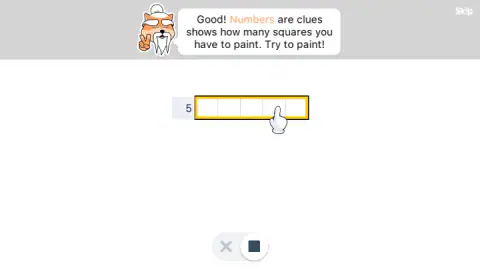
The first time we opened Nonogram with a clean browser, there was no menu. An orange teacher with a long white beard and a topknot was waiting. A sign read "Welcome to Nonogram! Let's learn some basic rules." Then he walked us through a small 5×5 puzzle, one rule at a time.
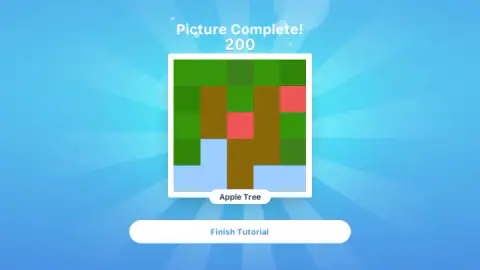
The puzzle is a classic nonogram. Each row and each column has numbers. The numbers tell you how many squares to paint, and in what order. Paint them all right, and the grid turns into a color picture with a name. In the tutorial, it is an apple tree.
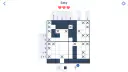
Two things set this version apart. First, you get three hearts, and each square you paint by mistake costs one. Second, the Easy board does not start empty. The game puts X marks on some squares for you. Both change how you should play.
Nonogram is made by Anna Inc. It is a flat 2D puzzle on a wide screen. You play it free in your browser here on mavagames.com, with nothing to download. We played it twice on a computer with a mouse. The first time, we lost all three hearts. The second time, we finished the tutorial and solved an Easy board without losing a heart.
Start with the lines that have only one answer
Some lines can only be filled one way.
Add up the numbers in the line. Then add 1 for each gap between two blocks, because blocks always need at least one empty square between them. If the total is 10, the line is full. There is only one way to paint it.
Take the clue "2 7". That is 2, plus 1 gap, plus 7, which makes 10. So you paint two squares, leave one empty, and paint seven more.
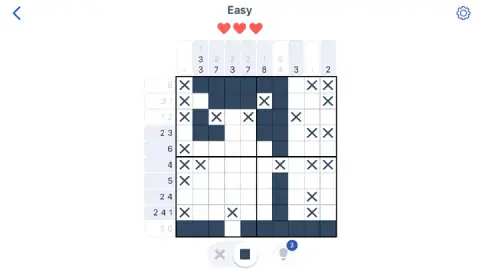
On the Easy board we got, five lines worked like this. They were columns 3 and 5 (2 7), column 6 (1 8), column 7 (5 4) and the bottom row (3 6). We painted those first. Each one fixed all ten of its squares. So the rows and columns that cross them had fewer choices left.
Then we solved the top two rows. Next came rows 3 to 7, and last rows 8 and 9. We never had to guess. The whole board took us about three minutes.
At the end, the grid turned into a yellow figure with a brown mane under a blue sky. It looked like a lion to us. We did not reach the screen that shows its name.
Treat the free X marks as extra clues
The Easy board starts with X marks the game puts there for you. We counted 23 on all three fresh boards we opened. The clues were the same every time, but the X marks were in different places. So your board may not match ours.
Each X is a square you know is empty, so use it. Look at the open space left in a line, and see what fits.
On our board, row 6 had the clue 4. It had X marks in columns 1, 2, 7, 9 and 10. The only open stretch long enough for 4 squares was columns 3 to 6. So we painted all four.
Here is a second trick. On another fresh board we opened, row 7 had the clue 5, and only columns 1 to 7 were open. Push the 5 all the way left, and it covers columns 1 to 5. Push it all the way right, and it covers 3 to 7. Columns 3, 4 and 5 are painted either way, so they are safe to paint.
This is our own rule of thumb, not something the game tells you. If a clue is longer than half of the open space, its middle squares are safe.
Only paint what you are sure of: a mistake costs a heart
When you paint a wrong square, it turns red and gets a cross. One of your three hearts goes empty.
After the third mistake, the game shows "Out of Lives!". You get two choices. One is a "Get More Lives" button with a film icon. We did not press it, so we cannot tell you what it asks for. The other is "Restart". It gave us the same puzzle, with the same clues and a new set of X marks.
In our first game, we lost all three hearts by painting squares we were not sure about. In our second game, we only painted squares the clues proved. We finished with all three hearts.
Mistakes can also start with the switch. The side that is on sits inside a white circle. Say you mean to mark an X, but the square side is on. Then you paint the square. If that square should be empty, you lose a heart. So switch to the X only to mark empty squares, then switch back to the square to paint.
Gray numbers and white tabs show what is left
Halfway through a board, it is easy to lose track. The clues tell you where to look.
- Each number turns light gray when its block is done. For example, a column can have its "1" gray and its "3 3" still dark.
- When every number in a line is done, the whole tab turns white. The line is finished, even if some squares in it are still blank.
- In the tutorial, each finished row and column also gets a green check.
So skip the white tabs. Only look at the pale blue tabs with dark numbers. Near the end of our board, five lines were still dark. They were column 2 (3 3), column 3 (7), column 10 (2) and rows 8 and 9. That was all we had left to finish.
What a nonogram is, and where the name comes from
A nonogram is a logic puzzle on a grid. The numbers next to each row and above each column tell you the blocks of painted squares in that line. The blocks come in the same order as the numbers. There is at least one empty square between them. When every line is right, a picture appears.
The puzzle was born in Japan in 1987. From 1990, a British Sunday newspaper printed one every week, and the name nonogram comes from there. You may also know it as griddlers, hanjie or paint by numbers. If you have played any of those, you already know the rules here. The tutorial still helps, because it shows you this game's switch, the X marks and the hearts.
Where we stopped, and why we suggest Easy first
All the advice on this page comes from the tutorial and the Easy board. We did not open Medium, Hard or "Continue Practice". So we cannot tell you their grid sizes or how hard they get. We also did not use the light bulb. We do not know if your progress is saved after you close the game. Our advice is to start on Easy. There, the full lines and the free X marks give you a safe way in.
More logic puzzles to try next
Like numbers in a grid? Try Sudoku. Want something calm and slow? Try Solitaire. You can also look through all our puzzle games.
Screenshots
How to play Nonogram
- On the first tutorial step, look under the grid. You will see a switch with an X on one side and a square on the other. Click the square. It worked if the white circle moves onto the square. Now your clicks paint.
- Find the row inside the yellow frame. Hold the mouse button down and drag across it. The squares turn dark blue.
- Follow the yellow frame through all seven steps. When you paint the last square, the grid becomes a color apple tree. "Picture Complete!" shows 200 points. Click "Finish Tutorial".
- In the menu, click "New Game", then "Easy". You get a 10×10 board, three red hearts and some X marks already in place.
- Pick a line and add up its numbers. Add 1 for each gap between blocks. If the total is 10, paint the whole line. When a line is done, its number tab turns white.
Tips from our games
- Check the switch before you click. In Easy, it starts on the square, so a click paints.
- A red square with a cross means a mistake. One heart is gone.
- Put an X on squares you know are empty. They help you see what is left.
- If you lose all three hearts, you see "Out of Lives!". "Restart" gave us the same puzzle again.
Controls
| Click a square | Paints it or marks it with an X, depending on which side of the switch is active |
|---|---|
| Click and drag | Paints several squares in one move (we painted whole rows this way in the tutorial) |
| Click the switch under the grid | Changes between the X (mark empty) and the square (paint). The active side sits inside a white circle |
| Touch screen | Listed as working on phones and tablets, but we did not test touch |
| Keyboard | We have no confirmed keyboard controls to share |
| Light bulb with a 3 | We did not use it, so we cannot say what it does |
Features
- Opens with a 5×5 "How to Play" tutorial in seven steps, led by an orange teacher with a long white beard
- Three hearts per board. Each wrong square you paint turns red and costs one
- The Easy board is 10×10 and starts with X marks already placed. We counted 23 on all three fresh boards we opened
- Each number grays out when it is done. When the whole line is done, its tab turns white
- Pick your challenge by name, Easy, Medium or Hard, from "New Game"
- Every solved puzzle turns into a named color picture. The tutorial one is "Apple Tree", worth 200 points
Game details
- Developer
- Anna Inc
- Release date
- December 2025
- Added here
- December 2025
- Technology
- HTML5 (2D)
- Platforms
- Browser (desktop)
- Classification
- Puzzle
- Saved progress
- Saving, when available, is managed by this game. Mava cannot confirm your level.
FAQ
Is there a daily nonogram in Nonogram?
No. The menu we saw has "New Game" and "Continue Practice", and no daily puzzle. You choose Easy, Medium or Hard whenever you want a new board.
What grid sizes does Nonogram have?
The tutorial is 5×5, and the Easy board we played was 10×10. "Continue Practice" is labeled "Basic - 5x5", but we did not open it. We did not open Medium or Hard either, so we cannot confirm 15×15 or 20×20 grids.
Can Nonogram solve the puzzle for me?
Not on its own. We solved our boards by ourselves. There is a light bulb with the number 3 next to the board. We never used it, so we cannot say what kind of help it gives.
Does marking a wrong X cost a heart in Nonogram?
We do not know. We saw that painting a wrong square costs a heart. We did not test what happens when you put an X on a square that should be painted.
Can I play Nonogram on a phone or tablet?
It runs in the browser on mavagames.com, so there is no app to download. It is listed as working on phones and tablets. We only played on a computer with a mouse and did not test touch.
Is Nonogram in color or 3D?
It is a flat 2D grid. The clues are a single color while you play. When you finish, the grid turns into a color picture.
Can I skip the Nonogram tutorial?
The first screen has a "Skip" button at the top right. We did not skip the tutorial, so we cannot say what that button leaves out. We followed all seven steps. They teach the switch, the gap rule and the X marks.
What games are similar to Nonogram?
If you like Nonogram, try [Nonograph](/game/nonograph), [Traffic Puzzle Game Linky](/game/traffic-puzzle-game-linky) and [Slide And Divide](/game/slide-and-divide) on mavagames.com: they are the closest games to it in our catalogue.