







About Sudoku
In this Sudoku, the number buttons go away as you play. When a number is on the board nine times, its button vanishes and leaves a gap. Near the end of our game, only one button was left: the 9. That was the number for the last empty square.
The puzzle itself is the classic one. The board has 9 rows and 9 columns. It is split into nine boxes of 3×3 squares. Some squares already have numbers when you start. You fill in the rest with the numbers 1 to 9. Each number can appear only once in every row, every column and every box. You never add anything up. The puzzle is all about where each number fits.
You play for free in your browser, with nothing to download. There are ads inside the game. There are eight levels, from EASY to CHAMPION. You get only 3 mistakes in each game.
We played one game on EASY, on a computer, with a mouse. Our board had 31 empty squares. We filled 30 of them with 1 mistake, and the clock said 04:43. We did not finish, because one square was still empty. So this page can show you how a game on EASY goes. It cannot show you the harder levels or the win screen.
Pale yellow squares show where a number cannot go
When a number is picked, every square that already has it turns pale yellow. That number's button at the bottom turns dark green. At 01:40 in our game, the 4 was picked. Five 4s lit up across the board.
Use the yellow squares to rule out places. A row with a yellow 4 cannot take another 4. The same goes for a column or a box. The places that are left are the only spots where a 4 can still go.
Here is what each color means:
- Mustard yellow: the square you picked.
- Light blue: the row, column and box of that square.
- Pale yellow: every square that has the picked number.
- Dark green: the button of the picked number.
- Black: the numbers the board started with.
- Blue: the numbers you put in.
- Red: a wrong number.
Start with a row that has only one gap
At 03:34, row 3 read 1 2 8 9 7 3 _ 5 4. Only one square was empty. Count from 1 to 9 and find the number that is missing. Here it is the 6. We put the 6 in that square. It showed in blue, and the counter stayed at 1/3.
This is the safest move on the board. Before you think hard about any square, look for a row or column with only one gap.
When a button disappears, that number is finished
Each number has to fill nine squares, one in every row. When the ninth one goes in, its button leaves. The other buttons stay where they are, so a gap opens in the row of buttons.
In our game, the buttons went away like this:
- At 03:34, the 3 was gone.
- At 04:17, only 1, 2, 8 and 9 were left, and 5 squares were empty.
- At 04:43, only the 9 was left, and 1 square was empty.
So near the end, look at the buttons first. You only need to think about the numbers you can still see.
With three squares left, match each one to its column
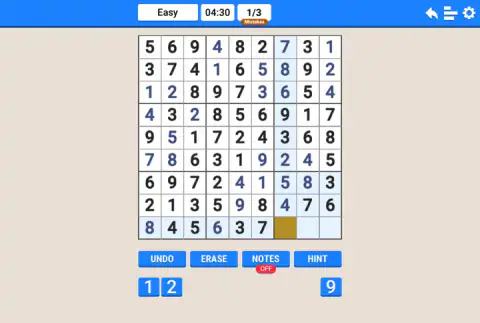
At 04:30, the last three empty squares sat side by side in the bottom row. The buttons showed only 1, 2 and 9. Those three squares needed a 1, a 2 and a 9. But the row could not tell us which number went where.
The columns could. Column 7 was missing a 1. Column 8 was missing a 2. That left the 9 for the last square. The second picture on this page shows that moment.
When you have a few squares left, look at each one's column or box, not just its row.
You get 3 mistakes, so check the whole row before you click
At 02:07, we put a 4 in row 9, column 7. It turned red. The counter changed to "1/3 Mistakes". Row 9 already had a 4, in column 2. We had not looked along the whole row.
The game did not stop. Another square was already picked while the red 4 stayed on the board. By 02:36, the square with the red 4 was empty again. The right 4 went in one row higher, in row 8, by 03:03. We cannot say how to clear a wrong number, because we have not tested the buttons that might do it.
The "/3" stays on screen the whole time. We never reached 3 mistakes, so we did not see what happens then. To be safe, check the row, the column and the box before every click.
The clock does not stop for ads
A few seconds into our game, a sign said "Ad in 3 s". The top bar went dark, but the board stayed in view. Then a notice with a "Continue playing" button stayed up for about a minute. The clock kept running the whole time. When we got back to the board, it already said 01:23.
So our time of 04:43 includes the ad. If you want to compare your times, remember that an ad can add about a minute to yours.
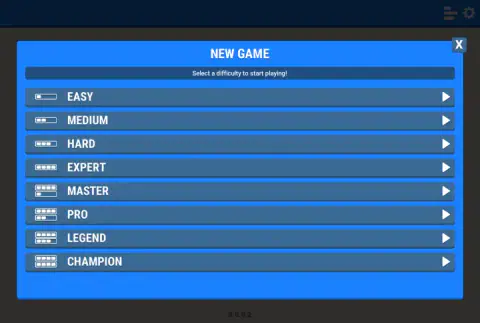
Eight levels, from EASY to CHAMPION
The level window lists EASY, MEDIUM, HARD, EXPERT, MASTER, PRO, LEGEND and CHAMPION. Each row has a small bar icon on the left. It fills up more as the levels get harder. Each row also has a white arrow on the right. There is no map and no list of numbered levels. Each game is a single board.
We only played EASY. Our board started with 31 empty squares. We got within one square of the end in under five minutes. That makes EASY a good place to start. We cannot tell you how many empty squares the harder levels have, or how hard they feel.
What we tested, and what we did not
We tested the game on a computer, with a mouse. We clicked NEW GAME, the EASY arrow, the empty squares and the number buttons. The menu shows version 3.0.0.2 at the bottom.
We have not tested these yet:
- The UNDO, ERASE, NOTES and HINT buttons.
- The curved arrow, bars and gear icons at the top.
- A computer keyboard.
- A touch screen on a phone or tablet.
Find more free games for families in our kids games section.
Screenshots
How to play Sudoku
- Click the blue NEW GAME button. A window opens. It says "Select a difficulty to start playing!" If nothing happens, wait a second and click again.
- Click the white arrow on the right of the EASY row. The board opens. When we clicked the middle of the row, nothing happened. The arrow worked.
- Look at the bar at the top. It shows the level, a clock and "0/3 Mistakes".
- Click an empty square. It turns mustard yellow. Its row, its column and its box turn light blue.
- Click a number in the row of buttons at the bottom. A right number shows in blue. A wrong number shows in red, and the mistake counter goes up by one.
Tips from our game
- Start on EASY. On our board, we could solve almost every square by checking which number its row, column and box were missing.
- Look for a row or column with just one empty square. Its missing number is a safe move.
- Check the buttons, not just the board. When a button is gone, that number is done.
- Our only mistake came from going too fast. Check the whole row before you click.
Controls
| Mouse click on an empty square | Picks the square. It turns mustard yellow, and its row, column and box turn light blue. |
|---|---|
| Mouse click on a number button | Puts that number in the picked square. A right number shows in blue. A wrong one shows in red. |
| Mouse click on the white arrow of a level | Starts a game at that level. Clicking the middle of the EASY row did nothing for us. The arrow worked. |
| UNDO, ERASE, NOTES, HINT | Buttons under the board. We did not test them. |
| Touch screen and computer keyboard | Not tested. We played only with a mouse on a computer. |
Features
- Classic 9×9 board split into nine 3×3 boxes, with some numbers already in place when you start.
- Eight levels: EASY, MEDIUM, HARD, EXPERT, MASTER, PRO, LEGEND and CHAMPION.
- A mistake counter that is always on screen. You get 3 mistakes per game.
- Number buttons that vanish once that number is on the board nine times, so you can see which numbers are still missing.
- Color help on the board. The picked square is mustard yellow, its row, column and box are light blue, and every copy of the picked number is pale yellow.
- UNDO, ERASE, NOTES and HINT buttons under the board. We have not tested them yet.
- Our Easy game: 31 empty squares at the start, 30 filled with 1 mistake in 04:43, one square short of the end.
Game details
- Developer
- Partner studio
- Release date
- May 2025
- Added here
- May 2025
- Technology
- HTML5
- Platforms
- Browser (desktop)
- Classification
- Kids
- Download size
- 1.6 MB
- Ad requests
- 3 (few)
- Has a save
- Yes
- Saved progress
- Saving, when available, is managed by this game. Mava cannot confirm your level.
Measured by opening the game ourselves on 2026-09-11, not taken from the feed. Twelve seconds on a phone-sized screen, with ad requests counted and blocked rather than loaded.
FAQ
Can I play this Sudoku online for free without downloading it?
Yes. This Sudoku is free to play in your browser on mavagames.com, and you do not need to download anything. It has ads inside the game. In our game, an ad came up a few seconds in, and the clock kept running while it was on screen.
What are the rules of Sudoku?
The board has 9 rows, 9 columns and nine 3×3 boxes. Some squares already have numbers. Fill each empty square with a number from 1 to 9. Each number can appear only once in every row, column and box. In this version, you click an empty square and then a number, and you get 3 mistakes per game.
Is Sudoku a math game?
No. Sudoku uses numbers, but you never add or subtract anything. You only have to work out which number is missing from each row, column and box. That makes it a logic puzzle.
Which Sudoku level should a beginner choose?
Start with EASY, the first of eight levels. Our EASY board had 31 empty squares. We filled all but one of them in under five minutes, with one mistake. We have not played the seven harder levels, so we cannot say how hard they are.
What happens when you make 3 mistakes in this Sudoku?
We do not know yet. Our game only reached 1 mistake out of 3. A wrong number turns red and adds one to the "Mistakes" counter at the top. After our first mistake, the game went on as normal.
Can I play this Sudoku on a phone or tablet?
We have only played it on a computer, with a mouse. We have not tested a touch screen or a computer keyboard yet. So we cannot promise that either one works.
What do the NOTES and HINT buttons do in Sudoku?
We have not tested them yet, so we cannot say what they do in this version. We do not know what HINT gives you, whether it has a limit, or whether it asks you to watch an ad. Both buttons sit under the board.
What games are similar to Sudoku?
If you like Sudoku, try [Sudoku - Number Games](/game/sudoku-number-games), [Screw & Pin: Puzzle Levels](/game/screw-and-pin-puzzle-levels) and [Merge number up](/game/merge-number-up) on mavagames.com: they are the closest games to it in our catalogue.