





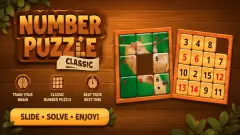



About SUM+SUM
Most number puzzles give you a grid with holes in it and ask you to fill them. SUM+SUM gives you a grid with too much in it and asks what you would throw away. Every row and column has a target, and the numbers you keep must add up to it exactly.
So you are hunting for the surplus more than the sum, and a number that looks useless in its row may be the one its column cannot do without.
Here is how far we got. We played one ten-minute session on a computer with the mouse: the tutorial, two Daily puzzle boards that we opened and left, and three tries at Easy #1. We did not solve a single board. All three tries ran out of time, partly because we were clicking only about once every eight seconds. Everything past the first level is unknown to us.
There is a second limit. We played in a wide, short window, and the row of column targets hung off the bottom edge with only its top showing. So on real boards we never read a column target, and what follows about rows is firmer than what follows about columns.
The game is credited to carolineblueeyes. It went up in May and was last updated in October.
The lesson does not add up, so trust the counter
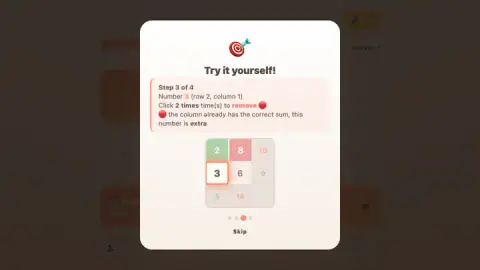
The tutorial has a slip that can leave you confused. Its How it works page shows a small board of four numbers, two in green and two in red. Right above it, four ticked lines explain the targets, and the first says 2 + 8 = 10. But the 8 on that board is painted red.
All four sums work the same way, counting every number on the board. If red means removed, the board on screen does not meet any of its own targets. The practice round then asks you to click out that same pattern and says well done.
Real boards work the plain way. With a 9 kept in a row aiming for 13, the counter read 9/13.
Red and white tiles added nothing. On a later row with the 9 green, a white 4 and a red 2, the counter read 9/11. So only green counts, whatever the lesson appears to say.
Red is not an error, and the game does not tell you off
A red tile looks like a mistake, but it is only your own decision to remove a number. In three timed tries, nothing was flagged as wrong and nothing cost us coins or seconds.
That leaves three signals, and one is easy to miss:
- The counter climbs as you keep numbers.
- The target turning green means that line adds up exactly. It says nothing about whether you chose the right numbers for the crossing columns.
- The counter disappearing means you have gone over. When our green numbers came to 15 against a target of 13, the tile simply lost its counter. There is no warning colour, so a blank orange tile means take something back.
A thin orange bar above the grid is the fourth clue. It appeared when a line went green and emptied when we undid it. It filled by a tenth on the five-by-five board and a sixth on the three-by-three. Our reading is that it counts finished rows and columns together, so a full bar would be the win. We never filled one.
Think in surplus: working through our boards
We worked out these rows from our boards afterwards, so the game never confirmed them, and each answer still has to survive the columns.
Add up the row, subtract the target, and the difference is what has to go.
| Row | Target | Total | Surplus | So |
|---|---|---|---|---|
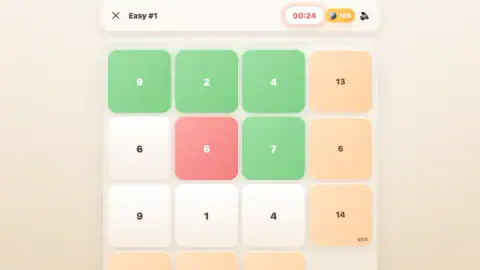
| 9, 2, 4 | 13 | 15 | 2 | Remove the 2 |
| 9, 1, 4 | 14 | 14 | 0 | Keep all three |
| 7, 8, 9 | 9 | 24 | 15 | Remove 7 and 8 |
| 6, 6, 7 | 6 | 19 | 13 | Remove the 7 and one 6, but which? |
| 7, 7, 1 | 8 | 15 | 7 | Keep the 1 and one 7, but which? |
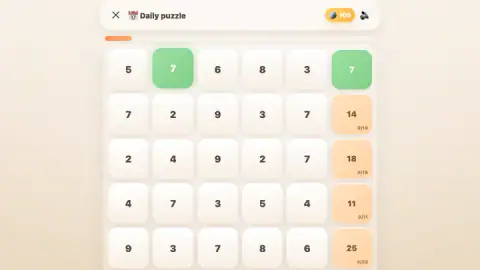
| 7, 2, 9, 3, 7 | 14 | 28 | 14 | Keep 7 + 7, or keep 2 + 9 + 3? |
The first three rows solve themselves, and that is where to start. The rest are the puzzle: the row alone cannot pick between the possible answers, and only the column targets can.
Every Easy board we saw had one row that kept everything, so scan for that first. Ninety seconds looks generous for nine numbers once you stop adding up from zero.
The Daily boards are harder because five numbers allow more answers, as the last row of the table shows. One Daily row also had an easy way in, because a target of 0 means every number in that row goes.
New numbers every time, even on the Daily puzzle
Easy #1 is not a fixed puzzle. Each of our three tries dealt a different board under the same name: the target on the top row was 13 the first time, then 4, then 11. So you cannot learn the answer by failing.
The Daily puzzle surprised us more. We opened it, went back to the menu and opened it again less than half a minute later, and the board was different. If it is meant to be one shared puzzle a day, that is not what we saw.
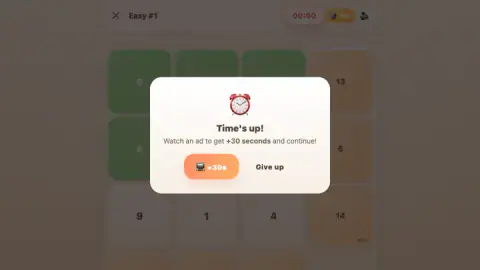
When the clock runs out, a panel offers +30 seconds for watching an ad, or Give up. We gave up every time. Our coins stayed the same, Easy stayed at 0/10 and level 1 opened again with a full clock. Since failure costs so little, the ad is only worth it if you are one click from the end.
What the menu promises
Above the level grid are tabs for Easy, Medium, Hard, Expert and Master. The first four read 0/10, and the edge of our screen cut off the fifth. We opened only Easy, and there may be more to the right.
The Daily puzzle is labelled No limit, with 15 and a coin beside it, which we take to be its reward. Its header has no clock, so it is the place to learn.
The reward strip runs for seven days. Day 1 gave us 50 coins and our balance read 100 from then on. Most of the later days also show coins, but one shows a light bulb, one a stopwatch and the last a gift. We saw no hint button or shop on any screen we could view, so we can only guess what the bulb and the stopwatch do, and what coins are for.
What we did not reach
- A solved board, and so whatever the win screen and its coins look like.
- Level 2, or any tab beyond Easy.
- A column target on a real board, or anything below the grid.
- The records the tutorial mentions.
- The +30 seconds, the sound button or the moon button.
- A touchscreen. We solved nothing with a finger: the whole session was mouse clicks, and the touch-ready label is the word of the game's listing.
Who it is for, and more to play
It suits someone who enjoys mental arithmetic and wants a puzzle that takes minutes rather than an evening. A child comfortable with adding up to about 15 can follow the Easy boards we saw. It will not suit someone looking for a story or a patient teacher: after the muddled lesson, you are alone with the counter.
We found no other game by this developer in our catalogue. If you want more number logic, Sudoku Vault lists boards from four by four to nine by nine. Number Merge 10 is built on selecting areas that add up to 10, and Ten Link: Number Games on linking pairs that do. For logic with pictures instead of sums, there is Nonogram.
More in our puzzle games.
Screenshots

Taken by opening the game ourselves and letting it run — not supplied by the publisher, and not the same picture every other site shows.
How to play SUM+SUM
- Claim the reward and take the tutorial. On first launch a Daily reward panel appears, then a short lesson. It can be skipped from its third page.
- Pick a board. On the menu, only level 1 of Easy is open, with nine padlocks beside it. The Daily puzzle sits underneath.
- Mark the numbers. One click keeps a number, a second removes it and a third clears it.
- Watch the targets. The small counter on each orange tile shows what your green numbers add up to so far. When it matches, the tile turns green.
- Beat the clock. Easy #1 gives you a minute and a half, and the clock turns amber and then red as it runs down.
Tips from our run:
- Check the bottom row first. If the column targets are cut off, sort that out before the clock matters. We did not try scrolling or resizing, so we cannot say which one fixes it.
- Do not hurry the clicks. Two clicks is not a double-click. Our presses were eight seconds apart and each one still moved the tile on a step.
- Do not leave for a better look. The X drops you to the menu at once, with no question asked, and coming back gives you different numbers.
Controls
| Click a number once | Keeps it; the tile turns green and counts toward its row |
|---|---|
| Click it a second time | Removes it; the tile turns red and stops counting |
| Click it a third time | Clears it back to white |
| Click the X at the top left | Leaves the board for the menu with no warning; we used it on the Daily puzzle, and coming back gave us different numbers |
| Click Give up | Appears when the clock runs out and takes you back to the menu |
Features
- A full grid with a target at the end of each row and column, and you decide which numbers stay
- One tile that cycles through keep, remove and blank, so a slip costs only a click or two
- A running counter on each target that adds up only the green tiles
- Easy boards of three by three on a 90-second clock
- A clockless Daily puzzle of five by five, marked with 15 coins
- Five difficulty tabs we could read, from Easy to Master, with levels unlocked in order
- A seven-day reward strip, starting with 50 coins on Day 1
Game details
- Developer
- carolineblueeyes
- Release date
- May 2026
- Last updated
- October 30, 2026
- Added here
- April 2026
- Technology
- HTML5
- Platforms
- Browser (desktop), Browser (mobile & tablet, touch)
- Classification
- Educational , Puzzle
- Saved progress
- Saving, when available, is managed by this game. Mava cannot confirm your level.
FAQ
How do you play SUM+SUM?
Each row and column has a target number. Click a number once to keep it (green), a second time to remove it (red), a third time to clear it. Only green numbers count, and the aim is for the green numbers in every row and column to add up exactly to its target.
How do you solve SUM+SUM faster?
Add up the whole row and subtract the target: the difference is what has to go. If the row totals 15 and the target is 13, you are looking for 2 to remove. A row with no difference keeps every number. Rows with two possible answers wait until the columns can settle them.
What happens when the time runs out in SUM+SUM?
A Time's up panel offers +30 seconds in exchange for watching an ad, or Give up. We gave up all three times. It cost us nothing visible: our coins stayed at 100, we went back to the menu, and Easy #1 reopened with a full clock and different numbers.
Does SUM+SUM have a time limit?
Easy #1 gives you one minute 30 seconds. The Daily puzzle has no clock and the menu marks it No limit. We did not reach the Medium, Hard, Expert or Master levels, so we cannot say what their clocks are.
Is red a mistake in SUM+SUM?
No. Red only means you have removed that number. The game did not mark any of our choices as wrong while we played. The signals to watch are the counter on the target tile and the target turning green when its line adds up exactly.
What does a target of 0 mean in SUM+SUM?
It means every number in that line has to be removed, because nothing kept could add up to zero. We saw one on a Daily puzzle board, on a row of five numbers. It is a free line to clear, and each removal also helps the columns those numbers sit in.
Is SUM+SUM a sudoku?
No, despite the tag on its listing. You do not place digits, and numbers can repeat: our boards had rows with two sixes and rows with two sevens. Everything is already on the grid, and the question is which numbers to take away so the sums work.
Who made SUM+SUM?
The game is credited to the developer as carolineblueeyes, published the game on 25 May 2026 and updated on 30 October 2026. We found no other information about the developer.