

About JigRot
A jigsaw normally introduces itself before you start. The lid of the box carries the picture, and the lid stays propped against the fruit bowl for the next three evenings. JigRot takes the lid away. Press play and the pieces are already loose on a pale blue chequerboard with nothing to measure them against: no tray, no frame, no faint outline of where the image belongs, and no thumbnail anywhere along the top.
What the top does give you is a back arrow, an empty progress strip, a greyed button with a lightbulb on it, and a count. Everything else is dragging. The pieces carry proper interlocking tabs and sockets, the outer ones have flat straight sides, and they all arrive the right way up - we never saw one rotated, and never found a control that would turn one. That single decision changes what the puzzle is: you are not fiddling with orientation, you are recognising fragments.
The fragments on the board we reached were a state trooper in a campaign hat, a sweating man sitting in a toilet bowl, a driving licence changing hands, cornfields and green road signs reading ONLY IN OHIO. We only worked out what we were building afterwards, from the menu, where the finished artwork sits on the banner that launches the board. The subtitle under the game's name is BRAINROT JIGSAW, and it is not being coy: in December 2024 Oxford University Press made "brain rot" its word of the year, after usage of the phrase rose by 230 per cent.
It is credited to Mabolie and has been available since April 2026. Our own run was about four minutes on a desktop, most of it spent on the menus rather than the board. The piece count never moved off thirty-six, the progress strip never left empty, and we never finished the picture. Nothing below pretends we did.
The jigsaw was a geography lesson before it was a pastime
Almost every page about a game like this calls the jigsaw a timeless classic. The classic has a date and an inventor, and it was not invented to relax anybody.
Around 1760 a London cartographer and engraver named John Spilsbury took a printed world map, mounted it, and cut it apart along the borders of its countries with a marquetry saw. He sold the result as a Dissected Map, and it was a teaching aid: a child who put Europe back together had handled the shape of every nation in it. The puzzle was the lesson. The word "jigsaw" only attached itself around 1880, when the fretsaw became the usual tool for cutting the shapes, and the phrase "jigsaw puzzle" is younger still, dating to 1906.
The piece that locks is younger than all of it. Wooden puzzles made either side of 1910 were frequently not interlocking at all - the pieces butted up against each other, which made them brutally hard, because a careless elbow undid an hour. The snug tab-and-blank fit most people now think of as the definition of a jigsaw arrived with the heavy hydraulic presses of the 1930s, precise enough to cut cardboard that held onto its neighbour.
JigRot inherits the shape of that press without any of its physics. The tabs and sockets on its pieces are drawn, not cut, and whether two of them hold together is a decision the software makes rather than a thing friction does.
What a screen does that a kitchen table cannot
Three things change when the pieces are pixels, and a cardboard veteran notices all of them in the first minute.
Nothing is ever lost. The hoover does not eat a piece and nobody reaching for the salt knocks the board off the table. Nothing can be sorted into lids either, though: there is no second surface, so every piece you are not using is still on the same chequerboard, getting in the way of the ones you are.
The fit is granted rather than felt. On cardboard you know a piece is right because your thumb feels it seat. Here there is no feedback in your hand at all, only what the game chooses to show you, and the listing's notes say what it shows is edges snapping together when they align. We never confirmed a snap, so that is the provider's account of the game and not ours.
Joined groups travel, and this is the gain the game is named around. Once a handful of pieces have merged, the provider's notes say the whole cluster picks up as one object. Slide four joined pieces across a real table and they come apart in your hand; on a screen they are a single thing, so you can build a corner wherever there is room and carry it over afterwards.
Two currencies stand between you and most of the pictures
The pack list is where the game turns from a jigsaw into something with an economy, and two different tokens are counted on it.
The first is a small green jigsaw piece, and it opens packs. The header carries a bar labelled NEXT PACK with your running total on it, and every locked row prints its price in plain words: 600 for one pack, 800 for the next, 1000 for the one after that. The second is a gold coin, and it opens nothing at all. Coins go on the hint button and on a separate Cosmetic Shop of frames, screen effects, emotes and badges, where the cheapest border is forty and the dearest badge runs past eight hundred. Not one thing in there touches a puzzle.
Boards pay out in both. The two unlocked cards we could read carried the same pair of rewards in the corner of the artwork, thirty-five coins and twenty green pieces, on a board that is itself twenty pieces. Set that against the first locked pack's price and you have the real shape of the game's progression: a lot of small pictures before a new set of big ones.
There is a shortcut, and it is the one every free browser game offers. A row on the home screen pays green pieces for watching an advert, and the shop has its own row paying coins. Both are buttons you choose to press rather than interruptions that arrive on their own, which is the better version of this bargain. We pressed neither.
One thing we cannot explain. The daily board advertised a price in green pieces, our counter sat on zero before we opened it and on zero afterwards, and we played it anyway. Either the first one is free, or the price is not enforced, or something happened that we did not see. We would rather leave that open than invent a rule for it.
More jigsaws on our shelves
Mabolie has one other game and we do not carry it, so the nearest neighbours here are other people's jigsaws. Cozy Jigsaw Puzzles is the one to try if JigRot's boards feel small: its difficulty settings run from a gentle thirty-five pieces up into the hundreds. Jig Snap Puzzles starts simpler and works through photographs of landmarks, animals and food rather than memes. Jigsolitaire Puzzle builds daily challenges and collections around the same drag-and-snap idea, and Jigsaw Puzzle Game is the plainest version of the format we carry, with nothing to unlock at all. The rest is in puzzle games.
Screenshots
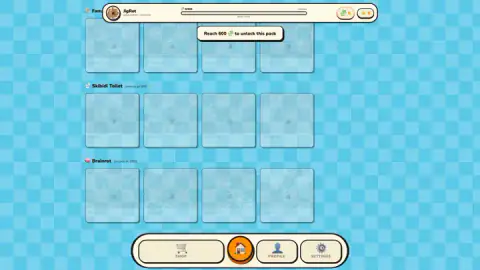
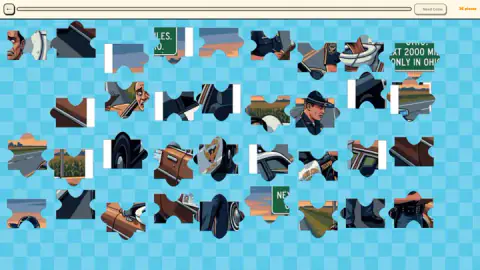
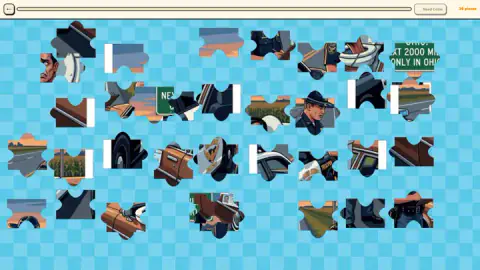
Taken by opening the game ourselves and letting it run — not supplied by the publisher, and not the same picture every other site shows.
How to play JigRot
- Look at the card art before you press play. The menu shows each board as a thumbnail of its finished picture. That is the only view of it you get, because the board itself shows you nothing.
- Check the size printed under the name. Every card carries its own piece count, so you know whether you are committing to a quick board or a long one.
- Click and hold a piece, drag it, release. The listing's control notes say matching edges snap together when they line up, and that a cluster you have already joined picks up and moves as one lump.
- Build outward from whatever you can name. A shoulder patch, a letter on a road sign, an eye, a wheel arch. On a picture this busy, recognisable detail is a far better handle than colour.
- Treat the lightbulb as a last resort. It is the hint and it is priced in coins, so it only works if you have been earning them elsewhere.
What the session taught us:
- Nothing stops you dropping a piece on top of another one. Where our edges did not match, the pieces simply lay over each other, one picture half-covering the next. No bounce-back, no penalty - forgiving, but it also means a crowded corner gets harder to read the more you work in it.
- The board answers to the mouse and, as far as we could tell, to nothing else. Arrow keys and letter keys produced nothing we could see or hear.
- The straight edges are worth hunting first. They exist here exactly as in cardboard, and on a board with no outline to work against they are the only pieces that announce where they belong.
- The hint button can be dead before you start. Ours read "Need Coins" for the whole session, which is what the button becomes when the bank is empty.
Controls
| Click and hold a piece, drag it, release | Moves it. This is the whole game on a desktop, and the only thing we ever saw work |
|---|---|
| No rotation | Every piece arrives the right way up and stays that way. We found no control that turns one |
| Arrow keys and letter keys | Nothing we could hear or see. The board answers to the mouse and to nothing else we tried |
| The lightbulb button, top right of the board | The hint. It is priced in coins, and with none in the bank it simply reads "Need Coins" |
| The back arrow, top left of the board | Leaves the board and returns you to the pack list |
Features
- Boards come in fixed sizes and the menu prints each one on its card - 20, 30, 36 and 42 pieces across a pack, with the hardest row jumping into the fifties
- A daily board with its own artwork, stamped with the date and priced separately from everything else
- Pieces carry classic interlocking tabs and sockets, and never need turning - they land the right way up
- No tray, no frame and no outline of the finished picture while you play, and no thumbnail on the bar either
- Two currencies that do different jobs - green pieces open packs, gold coins buy cosmetics and hints
- A Cosmetic Shop selling frames, screen effects, emotes and badges, priced from 40 coins up to 812
- Available since April 2026 and last updated in August
Game details
- Developer
- Mabolie
- Release date
- April 2026
- Last updated
- August 10, 2026
- Added here
- February 2026
- Technology
- HTML5 (2D)
- Platforms
- Browser (desktop), Browser (mobile & tablet, touch)
- Classification
- Puzzle
- Saved progress
- Saving, when available, is managed by this game. Mava cannot confirm your level.
FAQ
How do you play JigRot?
You pick a board from the pack list and the game scatters its pieces loose across a chequered background. Click and hold a piece, drag it where you want it and let go. Pieces always arrive the right way up, so you never have to turn one, and the listing's control notes say matching edges snap together when they line up and that a joined cluster drags as a single lump. On a touchscreen the same notes say you touch, drag and lift your finger to place.
How many pieces does a JigRot puzzle have?
It depends on the board, and the menu tells you before you commit - every card prints its size under the name. In the two packs where we could read all four, the sizes ran 20, 30, 36 and 42 pieces. The hardest row we saw carries the same size on all four of its cards, somewhere in the fifties. The daily board we played was 36.
Can you see the finished picture while you are solving it?
No, and this is the thing to know before you start. Once you are on the board there is a back arrow, a progress strip, a hint button and a piece count, and that is the entire interface - no preview, no faint outline, no box lid. The only place the completed image appears is on the card or banner in the menu, so look at it properly before you press play.
What are the green pieces and the gold coins for?
They are two separate currencies and they buy different things. The green jigsaw-piece token unlocks packs - the menu asks for 600 of them for one pack, 800 for the next and 1000 for the one after - while gold coins go on the Cosmetic Shop and on hints. Finishing a board appears to pay both, because the two cards we could read promised 35 coins and 20 green pieces each.
Does JigRot have ads?
It offers them rather than forcing them, at least everywhere we looked. The home screen carries a Watch Ad row paying 20 green pieces and the shop carries its own paying 100 coins, both of them optional buttons you choose to press. We never pressed either one, so we cannot tell you what the ad itself is like or how long it runs.
Who made JigRot?
The game is credited to Mabolie. No studio name appears on screen while you play. It has been available since April 2026 and was last updated in August 2026.
What does the lightbulb button do?
It is the hint, and it costs coins. Through our whole session it sat greyed out with the words "Need Coins" on it, because our coin counter never left zero. We never saw it fire, so what the hint actually does - place a piece, flash a location, show the picture - is something we cannot tell you.
Can you finish a JigRot board in one sitting?
Almost certainly, but we did not manage it. Our session ran about four minutes on a desktop and most of that went on the menus, trying to find a board that was not padlocked. On the 36-piece daily we moved pieces around without ever locking a confirmed join, and the progress bar along the top never left empty. We will not guess at how long a board takes when we have not finished one.