






About Blocks Adventure Jungle Saga
Most block puzzles of this kind hand you a piece the way it comes and leave you to live with it. If the gap on your board is a T standing upright and the piece on offer is the same T upside down, that is your bad luck. Blocks Adventure Jungle Saga adds a small box on the left of the screen, labelled POCKET, and tells you that whatever sits in it can be turned.
That box is the reason to choose this game over its many neighbours. It is also where our session came unstuck. We played the tutorial and the first move of a normal game, at a desktop with a mouse, for about four minutes. We cleared a row and a column, put a piece in the pocket, and then spent roughly half our time failing to turn it. This page says what those minutes showed, mistake included, so that you do not repeat it.
The rest will look familiar. A wooden board sits in front of a jungle, with panels for score and moves on the left and a queue of pieces on the right. You drag a piece onto the board and it stays where you drop it. Nothing falls, and there is no clock anywhere on the screen.
The game's listing credits the game to Zop Technologies WLL. It has been available since May 2026.
Two buttons with arrows, and we pressed the wrong one
The tutorial is short and its opening steps are quick. A row with one gap in it is waiting for a single green block. Then a short bar finishes a column. Then a green T made of five blocks appears in the queue, and the banner reads "DRAG THE BLOCK TO THE POCKET!".
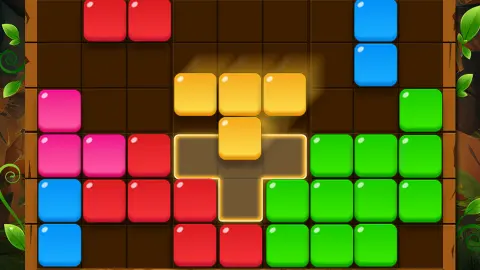
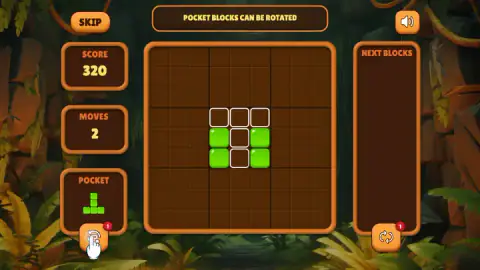
The fourth step is the one that matters. The banner changes to "POCKET BLOCKS CAN BE ROTATED". On the board, four green blocks stand around a slot of five empty cells, outlined in white. The slot is a T with its bar on top. The piece in the pocket is the same T with its bar at the bottom.
So the piece has to be turned over before it will fit, and the white hand rests on the button under the pocket to say so. We did not take the hint. We pressed the button under NEXT BLOCKS, which has a near-identical pair of arrows, and we dragged the piece to the slot unturned. We did both several times. For about two minutes the score and the move count did not change.
It is an easy mistake to make, and the game could do more to prevent it. The two buttons are the same size and colour and wear the same red badge. If you get stuck on that step, look left.
We cannot tell you what the right-hand button does. After we had pressed it, it turned grey and showed an "Ad Get +1" tag, which reads as one more use in exchange for watching an advert. Because of that, we take the red "1" on each button to be a count of uses. Whether the rotate button also runs out after one turn is something we did not find out.
What the score told us in three moves
Lines are where the points are. Completing the row brought up "Good! +100" in green, and completing the column brought up "Nice! +100" in orange. A row and a column are worth the same on the sign.
The panel did not agree with the signs, though. After those two lines and nothing else, SCORE settled at 320. We do not know where the extra points come from. The game does not break the number down, and we will not guess.
Placing a piece earns a little by itself. In the normal game we dropped the five-block T on an empty board, cleared nothing, and the score went from 0 to 5. One point per block would explain it, but that is a single placement and not a rule we tested.
One shape, four pieces: why turning matters
The pieces in this kind of puzzle have a name in mathematics. They are polyominoes, shapes made of squares joined edge to edge, and the word was coined by the American mathematician Solomon Golomb in the 1950s. A shape of four squares is a tetromino and one of five is a pentomino. Our green T is a pentomino, and so is the pink bar of five that turned up in the queue.
Mathematicians count these shapes in more than one way, and the difference is the whole point of the pocket. If you may turn and flip the pieces freely, there are 12 pentominoes. If every orientation counts as a piece of its own, the same set becomes 63.
A block puzzle with no rotation plays with the larger set. The T pointing up and the T pointing down are different pieces, and you wait for the one you need to be dealt. A pocket that turns pieces moves you towards the smaller set, one piece at a time: the T you were given can become the T you wanted. The tutorial's last step is built to show exactly that, with a slot that only the turned piece will fill.
What we did not see
A good deal, and it is better to say so.
The board is nine cells by nine, and heavier lines divide it into nine squares of three by three. That is the layout of a sudoku grid. We filled a row and a column and never a square, so we do not know whether a full square clears as well.
We placed one piece in the normal game and stopped. We did not see the queue refill, two lines go at once, or a game end. The listing says the game is over when none of the pieces on offer fits on the board. Nothing we saw contradicts that, and nothing we saw confirms it.
And we never saw a piece turn.
Who it is for
Someone who likes to think about one piece at a time with nothing hurrying them. There is no clock, the pieces are bright and the board is easy to read. A child who can drag and drop can play it, and the tutorial's first three steps explain themselves.
It is less suited to a player who wants the rules spelled out. The score is not explained, and the one idea that sets the game apart is taught with two buttons that look alike.
More block puzzles to try
Wood Block Journey uses the same nine-by-nine layout, and there the squares of three by three clear along with rows and columns. QBlock Puzzle is the plainest version of the idea, on a wider board with no clock. Block Crush rewards clearing lines one after another, and Sand Blocks lets every piece you drop crumble into grains. The rest are under puzzle games.
Screenshots
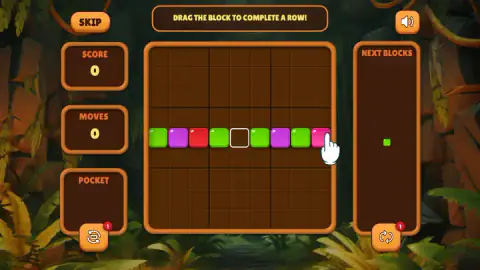
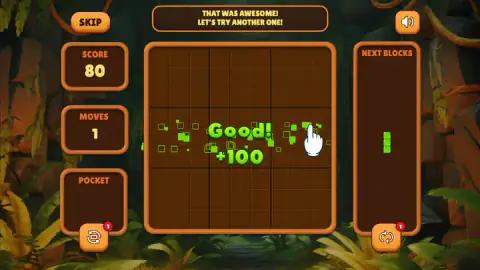
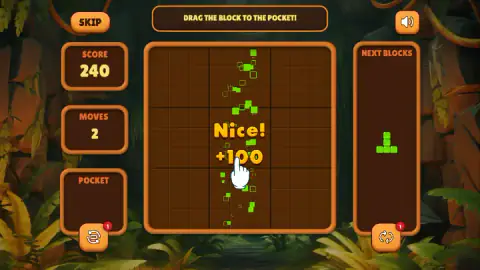
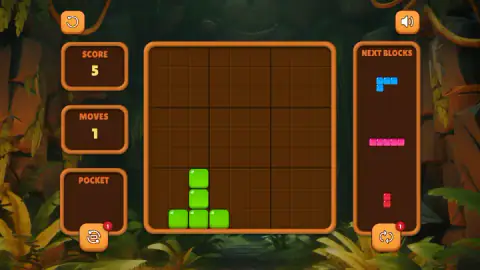
Taken by opening the game ourselves and letting it run — not supplied by the publisher, and not the same picture every other site shows.
How to play Blocks Adventure Jungle Saga
- Start a game. The first thing you get is a tutorial: a banner across the top says what to do and a white hand shows where. SKIP, top left, stays on screen throughout and ends it.
- Drag a piece from NEXT BLOCKS, on the right, onto empty cells of the board and let go.
- Fill every cell of a row or of a column. The line clears and a "+100" sign appears over the board.
- If a piece does not suit you yet, drag it into POCKET on the left. Drag it back out when you want it.
- Keep an eye on the two panels on the left. SCORE goes up as you place and clear, and MOVES counts the pieces you have put down.
What our session taught us:
- The rotate button is the one under the pocket. There are two buttons with arrows on them, one under POCKET and one under NEXT BLOCKS, and each carries a red "1". The tutorial hand points at the left one.
- Pocketing a piece is free. Our MOVES panel read 2 before we put a piece in the pocket and 2 afterwards.
- Taking it out is not. When we dragged the pocket piece onto the board in the normal game, MOVES went up by one, as with any other piece.
- The tutorial accepts one answer. Its last step shows a slot outlined in white, and the piece only goes in the right way up. Dragging it there as it was did nothing, however often we tried.
- Skipping costs you nothing. We pressed SKIP in the end. A normal game opened on an empty board, and the piece we had pocketed was still in the pocket.
Controls
| Drag a piece from NEXT BLOCKS onto the board | Places it on the empty cells under it; it stays where you drop it |
|---|---|
| Drag a piece from NEXT BLOCKS into POCKET | Sets the piece aside without using a move |
| Drag the piece out of POCKET onto the board | Places it like any other piece; this does count as a move |
| Button with a red "1" under POCKET | The one the tutorial points at when it says pocket pieces can be rotated; we never pressed it |
| SKIP, top left | Ends the tutorial and starts a normal game on an empty board |
| Speaker button, top right | Sound; we left it alone |
Features
- A wooden board of nine cells by nine, with heavier lines marking nine squares of three by three
- Pieces you drag and drop, with no clock on screen and nothing that falls
- Full rows and full columns both clear, each with a "+100" sign over the board
- A pocket that holds one piece for later, and a button under it for turning that piece
- Three pieces on show at once in a normal game, from a two-cell bar to a five-cell one
- A tutorial of four steps with a SKIP button on every one of them
- A second arrows button under the piece queue that offers an extra use for watching an advert
Game details
- Developer
- Zop Technologies WLL
- Release date
- May 2026
- Added here
- March 2026
- Technology
- HTML5
- Platforms
- Browser (desktop)
- Saved progress
- Saving, when available, is managed by this game. Mava cannot confirm your level.
FAQ
What is Blocks Adventure Jungle Saga?
It is a free block puzzle for the browser, credited to Zop Technologies WLL. You drag coloured pieces onto a wooden board of nine cells by nine, set in front of a jungle, and a row or column disappears when it is full. A pocket on the left holds one piece aside, and the game says pocket pieces can be rotated.
How do you play Blocks Adventure Jungle Saga?
Drag a piece from the NEXT BLOCKS panel on the right and drop it on empty cells of the board. Fill every cell of a row or a column and that line clears. Nothing falls and nothing is timed, so you can take as long as you like over each piece.
How do you rotate a block in Blocks Adventure Jungle Saga?
Only a piece in the pocket can be turned, according to the tutorial. Drag the piece into the POCKET box on the left first. The tutorial then points at the button under that box, the one with a red "1" on it. We pressed the similar button on the right-hand side by mistake and never saw a piece turn, so we cannot describe the rotation itself.
What is the pocket for in Blocks Adventure Jungle Saga?
It holds one piece for later. Putting a piece in did not add to the MOVES counter in our session, and the piece was still there when we skipped the tutorial and a new game began. Dragging it out onto the board worked like any other placement.
How does the score work in Blocks Adventure Jungle Saga?
We saw three things. Clearing a row and clearing a column each showed a "+100" sign. The score panel read 320 after those two lines, which is more than the signs add up to, and we cannot explain the difference. In the normal game, placing a five-cell piece without clearing anything took the score from 0 to 5.
How do you lose in Blocks Adventure Jungle Saga?
We did not play long enough to see a game end, so this is not first-hand. The game's listing says the game is over when none of the pieces on offer fits on the board. There is no timer on screen and no limit on moves that we could see; the MOVES panel counts up.
Can you play Blocks Adventure Jungle Saga on a phone?
It is listed for PC, Android and iOS, in landscape and portrait. We played on a desktop with a mouse only, so the phone version is the listing's word and not something we tested.
Who made Blocks Adventure Jungle Saga?
The game's listing credits Zop Technologies WLL. The game was published in May 2026.