








About Turnline: Relaxing Puzzle
Most line puzzles hand you a pen. You drag from dot to dot, and if the route is wrong you rub it out. Turnline takes the pen away. Every piece of the line is already on the board, fixed to its square, and the only thing you can change is which way each piece faces.
That sounds like less to do. It is a different kind of thinking. You are not inventing a route; the route already exists, in pieces, and you have to find the one arrangement in which a line runs unbroken from a circle to a square. Tap a tile and it turns a quarter. That is the whole set of rules.
What makes it readable is colour. While you are working, any line joined to the circle is drawn in copper and everything else stays dark grey. So after every tap the board tells you how far your route reaches and exactly where it stops.
Turnline is by Arslan. It was published in September 2026. We have now sat with it twice, the second time for ten minutes, and that longer visit is why this page has changed. Not because we got better at it. We got worse.
What you meet before the first tile
The game arrives, so the first screen is the portal's own: the title, the word Puzzle, and a wide purple button that reads Warming Up while the game loads. Press it when it is ready and a black screen carrying the distributor's logo runs for a moment before the board appears. That happened twice for us, both times on loading, and never once in the middle of a puzzle.
Then comes Turnline's own title screen, and it is worth a look, because it quietly explains what the game is. The logo sits on the left. On the right there is a Play button, and under it the line Journey · Level 1 with a row of twelve small dots. Below that, buttons for Modes and Levels, and a Daily puzzles counter that read 0 / 3 for us. A last row holds four icons: a speaker, a moon for a dark theme, a sliders icon and a globe set to EN.
The interesting part is what that screen looks like the second time. The button now said Continue, the line under it read Journey · Level 2, and the second dot was ringed instead of the first. Pressing it dropped us back onto the exact board we had left, with the move counter still where we had pushed it. Your place is kept, which makes this a game you can abandon mid-puzzle without paying for it. We never opened Modes, Levels or Daily puzzles, so we cannot tell you what is behind them, and twelve dots may be the whole Journey or only its first stretch.
Two levels: one turn, then thirty-three
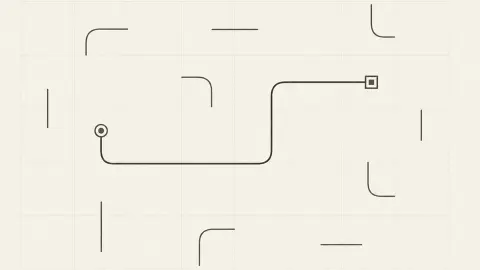
Level 1 is a three-by-three grid with four pieces. The circle sits bottom left, its copper line already climbing up and across through two corners, and the square sits top middle with its short line pointing right, away from everything. The game even draws a copper ring around that square, so there is no mistaking which tile is wrong. One tap swings the stub down, the two ends meet, and the board reports ✓ Solved with a Next button and the line Up next · Rotate.
One detail there is worth keeping. The moment the level solved, the finished line lost its copper and settled to the same dark grey as everything else. Copper is not a reward for the completed route; it is a marker for the part you are still holding.
Level 2 is the same size of grid with five pieces and four empty cells: circle top left, square bottom right, three corners between them. Our best moment came early, at about five moves, when copper ran right from the circle and bent down into the middle column. Two tiles of progress. Then we drifted. We turned tiles that had nothing to do with the route, undid nothing, and ten minutes later the counter read thirty-three and the circle's own line was pointing straight up off the top edge of the board, where nothing can ever meet it. The level went unsolved.
Our first visit to this puzzle got closer in a quarter of the time. That is the honest shape of Turnline: with no clock and no limit, the thing that beats you is not the board. It is the moment you stop reading the colour and start tapping.
Undo, restart and a counter that does not punish you
The counter at the top records every single turn, and as far as we could see that is all it does. There is no clock, nothing flashes when the number climbs, and we passed thirty without the game so much as blinking. Treat it as a score to beat on a second run rather than a budget to spend.
Two ways back are always on screen. The undo arrow under the board takes back your last turn and stays greyed out until you have made one. The redo arrow beside it stayed grey for us all session, because we never undid anything to put back. The restart arrow in the top right is the bigger hammer: the counter returns to zero and every tile goes back to exactly where the level started, so a puzzle you restart is the same puzzle, never a reshuffled one.
There is also a Hint button marked with a small diamond and the number 3. It never changed, because we never pressed it, so we cannot tell you whether that means three free hints or a price to pay. The sliders icon in the bottom right is the same glyph the title screen uses for settings, which is the best guess we can honestly offer about it.
A puzzle older than the browser
Turning pieces of a network until everything connects is an old idea. The best known version is Net, one of the puzzles in Simon Tatham's free Portable Puzzle Collection, where you rotate tiles until every one is linked to a power source in the middle. Net also lights up the tiles that are joined to the source, for the same reason Turnline paints them copper: in a rotation puzzle, the hard part is not working out the answer, it is seeing what you have already got.
Turnline keeps the idea and strips it back. A chip above the board reads Rotate, with a question mark beside it and a thin bar underneath whose length changed as we played. The solved screen's Up next · Rotate suggests the game names each mechanic as it introduces one, but across two levels Rotate was the only name we met.
Who it is for
This is a quiet game. There is no clock, no score that can go down, and the screen is plain cream with dark and copper lines. It fits a short break, a younger player learning to think a step ahead, and anyone who wants a puzzle they can put down mid-move and pick up intact tomorrow.
It is not a fit if you want pressure. Nothing chases you here. The only thing pushing you along is a number at the top of the screen, and only if you decide to care about it.
More line puzzles to try
The closest game in our catalogue is Connect Line, which uses the same idea of turning fixed pieces until two ends meet. Untangle Threads swaps turning for dragging: you pull glowing nodes apart until no two threads cross. If you would rather draw your route than turn it, Brain Line Connect asks for one continuous line through every dot. Arslan's other game with us is Fruit Drop 3D, a fruit-merging puzzle of a different kind. You will find the rest in our puzzle games.
Screenshots
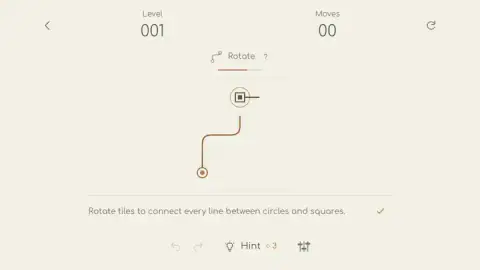
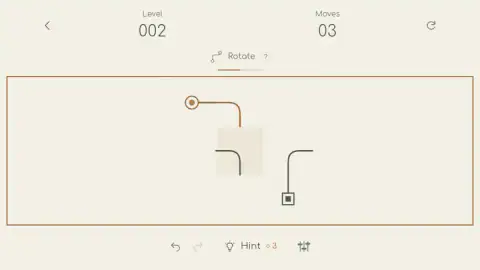
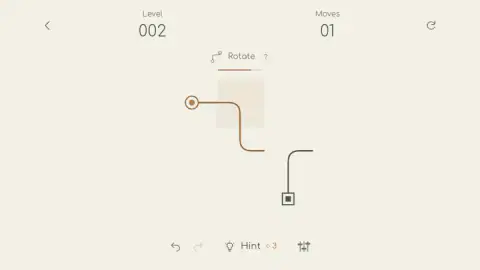
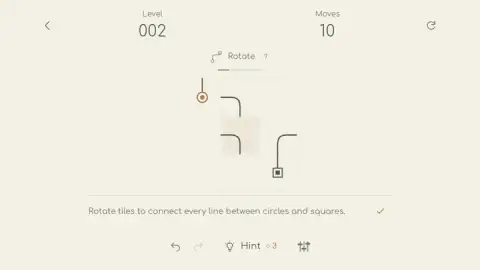
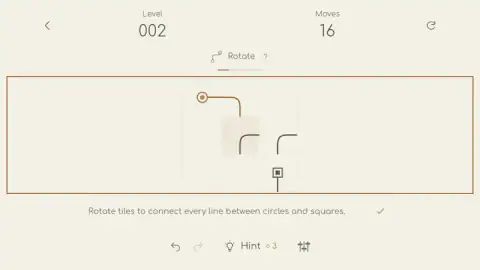
Taken by opening the game ourselves and letting it run — not supplied by the publisher, and not the same picture every other site shows.
How to play Turnline: Relaxing Puzzle
- Find the circle and the square. Your line has to start at one and end at the other.
- Tap any tile to turn it a quarter turn.
- Watch the colour. A tile that joins the copper line is in place; a grey one is not, yet.
- Keep turning until the copper reaches the square. The level is then solved and the next one opens.
- Lost the thread? The curved arrow in the top right puts the level back exactly as it started.
Tips from our games:
- Turns go one way. Counting our moves against the board, every tap turned a tile clockwise. A corner that is one step anticlockwise from where you want it needs three taps.
- The ends turn too. The circle and the square are tiles like any other. If the circle's line points off the edge of the board, nothing can join it until you turn it back.
- Copper is a promise. Once a tile goes copper, leave it. Tapping it again can only break what you already have.
- Work from the circle outwards. Each tile you set narrows what the next one has to do.
- Stop when you stop reading. You cannot lose this game, but you can forget what you were building. That is the only real failure state here.
Controls
| Click or tap a tile | Turns it a quarter turn; as far as we could count, always clockwise |
|---|---|
| Curved arrow (top right) | Restarts the puzzle from its starting layout and resets the move counter |
| Undo and redo arrows (bottom) | Take back a turn or put it back; undo is greyed out until your first move |
| Hint (bottom) | Marked with a small diamond and a 3; we did not use it |
| Back arrow (top left) | Leaves the puzzle; we did not try it |
| Play or Continue (title screen) | Starts the Journey, or returns you to the level you left, counter and all |
Features
- Each puzzle is a small grid of squares, some empty, some holding a piece of line, with a circle at one end and a square at the other
- Every piece turns when you tap it, including the circle and the square themselves
- Line joined to the circle is drawn copper while you work, so you can see at a glance how far your route reaches
- No clock and no move limit; the counter at the top records your turns but never stops you
- Your place is kept between visits, and the title screen offers Continue with the level you left
- A Journey of numbered levels, plus Modes, a level picker and a Daily puzzles slot that reads 0 / 3
- Undo and redo arrows sit under the board, next to a hint button and a settings icon
Game details
- Developer
- Arslan
- Release date
- September 2026
- Last updated
- September 17, 2026
- Added here
- September 2026
- Technology
- HTML5 (2D)
- Platforms
- Browser (desktop, mouse), Browser (mobile & tablet, touch)
- Saved progress
- Saving, when available, is managed by this game. Mava cannot confirm your level.
FAQ
How do you play Turnline: Relaxing Puzzle?
Tap a tile and it turns a quarter of the way round. Keep turning tiles until one unbroken line runs from the circle to the square. When every line is joined, the puzzle is solved and the next level opens.
How can you tell if a tile is in the right place in Turnline?
While you are working, line that is joined to the circle is drawn in copper and everything else stays dark grey. When a tile turns copper after a tap, it is now part of your route. If a copper tile goes grey again, you have just broken the line.
Does Turnline save your progress?
Yes. In our session the page reloaded twice, and both times the title screen offered a Continue button reading Journey, Level 2, which put us back on the same board with the same number on the move counter. You do not have to finish a level in one sitting.
Which way do the tiles turn in Turnline?
As far as we could count from our own moves, every tap turns a tile a quarter turn clockwise. That means a piece one step anticlockwise from where you want it takes three taps, not one.
Do the circle and the square turn in Turnline?
Yes. The circle and the square are tiles like the others, and each has a short line that has to point at the next piece. In our run the circle's line pointed right, then left, then straight up off the edge of the board as we tapped it.
Is there a time limit or a move limit in Turnline?
We saw no clock anywhere on the screen. A counter at the top records every turn you make, but it never stopped us from playing, even after it passed thirty on a single level.
Are there ads in Turnline: Relaxing Puzzle?
The game is served through the distributor, and twice in our session a short black ad slot with the distributor's logo ran while the game was loading. We saw no ads at all while a puzzle was on screen, and nothing interrupted a level in progress.
How many levels did you play in Turnline?
We cleared level 1 with a single tap and then spent the rest of a ten minute session on level 2 without solving it. The title screen shows the Journey as a row of twelve dots, but we cannot say whether that is the whole game or only its first stretch.