





About Hex Mine 2D
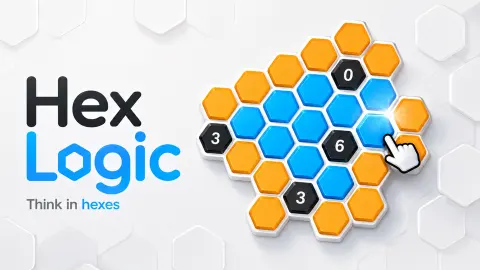
Most minesweeper games start with a guess. You click a random square on an empty grid and hope it is not a mine. Hex Mine 2D does not start that way. Both boards we played opened with some tiles already turned blue and numbered, and those numbers were enough to know where it was safe to tap first.
The other change is the shape. The tiles are hexagons, laid out like a honeycomb, so each one touches six neighbours instead of eight. That sounds like a small detail. It changes how every number reads, and the game spends its whole second level teaching you so.
Hex Mine 2D is by Lucas Entertainment Studio, which also made a 3D version played on round hex worlds. It was published on 10 August 2026.
Reading a hex board: one clue can solve a level
First Light is a good example of how much a single number can do. The board is seven hexagons in a flower, with one more blue 1 sitting outside it. When we started, SAFE LEFT read 5 and FLAGS read 0 of 1: six hidden tiles, one hazard.
The outside 1 touches only one of the orange tiles, the one at the upper right of the flower. So that is the hazard. The blue tile in the middle of the flower also shows a 1, and it touches all six petals. Its one hazard is already accounted for, so the other five petals are safe. Reveal them and the level is done, without a single flag placed.
Level 02, Honeycomb, is bigger: eleven orange tiles, of which the counters say eight are safe and three are hazards. Here the numbers start to overlap. A 2 near the middle touches four orange tiles, so on its own it cannot tell you which two are dangerous. You have to read it together with the 1s around it. The tutorial card at this point says only the six touching cells belong to a clue, and that is the whole trick: a number never reaches further than its own ring of neighbours.
Where it comes from: Minesweeper, then Hexcells
The idea of numbers that count hidden mines next to them is older than most people think. Microsoft's Minesweeper, written by Robert Donner and Curt Johnson, came out in 1990 in the Windows Entertainment Pack, before Windows itself started shipping it. An earlier game, Mined-Out from 1983, is often named as the true first. In both, the grid is square, so a number speaks for up to eight neighbours.
In 2014 the British designer Matthew Brown released Hexcells, which moved the puzzle onto hexagons and coloured it orange, blue and black. Hex Mine 2D clearly borrows that look; its menu even calls itself original hex logic. But it does not borrow the Hexcells rule. In Hexcells a number counts the blue cells around it. In Hex Mine 2D, as its own tutorial says, a number counts the black hazards. That is Donner and Johnson's rule on Brown's board.
Why does the shape matter? With eight neighbours, a 1 on a square grid leaves eight places for the mine. With six, a 1 leaves at most six, and tiles at the edge of a honeycomb often touch only two or three. Fewer neighbours mean numbers that pin things down faster, which is why a hex board can be solved without guessing.
Two levels in, and what is still unknown
One session of roughly ten minutes, mouse in hand, took us this far. We cleared First Light, got well into Honeycomb, and revealed three of its eight safe tiles before our time ran out. We never opened a black hazard, so we cannot tell you what happens when you do.
The game's listing promises 30 levels and other kinds of clue. We saw only plain numbers on two levels, so treat those as a promise, not a fact. The listing also describes the numbers as counting blue tiles. The game we played says the opposite, and on this page we follow the game.
Who it is for
Hex Mine 2D suits anyone who likes a quiet puzzle with a clear answer. There is no clock, the pause card tells you the board will wait, and the first two levels teach the rules one card at a time, so younger players can follow along. It is not an action game, and it is not classic Minesweeper with random boards: the levels are set puzzles, solved by reading, not by luck.
For the same puzzle on a sphere, try Hex Mine 3D, also by Lucas Entertainment Studio. MonkeySweeper: Mines Puzzles keeps the number-counting idea on a square grid. Nonogram and Kaku: Shikaku Logic Puzzle are other grids solved by pure logic. There are more in puzzle games.
Screenshots
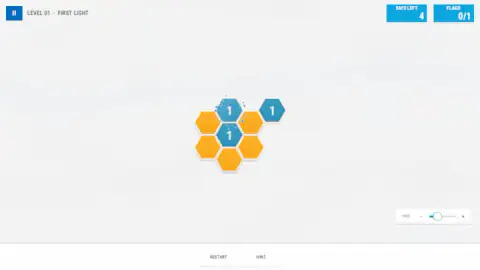
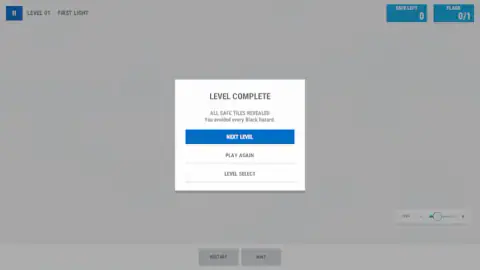
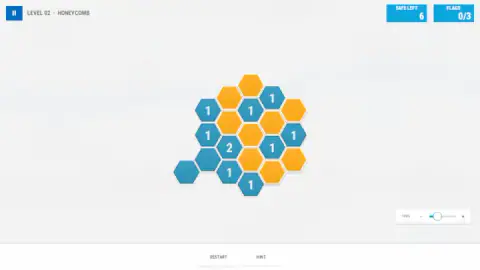
Taken by opening the game ourselves and letting it run — not supplied by the publisher, and not the same picture every other site shows.
How to play Hex Mine 2D
- Press Begin Journey on the main menu. Level 01, First Light, opens with a small flower of orange hexagons and a hand showing where to tap.
- Click or tap an orange tile to reveal it. A safe tile turns blue and shows a number.
- Read the number. It counts the black hazards among the tiles touching it, and only the six that touch it.
- Find the tiles that must be hazards, and reveal every other orange tile. The SAFE LEFT counter at the top right goes down with each one.
- When SAFE LEFT reaches zero, the LEVEL COMPLETE card appears with Next Level, Play Again and Level Select.
Tips from our session
- Start with the loneliest number. A blue tile at the edge of the board touches fewer tiles, so its number leaves fewer options. In First Light, a single 1 sits outside the flower and touches just one orange tile. That tile has to be the hazard, and the rest of the level follows from it.
- A blank blue tile is good news. On Honeycomb we revealed two tiles that turned blue with no number at all. Nothing around them was a hazard.
- You do not have to flag to win. We finished First Light with the FLAGS counter still at 0 of 1. Flags are a memory aid, not a requirement.
- Restart asks first. The Restart button opens a card warning that your current marks will be cleared. Keep Playing takes you back without losing anything.
- Hint shows one safe tile. It highlights a tile with a card that says it is safe to reveal. Use it as a nudge, not a solution.
Controls
| Click or tap an orange tile | Reveals it; a safe tile turns blue and shows how many black hazards touch it |
|---|---|
| HINT (bottom of the screen) | Highlights one tile that is safe to reveal |
| RESTART (bottom of the screen) | Asks for confirmation, then clears your marks and starts the puzzle again |
| Pause button (top left) | Opens the pause card with Resume, Restart, Settings, Level Select and Main Menu |
| Zoom slider (bottom right) | Makes the board bigger or smaller, from 100 % upward |
Features
- Minesweeper on a honeycomb: every tile has six neighbours instead of eight
- Blue tiles carry a number that counts the black hazards touching them
- Two counters at the top right, SAFE LEFT and FLAGS, tell you how many safe tiles and hazards remain
- A level ends when every safe tile is revealed; we cleared level 1 without placing a single flag
- A HINT button that highlights a tile which is safe to open
- Short tutorial cards with a pointing hand on the first two levels, which you can skip
- No timer: the pause screen says the board will wait
Game details
- Developer
- Lucas Entertainment Studio
- Release date
- August 2026
- Last updated
- August 11, 2026
- Added here
- July 2026
- Technology
- HTML5 (2D)
- Platforms
- Browser (desktop, mouse), Browser (mobile & tablet, touch)
- Classification
- Puzzle
- Saved progress
- Saving, when available, is managed by this game. Mava cannot confirm your level.
FAQ
How do you play Hex Mine 2D?
Click or tap the orange hexagons to reveal them. A safe tile turns blue and shows a number: how many black hazards touch it. Use those numbers to work out which orange tiles are hazards, and reveal every other one. The level is complete when the SAFE LEFT counter reaches zero.
What do the numbers mean in Hex Mine 2D?
A number on a revealed blue tile counts the black hazards among the tiles that touch it. On a honeycomb each tile touches at most six others, so a 1 means exactly one of those six is a hazard. A blue tile with no number has no hazards around it.
Do you have to flag the mines in Hex Mine 2D?
Not to win the first level. We finished level 1 with the FLAGS counter still at 0 of 1: the game counts a level as solved once every safe tile is revealed. The FLAGS counter is there to help you keep track of hazards you have already found.
Is there a hint in Hex Mine 2D?
Yes. The HINT button at the bottom of the screen highlights one tile and a card says it is safe to reveal. It is useful when you are stuck, but the puzzles are meant to be solved by reading the numbers.
How many levels does Hex Mine 2D have?
The game's listing says 30 handcrafted levels, and the game has a Level Select screen. We played the first two, First Light and Honeycomb, so we cannot confirm the total ourselves.
Who made Hex Mine 2D?
Hex Mine 2D is by Lucas Entertainment Studio, the developer listed for it. It was published on 10 August 2026. The same studio also made Hex Mine 3D.
Is Hex Mine 2D like Hexcells?
It looks like it, with orange, blue and black hexagons, but the numbers work the other way. In Hexcells a number counts the blue cells next to it. In Hex Mine 2D it counts the black hazards, which is the classic Minesweeper rule.
Is there a time limit in Hex Mine 2D?
No. We saw no clock on either level, and the pause card reads: Take a breath. The board will wait. You can think about each tile for as long as you like.