





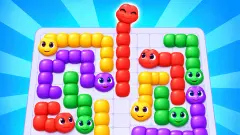




About Pop It!
The name says fidget toy. The game is Minesweeper. There are no silicone bubbles to press here and nothing to pop for the sake of it: every hexagon on the board is either safe ground or the bomb, and the only way to know which is to read the numbers the safe ones leave behind.
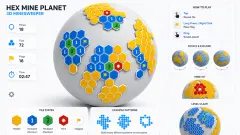
What Pop It! changes is the furniture. The grey squares of the old desktop game become glossy hexagons in bright colours, lying on a dark blue table in loose clusters. Open one and it vanishes. If a bomb touches that spot, a white number stays where the hexagon was. A black bomb icon in the top left corner carries the count of bombs you have still to find.
We played it on a desktop with a mouse for four minutes, and it is only fair to say how that went. We lost the first board by tapping the one hexagon the numbers had already told us to leave alone. We left the second board unfinished. This page is about what those two boards teach, because both can be solved from what was on the screen.
The game's listing credits Pure Pixels. It has been available since September 2026.
Two 1s were enough to find the bomb, and we tapped it anyway
The first board had two clusters of twelve hexagons each, side by side, and a bomb counter that read 1.
One tap in the middle of the left cluster, and by the time the board settled seven hexagons were gone. In their place stood two white 1s. Five hexagons were left on that side: two purple, a green and two red.
Here is the whole puzzle. The upper 1 touched three of the survivors, both purples and one red. The lower 1 touched two, both reds. Each number says one bomb is touching it, and the counter says there is one bomb on the board. So the bomb has to be a hexagon that touches both numbers, and only one does: the upper of the two reds.
We tapped that red hexagon. The board was gone a moment later, and the next thing in front of us was a new layout.
That is the game in one mistake. Nothing on the board was hidden from us, and no guess was needed. When there is one bomb and two numbers, the bomb is where the numbers overlap.
The second board can be solved from our last screenshot
The second board came with two 1s already open on the right, and a loose group of seven hexagons off to the left with no number near it.
We opened that loose group one hexagon at a time, then two orange ones at the edges of the right-hand group. That made nine taps and nine safe hexagons, and the star counter climbed from 58 to 76. None of the nine left a number.
Nine hexagons were still standing when we stopped. The two 1s sat side by side at the top left of the group. Between them and below them was a cyan hexagon, the upper of two cyan ones, and it was the only hexagon still on the board that touched both numbers. By the same reasoning as before, the bomb was under it.
We did not test that. We neither marked the cyan hexagon nor opened the eight around it, so we cannot show you what a finished board looks like. But the reasoning does not depend on us: one bomb, two 1s, one shared neighbour.
One thing the two boards did not agree on. On the first, a single tap cleared seven hexagons at once. On the second, every tap opened exactly one, even where no bomb was anywhere near. We cannot give you the rule for when an opening spreads, so do not count on the wide cascades of the classic game.
Six neighbours instead of eight: what the hexagons change
The Minesweeper most people know came bundled with home and office computers from the early 1990s, and it was played on squares. A square in the middle of that board touches eight others: four along its sides and four at its corners. The corner ones are the easy ones to forget.
A hexagon touches six, and all six share a full side with it. Nothing touches at a corner. That makes a hexagon board easier to read at a glance, since everything a number is talking about is pressed right up against it.
It also changes the arithmetic. A number here can never be higher than 6, and each one covers a smaller patch of the board, so two numbers next to each other share fewer hexagons. On our boards they shared exactly one, and that one was the answer both times.
Three modes, and how much of each we saw
The menu is three tall cards. How to Play is yellow and marked easy. Campaign is pink, marked medium, with "100 levels" under it. Eternal Game is blue, marked hard, with the words "Total Time Bank".
We opened How to Play twice and finished it neither time. It starts by putting a white star on one hexagon and asking you to tap it, then shows a small board with three 1s on it and spells out the rules beside it.
Our two boards carried a small green hexagon with a 1 in the top right corner. They were the first boards the game put in front of us, and we take them for the campaign's first level, though nothing on screen said so.
Eternal Game we did not open. Its card promises a time bank, so a clock of some kind is likely, but on our boards there was none on screen and nothing hurried us.
What four minutes did not show us
We did not clear a board, so we saw no win screen and no second level. We never used the right click, and so we never saw a marked bomb outside the tutorial.
We saw no number higher than 1 and no board with more than one bomb. The artwork on the menu cards shows numbers up to 4, a bomb and an alarm clock both stamped 99, and a tile reading "404 ERROR". None of that turned up in play, and we would rather not guess at it.
The menu has four more buttons: a trophy, a shopping bag with a dollar sign, a profile and a gear. We pressed none of them. We also did not try a phone.
Who it is for
Anyone who liked Minesweeper and wants it gentler. One bomb on a board of two dozen hexagons is a kind opening, and the bright colours take the office gloom out of it. A child who can count to six can follow the rule.
It asks for patience, though, and offers nothing to a player after speed or reflexes. And if you came for the fidget toy, this is a different thing entirely: one wrong tap ends the board.
More numbers to read
Lanternward is the nearest relative we have: numbered rooftops tell you how many lanterns stand beside them. Grid Odyssey: Nonograms hands you numbers along the edges and asks you to deduce a picture. Capybas hides capybaras instead of bombs and gives its clues by row, column and colour. Hexa Block Puzzle keeps the hexagons and drops the danger. The rest are under puzzle games.
Screenshots
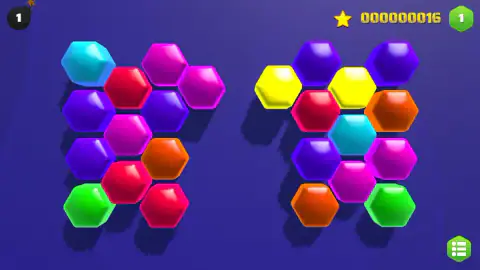
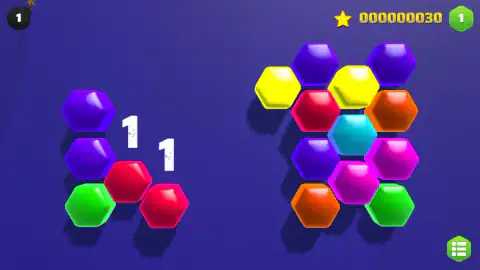
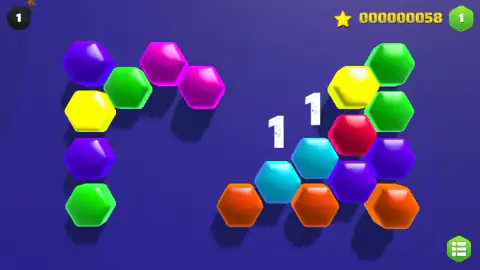
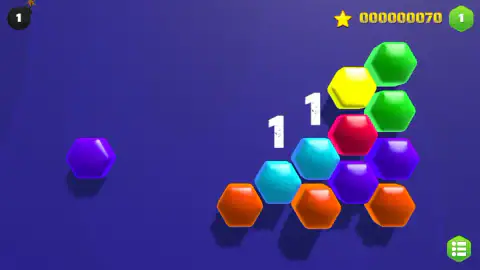
Taken by opening the game ourselves and letting it run — not supplied by the publisher, and not the same picture every other site shows.
How to play Pop It!
- Look at the bomb icon in the top left corner first. The number on it is how many bombs the board hides. On both of ours it read 1.
- Left-click a hexagon to open it. A safe one disappears and adds to the star counter in the top right corner.
- Read any number that appears. The game's own tutorial says it plainly: "Numbers show how many bombs are around".
- When you know where a bomb is, mark it. The tutorial's instruction for that is "Right-click to mark a bomb".
- Keep opening the hexagons that cannot be the bomb.
What two boards taught us:
- The colours mean nothing. Red, purple, cyan: a hexagon's colour is paint. We spent a while assuming they had to be matched, and they do not.
- One click is enough. Pressing the mouse button on a hexagon opens it. There is nothing to drag.
- A blank is information too. Most hexagons we opened left no number at all, which means no bomb touches that spot.
- Separate clusters are separate problems. A group of hexagons with no number anywhere near it cannot be reasoned about, only opened. With one bomb on the board and two numbers already pointing elsewhere, it is safe.
- The green button is the way out. The hexagon with a list icon in the bottom right corner takes you back to the menu.
Controls
| Left click on a hexagon | Opens it; a safe one disappears and may leave a number, the bomb ends the board |
|---|---|
| Right click on a hexagon | Marks it as a bomb, according to the game's own tutorial; we never used it |
| Green list button, bottom right | Leaves the board and opens the menu with the three modes |
Features
- Minesweeper rules on a board of glossy coloured hexagons instead of grey squares
- Numbers that count the bombs among the six hexagons touching them
- A bomb counter in the top left corner that tells you how many are still hidden
- Two stars for every safe hexagon opened, on a counter that carries from board to board
- Three modes on the menu, How to Play, Campaign and Eternal Game, marked easy, medium and hard
- A campaign that the menu card puts at 100 levels
- Boards that come as separate clusters, so part of the screen can be safe ground from the start
Game details
- Developer
- Pure Pixels
- Release date
- September 2026
- Added here
- August 2026
- Technology
- HTML5
- Platforms
- Browser (desktop)
- Saved progress
- Saving, when available, is managed by this game. Mava cannot confirm your level.
FAQ
What kind of game is Pop It!?
It is Minesweeper played on coloured hexagons, made by Pure Pixels. You open hexagons one at a time, the numbers that appear tell you how many bombs touch that spot, and you work out where the bomb is without tapping it. It is not a fidget-toy game, despite the name.
How do you play Pop It!?
Left-click a hexagon to open it. If it was safe it disappears, and if a bomb touches that spot a number is left behind. The game's tutorial says to right-click a hexagon to mark it as a bomb. The counter beside the bomb icon in the top left corner shows how many bombs are still to find.
What do the numbers mean in Pop It!?
The tutorial puts it in one line, "Numbers show how many bombs are around". A number counts the bombs among the hexagons touching it, and a hexagon has six neighbours. A spot that opens with no number has no bomb next to it.
What happens if you tap a bomb in Pop It!?
The board is over. We tapped the bomb on our first board and the whole layout was gone a moment later. The next board we played was a different arrangement of hexagons, and the star counter kept what we had earned.
What are the stars for in Pop It!?
Each safe hexagon we opened added 2 to the star counter in the top right corner, and the total stayed with us after a lost board. The menu has a button with a shopping bag and a dollar sign, which suggests somewhere to spend them, but we did not open it and cannot say what it sells.
How many levels does Pop It! have?
The menu card for Campaign reads "medium" and "100 levels". There are two more modes beside it, How to Play, marked easy, and Eternal Game, marked hard with the words "Total Time Bank". We did not finish a single board, so the 100 is the game's own figure and not something we counted.
Can you play Pop It! on a phone?
It is listed for PC, Android and iOS, in landscape. The tutorial mixes "tap" and "right-click" in its instructions. We played on a desktop with a mouse only, so we cannot tell you how marking a bomb works on a touch screen.
Who made Pop It!?
The game's listing credits Pure Pixels. The game was published in September 2026.