






About Pop Tap
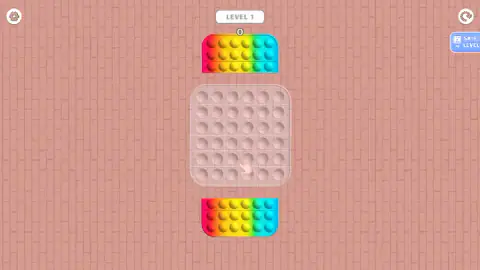
Most pop-it games in a browser hand you the finished toy: a tray of bubbles, your finger, nothing else. Pop Tap makes you build the tray first. Level 1 opens on a pink brick wall with a colourless, see-through grid of dimples in the middle of the screen and two slabs of rainbow bubbles parked above and below it, waiting to be dragged in.
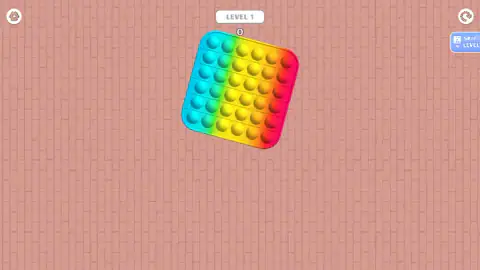
Only when both halves are in place does the toy exist. It tilts and turns for a moment, settles back square, and then the part everyone recognises begins: press the bubbles down one at a time. A number under the level label keeps count, and a pressed bubble stays sunken, so the toy itself shows how far you have got.
We spent ten minutes on it and never emptied a single toy. The label at the top never moved past level 1 and the count stopped at nineteen. This page is about what that first level actually asks of you, including the part that cost us the run.
The game is credited to Drivix Games. Press the play button on its opening card and the screen goes dark for a second before the brick wall appears, and nothing in the game itself puts a studio name on screen.
The number under the level label is a running tally, not a score
When the first toy came together, the number under the label read zero. Our first press took it to one.
From there it climbed slowly, and it survived something we did not expect it to survive. Partway through, the game went back to its opening card. We pressed play again, a fresh toy appeared with the frame empty once more, and the number sitting under the label had not been reset.
So it is not a score for the toy in front of you. It is a tally of every bubble you have pressed since you arrived, which is why our session ended at nineteen with the board still mostly raised.
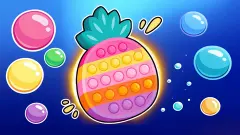
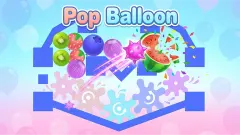
The toys changed while the label did not. The first was a rainbow. The next ran red into purple, the last pink into orange, and each was the same square of thirty-six bubbles dressed differently. The opening card also shows a rainbow pop-it that is not a square at all, so the shapes do not stop at squares; we simply never got far enough to be handed one.
Why our run stalled, and what that tells you about the controls
The honest answer is our hand, not the game. Clicking straight at a bubble is the obvious move, and it is the one that failed us most often. What worked was length: a drag that crossed the toy from one end to the other registered, every time.
The game's own instructions say a swipe pops the bubbles you cross. We never saw the count jump by more than one, so either that is not how it behaves in the opening level or we never swiped the way it wants. It is the one claim about Pop Tap we cannot confirm, and the reason this page does not tell you to sweep across the board.
If you are playing with a finger on a phone, this matters less: a finger naturally travels further than a mouse click. On a desktop, be deliberate about it.
The real toy behind the game
A pop-it is a tray of silicone half-domes. Press one and it pushes through to the other side with a soft click. When every dome is down you turn the tray over and the whole thing starts again from the other side. The toys spread through schoolyards and short videos around 2020 and 2021, sold as fidget or sensory toys, and the marbled rainbow trays became the look everyone recognises.
Pop Tap borrows that look closely, down to the rounded square shape and the colours running into each other. What it cannot borrow is the feel. The click under your thumb becomes a number going up, which is why that number carries so much weight here. And there is no flip: a sunken bubble simply stays down.
The jigsaw step is the game's own addition. A real pop-it comes in one piece. Here you assemble it first, which gives each toy a beginning before the pressing starts, and turns a fidget into something with a shape to complete.
The buttons, the advert and the pause
The screen is mostly the toy and the brick wall. Around the edges sit three controls: a gear top left for the settings, circular arrows top right that look like a restart, and a blue SKIP LEVEL button on the right carrying a small video icon with the letters AD.
That last one is the only place an advert appears, and it is optional: skipping a level is what you trade it for. We touched it once and got no advert at all. The board dimmed and a message appeared saying no ads were available, with a purple button underneath to carry on. Pressing it put us back exactly where we were, same level, same count.
There is one more thing worth knowing. Click away from the game and it pauses: the level badge at the top is replaced by a dark Click to keep playing label, and a single click on the board starts it again. Nothing is lost while it waits.
Who it is for
Pop Tap suits anyone who likes the idea of a pop-it and wants a little more than a tray to press. The puzzle step takes seconds, the controls are a drag and a tap, and nothing on screen punishes a slow player, which makes it an easy one to put in front of a young child.
It is not a game with a goal beyond the next toy, and in the level we played there was no way to lose. If you want a clock, a score to beat or a fail state, look elsewhere.
More pop-it games
Pop It Now is the plain version: a run of boards to press with no score and no timer. Pop It Master is the closest neighbour on the same portal. Fidget Pop Online describes the same two steps as Pop Tap, joining the parts before you pop them, and Electronic Pop It promises four modes, a memory game among them. If you prefer sorting to pressing, PopSortica uses the same kind of board. More quick games of this sort are in the arcade category.
Screenshots
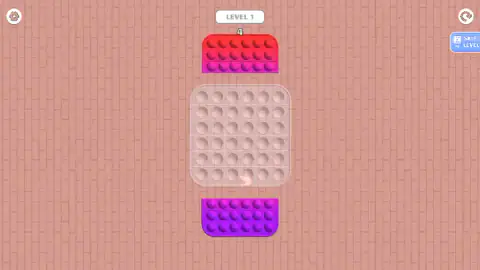
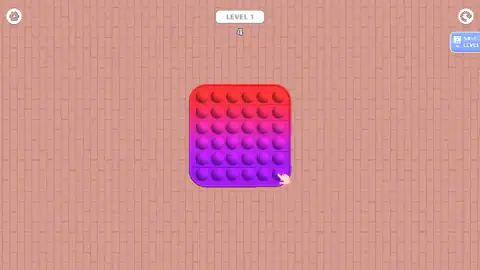
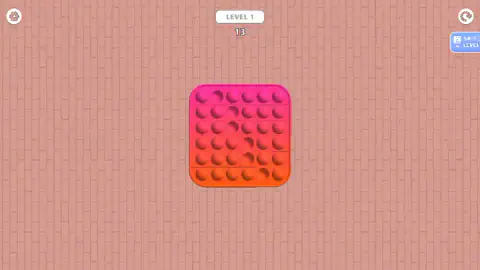
Taken by opening the game ourselves and letting it run — not supplied by the publisher, and not the same picture every other site shows.
How to play Pop Tap
- Press Let's Play on the opening card. It shows the game's name between two small pictures of it. A purple logo flashes, and the level loads.
- Look at the middle of the screen. The grid there is empty and almost transparent, six rows of six dimples with no colour in them. Above and below it sit two coloured slabs, three rows of bubbles each.
- Drag each slab into the grid. A pointing hand hovers over the gap to show you where. Pull all the way, not part of the way.
- Let the toy settle. When the second half lands, the completed square turns on the spot and comes to rest. Nothing can be pressed until it does.
- Press the bubbles. Click or tap one and it sinks a shade darker; the number under the label goes up by one.
Tips from our run:
- Drag long, not short. This is the single thing that decides whether the game answers you. Movements that crossed the whole toy worked. Nudges, and presses that began and ended on the same spot, did nothing at all.
- Follow the hand. It points at the empty half while you are building, then moves to a bubble on the bottom row once the toy is whole. Both times it is showing you a move that works.
- Trust the number, not your eyes. A sunken bubble is only slightly darker than a raised one, and on a marbled toy that is easy to miss. If the number did not move, the press did not count.
- Nothing is chasing you. There is no timer, no lives and no sound for failing, so a missed press costs you nothing but another try.
Controls
| Let's Play (opening card) | Starts the game; the screen goes dark for a second and level 1 loads |
|---|---|
| Long drag (mouse or finger) | Carries a coloured slab of bubbles into the empty frame; short nudges are ignored |
| Click or tap | Presses a bubble down; the number under the level label goes up by one |
| SKIP LEVEL button | Skips the level; the button carries an AD icon, so it asks you to watch an advert first |
| Circular arrows (top right) | Looks like a restart for the level; we did not use it |
| Gear (top left) | Settings; we did not open it |
Features
- Every level starts as a jigsaw, with an empty see-through pop-it frame and two coloured halves waiting to be dragged in
- The frame is six rows of six, and each half carries three of those rows
- The finished toy tilts and turns for a moment before settling square, the only animation in the level
- A number under the level label counts every bubble you press, and it does not reset when a new toy appears
- Pressed bubbles stay sunken, so the toy itself is the progress bar
- Drags have to be long, because short nudges and presses that start and end on the same spot do nothing
- No timer, no lives and no fail sound in the level we played
- Toys arrive in a different colour scheme each time, among them rainbow, red into purple, and pink into orange
Game details
- Developer
- Drivix Games
- Release date
- September 2025
- Last updated
- August 10, 2026
- Added here
- July 2025
- Technology
- HTML5 (2D)
- Platforms
- Browser (desktop, mouse), Browser (mobile & tablet, touch)
- Saved progress
- Saving, when available, is managed by this game. Mava cannot confirm your level.
FAQ
How do you play Pop Tap?
Each level starts with an empty pop-it frame and two coloured halves floating above and below it. You drag each half into the frame until the toy is whole, then press its bubbles down by clicking or tapping them. A pointing hand shows you where to start in both steps.
How do you finish a level in Pop Tap?
The game asks you to pop every bubble on the finished toy. In ten minutes we built three toys and pressed nineteen bubbles without emptying one, so we never saw an end-of-level screen. The label at the top stayed on level 1 the whole time.
What does the number under LEVEL 1 mean in Pop Tap?
It counts the bubbles you have pressed. It is not a timer and not a per-toy score: when a fresh toy appeared with the frame still empty, the number was already at four and carried on from there. It is a running tally for the whole session.
Why do my taps not pop the bubbles in Pop Tap?
Short movements are the usual reason. The drags that worked for us crossed the whole toy from one end to the other, while presses that started and ended on the same spot did nothing. If the number under the level label did not move, the press did not count.
What does Skip Level do in Pop Tap?
The blue SKIP LEVEL button on the right moves you past the current level in exchange for an advert, which is what the small video icon with the letters AD means. When we touched it the advert slot came up empty, with a message saying no ads were available and a Continue playing button that put us straight back in the level.
Can you unlock new toys or colours in Pop Tap?
Each new toy we were given arrived in a different colour scheme, and the opening card shows a pop-it that is not a square, so there is more than one shape in the game. We did not clear a level, so we cannot say whether colours and shapes are earned or simply handed out in order.
Can you play Pop Tap on a phone?
Yes. It is built for a phone held upright and works with a finger, and in a desktop browser it plays with the mouse, filling the sides of a wide screen with the same pink brick wall. There is nothing to download and no sign-in.
Who made Pop Tap?
Pop Tap is credited to Drivix Games, and it was published in September 2025. Nothing inside the game itself names a studio, so that listing is the only credit we can point to. It is free in the browser.