



About Tile Pop: Block Blast
A score of 12 looks like nothing in a block puzzle, and in our run of Tile Pop it sat there for seven and a half minutes. The game had not ended. Most of the board was still empty and no clock was running. We had simply stopped landing pieces, and working out why taught us more about the game than the pieces that did land.
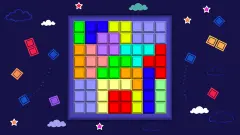
Tile Pop: Block Blast gives you an 8x8 board of dark glass cells and a tray of up to three shapes beneath it. You drag the shapes up and drop them wherever they fit, and the tray refills only once it is empty. According to the game's listing, full rows and columns then clear to make room. You choose where a shape goes but never which shapes you get, and that is where the puzzle lies.
Here is how far this guide goes. We played one session of about ten minutes on a computer, with a mouse, and landed four pieces. We never cleared a line, never saw a game-over screen and never opened the settings. Anything below about line clears, modes or obstacles other than vines comes from the listing, and we say so where it does.
The game is credited to NXT IN and dates it August 10, 2026.
Twelve points meant twelve tiles
The big number at the top turned out to be easy to read. Twelve points meant twelve tiles on the board: green, white and amber, from four shapes of the same size. Every landing added exactly three points.
So placing a shape pays by size, which gives a small reason to prefer big shapes when they fit. We cannot tell you how much a cleared line pays on top, or what the combos in the listing are worth, because we never got one.
The gold BEST counter under the score climbed in step with it, and a burst of confetti and ribbons greeted our first piece. On a first run, then, every placement is a new record. Whether that record survives closing the game is something we did not check.
Why our score stopped, and how to avoid it
After the fourth piece, the screen looked like this: 16 of the 64 cells occupied and two shapes waiting, a red T and a yellow T. There was plenty of room, yet neither shape moved for the rest of the session.
The landed pieces explain it. All of them settled above the point where we let go, by anything from half a tile to two tiles. That is presumably so your finger does not hide the shape, though the game does not say. Once you know, the rest of our session reads differently:
- More than half of our remaining drags ended below the board. We were letting go in the empty space between the grid and the tray.
- Most of the others went for the crowded middle. With the shape settling higher than the release point, our reading is that they came down on tiles already there.
- A few began on the board rather than in the tray, and those picked up nothing.
We would not call the controls broken, since the same motion landed four pieces earlier. We would call them unforgiving until you learn the offset, and nothing on screen teaches it. The instructions mention highlighted cells as a guide to valid drops, which we did not catch in any of the frames we kept, so watch for them while dragging.
The green tiles are vines, and one of them spread
Our board was never empty. From the first placement we saw three tiles of tangled green growth, two side by side near the top right and one near the bottom left. The listing names Vines among the obstacles of its Adventure mode, so we take these to be those, and take our session to be Adventure. We never saw a menu where you pick a mode.
Between our second placement and the arrival of the second tray, a fourth vine tile appeared, directly beneath one on the top right. Then the count stayed at four, including through the long stretch when we placed nothing. That is one sighting, not a rule, but our reading is that vines do not grow on a clock: pausing to think did not cost us any cells.
That matters on a board this size, because a vine sitting in a row looks like a tile you cannot simply fill in. We never dropped a piece on one and never cleared a line next to one, so how they are removed remains an open question. The listing promises each obstacle its own rules; for vines, we can vouch only for how they looked and that one spread.
Classic, Adventure and the other obstacles
The listing describes two modes. Classic is endless play for a personal best. Adventure is also endless, with random obstacles: Frozen Ice, Vines, Spider Webs, Stone Blocks, Chains, Slime, Crystals and Corrupted Tiles. We saw only the vines, so treat the rest of that list as the studio's word.
The same goes for block themes and regular updates. Every tile we saw had the same glassy swirl, in green, white, amber, red and yellow. The listing's mention of offline play and downloading also reads like shop text rather than a description of the browser version we played.
A familiar idea on a smaller board
Dropping shapes on a grid with no gravity and clearing full lines is an established format. One of its best-known early examples is 1010!, released by Gram Games in 2014, which uses a 10x10 board. Block Blast is also the name of a mobile game attributed to Hungry Studio; Tile Pop is credited to NXT IN, and nothing we saw links the two.
Board size is what you should compare. Tile Pop's 64 cells leave far less slack than a board of 100, and each vine takes one of them away before you have played anything. That is why the order of your shapes matters more than it first seems.
What we did not reach
- A cleared line or a combo. We have only the listing's word for how they work.
- A game over. In this kind of game a run usually ends when no tray shape fits; we never came close.
- A four-tile shape on the board. Both Ts stayed in the tray.
- Classic mode, or any menu for choosing a mode.
- Any obstacle except vines, or any way of removing them.
- Rotating a shape. We did not try, and neither the listing nor the instructions mention it.
- The gear icon in the top-right corner.
- A phone or tablet.
Who it is for, and more block puzzles
It suits players who want to think without being rushed. There was no clock in our session, and the vines we saw added a little pressure without forcing the pace. If you dislike fiddly controls, give yourself a few drops to learn the offset before you judge it.
If you want the same drag-and-clear idea on a board of another size, Eco Block Puzzle plays on nine by nine with pieces of spoiled soil, and Popsy Blocks squeezes bubble pieces onto six by six. Jewel Box: Block Puzzle is the closest in look, with gemstone blocks and, by its listing, levels instead of an endless run. Block Puzzle: Prize Mania adds collectible items, also by its listing.
More in our puzzle games.
Screenshots
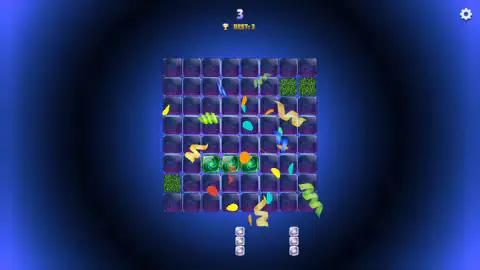
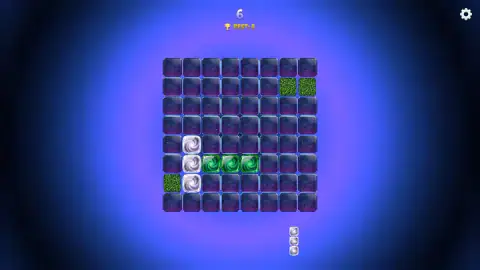
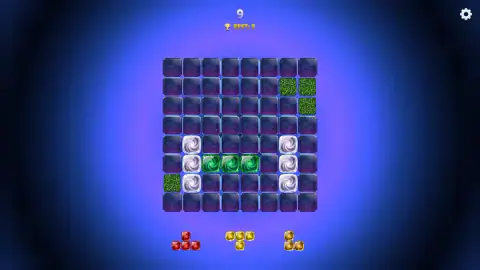
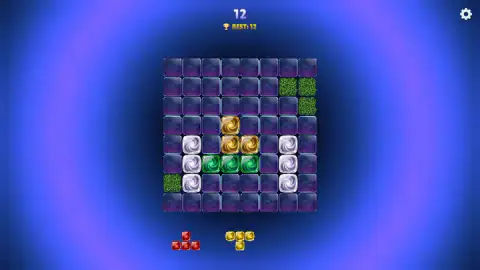
Taken by opening the game ourselves and letting it run — not supplied by the publisher, and not the same picture every other site shows.
How to play Tile Pop: Block Blast
- Look at the tray. Up to three shapes sit under the board, drawn at about half the size they will be once placed.
- Press and hold a shape. Drag it up towards the board. The game's instructions describe the same motion with a finger on a phone.
- Let go below your target. The shape settles higher than the point where you release it.
- Use every shape in the tray. Our first tray was a green line and two white columns. Only after the last one landed did three new shapes appear.
- Fill a row or a column. By the listing, a complete line clears and frees its cells. This is the step we did not reach.
Tips from our run:
- Grab low, release low. The lower on a shape we grabbed it, the further above the pointer it seemed to settle. Our longest gap came from holding a white column by its bottom tile.
- Start the drag on the shape itself. The tray pieces are small targets, and a drag that starts on the board moves nothing.
- Do not count on the next tray. New shapes wait until the current ones are gone, so a hard shape left for last can hold everything up.
- Ignore the colours for now. The listing asks for full rows and columns, not matching ones, and tiles of different colours landed side by side for us.
- Plan for four-tile shapes. Our second tray held a red T and a yellow T, each four tiles and three wide, which need more space than the columns of the first tray.
Controls
| Click and hold a shape in the tray, or touch and hold it on a phone | Picks it up; the touch version comes from the game's instructions, as we played with a mouse |
|---|---|
| Drag up to the board and let go | Drops the shape, which settles higher on the board than the point where you let go |
| Gear icon, top right | Presumably the settings; we did not open it |
| Keyboard | Nothing we needed; the arrow keys, Space and Enter gave no sign of doing anything |
Features
- An 8x8 board of dark glass cells, centred on the screen on a computer, with a tray of up to three shapes beneath it
- The tray refills only when it is empty, so an awkward shape keeps its slot until you find room for it
- Each of our four placed pieces added its tile count to the score: three tiles, three points
- The score and the BEST counter climb together as you set a new record, with a burst of confetti on our first piece
- Green vine tiles start on the board; we began with three and a fourth appeared directly beneath an existing one
- No clock: we went more than seven minutes without placing a piece and nothing ended
- The game's listing gives Classic and Adventure modes and seven more obstacles besides vines; we saw vines only
Game details
- Developer
- NXT IN
- Release date
- August 2026
- Added here
- July 2026
- Technology
- HTML5 (2D)
- Platforms
- Browser (desktop), Browser (mobile & tablet, touch)
- Classification
- Puzzle
- Saved progress
- Saving, when available, is managed by this game. Mava cannot confirm your level.
FAQ
How do you play Tile Pop: Block Blast?
Drag shapes from the tray under the board onto the 8x8 grid. When all the shapes in the tray are used, new ones arrive. The game's listing says full rows and columns clear to make room, though we did not complete one in our session. We played with a mouse; the instructions describe the same drag with a finger.
Why won't my piece go where I drop it in Tile Pop?
The piece settles higher than the point where you let go. In our session, every shape that landed sat between half a tile and two tiles above our release point, depending on where we had grabbed it. Aiming directly at a gap can therefore put the shape on tiles that are already there. Let go a little below the gap.
How does scoring work in Tile Pop: Block Blast?
As far as we played, you score one point per tile placed. Each of the four shapes we landed had three tiles and added three points, taking us to 12. The listing also mentions combos, but we never cleared a line, so we cannot say what clearing or combos are worth.
Does Tile Pop: Block Blast have a timer?
We saw no timer. In our session more than seven minutes passed without a piece landing, and the game simply waited, with the board and score unchanged. The listing also says there are no time limits.
What are the green tiles in Tile Pop?
They are tangled green vine tiles already on the board when play starts. We take them to be the vines the listing names among the Adventure mode obstacles. We started with three and a fourth appeared directly beneath one of them. We never dropped a piece on one, so we cannot say how they are removed.
Do lines have to be one colour in Tile Pop: Block Blast?
The game's listing only talks about completing rows and columns and says nothing about matching colours. We cannot confirm this from play, because we did not complete a line in our session. Colour did not stop a piece landing: white, green and amber tiles sat side by side.
Is Tile Pop: Block Blast the same as the mobile game Block Blast?
Nothing we saw suggests so. Tile Pop is credited to a studio called NXT IN, while the mobile game named Block Blast is attributed to Hungry Studio. Block Blast in this title also works as a plain description of the genre, in which you place shapes on a grid and clear lines.
Can you play Tile Pop: Block Blast on a phone?
The game's instructions describe touch controls: hold a shape, slide your finger to the grid and lift. We played only on a computer with a mouse, so we did not try it on a phone. The listing also mentions offline play, which we did not test either.