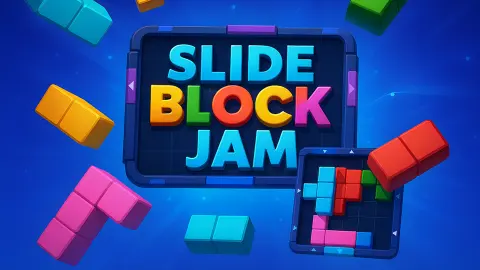






About Slide Block Jam
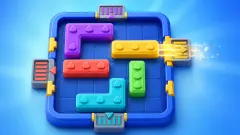
Nearly every block puzzle in a browser tab asks you to fill something. Drop the shapes in, clear the line, keep the board from choking. Slide Block Jam wants the opposite: the tray starts with blocks on it, coloured doors are cut into the walls around them, and the level ends when every block has left through the door matching its colour. An empty board is the win.
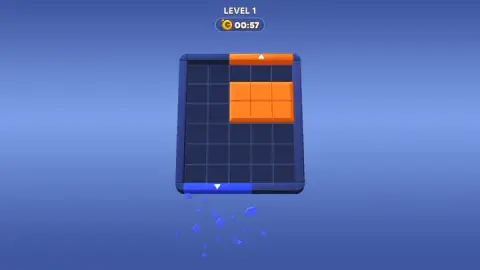
Then there is the thing that turns a puzzle into a game. A gold stopwatch sits under the level number, and it counts down. On level one it was already reading 00:57 the first time we looked, and the digits go red near the end. The blocks themselves do exactly one thing: they slide along the grid and stop at the first wall or block in the way. We never found a way to turn one, which is why a piece bent like an L has to be walked around the tray rather than spun to fit.
29Studio made it, and it has been available since August 2025. Our session ran about four minutes, with a mouse, on a desktop. We let the first level's clock run out, finished that level anyway, and got as far as level three.
The clock counts down, and the first level barely gives you a minute
Run it out and the board dims behind a pop-up headed OUT OF TIME! Inside: a gold stopwatch marked +30s, the line "Get 30 seconds to keep playing!" and one button, Play On, priced at 180. Ours was grey: the purse in the corner read zero. Under the whole window, a line reads Hold to see the board, so you can peek at the puzzle the pop-up is covering.
Across the top of that screen sat the other half of the economy: a red heart with a 4 on it, beside a countdown of 25:20. Lives, and a timer putting the next one back.
We closed it with the red cross, and here is the honest part. The board came back with the clock frozen at 00:00, the orange block still where we had left it, and the game let us carry on sliding. We finished the level and it paid out 10 coins. Whether it had quietly handed us a fresh attempt or simply stopped caring about the count, we cannot tell you. What we can say is that the level we failed on time was the level we then completed — and that thirty seconds cost 180 in a game that pays ten for a win.
On levels two and three the clock reset to 04:30, which is a different animal entirely. A minute is a reflex test. Four and a half is enough to think — and that gap, between the level that rushes you and the levels that do not, is the clearest thing the first few minutes tell you about the design.
Three levels, three different trays
Level one is squat: five squares across, six deep, one orange rectangle on it, an orange door in the top wall and a blue one in the bottom. In our very first capture there were small blue cubes still raining out under the board, which is what a block looks like a second after it leaves: a blue piece had gone out the bottom before we touched anything.
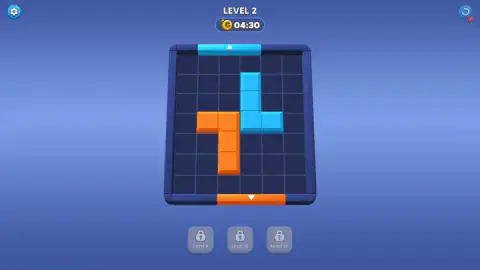
Level two is wider and deeper. Cyan door at the top, orange door at the bottom, two blocks bent into L shapes, one of each colour. Seven seconds after we arrived the orange one was gone and the cyan one stood alone on an otherwise empty grid, which is how fast these read once you have seen the answer.
Level three changes the proportions. The tray is suddenly narrow and tall — five squares across and eight deep — and the doors are on all four walls: blue at the top left, red at the bottom right, and two yellow ones, one in each side wall, set at different heights. Three blocks, every one of them an elbow, stacked across the middle so that each is in the way of another. Two doors for one yellow piece suggests there is more than one right answer, though our session ended before we could prove it.
Under the board, from level two onwards, sit three grey buttons behind padlocks, labelled with the levels that open them: Level 6, Level 12 and Level 16. We never reached the first, so what they hand you is still a mystery. What they settle is the size of the thing: a game that holds a button back until level sixteen is not a game that ends at level ten.
Slide, never turn: the rule here is more than a century old
The constraint that makes this a puzzle rather than a chore is the one Slide Block Jam never bothers to state — a piece can be pushed, but not lifted and not turned. That rule is old enough to carry a patent number. In December 1907 an American named L. W. Hardy filed for one covering a sliding-block puzzle built from the same piece shapes that later became famous as Dad's Puzzler: a tray of rectangles with a single gap in the frame and one large block that has to reach it. The patent came through in February 1912, by which time the thing was already being sold in Chicago as the Pennant Puzzle.
The same arrangement surfaces elsewhere wearing other names. In China it is Huarong Dao, the Huarong Pass. In France it was sold as L'âne rouge, the red donkey. Martin Gardner handed it a Scientific American column in February 1964 under a title that has outlasted the article: "the hypnotic fascination of sliding-block puzzles".
That fascination is not just a polite word for how fiddly they are. In 2005 Robert Hearn and Erik Demaine proved that sliding-block puzzles are PSPACE-complete — in plain terms, about as hard as a puzzle is allowed to get — and that this holds even when every piece is a plain two-square domino and all you must do is move one particular block. There is no neat trick waiting to be found. The pieces are simple; the tangle they make is not.
Which is precisely what the countdown in the corner does to you. Take the clock away and Slide Block Jam is the hundred-year-old object: you sit with it, you try things, you put it down and come back. Put a minute on it and the task changes species. You are no longer asked to solve the tray, you are asked to see the answer before your hand moves, because trying things is the part that costs. Which is why the most useful habit we picked up was the least natural one: read the walls, find the block that is blocking the block, and only then touch anything.
More blocks to shift
Cube Drop Puzzle is 29Studio's own and the nearest thing to this in their catalogue: dragging again, colours matched to targets again, falling instead of sliding. Slide the Blocks: Build the Pictures! keeps the slide-but-never-turn rule and flips the goal — you are assembling a picture rather than emptying a tray. Bus out - Bus Away traffic jam is the gridlock branch of the family, where the thing that has to escape is a vehicle in a full car park, and Railway Traffic Jam! Untangle the Trains! does it with rolling stock. Brick Slide is the honest opposite: you slide there too, but to fill rows rather than clear the board. The rest are in puzzle games.
Screenshots

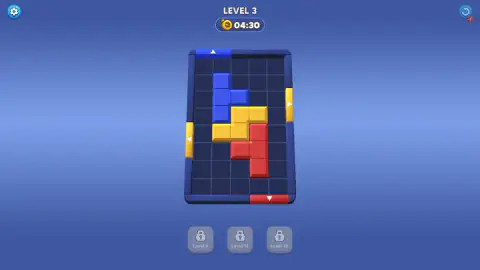
How to play Slide Block Jam
- Drag a block. Press on it and pull it the way you want it to go. It slides along the grid and stops at the first thing in its path. The arrow keys do nothing: we pressed all four and the board did not shift a square.
- Read the walls before you read the board. The coloured strips set into the frame are the doors, each with a white triangle pointing out of the tray. Orange block, orange door. By level three there is one in every wall.
- Clear the road, not the block. A piece only leaves when there is an unbroken run of empty squares between it and its door, so most of the work is shifting the pieces that are not going anywhere yet.
- Empty the tray. The level ends on a LEVEL COMPLETED! banner with a pile of coins on it and a green Next underneath, which drops you straight into the following level with the clock already reset.
Things we only found out by being there:
- Keep your hand still and look first. Every second spent dragging a block into a dead end is a second the clock has taken, and level one gives you fewer than sixty.
- Restarting costs you. The circular arrow in the top right has a small red heart stuck to it reading -1. That is a life, not a free retry.
- Level one hides the furniture. No gear, no restart button, no row of buttons under the board — just a name and a clock. Everything else appears at level two, which makes the first level feel like a different, smaller game.
- The pieces are not all rectangles. Level one's single orange block is a tidy three-by-two; from level two on they are elbows, and an elbow needs clearance on two sides at once.
Controls
| Drag a block (mouse or finger) | Press on the block and pull it the way you want it to go. It slides along the grid and stops at the first wall or block in its path |
|---|---|
| Arrow keys | Nothing. We pressed all four and the board did not shift a square, so dragging is the only input the game takes |
| The circular arrow, top right | Restarts the level. The small red heart stuck to the button reads -1, which is what it costs you |
| The gear, top left | Settings. It only appears from level two onwards; level one shows nothing but the level name and the clock |
| Press and hold on the Out of time window | The line underneath it reads "Hold to see the board", so you can look at the puzzle behind the pop-up before deciding anything |
| Next | The green button on the completed screen. It takes you straight into the following level, with the clock already reset |
Features
- Blocks leave the board through doors cut into the walls, colour for colour, and the level ends when the tray is empty
- A piece slides along the grid and stops at the first thing in its way; we never found a way to turn one
- Every level is timed and the clock runs backwards — under a minute on level one, 04:30 on the two after it
- Run the clock out and a window offers 30 more seconds for 180 coins; finishing level one pays 10, so that price is a long way off at the start
- Lives sit on a timer of their own: four hearts, with a counter at 25:20 bringing the next one back
- Restarting a level is not free either — the button carries a red heart reading -1
- The tray is a different shape each level, and by level three the doors are in all four walls, two of them the same colour
- Three helper buttons wait under the board behind padlocks, each labelled with the level that opens it: 6, 12 and 16
Game details
- Developer
- 29Studio
- Release date
- August 2025
- Last updated
- October 23, 2026
- Added here
- June 2025
- Technology
- HTML5
- Platforms
- Browser (desktop), Browser (mobile & tablet, touch)
- Saved progress
- Saving, when available, is managed by this game. Mava cannot confirm your level.
FAQ
What is the goal in Slide Block Jam?
You empty the board. Every coloured block has to leave the tray through a door of its own colour cut into one of the walls, and the level ends when none are left. Most block puzzles ask you to fill a space; this one asks you to clear it.
How do you move the blocks in Slide Block Jam?
By dragging them, with a mouse or a finger. Press on a block, pull it in the direction you want, and it slides along the grid until a wall or another block stops it. We tried all four arrow keys and the board did not move, so dragging is the whole control scheme.
Can you rotate the blocks in Slide Block Jam?
We never found a way to. The pieces are bent into L and S shapes from level two onwards and they kept those shapes through everything we tried, which means an awkward block has to be walked around the tray rather than turned to fit. That is the oldest rule in sliding-block puzzles: pieces slide, they do not lift and they do not spin.
What happens when the timer runs out in Slide Block Jam?
A window headed OUT OF TIME! appears, offering 30 more seconds for 180 coins, with a line underneath telling you to hold to see the board. Our purse read 0, so the button was greyed out and we closed the window instead. The board came back with the clock stopped at zero, and we went on to finish the level and collect its 10 coins.
How much time does each level give you?
It varies, and more than you would expect. Level one's clock was already under a minute when we first looked at it, while levels two and three both started at 04:30. The digits turn red as the count gets low, which is the only warning you get.
What are the locked buttons under the board?
Three grey buttons sit in a row beneath the tray, each with a padlock on it and a label saying which level opens it: Level 6, Level 12 and Level 16. We did not get that far, so what they do is still their business. What they do confirm is that the game runs to at least sixteen levels.
Who made Slide Block Jam and when did it come out?
A developer listed as 29Studio. This one has been available since August 2025 and was last updated in August 2026. There is no studio site we could find, so the game's listing is the only thing to point at.
Is Slide Block Jam free, and does it work on a phone?
It is free and it runs in a browser on this page with nothing to install. The layout is built for a tall phone screen and it is listed for desktop, mobile and tablet alike. We played it with a mouse, so how the blocks feel under a thumb is still the game's claim rather than ours.