






About Kinetic Puzzle
Most block puzzles let you put a piece where you want it. Kinetic Puzzle only lets you choose a direction. Swipe a block and it keeps going, cell after cell, until a wall or another block gets in the way. You never decide where it stops. The board does.
That one rule is the whole game. Every level is a small grid, a few red blocks and an orange exit on one edge. Send each block out through the exit and the level is done. A counter at the top keeps track of your swipes, and each level has a number of moves it expects you to match.
The game is credited to Haven Grind. It was published in May 2026.
Our time with it was short, and you should know how short. We played for four minutes on a desktop, with the mouse. We cleared level 1, one move over par, and made a single swipe on level 2 before we stopped. We never pressed the three help buttons. So this page explains the rule and the first two boards closely, and says plainly where our knowledge ends.
Level 1 teaches the rule, and we still wasted a move
The first board is five cells by five. Two red blocks sit in the middle row and the exit is on the right-hand edge of that same row. A banner reads «Swipe the block toward the glowing exit», and an arrow points from the nearer block to the tab.
It is a two-move level: one swipe per block. We took three.
Our first counted move pulled the far block to the left, away from the exit. It slid one cell and stopped against the wall. That felt like a mistake worth worrying about. It was not, and the reason is the most useful thing level 1 has to say. Once the nearer block had gone out, we swiped the far one to the right. It crossed the whole row in one go and left through the same exit.
So distance costs nothing here. A block one cell from the exit and a block four cells from it are the same problem, one swipe each. What we paid for was the swipe that did no work. As we noted it, the result panel read 3 moves against a par of 2, with two of three stars lit.
On level 2 the grey block is the tool, not the obstacle
Level 2 adds a third piece: a grey block with a hatched face. The developer's instructions say grey blocks are fixed and stop anything that slides into them. We never touched it, but its position says a good deal.
The exit moves to the bottom edge, under the second column. One red block starts in that column, two rows down from the top. The other starts against the left wall in the fourth row. The grey block sits in the same row as that second one, two cells to its right.
Read it as lines. The upper block has a clear column beneath it, so a swipe down should take it out. The lower block is not in the exit's column. Pull it right and, with nothing in the row, it would run to the far wall and miss. But the grey block is there. It stops the red one after a single cell, directly above the exit. A swipe down finishes it.
That is three moves, and it is our reading of the opening position, not something we played. What we actually did was swipe the upper block to the right. It ran three cells and stopped against the wall, one move spent and no nearer the exit. The session ended there.
It is still the clearest picture of the game we came away with. The grey block looks like a wall dropped in your way. It is really the only thing on that board that can stop a block in the right place.
Why it is called kinetic
The word comes from the Greek for movement, and the rule is a schoolbook one. Newton's first law says a moving object keeps moving in a straight line until something acts on it. On a table, friction does that job quietly. Take friction away, as on ice, and a push carries you to the next thing you hit.
That is the board you are playing on. It explains why the puzzle is hard in a way a normal sliding puzzle is not. You cannot make a small correction. Every move is all or nothing, so the thinking has to happen before the swipe.
What we did not see
The developer's instructions describe two more kinds of block. Yellow ones are said to move and leave only in the direction of their arrow. Blue ones are said to stay locked until another block has left the board. Neither appeared on our two levels, so we can only pass that on.
The developer also says there are more than 50 levels. We saw two. We cannot tell you what I'M STUCK shows, or whether UNDO takes a move off the counter. By our notes, the pause button opened a panel with resume, sound, restart and main-menu options. And between the two levels a portal ad break filled the screen for a moment; nothing interrupted a level while we were moving blocks.
Who it is for
It suits people who like to solve a position in their head and then carry it out. Boards are small, there is no clock, and a level can be over in three swipes. The par gives a reason to go back to one you have already cleared.
It suits less anyone who wants to tinker their way to a solution. A swipe cannot be made smaller, so nudging is not on offer.
More games to try next
For sliding with a different goal, ExitBlocks: Color Match Puzzle sends shaped blocks through gates of their own colour, and Wood Blocks Jam does the same in wood, with no hurry. ArrowGami: Arrow Puzzle is another game about the order in which things leave the board. If you would rather fit pieces than move them, try Hexa Block Puzzle. The rest are under puzzle games.
Screenshots
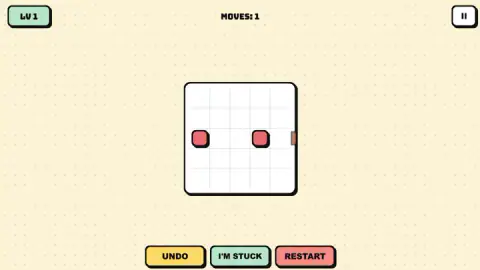
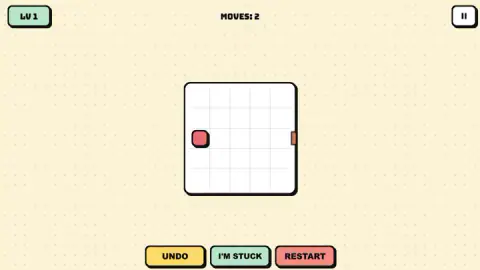
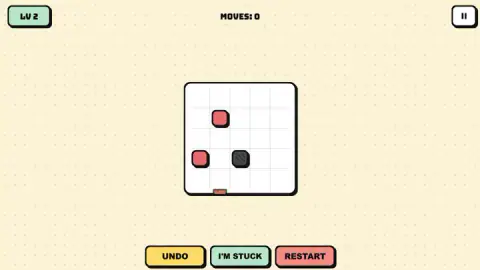
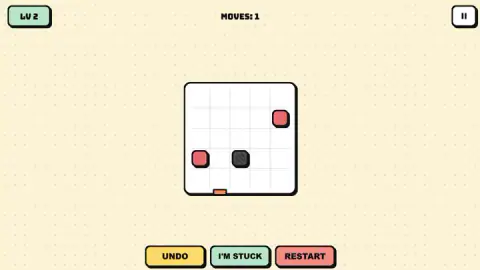
Taken by opening the game ourselves and letting it run — not supplied by the publisher, and not the same picture every other site shows.
How to play Kinetic Puzzle
- Find the exit. It is a small orange tab on the rim of the board. Note which row or column it closes.
- Drag a block. Hold the left mouse button on it, pull up, down, left or right, and let go.
- Watch where it stops. The block runs until it meets a wall or another block. If the exit is at the end of its line, it leaves the board.
- Empty the board. The level ends when the last red block is out.
- Mind the counter. Each swipe that moves a block adds one to MOVES at the top.
What two boards taught us:
- Think in lines, not cells. A block in the exit's row goes out from anywhere in that row, as long as nothing stands between it and the exit.
- A block alone on an open row cannot stop halfway. It needs something to lean on: a wall, a grey block, another red one.
- Order matters. A block can be in the way of another, or be the thing that stops it in the right place. Sometimes it is both.
- Not every pull registers. A couple of our swipes moved nothing, and the counter stayed where it was.
- The help row is always there. UNDO, I'M STUCK and RESTART sit under the board on every level. We left them alone.
Controls
| Click and drag a block (hold the left mouse button, pull up, down, left or right, release) | Sends the block sliding that way until a wall or another block stops it, or out of the board if an exit is at the end of its line |
|---|---|
| Click the II button (top right) | Pauses the level |
| Click UNDO, I'M STUCK or RESTART (under the board) | The three help buttons on every level; we did not press any of them in our session |
Features
- Blocks that do not stop where you let go: each swipe runs to the next wall or block
- A five-by-five board with a small orange exit on one edge, and a level that ends when the last block is out
- A move counter at the top and a par to beat: our first level set a par of 2
- Grey blocks that never move and work as stoppers, on screen from level 2
- UNDO, I'M STUCK and RESTART buttons under every board, and no clock anywhere
- Made by Haven Grind
Game details
- Developer
- Haven Grind
- Release date
- May 2026
- Last updated
- August 10, 2026
- Added here
- March 2026
- Technology
- HTML5
- Platforms
- Browser (desktop, mouse), Browser (mobile & tablet, touch)
- Saved progress
- Saving, when available, is managed by this game. Mava cannot confirm your level.
FAQ
How do you play Kinetic Puzzle?
Each level is a small grid with a few blocks and an orange exit on one edge. You drag a block in one of four directions and it slides until a wall or another block stops it. If the exit sits at the end of that line, the block leaves the board. The level is cleared when the last movable block is out.
How do the blocks move in Kinetic Puzzle?
They slide, they do not step. A swipe sends a block all the way along its row or column, and it only stops against a wall or another block. In our session one block crossed three empty cells in a single move, so you choose a direction and never a distance.
What is par in Kinetic Puzzle?
Par is the number of moves the level expects. The counter at the top adds one for every swipe that moves a block. We cleared level 1 in three moves against a par of 2, and by our notes the result panel lit two of its three stars.
What do the grey blocks do in Kinetic Puzzle?
The developer's instructions call them obstacles that stay where they are. The first one we met, on level 2, was more useful than that sounds: it stood one cell past the exit's column, so a block slid toward it stops exactly where it needs to be.
How many levels does Kinetic Puzzle have?
The developer says there are more than 50. We cleared level 1 and made one move on level 2, so we cannot confirm the total or describe the later boards. By our notes the title screen offers a level select next to the play button.
Is there a time limit in Kinetic Puzzle?
We saw none. The level screen shows the level number, a move counter and a pause button, with no clock. The developer also says there are no timers; the pressure comes from the move count.
Who made Kinetic Puzzle?
It is credited to Haven Grind. It was published in May 2026. It is listed for PC, Android and iOS as a landscape game; we played it on a desktop computer with the mouse.