





About Slide Blocks 3D
Most sliding puzzles show you the finished picture somewhere on the screen, or at least mark where a block should end up. Slide Blocks 3D does neither. You get a tiny square board, a few tiles carrying half a drawing each, a clock counting down from four minutes, and one clue: the edge where each drawing is cut off.
That clue nearly cost us the whole clock. We joined one picture with seven seconds left, the counter moved to 1/2, and time ran out before the second. In ten minutes on a computer with a mouse we saw three different boards, every one of them labelled Level 1, and never finished one. So this page covers the first level closely and nothing after it.
The 3D in the name comes down to thick, rounded tiles. You look straight down on a flat board, and nothing turned in our session.
The game is credited to Mewton Games. It was published in July 2026.
The cut edge tells you where the other half goes
Each tile holds a sticker-style drawing that runs off one side, as if someone had sliced it down the middle. On our second board, one purple tile had a racket head and a ball, cut at the left. The other had a handle, cut at the right.
So the handle goes on the left and the head on the right. The moment we slid the handle into the cell to the left of the head, the seam vanished: one wide purple tile, one whole racket, a green bar in the counter.
The cut can also run the other way. On our third board, one papaya half sat at the top of its tile and the other at the bottom, so that pair should stack, with the bottom-cut half above. We only saw one join, so treat the rule as our reading. Every other drawing we saw fits it.
Tiles start reversed, and that is the whole puzzle
Look at that racket board as it was dealt. The head started to the upper left of the handle, when it has to end up on the right. The second pair was reversed as well: the red squiggle cut at its right edge began in the far right column, and its partner in the far left.
That is where the thinking is. It is not hard to bring two tiles together, but it does take a moment to see that they must swap sides in a box with room for nine, and that they can block each other on the way.
Our first board was different. Its two fir tree halves were two cells tall, side by side and one row out of line, so a single short drag looked enough to close them. We got to it with three seconds on the clock.
A tile will take the long way round
The board has no one-cell rule that we could find. In a single drag, a red tile went from the middle of the left side, along the bottom row and into the far corner, travelling round the tile in the centre. Another moved diagonally in one gesture, from the centre to a corner.
That shortens the job a lot. Here is the racket board solved on paper, afterwards; we did not play it this way. Drag the handle one cell left. Drag the head along the top and down into the centre, and it should join. Slide the top-right red tile one cell left, then bring the bottom-left one along the bottom row and up the right side to sit beside it. That makes four drags, against the four minutes on offer.
Retry gives you new pictures and a full clock
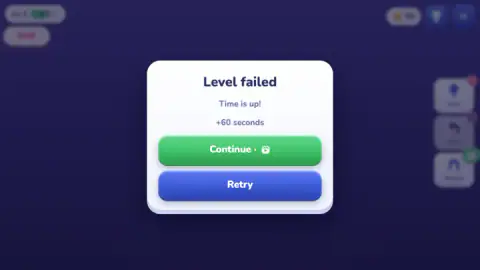
The Level failed card offers two buttons under the words Time is up. Continue promises +60 seconds and carries a small film icon, the same as the badge on Magnet, so we read it as a video. We never got the extra minute. Retry is the blue one.
Retry put the clock back to 4:00 both times we used it, and each time it changed the pictures: the fir and goggles became the racket and squiggle, and those became a papaya and a bundle of wood. The level number stayed at 1 and our joined racket did not count for anything. So it pays to learn the rule rather than the layout, because the layout may not come back.
Pausing stops the clock, and hides the board
Escape brought up the Paused card all ten times we pressed it. The clock really does stop: over one stretch of about twelve seconds with the card up for part of it, the clock lost five.
You cannot exploit that, however. The card sits right over the board and blurs the rest, so there is nothing to study while time stands still. Resume returns you to the same position. We did not press Restart.
Coins and boosters: what we can and cannot tell you
Claiming the first daily reward took our coins from 50 to 75. The counter did not move again, not even when we joined the racket, so we cannot say what earns coins beyond that card, or what they buy. The card itself pays more each day, rising to 300 on the seventh.
Three buttons sit on the right. Hint and Undo each show a red 1; Magnet shows the green film icon. Undo stays grey until you have moved something, and it was grey again right after our join. We used none of them. The game's listing says Hint marks the right spot, Undo takes back your last move and Magnet snaps a piece into place.
What we did not reach
- The end of a level, any reward for it, or Level 2. The listing says levels get bigger as you go.
- A second joined picture, or what a joined tile does afterwards. Ours was still on the board moments before the clock ended.
- The trophy button. The listing mentions a leaderboard.
- A phone. The listing says finger or mouse; we used a mouse.
Who it is for, and more from Mewton
On this evidence it suits a younger player or anyone wanting a short think. The drawings are friendly, there is nothing to read beyond a few buttons, and four minutes is plenty once you understand the cut edges. The clock is the only pressure. Until the rule clicks, though, nothing on screen explains it: no hand or arrow appeared on any of our boards.
Mewton has other puzzles in our catalogue. Block Match 3D also runs against a clock, taking apart a pile of sticker cubes. 3D Dots really does turn in three dimensions, which this one does not.
For a bigger grid, Slide the Blocks: Build the Pictures puts an animal picture back together from a few large blocks. Slide Block Jam keeps the clock but swaps pictures for doors in the wall.
More in our puzzle games.
Screenshots
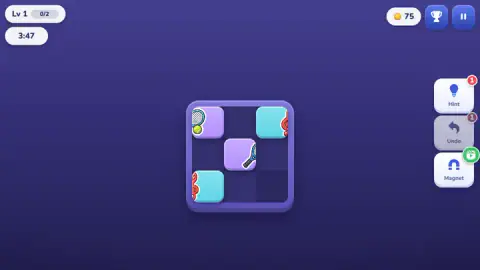
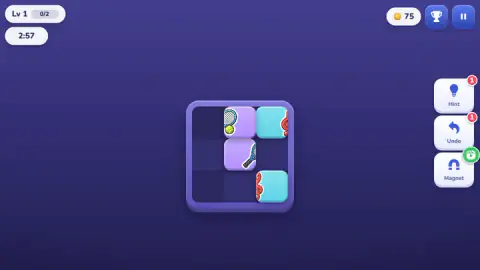
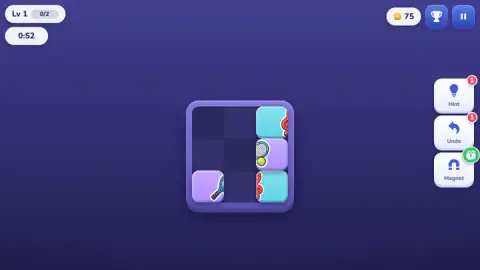
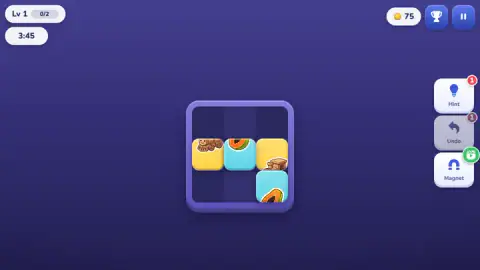
Taken by opening the game ourselves and letting it run — not supplied by the publisher, and not the same picture every other site shows.
How to play Slide Blocks 3D
- Claim the daily reward. A card with seven days of coins comes up first, and the green Claim button clears it.
- Find your pairs. Two tiles of one background colour, each with part of a drawing, make one picture. The counter at the top left says how many pictures the level wants.
- Read the cut edges. A drawing that stops at a tile's right edge needs its partner on that side.
- Drag tiles into line. A tile follows your pointer into any empty cell it can reach.
- Join every picture before the clock ends. The two halves fuse into one wide tile when they meet properly.
Tips from our run:
- Think before you drag. Level 1 needs very few moves. Most of our four minutes went on shuffling tiles that were never going to meet.
- Do not park a tile against the wrong wall. A half that needs its partner on the right is useless in the right-hand column. We left one there for almost the whole clock.
- Watch the clock's colour. It was white at 0:34 and red at 0:28, so red means about half a minute left.
- Start the drag on the tile. Drags that began on an empty cell did nothing, and neither did those aimed at a blocked spot.
Controls
| Drag a tile | Moves it to any empty cell it can reach, even round a corner |
|---|---|
| Escape | Opens the Paused card and stops the clock |
| Resume, on the Paused card | Goes back to the same board |
| Retry, on the Level failed card | New pictures on the board, with the clock back at 4:00 |
| Arrow keys and A | No response that we could detect |
Features
- A square board of nine cells, seen from straight above, with no picture of the finished result
- A four-minute clock on Level 1 that turns red at around the half-minute
- Tiles carry half a drawing, cut off at one edge; the right two join into a single wide tile
- A counter that reads 0/2 on Level 1, one step for each picture joined
- Retry deals different pictures: we saw a fir and goggles, then a racket and a red squiggle, then a papaya and a bundle of wood
- Daily reward card paying 25 coins on the first day and 300 on the seventh
- Hint and Undo with a red 1 each, Magnet with a green film icon
Game details
- Developer
- Mewton Games
- Release date
- July 2026
- Last updated
- October 30, 2026
- Added here
- May 2026
- Technology
- HTML5
- Platforms
- Browser (desktop), Browser (mobile & tablet, touch)
- Saved progress
- Saving, when available, is managed by this game. Mava cannot confirm your level.
FAQ
How do you play Slide Blocks 3D?
Drag the tiles around a small square board until each half of a drawing sits beside its other half. The two then join into one wide tile and the counter at the top goes up by one. Level 1 asks for two pictures in four minutes, and no finished picture is shown, so you work from the edge where each drawing is cut off.
How do you know which tiles go together in Slide Blocks 3D?
Look at the drawing and the background colour, then at the edge where the drawing stops. A drawing cut at the right edge of its tile needs its partner on the right. In our session a racket handle cut at its right edge joined a racket head cut at its left edge as soon as the handle sat to the left of the head.
Why don't my tiles join in Slide Blocks 3D?
Most likely they are next to each other in the wrong order. On the boards we saw, tiles started reversed, so the half that belongs on the left began on the right. Our racket halves touched in other arrangements without anything happening. The two cut edges have to meet.
What happens when the time runs out in Slide Blocks 3D?
A card says Level failed and Time is up, and offers Continue for +60 seconds or Retry. Continue carries a small film icon, which we read as a video. Retry gave us the clock back at 4:00 both times, but with different pictures on the board, and our joined picture did not carry over.
Does pausing Slide Blocks 3D stop the timer?
Yes. Escape opened the Paused card all ten times we pressed it, and the clock lost only the few seconds we spent before and after the pause. The card covers the board, though, so you cannot use the break to plan your next drag. It also holds the Music and Sound switches, Resume and Restart.
Is Slide Blocks 3D really in 3D?
Not in what we played. You look straight down on a flat board, and nothing turned or rotated in ten minutes on Level 1. The 3D amounts to thick, rounded tiles that look like soft buttons. The game's listing says levels get bigger later, but we did not get past the first one.
Who made Slide Blocks 3D?
The game is credited to Mewton Games and lists it as published in July 2026 and updated in October 2026. The same studio has other puzzles in our catalogue, including Block Match 3D and 3D Dots.