






About Blocky Set - 3d brick constructions
Most building games give you an empty plot and wish you luck. Blocky Set - 3d brick constructions does the opposite: it shows you the finished model before you place a single piece, and your only job is to copy it. There is nothing to invent. There is just the question of whether your hands can put a brick exactly where your eyes say it goes.
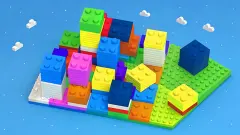
The scene is two blue grid boards floating on a green lawn. The small one at the back holds the model, already built. The big one in front has a white patch in the middle, the footprint your copy must stand on. The loose bricks wait on the grass in front of the big board, each with four studs on top, and you carry them into place with the mouse.
We have to be honest about how our own attempt went. On the first level, which has just two bricks, we moved both of them around the big board for about ten minutes and never got the counter at the top off 0 / 2. We stacked them, we dropped them on and beside the white patch, and at one point we even piled them on the model itself. So this sheet covers the first level and the controls in detail, and it says plainly what we did not get to see.
Blocky Set is by Rebenke Games. It came out in February 2026, and is in English only.
The controls we used and the ones we did not
Dragging is the whole game on the first level, and it works with a plain mouse press. The game's instructions add three more tools: A, W, S and D to move the camera, and R to rotate a brick. On the first level both bricks are cubes, so turning one changes nothing you can see, and we never had a reason to.
The column of orange buttons on the right is where the camera lives on screen. From the bottom up there are two curved arrows that turn the view, a zoom-out and a zoom-in button, and two buttons with brick icons that we did not try. A move button with crossed arrows sits in a circle in the bottom left corner. We left all of them alone, which is the clearest lesson of our session: the default view is fine for seeing the model and not good enough for placing a brick exactly.
A puzzle psychologists have used for a century
Copying a coloured model out of loose blocks is older than video games. In 1920 the American psychologist Samuel C. Kohs published the block design test: a person looks at a pattern and rebuilds it with coloured cubes, and the examiner notes accuracy, time and the number of moves. Kohs meant it as a test that needs no words, so it could be given to people with language or hearing difficulties. David Wechsler later adapted it into the Block Design subtest of his intelligence scales, and versions of it are still in use.
What the test measures is the same thing Blocky Set asks of you: holding a model in your head and mapping it, piece by piece, onto a space seen from a slightly different place. The model board sits further back than your board, so it looks smaller and flatter. Every drop is a small act of translation from one board to the other. That is why a two-brick level can take longer than it looks, and why being one square off is the usual mistake rather than picking the wrong colour.
What we did not get to see
Because the counter never moved, a lot of the game stayed out of reach. We did not see a level-complete screen, a second level or a main menu, and we cannot tell you how many levels there are or how big the models get. We do not know whether later levels add bricks of other shapes, which is where R and the camera keys would start to matter. It is filed under easy puzzles, and the first level fits that, once the brick lands on the right square.
Similar games
If you like rebuilding a shape from parts, Construction Set - 3D Builder and Constructor Bricks are both 3D brick-assembly games from other studios. For a flat version of the same idea, Slide the Blocks: Build the Pictures has you slide shapes into a finished picture. There are more in our puzzle games.
Screenshots
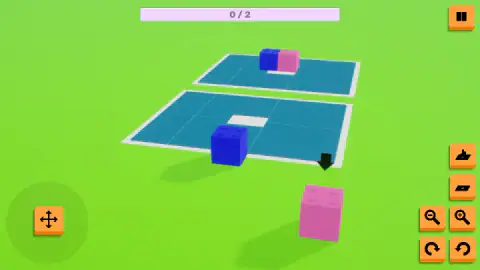
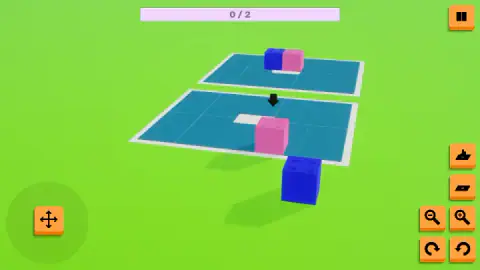
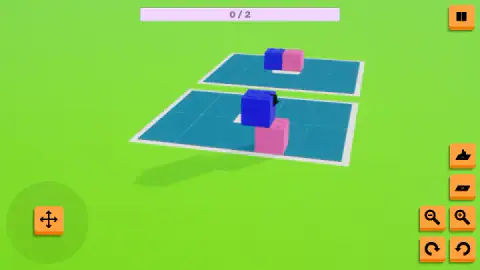
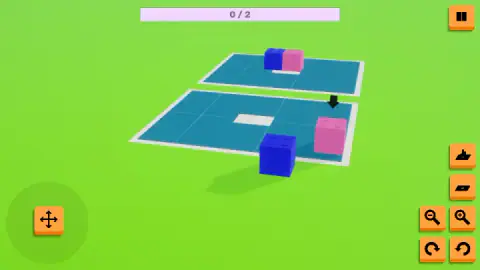
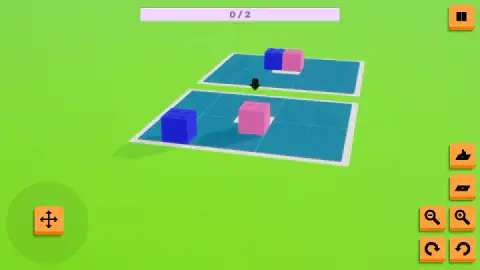
Taken by opening the game ourselves and letting it run — not supplied by the publisher, and not the same picture every other site shows.
How to play Blocky Set - 3d brick constructions
- Look at the model first. On the first level it is one blue brick on the left and one pink brick on the right, touching, standing on a white patch.
- Find the matching patch. The big board in front has an empty white patch of the same shape. That is where your copy goes.
- Drag each brick onto its square. Press on a brick, carry it over the big board and let go. A black arrow hovers over the brick you last moved.
- Watch the counter. The bar at the top counts the bricks that sit exactly where the model says. The level ends when it reaches its total, 2 / 2 on the first level.
- Use pause if you get stuck. The button in the top right opens a panel with Continue, Restart and To Main Menu, plus separate music and sound sliders.
Tips from our run:
- Do not drop bricks on the model. The small board at the back accepts bricks too. Late in our session we left our pink brick on top of the model's pink, and the blue one ended up half inside the model's bricks. Neither counts.
- Lift a stacked brick straight off. A brick dropped on another sits on top of it. If you see a tower of two where the model has a row, pick up the top one before anything else.
- Near is not enough. We had the blue brick resting on the white patch and the counter still said 0 / 2. The square has to be exact, and from the default camera angle it is hard to tell one square from the next.
- Zoom before you drop. The magnifying glass buttons on the right bring the board closer. We did not use them, and in hindsight that was the mistake: at the default distance, a brick that looks centred on the patch can be one square off.
- Watch the view. During some of our drags the whole scene slid sideways and then settled back. If the boards suddenly look off-centre, wait a moment before the next drop.
Controls
| Mouse drag (or touch drag) | Picks up a brick and carries it across the boards; let go to drop it |
|---|---|
| A, W, S, D | Move the camera, according to the game's instructions |
| R | Rotates a brick, according to the game's instructions |
| Zoom buttons (magnifying glasses) | Zoom the view out and in |
| Rotate buttons (curved arrows) | Turn the view, in the bottom right corner |
| Pause button (top right) | Opens a panel with music and sound sliders, Continue, Restart and To Main Menu |
Features
- Every level shows you the answer: a small board at the back holds the finished model, and a big board in front holds an empty white patch where your copy goes
- The first level has two bricks, one blue and one pink, set side by side
- The bricks start on the grass in front of the big board, not on it
- A bar at the top counts the bricks placed correctly, starting at 0 / 2 on the first level
- A brick dropped on another brick stacks on top of it, so height is part of the puzzle
- A black arrow hovers over the brick you last moved, which helps you keep track of it from a distance
- Orange buttons on the right zoom and turn the view; the pause panel has separate music and sound sliders and a Restart button
Game details
- Developer
- Rebenke Games
- Release date
- February 2026
- Last updated
- October 1, 2026
- Added here
- December 2025
- Technology
- HTML5 (3D)
- Platforms
- Browser (desktop, mouse and keyboard), Browser (mobile & tablet, touch, landscape)
- Saved progress
- Saving, when available, is managed by this game. Mava cannot confirm your level.
FAQ
How do you play Blocky Set - 3d brick constructions?
A small board at the back of the scene shows a finished model made of toy bricks. Below it is a larger board with an empty white patch. You drag the loose bricks onto that patch so your copy matches the model, colour for colour and position for position. A counter at the top tracks how many bricks are in the right place.
How do you complete a level in Blocky Set?
The counter at the top has to reach its total, for example 2 / 2 on the first level, which means every brick is in exactly the right square. In our run we got both bricks onto the big board and near the white patch, but the counter never moved from 0 / 2, so we never saw the level-complete screen ourselves.
What does the white patch on the board mean in Blocky Set?
It marks the footprint of the model. On the small board the model's bricks stand on a white patch of the same shape, so the patch on the big board shows you where your copy must stand. On the first level it is two bricks wide.
Can you stack bricks in Blocky Set - 3d brick constructions?
Yes. When we dropped the blue brick onto the pink one, it sat on top of it instead of pushing it aside. That matters because a brick left on top of the wrong one will not count until you lift it off and put it down on the board.
Why is the counter stuck at 0 in Blocky Set?
The counter only counts bricks in the exact square the model asks for. Ours stayed at 0 / 2 even with the blue brick resting on the white patch, which suggests the drop has to land precisely, not roughly. Zooming in and checking which square the brick lands on is the first thing we would try next time.
Who made Blocky Set and when did it come out?
Blocky Set - 3d brick constructions is by Rebenke Games. It came out in February 2026 and was last updated in October 2026. When we checked, and it is in English only.
Can you play Blocky Set on a phone?
It is listed for Android and iOS as well as PC, in landscape, the same wide layout we saw on a computer. We played it with a mouse, so we have not tried dragging bricks with a finger.