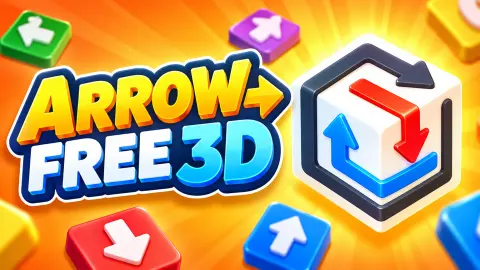





About Arrow Free 3D
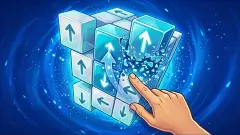
Most arrow puzzles are flat. You get a board, a tangle of arrows and the whole problem in one look: tap an arrow, it leaves, and your job is to find an order in which nothing gets in anything else's way. Arrow Free 3D wraps the tangle round a white cube. Part of every level is always on a side you cannot see.
The arrows are not darts painted on a face either. They lie in grooves cut into the block, like a maze carved into a bar of soap, and a groove can wind back and forth across one face, fold over an edge and carry on down the next. The head that tells you where an arrow is going can be on a different side from where its tail begins.
The game is by Drivix Games, the studio behind Goods Sort 3D, and it was published in September.
We have now played it twice. The first time we cleared two of level 1's four arrows in four minutes. The second time, ten minutes long, we cleared none at all and lost the level, and that is the sitting that taught us how the game works, because it is the one where the game told us we were wrong.
The arrows are carved, not drawn
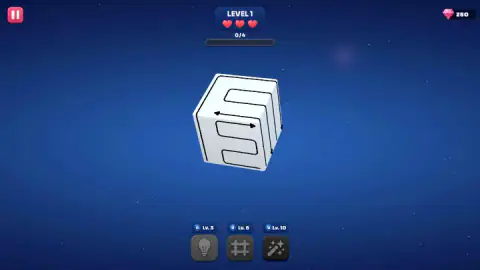
Look at the cube on level 1 from the angle it starts at, and the four grooves read like plumbing. One runs in from the left edge of the front face, doubles back on itself twice and leaves at the top. Another crosses the upper face and drops over the right-hand edge. The walls of each channel catch the light, so you can see which groove is which even where two of them run side by side.
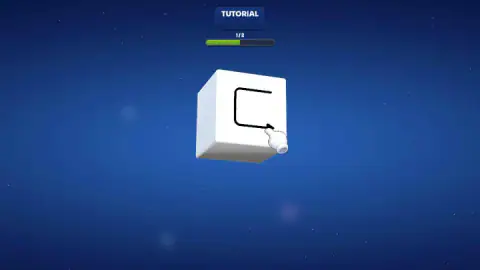
That is the whole reason the game works as a puzzle rather than a picture. The tutorial draws its arrow as a thin hooked line on a single face, and tapping the head wipes it away. The real levels take the same shape off the flat, and a line you can only half see is a line whose head you are guessing at.
There is a small mercy on level 1. All four heads happen to be visible from the opening angle: one pointing left, one pointing right and two pointing down the right-hand side. Seeing a head is not the same as knowing which groove it belongs to, though, and that is what the turning is for.
A red line and a dark heart
Here is the pair of moments the second sitting gave us. Before: three full hearts, every groove on the cube black, the counter on zero. A few taps later: the third heart dark, one groove glowing red, and the counter still on zero.
So a tap the game will not accept is not a free try. It marks the arrow you picked in red, which is the only colour the cube ever shows, and it takes a heart. The game's own instructions warn about exactly this, in the dry way instructions do, by telling you to tap in the right order so arrows do not get stuck. What they do not tell you is the price.
Three mistakes end it. Ours asked whether we wanted to carry on, and then put up a Level Failed card with Home and Restart on it. That was on level 1, with four arrows and no clock. It is not a hard game, but it is not a game you can poke at either.
Why it is easier to turn the cube than to picture it
In 1971 the psychologists Roger Shepard and Jacqueline Metzler published a study in the journal Science that is still taught today. They showed people pairs of drawings of 3D block shapes and asked whether the two were the same object turned round. The further one shape was turned from the other, the longer people took to answer, in a near straight line. The mind seems to turn the object step by step, the way a hand would.
The name for this is mental rotation, and it is what Arrow Free 3D asks of you every time a groove bends out of sight. You can try to imagine where the line goes after the edge. Or you can drag and look.
The game wants you to look, and it has arranged its prices to make sure of it. Turning the cube costs nothing at all: no clock, no move counter, no penalty we could find. Tapping is the only thing that can cost you. So the lazy habit is the right one. Every time you are about to tap an arrow whose head you have not actually seen, turn the cube first.
Gems, helpers and what we still cannot tell you
The rest of the screen is quiet. A pink gem with the number 250 sits in the top right corner, and a pause button in the top left.
Under the cube are three grey buttons wearing padlocks: a light bulb marked Lv. 3, a grid marked Lv. 6 and a magic wand marked Lv. 10. They stay shut until those levels.
Our gem total never moved, in either sitting, so we can describe it and not explain it. A light bulb usually means a hint, but we never unlocked one.
What we cannot tell you yet: how many levels there are, how fast they grow past four arrows, what the gems buy and what each helper does. The description that comes with the game does not give a level count either. Our first sitting ended on a card reading Level Complete, but we have no picture of the last two arrows leaving, so we will not pretend to know which taps finished it.
A calm puzzle, with teeth
It suits players who like to sit and think. Nothing moves unless you move it, and a child who can follow a line with a finger will understand the rule in a minute. Anyone who enjoys picturing shapes in their head gets more out of it, because the game is built on exactly that.
It is not a reflex game and not a matching game. There is nothing to swap, nothing falls, and there is no score to chase beyond the level number. What it does have is a cost for guessing, which is more than most puzzles this gentle-looking bother with.
Drivix Games and more arrows on a cube
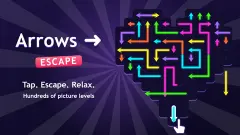
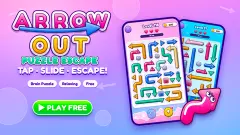
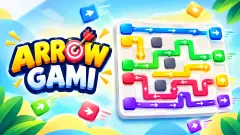
From the same studio, Goods Sort 3D is a shelf-sorting game in 3D, Maths Puzzle swaps arrows for numbers and Fruit Chopper is a one-button timing game with a knife and a blender. If the cube is what you came for, Arrow Cube 3D is another set of arrows on six faces, and ArrowGami: Arrow Puzzle is the flat version of the idea, with winding arrows on a single board. The rest are in our puzzle games.
Screenshots
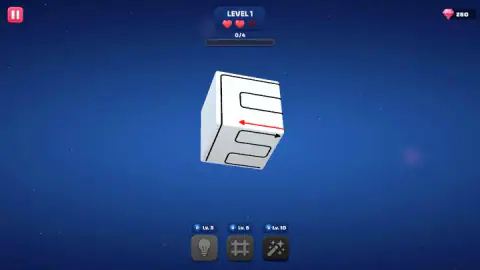
Taken by opening the game ourselves and letting it run — not supplied by the publisher, and not the same picture every other site shows.
How to play Arrow Free 3D
- Look before you touch. The grooves on the cube each end in an arrowhead, and the bar under the level name counts the ones you have taken off, out of four on level 1.
- Drag across the cube to turn it and see the faces at the back.
- Work out the order. An arrow has to be able to leave without getting stuck, so start with the ones that have nothing standing in front of their heads.
- Tap an arrow to take it off. The counter moves on by one.
- Keep an eye on the three hearts beside the level name. They are the budget for your mistakes.
Tips from our run
- The tutorial's first step wants a drag, not a tap. We spent the first minute and a half clicking the middle of the cube with the counter stuck on 0/2. It moved the moment we dragged across a face instead. The game teaches turning before it teaches tapping.
- Aim for the head. In the second tutorial step the pointing hand sits on the arrowhead, not on the tail, and that is where the tap registers.
- A red line means stop. It is the only colour on the whole cube, and it costs you.
- Turn in short drags. One long swipe leaves you staring at a face you cannot place, with no idea which way the arrows went.
- A blank face is not a finished face. It is simply a face that had no arrows on it. Keep turning until you have seen all six.
- Use the mouse or your finger, not the keyboard. We tried the arrow keys and got no response we could confirm; dragging is what turned the cube for us.
Controls
| Click or tap an arrow | Takes that arrow off the cube and moves the counter under the level name on by one |
|---|---|
| Drag across the cube | Turns the cube so you can see the faces at the back |
| Pink button (top left) | Pause; we did not open it |
| Light bulb, grid and wand (bottom) | Three helpers, locked until levels 3, 6 and 10 |
Features
- The arrows sit in grooves cut into the cube, and a groove can fold over an edge and carry on across the next face
- Level 1 has four arrows, counted on a progress bar under the level name
- Three red hearts sit beside the level name from the first level
- A tap the game refuses turns that line red and takes a heart; lose all three and the level is over
- You start with 250 gems, shown in the top right corner
- Three helpers, a light bulb, a grid and a magic wand, open at levels 3, 6 and 10
- A two-step tutorial comes before the first level, and no clock appears on screen
- Made by Drivix Games
Game details
- Developer
- Drivix Games
- Release date
- September 2026
- Added here
- September 2026
- Technology
- HTML5 (3D)
- Platforms
- Browser (desktop, mouse), Browser (mobile & tablet, touch)
- Saved progress
- Saving, when available, is managed by this game. Mava cannot confirm your level.
FAQ
How do you play Arrow Free 3D?
Arrow Free 3D puts a set of arrows on a white cube. You drag across the cube to turn it and see every face, then tap the arrows one by one to take them off. The order matters, because an arrow has to be able to leave without getting stuck, and the level ends when the cube is clean.
Why do the arrows in Arrow Free 3D look so long?
Each arrow lies in a groove cut into the cube, and the groove can run across one face, fold over an edge and continue on the next, with the head at the far end. On level 1 one of them winds back and forth across a whole face before it even reaches an edge. Follow a line to its head before you tap it.
What do the hearts mean in Arrow Free 3D?
You get three, next to the level name, from level 1 onwards. A tap the game will not accept costs one of them: in our second sitting a heart went dark without the counter moving. When the third one goes, a Level Failed card appears with Home and Restart on it.
What does a red arrow mean in Arrow Free 3D?
Red is the game saying no. In our pictures every line on the cube is black until one tap turns a single line red, and in the same moment a heart has gone dark and the counter has not moved. Treat a red line as the one you should have left for later.
What do the light bulb, grid and wand buttons do in Arrow Free 3D?
They are three helpers shown under the cube, and all three are locked at the start. The light bulb opens at level 3, the grid at level 6 and the magic wand at level 10. We did not reach them, so we cannot tell you what each one does.
Does Arrow Free 3D have a timer?
Not in what we played. The tutorial and level 1 showed no clock and no move counter, only the level name, the hearts, a progress bar and the gem total. You can turn the cube and look for as long as you like; it is the tapping that costs you, not the looking.
Who made Arrow Free 3D?
Arrow Free 3D is by Drivix Games, who also made Goods Sort 3D, Maths Puzzle and Fruit Chopper. It was published in September 2026. It is listed in English for PC, Android and iOS.
Can you play Arrow Free 3D on a phone?
It is listed for Android and iOS as well as PC, and as a game for a phone held upright. We played it on a computer with a mouse, in a wide browser window, where it filled the screen without trouble. We did not test it on a touch screen.