







About Fruit Chopper
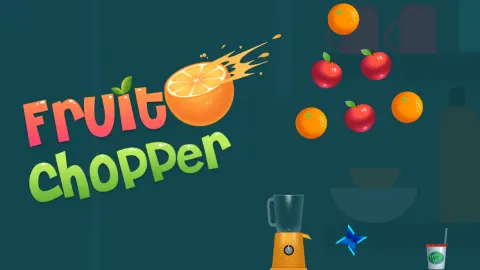
Most fruit-slicing games ask you to drag a blade across the screen. Fruit Chopper takes the dragging away. The knife lies on a kitchen counter, a loose ring of fruit turns in the air above it, and the only thing you control is the moment the knife leaves the counter.
It flies straight up. Whatever is in its path gets cut and drops towards the blender; whatever is off to the side stays whole and keeps circling. Then the knife is back on the counter and you go again. If it goes up and touches nothing, a pink MISS label appears beside the fruit that got away and the run is over.
The game is credited to Drivix Games, who put it up there in September 2025.
We should be plain about how far we have got. Two sittings, the longer of them ten minutes, every run on level 1, and we have never finished it. Our best throw-by-throw run reached 33 points; in the longer session we topped out at 17. So this page covers the core of the game closely and stops short of everything that comes after a completed level.
Four fruits in one throw are worth ten
The plus figures explain the game better than any tutorial. On the throw we remember best they stacked up the screen in order: a strawberry and a pear at the bottom, a watermelon above them, then a pineapple at the top, with +1, +2, +3 and +4 rising alongside. The score read 10 a moment later. We have now seen that same arithmetic twice, months apart.
Cut those four pieces one at a time and they would have paid four points between them. So patience pays more than twice over, and the natural plan is to hold the knife until the ring lines several pieces up above it.
The catch is that waiting is safe only while the ring is crowded. On that same throw a whole orange hung well to the right of the knife's line and came through the explosion untouched. That is the price of a big throw: fewer pieces left, more empty air between them, and one empty throw ends everything. The game is a trade between a bigger stack now and an easier clean-up later.
The fruit itself is drawn plainly and there is a fair spread of it: watermelon, pineapple, orange, lemon, pear, apple, strawberry, mango, kiwi and plum all turned up in our runs. None of them behaves differently. A watermelon is worth what a strawberry is worth; only its position matters.
What a miss actually costs
Missing is the only way we have ever lost. There is no clock, no lives, nothing falling that has to be dodged, and nothing that punishes you for leaving fruit uncut as long as the knife keeps connecting. Throw into a gap, though, and the label appears over the fruit you failed to reach and the kitchen stops.
What comes next was the surprise of our longer session. Before the game gives up on you it offers one more go: a panel reading Continue? with a handful of seconds ticking down, a green button with a small video icon on it, and a No thanks link underneath. We met that offer five times in ten minutes, which is to say after nearly every run. We took it twice; play resumed, and the message that came back said the advert had been skipped. Whether the points from the failed run come back with you, we could not tell.
Decline it, or let the countdown run out, and you get the end panel: Level failed, your score in large figures, the best score of the visit under it, then Refresh and Home. Refresh puts you straight back on the same level at zero, which is where both our sessions lived. The best score is a visit record, not a trophy you keep: ours read 17 from our first failed run to our last.
The blender keeps score too
Every cut piece falls into the jar and leaves a band of colour there, in the order you cut it: a yellow stripe for the lemon, green for the pear, red for the watermelon. It is a quick way to read how far through a ring you are without counting fruit. When we once cleared a ring, the jar was full to the brim and a cup with a straw stood beside it on the counter, and from then on the cup stayed at the right-hand end.
The bar at the top fills far more slowly than the jar. At 17 points it had moved about a quarter of the way along, still on level 1, which puts the end of the bar a long way past anything we have managed. We never saw what reaching it brings. The publisher's description mentions a cocktail for each completed level and a prize wheel after four of them; none of that appeared in the part we played.
Two counters sit in the top-right corner, one with a gold coin and one with a blue token. Through a whole session of a dozen runs neither moved off zero. In our earlier sitting the coin counter did climb, a few at a time, and it held its total through a failed run, so something in there pays coins. We still have not worked out what, nor found anything to spend them on.
It is built for a tall screen
The game is laid out for a phone held upright, and it shows on a desktop monitor. Everything that matters, the ring, the blender, the knife and the cup, sits in a narrow column down the middle of the window; to the right there is a painted kitchen with shelves, a plate and a pot plant, and nothing happens in it at all. Nothing is lost by that, but there is no reason to play it full screen. We have played it with a mouse on a desktop browser and not yet on a phone.
Who it suits
It suits anyone who likes one-button timing games where a single mistake sends you back to zero. Runs are short, ours rarely lasted a minute, and restarting takes one press of Refresh. It also suits a player who enjoys squeezing a system: the stacking rule means there is a measurably better way to play than tapping on sight.
It suits less a player who wants the free-hand slashing of the usual fruit-slicing games, or a cooking game with recipes and customers. The blender here is a scoreboard, not a kitchen.
More knife and fruit games
The closest relatives are the other knife-throwing games: Knife Smash has you time throws at spinning targets, and Knife Tower turns the same idea into a race up a tower. If it was the blender that caught your eye, Juice Tycoon is about running a juice business and Fruit Lane Cafe is a card-sorting puzzle set in a fruit shop. The rest are under cooking games.
Screenshots
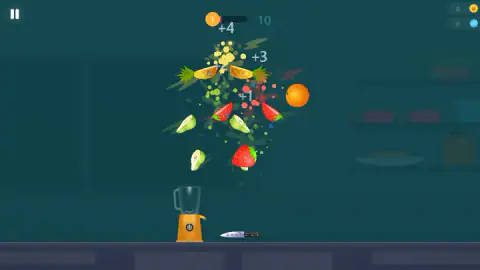

Taken by opening the game ourselves and letting it run — not supplied by the publisher, and not the same picture every other site shows.
How to play Fruit Chopper
- Find the knife. It rests on the counter just to the right of the blender, under the middle of the ring. It always starts from there, and the prompt on the title screen is three words: tap to shoot.
- Watch the middle of the ring, not the fruit you like. The knife travels in one vertical line. Only fruit crossing that line when you throw will be cut.
- Tap to throw. Each piece you cut shows a small plus figure and adds to the score next to the level bar at the top.
- Clear the ring. When the last piece is cut, the blender, by now striped with coloured layers, is poured into a cup and a new ring arrives.
- Do not throw into a gap. One empty throw and the run is over.
What we picked up while playing:
- Stacking is the whole scoring system. The first fruit in a throw is worth one point, the second two, the third three. One of our throws went through four pieces and paid 10 points on its own.
- The last fruit is the dangerous one. With a crowded ring there is nearly always something over the knife. With one or two pieces left the line is empty most of the time, and that is where every run of ours has died.
- Fruit that drifts wide is not lost. The ring keeps turning, so a watermelon sitting out on one side will come back over the knife sooner or later. Waiting for it costs nothing but nerve.
- Read the jar, not the air. The blender gains a band of colour for every piece you cut, so one glance tells you how far into the ring you are without counting what is left above you.
Controls
| Tap or click | Throws the knife straight up from the counter into the ring of fruit |
|---|---|
| Pause button (top left) | Pauses the game |
| Continue (after a miss) | Offers one more go, with a countdown and a video icon on the button; No thanks declines it |
| Refresh / Home (after a failed run) | Refresh starts the level again from zero; Home leaves the level |
Features
- One input: the knife lies on the counter and is thrown straight up; you choose when, not where
- Fruit arrives a handful of pieces at a time and turns in a loose ring; we counted rings of six, seven and eight
- Each extra fruit cut in the same throw is worth one point more: four in one throw paid 1, 2, 3 and 4
- A throw that leaves the fruit untouched shows a MISS label and ends the run
- A countdown panel then offers one more go in exchange for a video, with a No thanks underneath
- Cut fruit drops into the blender and fills the jar with a band of colour per piece
- Made by Drivix Games
Game details
- Developer
- Drivix Games
- Release date
- September 2025
- Last updated
- August 10, 2026
- Added here
- August 2025
- Technology
- HTML5
- Platforms
- Browser (desktop, mouse), Browser (mobile & tablet, touch)
- Saved progress
- Saving, when available, is managed by this game. Mava cannot confirm your level.
FAQ
How do you play Fruit Chopper?
A ring of fruit turns above a blender and a knife lies on the counter under it. You tap to throw the knife straight up and it cuts whatever is in its path at that moment. Cut fruit adds to your score and fills the level bar; a throw that cuts nothing ends the run.
How does scoring work in Fruit Chopper?
Each fruit cut in the same throw is worth one point more than the one before it. We have twice watched a single throw go through four pieces and pay 1, 2, 3 and 4, which is 10 points. Four separate throws at one fruit each would have paid 4.
What happens when you miss in Fruit Chopper?
A pink MISS label appears beside the fruit that got away and the run is over. Before the Level Failed panel arrives, the game offers one more go: a Continue button with a few seconds counting down and a video icon on it, and a No thanks link below. Decline it and you get the panel, with your score, the best score of the visit, Refresh and Home.
Is Fruit Chopper a swipe game like other fruit-slicing games?
No. You do not draw a cut across the screen. The knife always starts from the same spot on the counter and travels straight up, so the only decision is the moment you let it go. Fruit sitting off to the side comes through a throw untouched.
Does Fruit Chopper show adverts?
The one advert slot we met is optional. It sits between a miss and the Level Failed panel, as a Continue button carrying a video icon with a countdown beside it. There is a No thanks link under it, and on the two occasions we accepted, a message told us the advert had been skipped.
What is a good score in Fruit Chopper?
Hard to say, because the game never told us what level 1 asks for. Our best run in two sittings reached 33 points, and in the longer of the two we topped out at 17, which moved the level bar about a quarter of the way along.
How many levels does Fruit Chopper have?
We cannot say from play. We have never completed level 1 in two sittings, the longer one ten minutes, so we never saw level 2. The publisher's description talks about reaching level 100, which we did not check.
Who made Fruit Chopper?
It is credited to Drivix Games. It was published on 22 September 2025. It is listed for PC, Android and iOS, in portrait orientation.