









About Super Fruit Runner - Hyper Casual
Most runner games pay you for staying alive. Super Fruit Runner pays you for failing as well. In our session we lost every run we started, and the gem counter in the corner still went up after each one, from 0 to 8 in even steps. That one detail changes how the game feels. A crash is not a wasted minute: it is a small deposit toward the upgrades that make the next attempt easier.
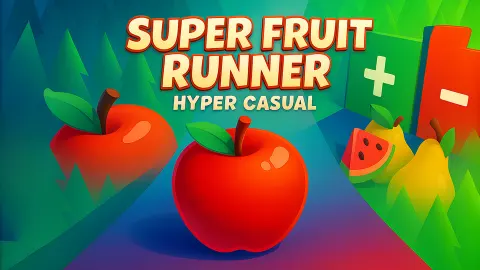
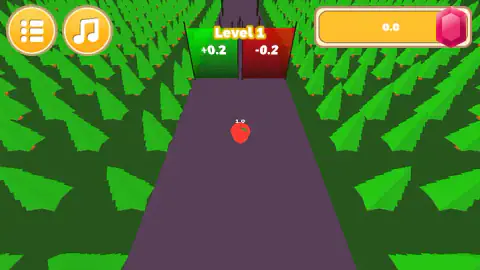
The run itself is simple. A red apple rolls forward on its own down a dark road through a pine forest. Almost as soon as it starts, the road splits between two gates standing side by side: a green one marked +0.2 and a red one marked -0.2. Your job is to steer, pick the right side, avoid what stands in the road and reach the finish.
We played Super Fruit Runner on a desktop computer for about four minutes, all of it on Level 1. We should be clear about the result: we never reached the finish line, and four runs ended on the You Died screen. Everything below comes from those runs and our screenshots of them. What we did not reach is listed near the end.
The game is credited to Nexand Studios, which also made Pop Sweet Fruits and Mega Sweet Fruits - Popper. It was listed in August 2025.
The gate and the number above your apple
A small number floats above the apple: it read 1.0 at the start of every run we played. The gates are marked in the same units, +0.2 and -0.2, so the number is what they change. The game's listing describes it as your fruit count and says red platforms reduce it.
Read that way, the choice at each gate is a small sum. Green adds a fifth of a fruit, red takes a fifth away. One gate makes little difference. A road of them, taken well or badly, decides how much you carry to the end.
We should be honest about the limit of what we saw. In every screenshot we took, the apple still showed 1.0, because it had not yet reached a gate. We never watched the number change.
What the gems are, and why they are called Yakut
The counter at the top right of the screen has a pink-red gem for an icon. The game's listing calls the currency Yakut, says you earn it by hitting knives, and says you spend it on four upgrades: more fruit at the start, more Yakut per run, a bigger bonus from green and a smaller loss from red.
The name is not made up. Yakut is the Turkish word for ruby. It came into Turkish through Arabic, and it matches the gem on the counter, which is red rather than green or blue. Turkish is also one of the seven languages the listing says the game offers.
Rubies get their colour from a trace of a metal inside the stone, and the English word comes from the Latin for red. In the game, the colour has a second job. Green gates add, red gates subtract, and the reward you collect is red as well: the one red thing on screen that is good for you.
That also fits what we saw. The listing says knives earn Yakut, and every one of our runs ended in a crash. Each crash came with 2 more gems. We take the thin dark shapes standing in the road beyond the gates to be those knives, though they were too small in our screenshots to make out.
The forest road and the finish
Each run takes place on a straight road of dark purple stone, lined on both sides by rows of low-poly pine trees. The camera sits behind the apple and looks down the road, so you see the gates and anything after them coming.
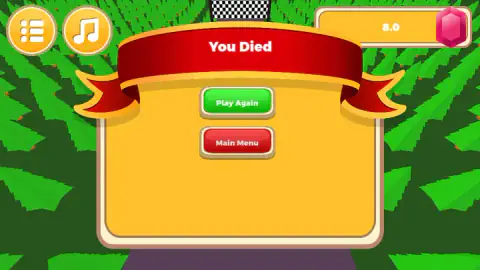
At the far end is a checkered strip, the finish line. We saw it from the You Died screen, peeking out over the red ribbon, but never got close to it.
Two round buttons sit in the top-left corner at all times: a list button for the menu and a music note to switch the music on or off.
After a crash
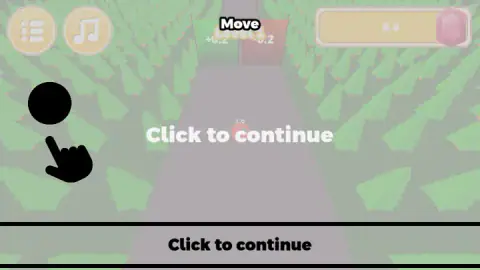
When the run ends, a red ribbon reading You Died drops over a yellow panel with two buttons: a green Play Again and a red Main Menu. Play Again does what it says, putting you back on the same road. Before the apple moves, the screen dims once more with a Click to continue prompt, this time without the tutorial hand.
The gem counter carries over. It does not reset when you restart, which is how ours climbed through four failed runs.
What we did not see
We did not finish Level 1, so we do not know what a completed level pays, what the next road looks like or how the difficulty rises. The listing speaks of 15 levels, 12 achievements and an upgrade shop. We did not open the shop or see an achievement. We did not see a gate change the apple's number, and we could not identify the obstacles that ended our runs. We only played on a computer; the game is also listed for phones and tablets.
Who it is for
Super Fruit Runner suits younger players and anyone who wants a short game with one decision at a time: left or right, green or red. There is no text to read beyond a few words, and the colour coding is easy to follow at any age.
If you want a runner that tests your reflexes from the first second, this is a gentler kind of game. The pressure comes from the choices, not the speed, and a crash costs you only the run.
More from Nexand Studios and similar runners
Pop Sweet Fruits and Mega Sweet Fruits - Popper come from the same studio and keep the fruit theme in a different kind of game. For more short score-chasing games, browse the arcade games.
Screenshots
Taken by opening the game ourselves and letting it run — not supplied by the publisher, and not the same picture every other site shows.
How to play Super Fruit Runner - Hyper Casual
- Start a level. The first one is Level 1, with a sign of the same name hanging over the first pair of gates.
- Click to clear the Click to continue screen. Your apple starts rolling.
- Move left or right to choose a lane. The tutorial shows this with a hand that slides across the screen under the word Move.
- Go through the green gate rather than the red one, and keep clear of the dark shapes further down the road.
- Reach the checkered finish line at the end of the road. If you crash, press Play Again to restart the level.
What four lost runs taught us:
- The tutorial can be stubborn. The first Move screen stayed up for about a minute and a half while we clicked in the middle of it. A later click finally started the run. If yours does not budge at first, keep clicking.
- The text appears twice. Click to continue shows once over the road and again in a black bar along the bottom. Both mean the same thing.
- The gates come almost at once. They stand just ahead of the apple when the run begins. Look at which side is green before you click, not after.
- Losing still pays. Our gem counter grew by 2 after every crash. Several short failed runs early on are not wasted time.
Controls
| Click | Clears the Click to continue screen and starts the run |
|---|---|
| Move left and right | The tutorial hand slides across the screen to show it; this is how you pick a gate and avoid obstacles |
| Play Again (after a crash) | Restarts the same level from the beginning |
| Main Menu (after a crash) | Leaves the run |
| Music button, top left | Turns the music on or off |
Features
- A red apple that runs on its own down a forest road, with you choosing the lane
- A green +0.2 gate and a red -0.2 gate side by side right after the start
- A pink-red gem counter that kept growing in our session even though we lost every run
- A You Died screen with Play Again, which puts you straight back on the same road
- A finish line marked with a checkered strip at the end of the road
- Fifteen levels, twelve achievements and four upgrades, according to the game's listing
Game details
- Developer
- Nexand Studios
- Release date
- August 2025
- Last updated
- August 10, 2026
- Added here
- July 2025
- Technology
- HTML5 (3D)
- Platforms
- Browser (desktop)
- Classification
- Arcade
- Saved progress
- Saving, when available, is managed by this game. Mava cannot confirm your level.
FAQ
How do you play Super Fruit Runner - Hyper Casual?
Your fruit, a red apple in Level 1, runs forward on its own down a forest road. You move it left and right to choose which gate to pass and to avoid what stands in the road. The tutorial shows this with a hand sliding across the screen under the word Move.
What do the green and red gates do in Super Fruit Runner?
The green gate is marked +0.2 and the red one -0.2, and they sit side by side just after the start. The game's listing says green platforms give extra rewards and red ones reduce your fruit count. The apple carries its own number, 1.0 at the start of each run.
What is Yakut in Super Fruit Runner?
The game's listing calls its currency Yakut and says you earn it by hitting knives and spend it on upgrades. Yakut is the Turkish word for ruby, and the counter at the top right uses a pink-red gem as its icon. In our session it rose by 2 after each run we lost.
How many levels does Super Fruit Runner have?
The game's listing says 15 levels and 12 achievements. We played only Level 1 and did not reach its finish line, so we cannot confirm the rest.
What happens when you crash in Super Fruit Runner?
A red ribbon reading You Died appears with two buttons, Play Again and Main Menu. Play Again restarts the same level, after a dimmed Click to continue screen. The gem counter keeps what you earned.
Why does the tutorial not go away in Super Fruit Runner?
In our session the Move tutorial, with its Click to continue text, stayed on screen for about a minute and a half while we clicked. A later click finally started the run. If it happens to you, keep clicking in the middle of the road.
Who made Super Fruit Runner - Hyper Casual?
The game is credited to Nexand Studios, the studio behind Pop Sweet Fruits and Mega Sweet Fruits - Popper. It was listed in August 2025 and updated in August 2026.