

About Keyboard Escape: +1 Speed | Sweets
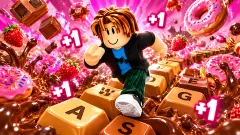
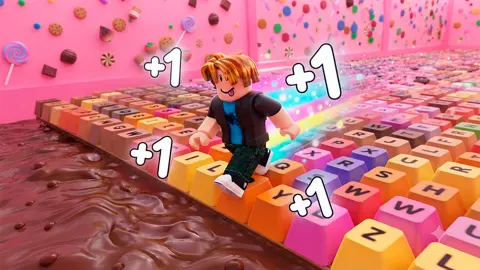
Most games with speed in the title hand you the speed. This one makes you walk for it. Keyboard Escape: +1 Speed | Sweets puts a blocky runner at the mouth of a long golden corridor, paves the floor with giant keyboard keys, and pays you one point of Speed for every step.
That is the whole deal, and the name says it. Run, and a small shoe with a +1 pops up over the runner's head. The points pile into a bar at the bottom of the screen. Fill the bar and you go up a level, and the level is what lets you run faster.
The game is an obby, a common short name for a 3D obstacle course played with a blocky character. It is by NewPlace. It was published in August 2026.
We should say how much of it we saw. We played for about four minutes, all of it in the first zone, and roughly half of that time went on pop-ups and the shop page instead of running. What follows is the opening of the game in detail, with the unseen parts marked.
Two numbers called speed, and which one moves you
This is the part that is not obvious at first. The number over the bar read 74 Speed when we first looked, and 170 by the end. It never stops climbing while you run.
The blue panel on the right tells a different story. It holds a small box, an OK button, and two lines of small print: a maximum speed and a current speed. On level 1 both read 10. On level 2 both read 12, and they stayed there while the total above the bar went up by more than thirty points.
So the steps do not make you faster one by one. They fill the level, and the level raises the limit. We saw only one level-up, so we cannot say whether every level adds the same amount.
The bar itself also grows. Level 1 asks for 100. Level 2 asks for 114, and the count starts again from zero inside each level. When we stopped, level 2 was a little over half full.
Where the gems go: the offers under the bar and the shop
Three buttons sit under the level bar: +150K speed, +1M speed and +10M speed. Tap one and a blue card appears with a price in gems and two buttons, Buy and No. The smallest showed 49 gems. The largest showed 599.
Put that next to what running pays. A step is worth one point, and the smallest offer is worth 150,000 of them. The offers are a different scale from the footwork, which is the point of them.
Our gem counter, top right, read 0 G from the first second to the last. Pressing Buy with an empty purse does not buy anything. It opens the shop with a notice that says Not enough Gems, how many you need, and that you have none.
The shop has three tabs: Treadmill, Wins and Gems. The page we landed on lists gem packs with prices in dollars, from 25 gems at $1.00 to 10K gems at $25.00. Beside them are packs of wins sold for gems, such as +100 wins for 99. We did not tap a pack, so we cannot say what happens next, and we bought nothing.
One sum is worth doing before a child asks. The cheapest boost costs 49 gems and the cheapest pack holds 25.
There is also a pink X2 speed button marked 5 G on the right, and four more on the left: Rebirth, Teleport, Inventory and Sounds. We opened none of them. A trophy counter above them counts wins. Ours stayed at zero.
The floor is a real keyboard, and its order is 150 years old
Look down while you run. The keys are pink and lilac, and each carries a letter or a digit. The pairs we could read side by side were W and E, I and O, H and J, K and L, Z and X, C and V. Every one of those is a pair of neighbours on the keyboard you are playing with. One was not: P turned up beside A.
That order has a name, QWERTY, after the first six letters of the top row. It comes from Christopher Latham Sholes, a newspaper editor and printer from Wisconsin, who filed a patent for an early writing machine in October 1867 with Carlos Glidden and Samuel W. Soule. In 1873 the manufacturing rights were sold to E. Remington and Sons. Their Remington No. 2 of 1878 added the Shift key, and capital and small letters on one machine.
Why the letters sit where they do is still argued over. The usual explanation is mechanical: common letter pairs were kept apart inside the machine so the metal typebars would not clash. A second view says the layout grew out of feedback from Morse telegraph operators. Its supporters point at E and R, a very common pair in English, sitting side by side.
The game gives you that pair underfoot. In one stretch W and E lay under the runner, on a floor laid out long before anyone thought of running across it.
What we played, and what we did not reach
We ran in Zone 1 only and did not get to the end of the corridor. We saw no obstacle, no gap to jump and no fall, so we cannot describe what a mistake costs. The game's own description mentions other players and a leaderboard. We saw neither.
About the sweets in the title: in the stretch we ran, they are a matter of colour. The keys are candy pink and lilac, and the walls are a studded gold. We did not see anything more edible than that.
We earned no win, opened no menu on the left, and did not test jumping, the camera or a touch screen. Two ad breaks appeared during the session. The only sound we noted was one at the opening.
Who it is for
Younger players who like a number that only goes up, and anyone who finds a long straight run restful. The early game asks for one finger and no reading. It is not for someone who wants jumps and traps from the first second: in our four minutes there were none. Parents should know that prices in dollars are one tap away from the run.
More +1 speed runs and blocky escapes
+1 Speed: Escape Prison uses the same step-by-step idea in a cell block, with cash upgrades instead of gems. +1 Speed per Step | Obby Mode is another take on it with rebirths, and +1 Speed Keyboard Escape is a different game on the same keyboard theme. For a blocky run with something chasing you, Escape Waves for Lucky Blocks sends you out of a safe zone and back before the next wave. The rest are under arcade games.
Screenshots
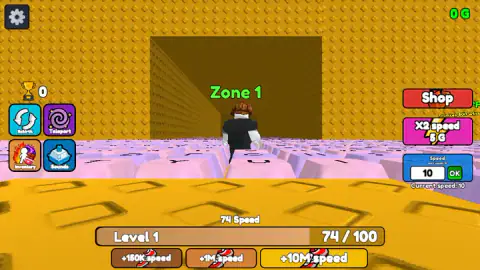
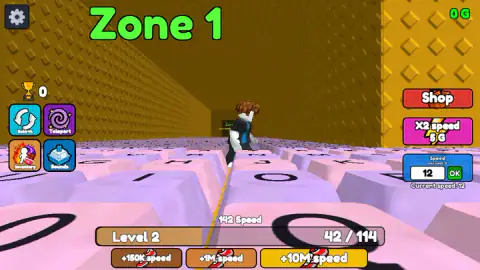
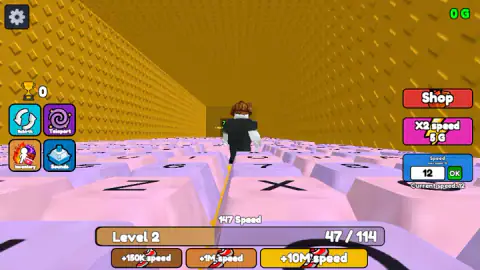
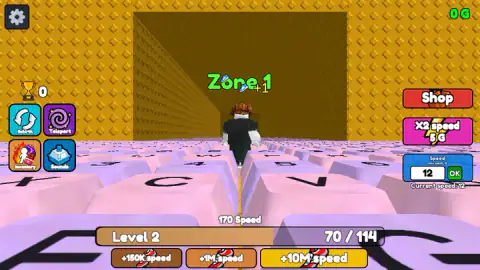
Taken by opening the game ourselves and letting it run — not supplied by the publisher, and not the same picture every other site shows.
How to play Keyboard Escape: +1 Speed | Sweets
- Once the game has loaded you stand at the entrance of Zone 1. Hold W and the runner sets off down the corridor.
- Watch the bar at the bottom. It shows your level and how much Speed that level needs. Level 1 fills at 100.
- Keep running. Each step adds one, and the number over the bar is your total since the beginning.
- When the bar fills, the level goes up and so does your maximum running speed, shown in the blue Speed panel on the right.
- The game's instructions add A, S and D to steer, Space to jump and the right mouse button to turn the camera. On a phone they describe a joystick and a jump button.
What four minutes taught us:
- Hold the key down. Each time we held W for a second and a half, the count went up by four or five.
- Read the right number. Two things on screen are called speed. The one over the bar is your score. The one in the blue panel is how fast you run.
- The buttons under the bar are not part of the bar. They sit right below the level counter and look like progress. They are offers, and each one opens a price.
- Close the card with No. A speed offer covers the middle of the screen until you answer it.
Controls
| W (hold) | Runs forward along the keys; this is the control we used for the whole session |
|---|---|
| A S D | Move sideways and back, according to the game's instructions |
| Space | Jump, according to the game's instructions; we did not need it in the stretch we ran |
| Right mouse button + mouse | Turns the camera, according to the game's instructions |
| Touch (phone and tablet) | Virtual joystick, a jump button and a swipe for the camera, according to the game's instructions; not tested by us |
| Speed box and OK button, right edge | Shows your running speed and its current maximum |
Features
- A corridor paved with giant pink and lilac keycaps, lettered like a real keyboard
- Every step adds one to a Speed total, shown with a small shoe and a +1 over the runner
- Level 1 fills at 100 Speed and level 2 at 114; our maximum running speed went from 10 to 12 at the first level-up
- Three paid boosts under the bar, from +150K speed for 49 gems to +10M speed for 599
- A shop with three tabs, Treadmill, Wins and Gems, and gem packs marked from $1.00 to $25.00
- Rebirth, Teleport, Inventory and Sounds buttons, and a trophy counter for wins
- Made by NewPlace
Game details
- Developer
- NewPlace
- Release date
- August 2026
- Last updated
- August 28, 2026
- Added here
- August 2026
- Technology
- HTML5 (3D)
- Platforms
- Browser (desktop, keyboard and mouse), Browser (mobile & tablet)
- Saved progress
- Saving, when available, is managed by this game. Mava cannot confirm your level.
FAQ
How do you play Keyboard Escape: +1 Speed | Sweets?
Hold W to run forward along a corridor whose floor is made of giant keyboard keys. Every step adds one to your Speed total, the total fills a level bar at the bottom of the screen, and reaching level 2 raised how fast we were allowed to run. The game's instructions add A, S and D to steer, Space to jump and the right mouse button to turn the camera.
What does +1 Speed mean in Keyboard Escape: +1 Speed | Sweets?
Each step adds one point to a running total labelled Speed, and a small +1 with a shoe pops up over the runner as it happens. That total is not how fast you move at that moment. In our session the running speed stayed at 12 while the total climbed from 137 to 170; it had moved from 10 to 12 when we reached level 2.
Who made Keyboard Escape: +1 Speed | Sweets?
It is by NewPlace. The game was published in August 2026.
Is Keyboard Escape: +1 Speed | Sweets free?
Yes, running is free in the browser with no download and no account. The screen does offer paid extras: speed boosts priced in gems, and a shop page where gem packs are marked from $1.00 to $25.00. We bought nothing, our gem counter read zero for the whole session, and two ad breaks appeared in about four minutes.
How much do the speed boosts cost in Keyboard Escape: +1 Speed | Sweets?
The smallest, +150K speed, shows a price of 49 gems, and the largest, +10M speed, shows 599 gems. Each opens a card with two buttons, Buy and No. The smallest gem pack in the shop is 25 gems for $1.00, so the cheapest boost costs more than the cheapest pack.
Can you play Keyboard Escape: +1 Speed | Sweets on a phone?
It is listed for PC, Android and iOS in landscape, and the game's instructions describe a virtual joystick, a jump button and a swipe to turn the camera. We played on a computer with the keyboard and did not test a phone ourselves.
How many zones does Keyboard Escape: +1 Speed | Sweets have?
We cannot give a total. Our whole session took place in Zone 1, a long corridor with golden walls, and we did not reach its far end. There is a Teleport button on the left of the screen, which suggests more than one place to go, but we did not open it.
Are the letters on the floor in Keyboard Escape in real keyboard order?
Mostly, as far as we could read them. The keys that sat side by side under the runner were W and E, I and O, H and J, K and L, Z and X, and C and V, all neighbours on a standard QWERTY keyboard. One pair did not fit: P appeared next to A.