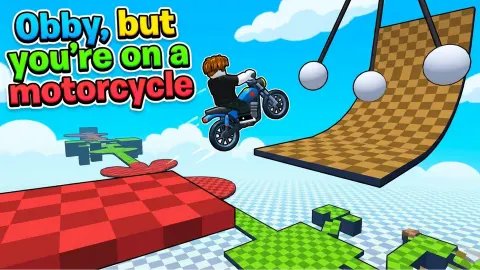


About Obby, but you're on a motorcycle
An obstacle course works because of a convention nobody states out loud: your character stops the instant you stop pressing. Every gap you have ever jumped in one was a question of timing and aim, because the run-up was yours to cancel at any moment. Put a motorcycle underneath that character and the convention breaks.
This game knows it, and it tells you in the first three seconds. The card that comes up before you move prints GET TO THE FINISH LINE, and underneath it, next to the movement keys, a key labelled BRAKE. An obstacle course on foot has never needed one.
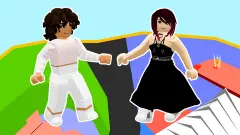
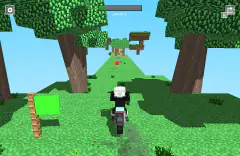
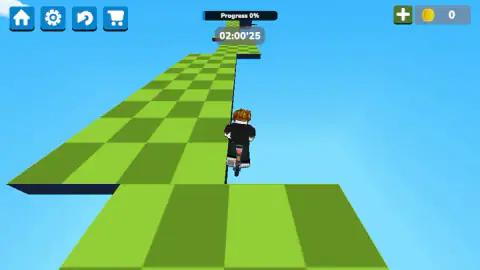
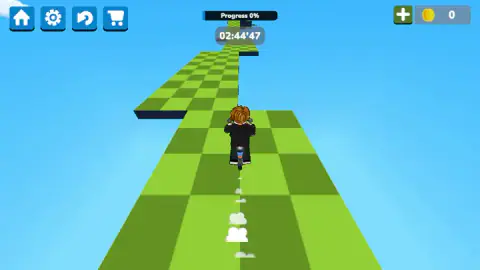
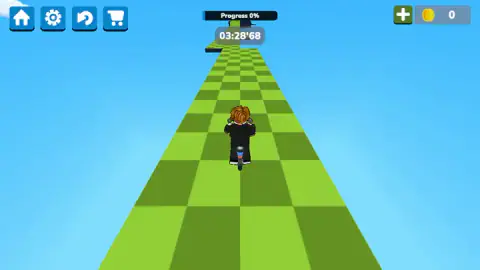
What that brake is for becomes obvious the moment you look at the course. It is a single path of green checkered slabs, strung across an empty blue sky with a few thin clouds in it. There are no railings. The dark band running down each side is the path's own thickness, the edge of the slab seen from the side, and past it there is nothing at all. Three readouts sit along the top of the screen: a Progress bar, a clock, and a coin purse.
The game is by Caribu. The other three are a match-three, an animal puzzle and a side-scrolling fighter, which makes this the only one of theirs with an engine in it. It went up at the end of April 2026, was updated that August.
And here is where our own account stops, because honesty is cheaper than pretending. We rode the first stretch, misjudged where it ended, and went off the broken edge. The clock climbed past three and a half minutes while Progress sat on 0% and the coin counter sat on zero. What follows is the shape of the problem, told by someone who lost to it.
An obby is just an obstacle course, with the word worn down
Obby is a clipping of obstacle course, shortened the way players shorten anything they say a hundred times a day. It names a shape of level rather than a specific game: floating platforms, hazards, gaps, a finish line, and usually a checkpoint system that lets you retry the bit that killed you rather than the whole run.
The shape got its name from courses that players built for one another, which is why it is so consistent. Somebody builds a jump, watches a friend fail it, and makes it slightly fairer. Repeat that a few million times and you get a genre with rules nobody wrote down: the gaps are survivable, the path is readable, and the challenge is in execution rather than guesswork.
This game inherits all of it except one thing. The courses that invented the genre were built for a character who runs.
The brake is the real mechanic
Here is the design observation worth taking away, and it is the reason the first gap is so punishing.
On foot, speed is a tap you can shut off. You arrive at an edge going exactly as fast as you chose to arrive, because releasing the key stops you dead. That is what makes a platform jump a test of aim. You line up, you commit, you land.
On two wheels, speed is a quantity you already have. Releasing forward does not stop the bike, it stops adding to it, and the difference between those two sentences is the entire game. Every jump becomes a test of inertia: not where do I aim, but when do I stop feeding it, which is a decision you have to take several slabs before the gap arrives. By the time you can see the landing clearly, you have already chosen whether you will reach it.
That is why there is a brake key at all, and why it sits in the opening card alongside the movement keys instead of being buried in a settings menu. In an obby on foot, a brake would be a key with nothing to do.
A button that admits the first step is hard
Most games hide their difficulty curve. This one prints it on a button.
SKIP A STEP is not a cheat you go looking for in a menu. It arrives on its own, in blue, the moment the game notices you have been stalled in the same spot, and it is offered with a plain grey CONTINUE underneath so the choice is genuinely yours. A game only builds that when enough players have stuck in the same place that letting them stay there costs more than letting them past.
The clock supports the same reading. It counts upwards, so nothing you do is ever rushed. The designer wanted you to be able to sit at the edge of a gap for a minute, work out the line, and try it. A countdown would have turned the same course into a different and far nastier game.
Those three readings along the top of the screen each measure a different thing, and only one of them is a score. Progress is how much of this course is behind you. The clock is how long you have been at it. The coins, with their green plus and the shop trolley over on the left, are the part of the game we never reached, and we would rather say so than guess.
More courses, more wheels
Moto Obby is the closest relative we have: the same pairing of motorcycle and obstacle course, with swinging hammers and spikes where this one has empty air. Car Parkour asks the same inertia question with four wheels instead of two, which turns out to be a very different problem. Crazy Motorcycle keeps the bike and the sky and drops the obstacles in favour of racing. And Your Obby Size is the control group: an obstacle course run on foot, where letting go of the key really does stop you. The rest are in driving games.
Screenshots
How to play Obby, but you're on a motorcycle
- Press PLAY and wait. The cover screen has a blue PLAY button in the middle, a settings cog and a shop trolley in the corners, and your coin total. A loading spinner follows.
- Read the card before you touch anything. It names the goal and lays out the keys: WASD or the arrows to move, right mouse button held and dragged to swing the camera, space to brake.
- Look before you ride. Dragging the camera around is free and costs you no time. The clock counts upwards, so there is no penalty for standing still and studying the next break in the path.
- Feed the throttle in bursts. Forward is not a step; it keeps adding speed for as long as you hold it. Short presses, then a look, then another short press.
- If the blue button appears, decide deliberately. SKIP A STEP shows up when you have been stuck in one place too long, with a grey CONTINUE underneath. One of them moves you on, the other puts you back where you were.
What our session taught us:
- The first gap is where runs die. Ours was not a chasm. The path simply ended and stepped down to a lower slab, and the bike carried enough speed to sail over the landing instead of onto it.
- Falling does not always mean dying. Twice the bike ended up hanging in open sky with no ground under it and no restart, just the clock ticking on. The restart arrow in the top left corner is faster than waiting.
- The camera is your only measuring tool. There is no shadow under the bike to tell you where you are, so the only way to judge a gap is to pan around and look at it from the side.
- Ads sit between attempts, not during them. The distributor drops an overlay in after a failure; one of ours announced that it had skipped the ad that time. They interrupt the gap between tries, which is the least costly place for them.
Controls
| W A S D, or the arrow keys | Steer the motorcycle. Forward is a throttle, not a step: it keeps feeding speed for as long as you hold it |
|---|---|
| Space | Brake. The game's own opening card prints it as BRAKE, under the movement keys |
| Right mouse button, held and dragged | Pans the camera around the bike, which is the only way to look at a gap before you commit to it |
| Joystick, bottom left (touch) | Steering on a phone or tablet, with a brake button on the opposite side and a drag anywhere to turn the camera |
| SKIP A STEP, the blue button | Offered when you have been stuck in the same place for a while. It is the game proposing to move you past the obstacle |
| CONTINUE, the grey button under it | Declines the skip and puts you back where you were |
| Circular arrow, top left | Restart. It sits between the settings cog and the shop trolley, next to a home button |
Features
- One path of green checkered slabs suspended in open sky, with no railings and nothing underneath the gaps
- Three readouts and nothing else: a Progress bar, a clock that counts upwards, and a coin purse
- A dedicated brake key, which an obstacle course run on foot has never needed
- A free camera on the right mouse button, so a gap can be measured before it is jumped
- A SKIP A STEP offer that appears when you stall in the same spot, with a plain CONTINUE beneath it
- Made by Caribu
- In English and Russian, landscape only
Game details
- Developer
- Caribu
- Release date
- April 2026
- Last updated
- August 10, 2026
- Added here
- March 2026
- Technology
- HTML5 (WebGL)
- Platforms
- Browser (desktop), Browser (mobile & tablet, touch)
- Saved progress
- Saving, when available, is managed by this game. Mava cannot confirm your level.
FAQ
What does obby mean?
It is a clipping of obstacle course, and it has become the name of a whole genre of browser and platform games: a run of floating platforms, hazards and gaps that you cross to reach a finish line. The word spread from courses that players built for each other, and it is now used the way words like roguelike or metroidvania are used, as a shorthand for a shape of level rather than a specific game.
Is Obby, but you're on a motorcycle an official Roblox game?
No. It is an independent browser game made by Caribu and published, with no licence from, affiliation with, or relationship to that platform or its company. It borrows only the genre word, which by now belongs to everybody, and it runs in a browser tab on its own.
How do you control the motorcycle?
W, A, S and D steer, or the arrow keys if you prefer them, and the space bar is the brake. Holding the right mouse button and dragging turns the camera around the bike. On a phone or tablet there is a joystick on the left, a brake button on the right, and a drag anywhere on the screen moves the camera.
What does SKIP A STEP do?
It appears, in blue, when you have been stuck in the same place for a while, with a grey CONTINUE underneath it. It is the game offering to move you past the obstacle you cannot clear. We were offered it repeatedly on the first gap and chose CONTINUE each time, so we cannot tell you what the skip costs or where exactly it puts you.
Why did the Progress bar stay at 0% in your run?
Because we never cleared the first gap. The bar measures how much of the current course is behind you, and ours never moved: we rode off the broken edge and the bike came to rest in open sky with nothing under it. The clock, which counts upwards rather than down, went past three and a half minutes on that one stretch.
Who made Obby, but you're on a motorcycle and when?
The other three are a match-three, an animal puzzle and a side-scrolling fighter, which makes this their only game with a vehicle in it. It went live at the end of April 2026, was updated that August.
Can you play it on a phone or a tablet?
Yes. It is listed for PC, Android and iOS, in landscape only, and the game ships a touch layout: a joystick on the left, a brake on the right, and camera panning by dragging. Our own session was on a desktop with a keyboard, so we cannot tell you how finely the joystick meters speed compared with a key.
What are the coins for?
There is a coin counter in the top right corner with a green plus beside it, and a shop trolley among the buttons in the top left, so the two are presumably connected. We finished our session with the counter still on zero and never opened the shop, so we cannot tell you what it sells or how coins are earned on the course.