



About Adventure Crazy Ramp Bike Stunt Game
Most stunt bike games put a retry button under the crash. Adventure Crazy Ramp Bike Stunt Game puts one button there, and it says HOME.
That decides how the whole game feels. A mistake does not cost you two seconds and a checkpoint. It costs you the level, the menu, the bike screen and the loading card, in that order, before the wheels turn again.
The riding itself is simple to describe. You see a dirt bike from the side on a 3D course made of tiled blocks and thin beams. Two keys drive it forward and back, and two more shift the rider's weight. The course does the rest.
We rode level 1 three times and failed it three times. We did not reach a finish line, pick up a coin or open a second level, so this page covers the start of the game and says so wherever it matters.
One thing to know before you look for it: the title screen calls the game Adventure Dirt Bike 3D. It is credited to the longer name and credits Mayaavi game studio. It has been available since November 2025.
Level 1: a tiled block, a red board and a narrow beam
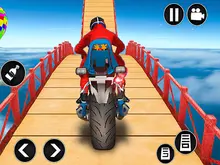
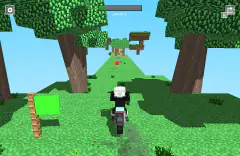
The level starts next to a tall yellow gate with a chequered banner. The ground is a long raised block, tiled in blue and amber on top and in blue and yellow squares down the side. Behind it are pine trees, white wind turbines and red-brown mountains.
A short way in, a red board with a white number 1 stands beside the track. It looks like a checkpoint marker. We passed it on every ride, and it never worked as one for us: each failure sent us to the menu and each new ride began back at the gate.
Then the tiles stop. At the far edge of the block the course drops to a dark, narrow beam running between wooden posts. This is the first place where the bike has to leave the ground or come down a step, and it is where the level got difficult for us.
We saw coins floating over the track beyond that point. We never reached them, and the counter on the title screen still read 0 at the end of the session.
What exactly counts as a crash we cannot tell you. The instructions say to reach the finish line safely and to avoid crashes, and none of our three rides got far past the beam.
MISSION FAILED has one button, and it is not retry
When a ride ends, the level blurs out and the words MISSION FAILED appear at the top of the screen. The only button on that screen is HOME.
We counted five clicks between a failure and the next ride: HOME, PLAY on the title screen, the level 1 card, SELECT on the bike screen and, once the loading card has passed, PLAY on the instruction page. The instruction page comes back every time, not just the first.
That makes the trip back to the start gate longer than the ride that ended, at least while you are learning. Our rides were short, and the menus between them were not.
It also changes how you should play. In a game with instant restarts, throwing the bike at a jump to see what happens is a fair way to learn. Here each experiment is expensive, so the slow approach pays: creep to the edge, look at what comes next, and only then commit.
Four levels in sight, three of them locked
The level screen shows four cards in a row. Level 1 has a picture on it, a rider in a red shirt on a blue and white bike. Levels 2, 3 and 4 are black with a gold padlock.
Yellow arrows sit at both sides of that screen, which suggests more pages of levels. We did not click them, so four is the number we can vouch for and not the total.
The title screen has a coin counter in the top left corner and, below it, a red button marked WATCH VIDEO with "100 coins" underneath. That is an offer to watch an advert in exchange for coins. We left it alone. Level 1 and the starting bike cost nothing, and the bike screen has arrows for looking at other bikes, which we did not use.
This is trials riding, where speed scores nothing
The side view, the lean keys and the obstacles belong to a real sport. In motorcycle trials, riders cross short sections of rocks, logs and steps, and nobody times them against each other. What is counted is feet. Each time a rider puts a foot down to steady the bike it costs a point, and the lowest score wins.
There is a ceiling on that. Three or more touches in a section cost three points, and failing the section outright, by falling or stopping dead, costs five.
This game keeps the idea and drops the small penalties. There are no feet to put down and no points for a wobble. Every mistake is the five-point kind, and the menu is the price. That is why it rewards the same habit real trials riders train: slow, deliberate weight shifts, with the throttle used in short touches.
Who it is for
Players who like a balance game that punishes haste, and who do not mind repeating the first stretch of a level many times. The controls take a minute to learn and the first block is gentle.
It is a poor fit if you want quick retries. The walk back through the menus after every fall will wear on anyone who learns by crashing. It is also not a race: we saw no rivals and no clock.
More bikes and more balance
Crazy Motorcycle is the nearest relative, a 3D motorbike obstacle course over floating tracks. Tractor Trial takes the same balancing act to a 2D tractor on eight off-road courses, and Bouncy Motors makes rotating a car in the air as important as the throttle. For bikes at racing speed on real circuits there is Superbike Hero. The rest are under driving games.
Screenshots
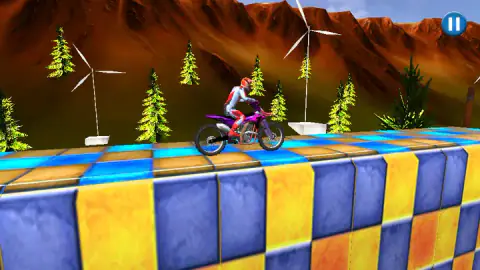
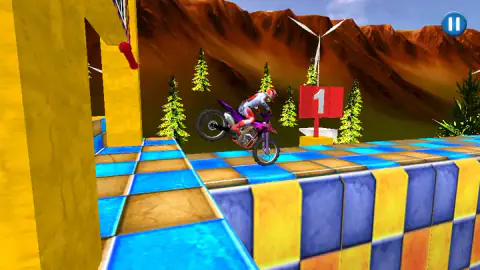
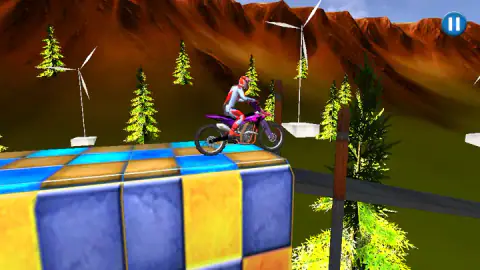
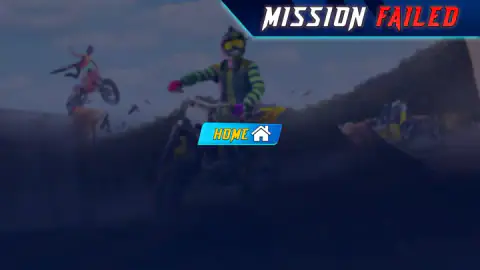
Taken by opening the game ourselves and letting it run — not supplied by the publisher, and not the same picture every other site shows.
How to play Adventure Crazy Ramp Bike Stunt Game
- Click the green PLAY button on the title screen. Menus answer to the mouse only.
- On the level screen, click the level 1 card. The other three cards on that page carry padlocks.
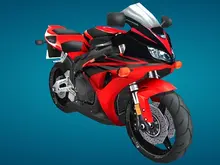
- A bike screen follows, showing a purple bike called Dash Cruiser with bars for speed, fuel and engine. Click SELECT.
- A loading card shows the four keys. After it comes a page of instructions with its own green PLAY.
- The level opens beside a START sign. Hold W or the Up arrow to move, and lean with A and D.
What three failed rides taught us:
- The arrow keys work, although the game never says so. The loading card shows W, A, S and D and nothing else. We used the arrows for every ride, and Up took the bike from the start gate to the end of the first block.
- Leaning is the real control. On our second ride the bike was standing on its front wheel a bike length or two past the start gate, before the course had asked anything of it.
- Let go of the throttle before an edge. Each of our rides ended at about the same place, where the first block stops, and each time we had arrived with the Up arrow held down.
- Do not steer the menus with the keyboard. We pressed arrow keys on the loading card and nothing happened. It moves on by itself.
- There is nothing to read while you ride. The screen shows the bike, the course and a pause button. No speed, no timer, no coin count.
Controls
| W or Up arrow | Drives the bike forward; the loading card calls it FRONT. We rode with the Up arrow |
|---|---|
| S or Down arrow | Reverse, according to the loading card and the listing; we did not need it |
| A or Left arrow | Lean backward. A is on the loading card; the listing gives the Left arrow for the same job |
| D or Right arrow | Lean forward. D is on the loading card; the listing gives the Right arrow for the same job |
| Left click | Every menu, from PLAY to the level card, the bike screen and HOME; arrow keys do nothing there |
| Pause button, top right | The only thing on screen during a ride; we did not press it |
Features
- A side-view 3D course built from blue and amber tiled blocks, narrow beams and gaps
- Four keys in total, two to drive and two to shift the rider's weight
- Level 1 open from the start and levels 2 to 4 padlocked on the first page
- No second chance inside a level, a crash ends it with MISSION FAILED
- A coin counter on the title screen that stood at 0 after our three rides
- A clean ride screen with no speedometer, timer or map, only a pause button
Game details
- Developer
- Mayaavi game studio
- Release date
- November 2025
- Added here
- September 2025
- Technology
- HTML5 (3D)
- Platforms
- Browser (desktop)
- Saved progress
- Saving, when available, is managed by this game. Mava cannot confirm your level.
FAQ
How do you play Adventure Crazy Ramp Bike Stunt Game?
Click PLAY, pick level 1, confirm the bike and click PLAY again on the instruction screen. Then hold W or the Up arrow to drive and use A and D, or the Left and Right arrows, to lean the rider back or forward. The aim is to reach the finish line without crashing, picking up coins on the way.
What are the controls in Adventure Crazy Ramp Bike Stunt Game?
The loading screen shows four keys. W is front, S is reverse, A leans backward and D leans forward. The card does not mention the arrow keys, but we rode with them and the Up arrow drove the bike just the same. Menus only answer to the mouse.
Is Adventure Dirt Bike 3D the same game as Adventure Crazy Ramp Bike Stunt Game?
Yes. Adventure Crazy Ramp Bike Stunt Game is the name on the game's listing, and Adventure Dirt Bike 3D is what the game's own title screen says once it loads. It is one game with two names.
What happens when you crash in Adventure Crazy Ramp Bike Stunt Game?
The ride ends with the words MISSION FAILED and a single button, HOME. There is no retry button and we were never put back at a checkpoint. HOME returns you to the title screen, and it took us five clicks to be riding level 1 again.
How do you unlock level 2 in Adventure Crazy Ramp Bike Stunt Game?
We did not get that far. Levels 2, 3 and 4 show a padlock on the level screen and level 1 is the only one open at the start. We failed level 1 three times, so we cannot say whether finishing it is all that the next level asks for.
What does the WATCH VIDEO button do in Adventure Crazy Ramp Bike Stunt Game?
It is a red button on the title screen that offers 100 coins for watching a video advert. We did not press it. We rode level 1 on the starting bike without spending a coin, so there was no reason to.
Can you play Adventure Crazy Ramp Bike Stunt Game on a phone?
The game's listing gives PC as its only platform, and the controls the game teaches are four keyboard keys. We played on a desktop with a keyboard and a mouse and did not try a phone.
Who made Adventure Crazy Ramp Bike Stunt Game?
The game's listing credits Mayaavi game studio. The game was published in November 2025.