

About Moto Obby
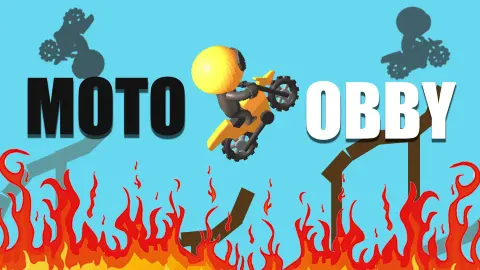
Most motorbike games in a browser want you to go fast. Moto Obby mostly wants you to arrive. The yellow dirt bike sits on a striped track floating over a blue void, a sign beside it tells you which keys are the gas and the brake, and a few metres ahead a brown ramp kicks up onto a dark block. Overshoot it and you fall. Arrive too slowly and the bike stalls on the slope.
That is the whole game, and it is a good one to understand before you start: the course rewards throttle control, not top speed. Every level is a short stretch with a beginning marked by a numbered blue sign, a handful of ramps and gaps, and an end. Crash anywhere in between and you go back to that level's sign.
The game is credited to Alexander Denisov and has been available from December 2024 and shows a last update in August 2026. We played it on a desktop with the keyboard, cleared the first level and crashed out on the second.
Level 1: a kicker, a block and a long climb
The first level opens on a flat striped track. Two signs stand on the right: a blue one with a large 1, and the lesson, "Up and down arrows - gas and brake". Just beyond them a short brown ramp leads up onto a dark block, and from the far side of that block a long brown plank climbs away to a higher deck.
This is where the game teaches you its one real skill. The ramp onto the block is easy if you simply hold the gas. The long plank is not, because it is steep and the bike slows as it climbs. In our screenshots the rear wheel throws up white dust as it fights the slope, which is a useful sign that you are still moving.
The plank ends in mid-air. Below and ahead is a striped landing deck with a blue-and-white checkered block standing on it. We jumped that gap, and the next thing on screen was Level 2. It took us about two minutes, advert included.
Level 2: the spin arrives, and that is where we stopped
Level 2 starts in exactly the same way: a numbered sign, this time a 2, and a new lesson beside it, "Arrows right and left - spin in the air". The ramps change colour from brown to pink. The first one launches you off the deck, and further on a pink A-frame sits on a lower platform across a gap.
From the Level 1 start line you can see a sign marked 2 on a parallel track higher up, and from the Level 2 start you can see a 3. Each level is one stretch of a single long course that doubles back on itself, and you can already see the start of the next level while you ride the current one. It also tells you what a level is: the space between two signs.
This is where our run ran out. We came off the pink ramp holding the gas and the right arrow, and the bike came down in pieces. The FAILURE screen is hard to miss: the word in white capitals, a large red X and a green RETRY button, with the rider and bike lying in bits behind it. RETRY put us back at sign 2, not at the start of the game, and we were sent back there at least twice. We did not see how much a single press of left or right turns the bike, so we cannot tell you yet how to land that first pink jump cleanly.
What "obby" means, and the real sport it echoes
Obby is gamer shorthand for an obstacle course: a run of jumps and traps you clear one section at a time, starting again from the last checkpoint when you fall. Moto Obby puts that idea on a motorbike, and the numbered signs are its checkpoints.
Real motorcycling has a version of this too, and it is not a race. In motorcycle trials, also called observed trials, riders on light bikes take on short sections of rocks, logs and built obstacles. An observer counts every time a foot touches the ground. Get through a section without a single touch and you score zero, which riders call "cleaning the section". Fail to finish it and you take the maximum penalty. The rider with the fewest points wins, so speed matters far less than balance and fine control of the throttle.
That is the closest real thing to what Moto Obby asks of you. The difference is that the game has no partial marks. In trials a dab costs one point. Here any crash costs the whole section, so the only way through is the clean ride.
Ads, pauses and the green button
Moto Obby comes with adverts, and it is fair to know where they appear. A dark screen reading "the ad" covered the first level twice in our session, once at the very start. Later, on Level 2, a similar screen said the advert had been skipped this time and offered a "Continue playing" button.
The green SKIP FOR AD button with a video icon stays in the top right corner the whole time. It is an advert, and we did not use it. The grey "Click to keep playing" note is different: it is a pause, and a click on the game brings the bike back to life.
What we did not see
We did not clear Level 2 or reach Level 3, so we cannot say how many levels there are or how long the full course is. We did not open the settings behind the gear icon. The game's listing mentions swinging hammers and sharp spikes; in the two levels we rode there were only ramps, blocks and gaps. Touch controls on a phone remain untested by us.
Who it is for
Moto Obby suits players who enjoy getting one tricky section right more than racing a clock. There is no timer on screen, no rival and nothing to collect in what we saw, just the next sign. The cartoon rider and bright colours make it friendly for younger players, and the restart is instant, so a crash costs seconds rather than patience.
If you want speed, overtakes or a career mode, this is not that game.
More bike and balance games
Adventure Crazy Ramp Bike Stunt Game is another dirt bike balanced across blocks and beams, seen from the side. Trial Xtreme leans further into the trials idea of balance over obstacles. Tractor Trial swaps the bike for a tractor on off-road courses, and Bouncy Motors asks you to rotate a squishy car over ramps and gaps. More of the same is in the driving category.
Screenshots
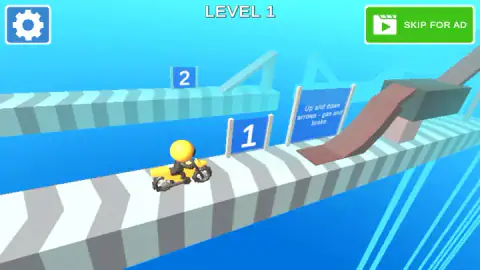
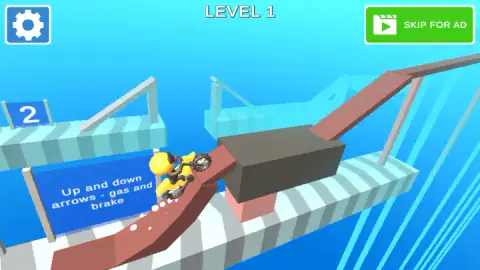
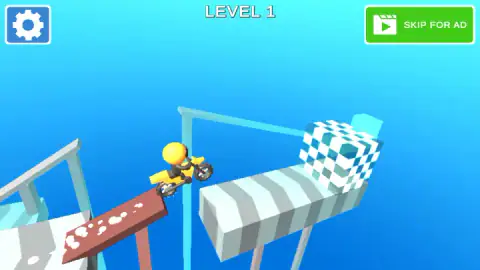
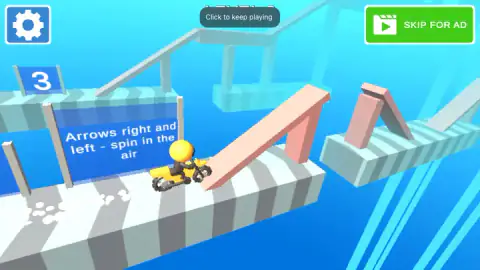
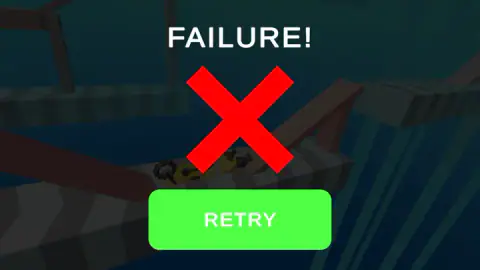
Taken by opening the game ourselves and letting it run — not supplied by the publisher, and not the same picture every other site shows.
How to play Moto Obby
- Click into the game. If a dark advert screen appears first, wait for it to clear.
- Hold the up arrow to accelerate along the track. The down arrow brakes.
- Use the ramps to climb from one deck to the next and to jump the gaps between them.
- From Level 2, use the left and right arrows in the air to spin the bike and land on its wheels.
- Reach the end of the level to move on. If you crash, press RETRY and the level starts again from its first sign.
Tips from our run
- Hold the gas, do not tap it. We cleared Level 1 by holding the up arrow for about a second and a half at a time. On the climbing planks, shorter presses left the bike sitting on the slope.
- Look up from the start line. The next level's sign is visible on a parallel stretch of track, so you can see roughly where you are heading.
- A grey "Click to keep playing" note sometimes appears at the top of the screen and the bike stops. A single click on the game clears it.
- Ignore the green SKIP FOR AD button in the top right corner. It is an advert, not a shortcut you need.
Controls
| Up arrow (W, per the listing) | Gas; hold it to gather the speed a ramp needs |
|---|---|
| Down arrow (S, per the listing) | Brake |
| Left and right arrows (A and D, per the listing) | Spin the bike in the air; the listing adds that they make a stuck bike hop |
| RETRY | Restarts the level from its first sign after a crash |
| Click on the game | Clears the "Click to keep playing" note and resumes |
| Gear, top left | Opens the settings |
Features
- A 3D dirt bike course cut into levels, each starting at a numbered blue sign
- Every level is a stretch of one long course that doubles back, so you can see the next level's start sign from the current one
- Controls taught on signs beside the track, one new idea per level
- Brown kickers, long climbing planks, gaps to jump and a checkered block on a landing deck in the first level
- Pink ramps and a pink A-frame in the second level, where spinning in the air is introduced
- A crash ends the attempt with a FAILURE screen and sends you back to the level's first sign
Game details
- Developer
- Alexander Denisov
- Release date
- December 2024
- Last updated
- August 10, 2026
- Added here
- April 2025
- Technology
- HTML5 (WebGL, 3D)
- Platforms
- Browser (desktop)
- Saved progress
- Saving, when available, is managed by this game. Mava cannot confirm your level.
FAQ
How do you play Moto Obby?
You ride a yellow dirt bike along a course of ramps, blocks and gaps that floats over a blue void. The up arrow is the gas, the down arrow is the brake, and the left and right arrows spin the bike in the air. Reach the end of a level without crashing and the game moves you on to the next one.
What are the controls in Moto Obby?
The signs beside the track teach them. Up and down arrows are gas and brake, and the right and left arrows spin you in the air. The game's listing says W, S, A and D work too, and that left or right makes the bike hop if it gets stuck.
What happens when you crash in Moto Obby?
The screen shows FAILURE with a big red X and a green RETRY button, and the bike and rider lie in pieces on the track. RETRY puts you back at the first sign of the level you were on, not at the start of the game.
How many levels does Moto Obby have?
We cannot give a number. We cleared Level 1 and crashed on Level 2 before our session ended. The levels are numbered on blue signs along one continuous course, and from the Level 2 start we could already see a sign marked 3.
What does obby mean in Moto Obby?
Obby is gamer shorthand for an obstacle course, a run of jumps and traps you clear one section at a time. Moto Obby is that idea on a motorbike, with numbered signs marking where each section starts.
Should I press SKIP FOR AD in Moto Obby?
That green button in the top right corner, with a video icon, is an advert. It is not part of the course, and pressing it is not needed to play. We cleared the first level without touching it.
Can you play Moto Obby on a phone?
The game's listing gives PC, Android and iOS, and the game's listing mentions phones. We only played it on a computer with the keyboard, so we cannot say how the touch controls feel.
Who made Moto Obby?
The game is credited to Alexander Denisov. The game was listed in December 2024 and last updated in August 2026.