




About City Tuk Tuk Simulator: Racing Game 3D
Most city driving games give you a car, a speedometer and a damage bar, and ask you to keep all three in order. City Tuk Tuk Simulator gives you three wheels, a clock and a map, and nothing else on the screen. No speed readout, no money counter, no health. Only the time you have left and the way to the next passenger.
That bareness is the game. You are a tuk-tuk driver in a 3D city, a passenger is waiting somewhere, and the minimap in the corner draws a yellow line to them. Everything you do is about that line: follow it, or lose time finding your way back to it.
We played Level 01 on a desktop with the arrow keys, for a little over two minutes of its clock. We did not pick anyone up. We missed the first turn, spent the best part of a minute nose to nose with a glass shopfront, and then drove right past the stop. What follows is what that run taught us, and we say plainly where it ends.
The game is credited to Mayaavi game studio. It was published in late 2025.
Three wheels, a clock and a map
The screen while you drive has three things on it. A blue pause button in the top left. A clock in the top centre. And a square minimap in the top right, with your tuk-tuk as a red arrow, the route as a yellow line and the stop as a green circle with a small vehicle in it.
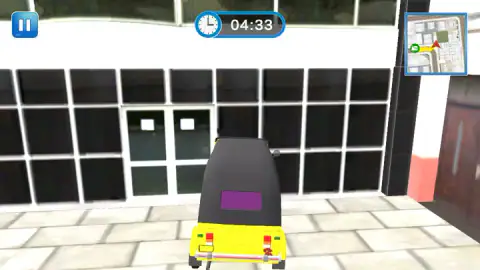
Everything else you have to read from the street. There is no speedometer, so you judge speed from how fast the kerb slides past. There is no damage bar, so a bump into a wall costs you nothing but the seconds it takes to back out. In our run that was the real cost: the clock went from about 4:30 to 3:28 while we worked our way off one shopfront.
That makes the clock the only score that matters. Every wrong street is time, and the map is how you avoid wrong streets.
The city we drove through
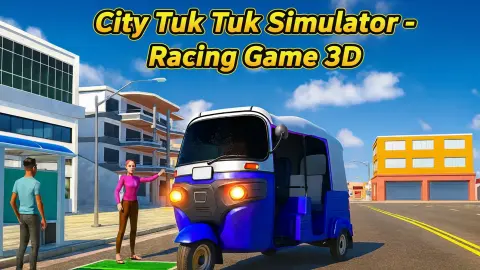
Level 01 starts on a wide avenue with lane markings, a pedestrian crossing and traffic lights on poles. Office blocks with glass fronts line one side, red brick buildings the other. There is traffic: a white car parked by the kerb at the start, and later a white van marked "Premium" passing on our left.
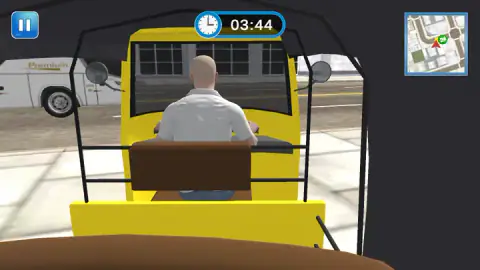
The pavement is fair ground. We drove onto the paving slabs and right up to the doors of a shop without any warning or penalty on screen. At one point the camera ended up inside the cab, looking forward past the driver's shoulders, a bald man in a white shirt with both hands on the handlebar. We cannot tell you what triggered that view. A few seconds later we were back behind the tuk-tuk.
The last thing we saw was a metal fence in front of us and the yellow line curving back the way we had come.
Why it is yellow and black, and why it says tuk tuk
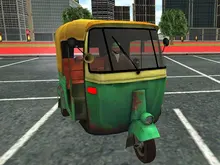
The tuk-tuk in the garage has a yellow body, a black canopy and a thin green stripe down the side. That is not a random choice. In Delhi and Agra, the older petrol auto rickshaws were black and yellow, and the newer gas-powered ones switched to green and yellow, which is how people tell them apart at a glance.
The name comes from the engine. In Thailand the vehicle is called a tuk-tuk because that is what a small engine sounds like. The real thing has a driver alone at the front steering with a handlebar, and room for up to three passengers on a bench behind.
That layout is why the game's goal makes sense. A tuk-tuk is a taxi you flag down for a short trip across town, not a racing machine. The game keeps the taxi part, a fare to collect and a place to drop it, and adds a clock to make it a race.
The garage, and what the stat bars suggest
Before the first level you see the tuk-tuk on a dark garage floor, with orange arrows on either side and three bars on the left: Speed, Engine and Handling. All three bars on the starting vehicle are short, none of them even a third full.
Short bars on the first vehicle and arrows to browse usually mean better ones come later. We did not browse them, so we cannot tell you what they cost or how you earn them.
Who it is for, and what we did not see
City Tuk Tuk Simulator suits someone who likes finding their way around a city more than going fast. The controls are four keys, the screen is uncluttered, and there is nobody to beat but the clock. A child who can read a map arrow can follow it.
Anyone expecting rival cars on a track will find none here. Level 01 had no laps and nobody to overtake.
Our time with it was short. We played part of Level 01, with about three minutes still on its clock when we stopped. We did not pick up or drop off a passenger, finish or fail a level, earn anything, open the shop or try other vehicles. We heard no sound and did not play on a phone.
More city driving with a job to do
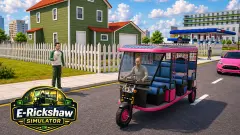
E-Rickshaw Simulator puts you in the battery-powered cousin of this tuk-tuk, with a health bar this game does without. Ambulance Simulator 2021 is the same pick-up-and-deliver idea seen from above, with patients instead of fares. Real City Driving 2 drops the clock and lets you roam an empty city, and Car Parking 3D is all about stopping in exactly the right spot. The rest are under driving games.
Screenshots
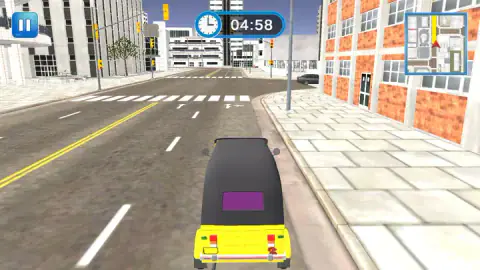
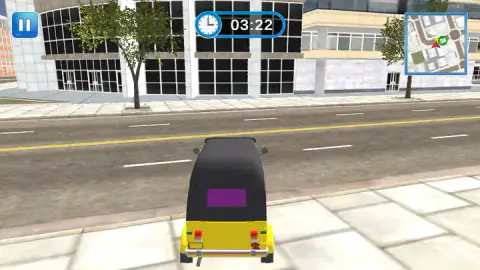
Taken by opening the game ourselves and letting it run — not supplied by the publisher, and not the same picture every other site shows.
How to play City Tuk Tuk Simulator: Racing Game 3D
- Press Start, then Select in the garage to take the yellow tuk-tuk.
- Choose Level 01. The later levels stay locked until you clear the ones before.
- Close the first card, which tells you to follow the map to pick up and drop off passengers.
- Drive with the arrow keys: up to go, down to brake and reverse, left and right to steer.
- Watch the minimap in the top right corner. Drive the yellow line to the green marker before the clock at the top runs out.
What our run taught us:
- Take the first corner on the road. The line turned left early. We went straight on, up the kerb and onto the pavement, and stopped against a building.
- Reverse longer than feels right. Short taps of the down arrow left us pinned to the glass. What freed us was backing off and then driving forward at an angle.
- Slow down near the marker. At 3:22 the marker sat right beside our arrow on the map, and nothing happened. We kept going and ended up with the route bending back behind us.
- Glance at the map, not just the road. The road ahead looks like any other street. Only the map says which one you want.
Controls
| Up arrow | Drive forward |
|---|---|
| Down arrow | Brake and reverse |
| Left and right arrows | Steer |
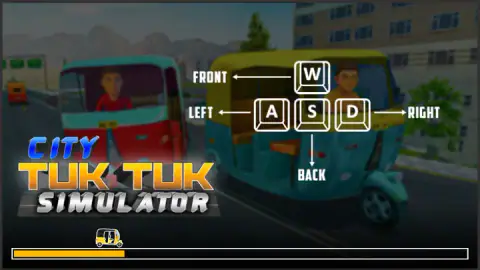
| W, A, S, D | Shown on the loading screen as front, left, back and right; we drove with the arrows |
| Pause button, top left | Pauses the level |
Features
- A yellow tuk-tuk with a black canopy, the old colours of petrol auto rickshaws in Indian cities
- A garage screen with Speed, Engine and Handling bars and arrows to browse vehicles
- Levels that open one at a time, starting from Level 01
- A countdown clock at the top of the screen that started at just under five minutes in Level 01
- A minimap in the top right corner with a yellow route line and a green marker for the next stop
- A 3D city of wide streets, crossings, traffic lights, shopfronts and moving traffic
- A plain screen with no speedometer, money or damage bar while you drive
Game details
- Developer
- Mayaavi game studio
- Release date
- November 2025
- Last updated
- August 10, 2026
- Added here
- September 2025
- Technology
- HTML5 (WebGL, 3D)
- Platforms
- Browser (desktop)
- Classification
- 3D , Driving , Simulation
- Saved progress
- Saving, when available, is managed by this game. Mava cannot confirm your level.
FAQ
How do you play City Tuk Tuk Simulator Racing Game 3D?
You pick a tuk-tuk in the garage, choose a level and drive through a 3D city with the arrow keys. The job is to find passengers and take them where they want to go, following a yellow line on the minimap in the top right corner. A clock at the top counts down while you drive.
What are the controls for City Tuk Tuk Simulator?
The up arrow drives forward, the down arrow brakes and reverses, and left and right steer. The loading screen also shows W, A, S and D for the same four directions. We drove with the arrows.
How long do you have in each level?
In Level 01 the clock read 4:58 the first time we saw it, so the limit is about five minutes. We did not reach zero, so we cannot say what happens when time runs out.
Where do you pick up passengers in City Tuk Tuk Simulator?
The next stop is the green marker on the minimap, and the yellow line shows the way to it. In our run we drove close to the marker and past it without a pickup, which suggests you have to stop on the spot itself. Follow the line turn by turn and slow down as the marker reaches your arrow.
Is City Tuk Tuk Simulator a racing game?
Not in the sense of rivals and laps. There were no other racers in the level we played. The race is against the clock, through ordinary traffic, with a route to follow.
Can you drive on the pavement?
Yes. We left the road at the first corner and drove on the paving slabs up to a shopfront without any penalty showing on screen. It costs time, though, because the route follows the streets.
Who made City Tuk Tuk Simulator Racing Game 3D?
The game's listing credits Mayaavi game studio. It was published on 23 November 2025 and last updated in August 2026.