






About Duck Family Simulator Animal Games
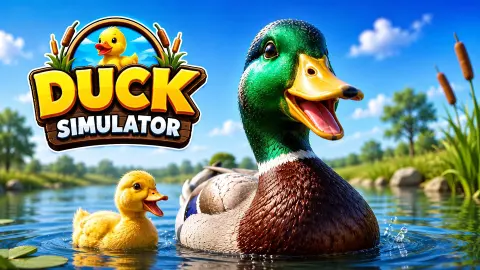
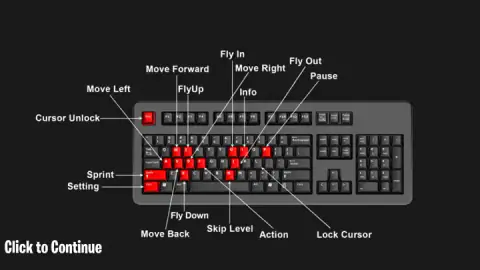
The logo promises a family: a green-headed duck, a brown one and four yellow ducklings on a pond. The game opens on one bird, alone, on a lawn. Before he has taken a step, Duck Family Simulator Animal Games shows you a diagram of a full keyboard with fifteen keys painted red.
That is the honest shape of the first minutes. This is a third-person 3D animal sim in which you are a mallard drake inside a fenced farmyard, and the first thing it asks of you is to learn where your hands go. Four of those keys are for flying alone.
The game is credited to CodesXpirit. It was published on 3 September 2026.
We played for about four minutes at a desktop, all of it in the first level of Story Mode, and we did not finish that level. We found no food, met no predator and never saw a duckling. This page is short because of that, and it stays inside what those four minutes showed.
Fifteen keys, and four of them are for the air
Most browser animal games give you arrow keys and one button. This one hands you a chart. Movement is the familiar W, A, S and D, with Shift to sprint and F as the action key. Three more keys run the menus: P, Ctrl and I.
Flying takes the rest. The chart labels U as Fly In and J as Fly Out, which the publisher's instructions describe as fly and walk. Once you are up, E climbs and X descends. So leaving the ground and gaining height are separate jobs on separate keys, and landing is a key of its own too.
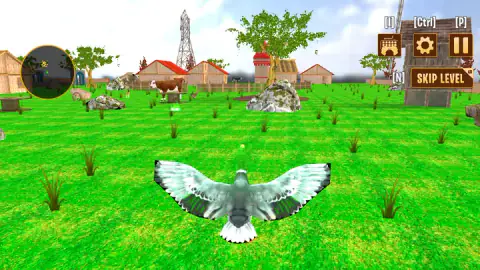
We cannot tell you how flight feels. Our duck spread his wings in most of our screenshots and stayed on the grass in all of them.
What the farmyard looks like
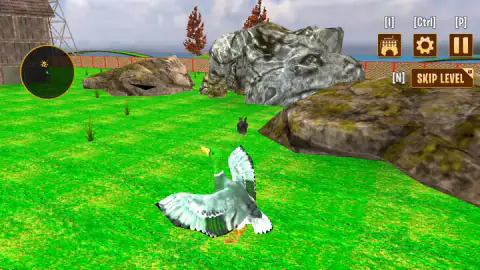
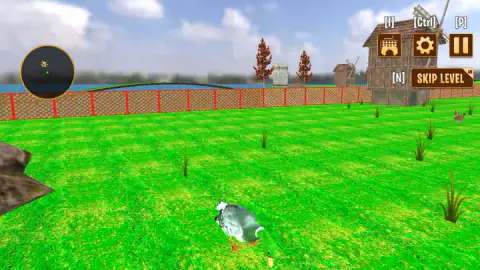
The level is a lawn of bright striped grass closed in by an orange mesh fence on red posts. There is water on the far side of the fence. Inside it stand mossy boulders, red-roofed barns, a wooden windmill, an electricity pylon and a few red-leaved trees.
You are not alone in there. A black-and-white cow walked across the middle of the field, a brown-and-white one stood near the barns, and hens wandered around us. None of them reacted to the duck in what we saw.
The round minimap in the top left corner shows you as a green arrowhead. A yellow marker sat just ahead of that arrowhead in every screenshot we took. We did not work out what it marks.
The duck on screen is a real one
The bird you control has a glossy green head, a white ring around the neck and a yellow bill. That is a male mallard, the most widespread wild duck in the northern hemisphere and the ancestor of nearly every farmyard duck. Only the drake wears the green head. The female is mottled brown from bill to tail, which is why the two adults in the logo look like different species.
Mallards are dabbling ducks. They feed at the surface or tip forward with their tails in the air, and they rarely dive. They also graze on land, on seeds, shoots and insects, which makes a brief about finding food on a lawn less odd than it sounds.
The ducklings in the logo have a real trick of their own. Mallard ducklings leave the nest within about a day of hatching and find their own food from the start. The mother does not feed them. She leads them to water and keeps watch.
What we did not reach
The game's description lists a good deal more than a farm: islands, lakes and forests, a home to build, a duck to customise, and predators that include crocodiles, snakes, sharks, giant lizards and wild dogs. None of that appeared in our first level, so we cannot say how any of it plays or when it turns up. The same goes for Free Mode, for coins and for every level after the first.
Who it suits
It suits a player with a keyboard, a mouse and some patience for a tutorial. The opening is slow, and the brief gives you a goal without pointing at it.
It suits less anyone who wants to be playing inside ten seconds, and it is a lot of keys for a small child to manage alone. The publisher's instructions describe a joystick on phones, which we did not try.
More from CodesXpirit, and more birds
CodesXpirit builds its sims on the same frame. Dinosaur Park Jurassic Dino World is its other wild-animal game, and Mother Simulator Husband Wife Games puts the same row of buttons in the top right corner of a family home. For another open world seen from a bird's back, try I am Crazy Bird. For a duck that needs one button and no chart, there is Chubby Duck Jump. The rest are under kids games.
Screenshots
Taken by opening the game ourselves and letting it run — not supplied by the publisher, and not the same picture every other site shows.
How to play Duck Family Simulator Animal Games
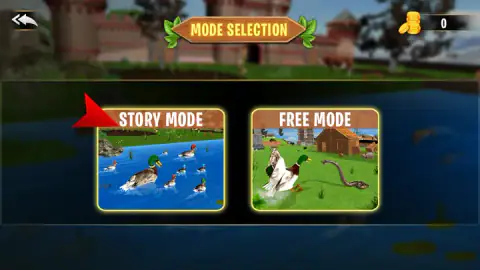
- Pick a mode. The first menu has two cards, Story Mode and Free Mode, with a coin counter in the corner that read 0. We took Story Mode.
- Start level 1. Story Mode leads to a level map. As we noted it, only the first level was open and the rest were padlocked.
- Read the brief. Level 1 gave us one line, in the game's spelling: "Eat food to fullfill your needs."
- Click through the tutorial cards. The game tells you to look around with the mouse, then shows the keyboard chart, then tells you to move.
- Move with W, A, S and D and turn the camera with the mouse. The duck is in the lower middle of the screen and the camera sits behind him.
What we picked up while playing:
- Esc gives you your pointer back. The mouse belongs to the camera while you play. The chart calls Esc Cursor Unlock, and you need it before you can click the buttons in the top right corner.
- The brief is on the pause card. Pause shows the level's one-line goal again, above a home button, RESUME and a restart button. If you forget what the level wants, press P.
- I brings the chart back. The button marked [I] has a keyboard icon on it. Fifteen keys are a lot to hold in your head from one viewing.
- Skip Level is an advert offer. The button sits at the top right from the first second and wears a small AD tag.
Controls
| W / A / S / D | Move forward, left, back and right |
|---|---|
| Mouse | Look around |
| Left Shift | Sprint |
| F | Action |
| U / J | Fly In and Fly Out, as the chart calls them; the instructions describe U as fly and J as walk |
| E / X | Fly up and fly down |
| Esc | Cursor Unlock, which frees the mouse pointer from the camera |
| I | Info; the on-screen button with this label shows a keyboard icon |
| P | Pause |
| Ctrl | Settings |
| N | Skip Level; the on-screen button carries a small AD tag |
Features
- Two modes on the first menu, Story Mode and Free Mode
- A third-person 3D farmyard with cows and hens walking about, red-roofed barns, a windmill and water beyond the fence
- A mallard drake as the playable duck, with the green head and white collar of the real bird
- A keyboard chart with fifteen marked keys, four of them for flying
- A round minimap in the top left corner with an arrowhead for you and a yellow marker
- A Skip Level button on screen from the first second of a level
- Made by CodesXpirit
Game details
- Developer
- CodesXpirit
- Release date
- September 2026
- Last updated
- September 4, 2026
- Added here
- August 2026
- Technology
- HTML5 (WebGL)
- Platforms
- Browser (desktop, keyboard & mouse), Browser (mobile & tablet, touch)
- Classification
- 3D , Fashion & Beauty , Simulation
- Download size
- 23.9 MB
- Ad requests
- 2 (few)
- Has a save
- Yes
- Saved progress
- Saving, when available, is managed by this game. Mava cannot confirm your level.
Measured by opening the game ourselves on 2026-09-11, not taken from the feed. Twelve seconds on a phone-sized screen, with ad requests counted and blocked rather than loaded.
FAQ
How do you play Duck Family Simulator Animal Games?
You pick Story Mode or Free Mode, then control a duck in third person on a 3D farm. W, A, S and D move, the mouse turns the camera and four more keys handle flying. In Story Mode each level opens with a short brief; the first one we got told us to eat food.
What are the controls in Duck Family Simulator Animal Games?
The game's own keyboard chart marks W, A, S and D to move, Shift to sprint, F for action, U and J to start and stop flying, and E and X to fly up and down. P pauses, Ctrl opens settings, I is info, N skips the level and Esc frees the mouse pointer.
How do you fly in Duck Family Simulator Animal Games?
The keyboard chart gives flying four keys: U is labelled Fly In, J is Fly Out, E is fly up and X is fly down. The publisher's instructions describe U as the key to fly and J as the key to walk again. We did not get the duck airborne in our short session, so we cannot describe how flight handles.
What is the difference between Story Mode and Free Mode?
Story Mode is a sequence of levels, each with a brief; we played its first level. We did not open Free Mode, so we can only say what its menu card shows: a drake facing a snake in a farmyard.
Can you skip a level in Duck Family Simulator Animal Games?
There is a Skip Level button at the top right of the screen, also bound to the N key. It carries a small AD tag, which means the skip is offered in exchange for an advert. We did not skip a level.
Can you play Duck Family Simulator Animal Games on a phone?
It is listed for PC, Android and iOS in landscape, and the publisher's instructions mention a joystick to move and dragging the screen to turn the camera. We played on a computer with keyboard and mouse and did not try the touch version.
Who made Duck Family Simulator Animal Games?
It is credited to CodesXpirit. It was published on 3 September 2026.