













About Rich Mom Family Simulator Luxury Life
The logo has a crown, a handbag, a stack of gold coins and a white saloon car on it. The first minute of actual play has a pavement, a tracksuit and a coin counter that reads zero. Rich Mom Family Simulator Luxury Life starts its billionaire a long way from the yacht, and it is worth knowing that before you press play.
What you get is a third-person walk. A woman with a black ponytail stands on a tiled pavement in a city of plain grey and blue blocks, the camera sits behind her shoulders, and the game hands you one written instruction. Ours was to go to the gym. You steer her there on the keyboard, turn the view with the mouse, and the level is that errand.
The game is credited to a developer listed as CodesXpirit. It was published in September 2026.
Now the honest part. Our session lasted about four minutes, at a desk, with keyboard and mouse. Well over a minute of it went on loading and on the opening cards, and the rest on walking round the block where the level begins. We did not finish the gym task, we did not earn a coin, and we did not see level 2. This page describes the controls, the screen and the first errand, and says plainly where our knowledge stops.
What is on the screen, corner by corner
The screen stays the same from the moment the cards end, so it pays to learn it once.
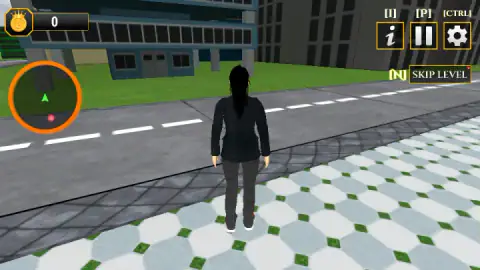
Top left is a gold coin wearing a crown, with a number next to it. That is your money. Under it is the minimap: an orange ring with a green arrow fixed in the middle and a red dot somewhere around it. We never saw a street drawn inside it. It works as a pointer, not as a map. During our walk the dot moved from below the arrow to its right, depending on which way we faced, and that is why we take it for the target of the current instruction.
Top right are three square buttons framed in gold: a letter i, a pause sign and a gear. Their keys are printed above them. Below sits a wider button, SKIP LEVEL, with N beside it. It is there from the first second, on level 1, before you have tried anything. We cannot tell you what it costs or where it lands you, because our session ended on the same level it started on.
There is no health bar, no clock and no task list on screen. Once you close the instruction card, the red dot is the only reminder of what you were asked to do.
Four minutes on the pavement: what our run reached
The game loads behind its logo and a gold bar, then talks to you through cards. One gives the instruction. One teaches the mouse. One shows the walking keys. Each needs a click.
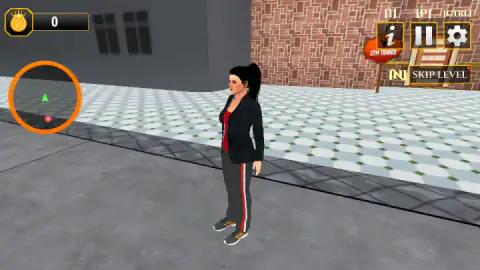
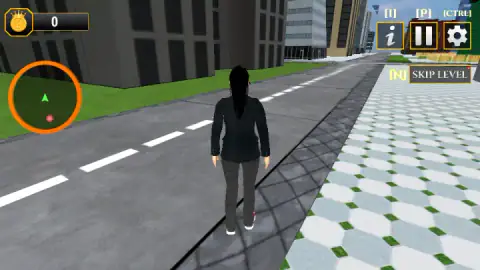
After that you are standing on white octagonal tiles with small green squares between them, beside a road with a dashed white line. The character wears a black jacket over a red top, grey track trousers with a red and white stripe down the side, and trainers. She is dressed for the errand, not for the boardroom.
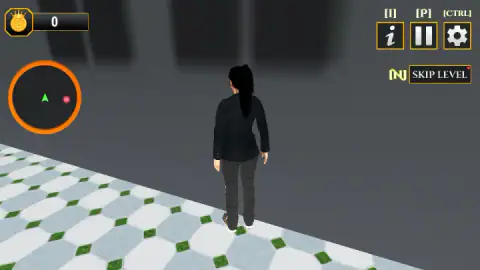
We crossed towards the road, came back, walked along a grey building, met its wall, and went round again. The scenery is simple: flat-coloured towers, grass, a fence in the distance. No other person and no moving car crossed our view in that time. Nothing made a sound of reward or of failure. When we stopped, the counter still read 0 and the level was still the first.
So the plain summary is this: the controls respond, the place is easy to read, and the first task is to find the right spot at the gym. We did not find it in the time we gave it.
From a house on a Commodore 64 to a mansion with levels
Games about running someone else's day are older than most players would guess. Wikipedia's article on life simulation games points to Little Computer People, released by Activision in 1985, in which you typed requests to a character living in a virtual house. Fifteen years later Will Wright's The Sims, out in February 2000, refined that idea and became, in the article's words, the most successful game of its kind.
The same article makes a point that explains what kind of game you are about to open. Life simulators, it says, often have no victory condition, and can be classed as "software toys". You are given a house and a person and left alone with them. Nobody tells you what to do next.
Rich Mom Family Simulator Luxury Life borrows the subject and reverses the structure. It has no connection with either of those games. It keeps the daily life, the house and the money, but it cuts them into levels, gives each one a sentence to obey and puts a skip button beside it. That makes it closer to a list of errands than to a toy. If you come expecting to arrange furniture freely for an hour, the first card will surprise you. If you like being told exactly what to do, it will suit you better than the classics would.
What the description promises and we did not see
The game's description lists a mansion to decorate, sports cars to drive, an office with employees to manage, jewellery, gadgets and a yacht to buy, parties, and time with a husband and family. It also says the day begins with a workout, which matches the instruction we received and the sign we walked past.
That one match is all we can confirm. Everything else on the list belongs to levels we did not reach.
Who it is for
It suits younger players who want a calm walk-and-do game with no timer on screen and, as far as we got, no enemies, and who enjoy the fantasy of the title more than a test of skill. The keyboard and mouse controls are the standard ones, so anyone who has played a 3D game will be moving in seconds.
It will frustrate anyone who wants the luxury at once. The opening asks for patience with cards, then for a short search on foot, and the city around you is plain.
More from CodesXpirit, and more simulators
The same developer made Mother Simulator Husband Wife Games, where green footprints lead a mother from one household chore to the next, and Anime Girl High School Simulator, which sets one small mission per level on a school campus. If the gym was the part that caught your eye, Gym Simulator Online, Escape turns every click into a lift. For a job with clearer rules, Shop Cashier Simulator 3D has you scanning items and counting change. The rest are under girls games.
Screenshots
Taken by opening the game ourselves and letting it run — not supplied by the publisher, and not the same picture every other site shows.
How to play Rich Mom Family Simulator Luxury Life
- Click through the opening cards. Each one waits for a click; the words CLICK TO CONTINUE sit in the bottom left corner.
- Read the instruction. It is one short sentence. Ours said to go to the gym for exercise.
- Walk with W, A, S and D and turn the camera with the mouse.
- Check the ring on the left. The green arrow is you. The red dot is where we believe the game wants you.
- Reach the place and do what it asks. This is the step we did not complete.
What four minutes taught us:
- The keys are written on the screen. Above each button at the top right there is a key in square brackets: I, P, Ctrl, and N beside SKIP LEVEL. You do not need to hunt for a manual.
- The gym is nearer than you think. A red sign reading GYM TRAINER, with a flexing figure on it, hangs on a brick building a few steps from the start. Turn the camera before you set off down the road. We walked the other way first and lost time.
- A wall is a wall. We spent several seconds pushing the character into a blank grey building. We found no way in through it; look for the sign instead.
- Walking pays nothing. The counter stayed at 0 however far we went.
- The mouse belongs to the camera. The card that teaches it shows a mouse with a curved double arrow and the words USE MOUSE TO LOOK AROUND. Swing the view round and you see the character from the side instead of from behind.
Controls
| W A S D | Walk |
|---|---|
| Mouse | Turns the camera around the character |
| Click | Dismisses each opening card (CLICK TO CONTINUE) |
| I | Opens the controls card; also a button at the top right |
| P | Pause; also a button at the top right |
| Ctrl | Settings; the gear button at the top right |
| N | SKIP LEVEL, the yellow-framed button under the other three |
| Left Shift | Sprint, according to the game's instructions; we did not test it |
| F | Action, according to the game's instructions; nothing we reached asked for it |
Features
- A third-person walk through a 3D city block, with the camera on the mouse
- One written instruction per level; ours was to go to the gym
- A ring-shaped minimap with a green arrow for you and a red dot that moves around it as you turn
- Every on-screen button has its keyboard key printed above it in square brackets
- A coin counter in the top left corner, which stayed at 0 for our whole session
- A SKIP LEVEL button on screen from the first second of play
- Made by CodesXpirit
Game details
- Developer
- CodesXpirit
- Release date
- September 2026
- Last updated
- September 25, 2026
- Added here
- September 2026
- Technology
- HTML5 (3D)
- Platforms
- Browser (desktop, keyboard and mouse), Browser (mobile & tablet, touch)
- Classification
- 3D , Arcade , Driving , Fashion & Beauty , Simulation , Strategy
- Saved progress
- Saving, when available, is managed by this game. Mava cannot confirm your level.
FAQ
How do you play Rich Mom Family Simulator Luxury Life?
You walk a woman through a 3D city in third person, with W, A, S and D to move and the mouse to turn the camera. Each level opens with a written instruction; in our session the first one was to go to the gym. A round minimap on the left shows a green arrow for you and a red dot to head for.
What are the controls in Rich Mom Family Simulator Luxury Life?
W, A, S and D walk and the mouse turns the view. The buttons at the top right carry their keys above them: I for the controls card, P for pause, Ctrl for settings and N for SKIP LEVEL. The game's instructions also list Left Shift to sprint and F as the action key, which we did not get to use.
What is the first mission in Rich Mom Family Simulator Luxury Life?
The first instruction we were given was to go to the gym for exercise. A red sign reading GYM TRAINER hangs on a brick building close to where the level starts. We walked around that block for the rest of our four minutes and did not find the spot that begins the workout, so we cannot describe the exercise itself.
What does the minimap show in Rich Mom Family Simulator Luxury Life?
It is an orange ring under the coin counter. A green arrow in the middle stands for your character and a red dot sits somewhere around it. The dot swung from below the arrow to its right as we turned and walked, so we read it as the place the current instruction wants you to reach.
How do you earn coins in Rich Mom Family Simulator Luxury Life?
We cannot tell you from play. The coin counter in the top left corner read 0 from the first second to the last of our session, in which we walked but finished no task. Walking alone pays nothing; whatever fills the counter comes after the point we reached.
Can you drive cars and decorate the mansion in Rich Mom Family Simulator Luxury Life?
The game's description says so, and adds an office with employees, shopping, a yacht and parties. None of it appeared in the four minutes we played, which began on foot on a city pavement in a tracksuit. Treat that list as the developer's account of later levels, not as something we watched happen.
Who made Rich Mom Family Simulator Luxury Life?
It is credited to a developer listed as CodesXpirit. It was published on 21 September 2026. It is listed for PC, Android and iOS in landscape; we played it on a desktop computer with keyboard and mouse.