





About My Bakery
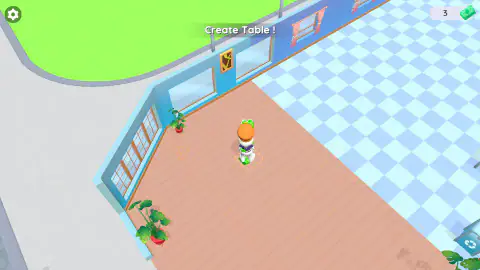
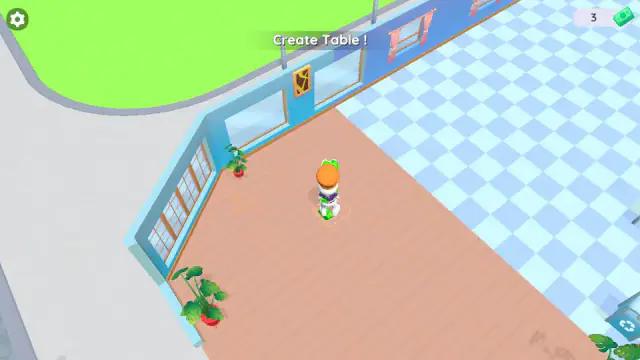
Most bakery games open in a finished kitchen with a customer already waiting. My Bakery opens outside an empty shop, with no money and one line at the top of the screen: "Create Table !" There is no cake in sight. First you pay for the furniture.
That is the shape of the game. It is a shop builder first and a bakery second. You walk a small chef around, and the shop grows one marked spot at a time. Each spot is a dashed square on the floor with a price, and a green arrow floats above the next one you need.
We played it on a computer three times. We built the first table, and we got stuck on the counter. This page shows what worked, what did not, and how to tell the two apart. The parts we only know from the game's listing are marked.
The game is credited to Dmitriy Kurylev. It came out in March 2026.
Why the counter will not build
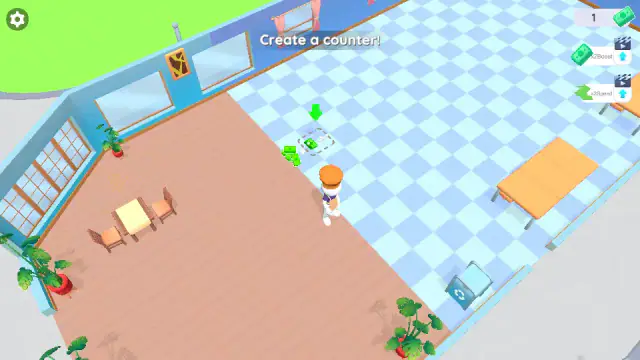
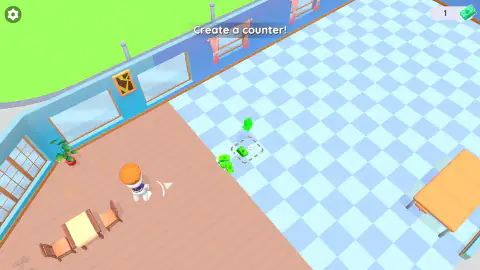
After the table, the banner asks for a counter. Its square sits on the blue and white tiles, and it also costs 5. After paying for the table, we had 1 left.
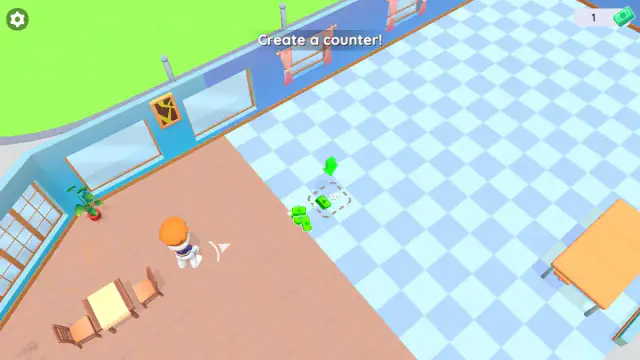
This is where we got stuck. In our first game, we spent four minutes on and around the counter square with 1 cash. The counter never appeared, and the cash stayed at 1.
So if your cash is lower than the number in the square, do not wait there. You need more money first.
Where that money comes from, we cannot yet tell you for sure. In one game, the chef walked over the little pile of green notes beside the table square. Our cash jumped from 0 to 6. In the next game, from a fresh start, the same walk gave us nothing for five minutes. We would rather say that than guess.
Why the counter comes second
The word counter in a shop comes from the Old French conteor. Before that, it was the Medieval Latin computatorium, from the Latin verb for counting. Dictionaries still give one meaning as a table or board where money is counted and business is done.
So a counter was named for money long before it was named for bread. My Bakery keeps the same order. First you get a table for guests to sit at. Then you pay for the place where cash changes hands, and its price is written right there on the floor.
The two x2 buttons
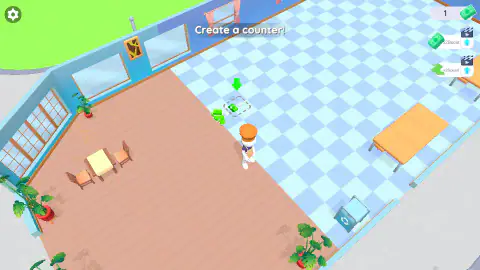
After a minute or so, a button called x2Speed shows up on the right side of the screen. About two minutes later, x2Boost joins it.
Both have a film-clapper icon. We did not press them, so we cannot say what they do.
What the shop looks like
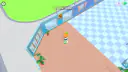
The shop starts almost bare. One corner has a wooden floor, potted plants and big glass windows. The rest has blue and white tiles, long orange tables and a vending machine. Outside there is a street with a zebra crossing. The camera looks down from above and follows the chef.
The cash, the task banner and a gear icon stay at the top of the screen. In our three games nothing else showed up there: no timer, no level number and no line of customers.
What the listing promises and we did not see
The game's listing describes what comes after the furniture. Customers arrive, you bake pastries, and you serve them quickly. Happy customers grow the business, which unlocks new recipes and a bigger dining room. It also talks about decorating your café.
We did not see any of that. No customer walked in, no oven appeared and no pastry was ever on screen. We cannot tell you how many recipes there are or whether the game has an end. We also played only on a computer, not on a phone.
Who it is for
My Bakery suits players who like to build something slowly. In our games there was no clock and no opponent. The hard part is the start: one banner, one arrow and not much more. Use the two numbers, the price and your cash, to decide when waiting is worth it.
More shop-builders from the same developer
Dmitriy Kurylev has made several games about growing a small business. My Phone Store does it with phones, laptops and tablets instead of cakes. Gas Station Simulator does it with fuel pumps and passing cars, and Trash Master with a recycling plant. For another kitchen with customers, try Burger Restaurant Simulator 3D. You can also browse our time management games or all our cooking games.
Screenshots
How to play My Bakery
- Click once inside the game. A card shows W, A, S and D with the words "MOVING" and "USE THE MOUSE". The keys did nothing for us until we clicked.
- Walk with W, A, S and D, or hold the mouse button and drag. You start outside on the pavement. If the glass wall stops you, walk right first, then up, to get onto the wooden floor.
- Find the green arrow. It floats over a dashed square with a 5 in it. That is the spot for your table.
- Check your cash in the top-right corner. If it shows 5 or more, walk into the square and stand still.
- Wait while green notes fly into the square. The table appears, and the banner at the top changes to the next task: "Create a counter!"
What our three games taught us:
- Stand still until it is done. Our cash went from 6 to 3 to 1 in a few seconds. Then a small table with two chairs popped up in the corner.
- Compare two numbers before you wait. Your cash is in the corner. The price is in the square. If your cash is lower, standing there does nothing.
- Follow the white arrow. When you walk away from the task, a white arrow shows up at the chef's feet. It points back to the square you need.
- Expect ad breaks. On one five-minute run, the game stopped for a full-screen ad seven times. Most came while we were walking.
Controls
| One click in the game | Wakes up the keys. Before our click, the keys did nothing. |
|---|---|
| W, A, S, D | Walk up, left, down and right. The camera follows you. |
| Hold the mouse button and drag | Also walks the chef the way you drag. |
| Finger (phones and tablets) | Moves the chef, the game's listing says. We did not try it. |
Features
- A new game starts outside an empty shop, with no money and one task: Create Table !
- Each new piece has a dashed square on the floor, with its price and a green arrow.
- The table costs 5 and the counter costs 5, paid by standing still in the square.
- A white arrow at your feet points back to the square you need.
- Your cash sits in the top-right corner, next to a green banknote.
- x2Speed and x2Boost buttons, with a film-clapper icon, show up after a minute or so.
- Baking, serving, new recipes and a bigger dining room, the game's listing says.
Game details
- Developer
- Dmitriy Kurylev
- Release date
- March 2026
- Last updated
- August 10, 2026
- Added here
- January 2026
- Technology
- HTML5 (3D)
- Platforms
- Browser (desktop, keyboard and mouse)
- Classification
- Casual , Clicker , Cooking , Fashion & Beauty , Simulation
- Saved progress
- Saving, when available, is managed by this game. Mava cannot confirm your level.
FAQ
How do you build the table in My Bakery?
Walk the chef into the dashed square with the green arrow above it. The square shows a price of 5. If you have 5 or more cash, stand still inside it. In our game the cash fell from 6 to 3 to 1. Then a small table with two chairs appeared, and the next task came up.
Why won't my counter build in My Bakery?
Look at your cash in the top-right corner. The counter costs 5. In one of our games we had only 1, and we stood on and around the square for four minutes with no counter. The cash stayed at 1 the whole time.
Why doesn't my character move in My Bakery?
Click once inside the game first. In our test, the keys did nothing until we clicked. After that, W, A, S and D walked the chef. You can also hold the mouse button down and drag.
Where do you get money in My Bakery?
We are not sure yet. Once, our cash jumped from 0 to 6 as the chef walked over the green notes beside the table square. On a second fresh start, the same walk gave nothing for five minutes.
What are x2Speed and x2Boost in My Bakery?
They are two buttons on the right side of the screen. Both have a film-clapper icon. We did not press them, so we cannot say what they do.
Do you need to download My Bakery?
No. My Bakery runs in your web browser, with nothing to install. Some phone apps have similar names, but this one is credited to Dmitriy Kurylev and opens with the "Create Table !" banner.
Can you play My Bakery on a phone?
The game's listing names Android and iOS and a finger control. We played it only on a computer, with the keyboard and the mouse.