










About Cooking City
Most kitchen games hand you a wall of buttons and a clock ticking down over the whole screen. Cooking City has neither. There is one counter with three things on it, and the only clocks in the game belong to the people standing at the window.
What you do is click, and the click only works on something that is ready. A basket of fries that has turned golden. A glass filling at the red drinks machine. The bowl of red sauce on its wooden stand. Then the customer, to hand the lot over. Click an empty stretch of counter or a machine that is still pouring and nothing happens at all — we spent a chunk of our first shift doing exactly that before the rule sank in. A click that does nothing is the game saying not yet.
A shift works like this. Customers walk up to the window one at a time, each with a card showing what they want in pictures. A bar across the top fills as you serve. When it reads ten out of ten, confetti comes down, the waitress puts her hands together, and a card hands you the level. The next shift opens at fifteen.
The game is credited to Boar Band and has been available since April 2026.
We played one session on a desktop: the whole tutorial shift, through the Level 1 card and into the start of the next one. Everything below came out of that.
The two counters at the top are counting different things
They sit side by side and it takes a shift to notice they are unrelated.
The one on the left is a small figure with a number next to it, and that number goes down as the restaurant gets busier: five when a single man stood at the window, three when there were two, one when four had gathered. It is not a score and it is not a life counter. It is how many people are still to come.
When it hits zero, a red CLOSED plate drops in beside the bar. That is the moment most players will think they have failed, and they have not. The door is shut, the queue is final, and the only thing left is to clear the people already standing there.
The counter on the right is a bar with a coin on it, and that is the shift itself: ten in the opening round, fifteen in the next. Fill it and the level is over. There is no clock across the top, no countdown, no bell. All the time pressure in this game is attached to individual customers, which is why a quiet counter feels genuinely quiet.
Cook it before anybody asks for it
The first thing the game teaches is not how to serve. It is how to wait — and specifically, how to have already waited before the order arrives.
That is the oldest working rule in professional kitchens, and it has a name: mise en place, French for putting everything in its place. It covers all the work done before service starts, and the whole brigade system that organises a restaurant kitchen into stations, usually traced to Auguste Escoffier at the end of the nineteenth century, exists to make it possible. A cook on a busy line is not inventing a dish when the ticket comes in. They are assembling things that were started earlier.
Fast food took the same idea further, because fries are the perfect example of it. They are slow to cook and fast to hand over, so no counter in the world starts a basket when somebody asks for one.
Cooking City is that rule shrunk to one screen. The fryer runs on its own, the green clock badge tells you it is busy, and a basket started during a lull turns golden about when the next customer gets to the window. Play reactively — wait for the card, then cook — and the meters beat you. Play ahead and the orders come out almost as fast as you can click. The game never explains any of this. It just builds a kitchen where only one of the two habits works.
Padlocks, coins, and the button we left alone
Look above the two fryer baskets and there are two more lids with a padlock drawn on each. They are there from the first minute, in the first kitchen, before anything has been earned. On the wall to the right, a poster shows a hot dog that this counter cannot make. The kitchen you are given is openly presented as a fraction of the kitchen that exists.
The card that ends a shift is where the other half comes from: it pays out in coins and diamonds, and the game says those are what upgrade the kitchen. Beside the plain green Continue sits a second button offering to double the coins, with a small video icon on it. We took Continue, finished the session without watching anything, and the shift that followed started normally. The game also advertises purchases of its own, which we did not test.
What we cannot tell you is how far the thing goes: how many shifts, how many venues, what each padlock opens and what it costs. Our session ended early in the second shift, and we would rather say that than guess.
The city in Cooking City
It is worth looking up from the counter once. Past the window there is a terrace of café tables with pink checked cloths, a park with a fountain behind it, and a skyline of glass towers with the Statue of Liberty standing among them. The restaurant next door, going by its sign, offers psychic readings.
None of it does anything. You cannot walk out there, the tables never fill, and the scenery is the same from the first customer to the last. But it is the reason the game is called Cooking City rather than Cooking Café, and it tells you which kind of city it has in mind before a single word is read.
More counters to run
If the serving is what you came for, Paws And Pals Diner puts you behind the same kind of counter with a staff and a clientele of animals. My Bakery slows the whole thing down into baking, serving and decorating a café of your own. Juice Tycoon is the one to try if the padlocks were the interesting part: it is built almost entirely around upgrading the machines that serve for you. And Cooking in the City of Winds drops the counter altogether and puts you at a festival, making the dishes themselves. The rest are in cooking games.
Screenshots
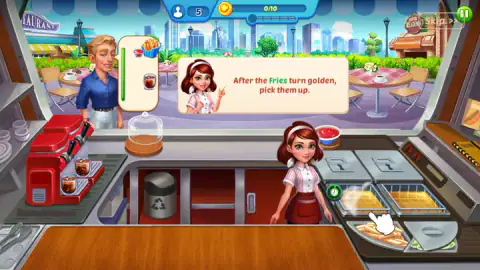
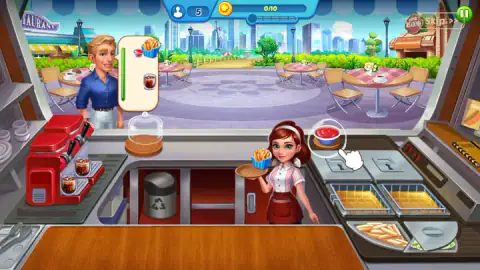
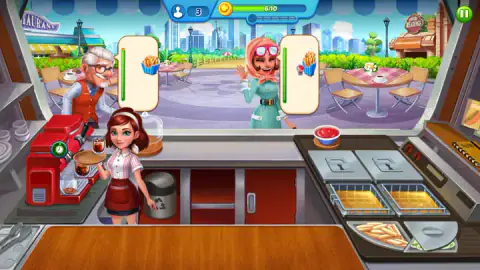
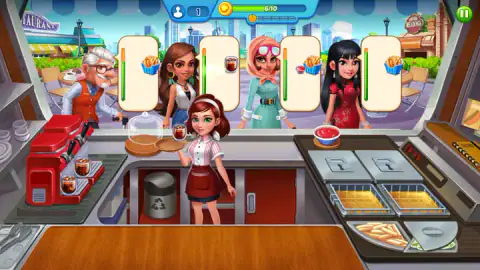
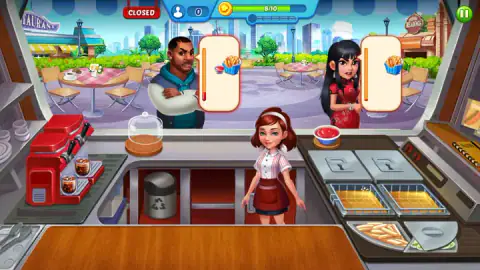
Taken by opening the game ourselves and letting it run — not supplied by the publisher, and not the same picture every other site shows.
How to play Cooking City
- Start something cooking before you look at anyone. Click a fryer basket and the fries go in. A round green badge with a clock face sits over the station while it works.
- Read the cards at the window. Each waiting customer has one, and it is drawn rather than written: a carton of fries, a glass of cola, a dish of ketchup, a burger.
- Click the fries when they come up golden. The game says so itself in the opening shift: "After the Fries turn golden, pick them up." They go onto the tray the waitress is carrying, and she can hold more than one thing at once.
- Add the rest of the order — the bowl of sauce, a glass from the drinks machine — and then click the customer to hand it across the counter.
- Keep an eye on the meter beside each card. It runs green, then orange, then red, and the customer's face changes with it. The one we kept waiting ended up scowling with his arms folded.
What our shift taught us:
- The fryer does not need you. It keeps going while you pour a drink and while you serve someone else. Every second you stand still with an empty basket is a second you are not getting back.
- A dead click is information. The counter and a half-poured glass simply ignore you. Nothing is mis-aimed; the thing is not ready.
- Serve the angry one first. The meters are the only pressure in the game, and they run independently. The face above the card tells you which one is closest to the end without your having to read the bar.
- The tutorial can be skipped, and the skip sits in the top corner. The pictures carry the rest, so you lose very little by jumping it.
- Nothing we pressed on the keyboard did anything. This is a one-button game, and the button is the mouse.
Controls
| Click | Picks up whatever is ready and hands it over — a basket of fries, a glass at the drinks machine, the bowl of sauce, then the customer at the window |
|---|---|
| Click again | Starts a station cooking before anyone has ordered; a green badge with a clock on it shows the station is working |
| Skip >> | Clears the tutorial prompts in the opening shift |
| No keyboard | Nothing we pressed on the keyboard did anything; every action in our session was a click |
Features
- One counter holding two deep fryers, a red drinks machine and a bowl of ketchup, with every order built from those
- Order cards drawn as pictures rather than written as words, so nothing has to be read to be served
- A patience meter beside each customer that runs from green to orange to red while the face above it sours
- A bar at the top that fills to ten in the opening shift and fifteen in the next, and ends the level when it is full
- A red CLOSED plate that drops over the window once the last customer of the shift has walked up
- Two more cooking stations sitting under padlocks from the first minute of the first shift
- It has been available since April 2026
Game details
- Developer
- Boar Band
- Release date
- April 2026
- Last updated
- August 10, 2026
- Added here
- February 2026
- Technology
- HTML5 (2D)
- Platforms
- Browser (desktop)
- Classification
- Cooking , Fashion & Beauty , Strategy
- Saved progress
- Saving, when available, is managed by this game. Mava cannot confirm your level.
FAQ
How do you play Cooking City?
You run the counter of a small city restaurant with one mouse button. You click a fryer to start the fries, click them again when they come up golden, add whatever else the order card shows, and then click the customer to hand it over. The shift ends when the bar at the top of the screen is full.
What does the CLOSED sign in Cooking City mean?
It means nobody else is coming, not that you have lost. A small figure at the top of the screen counts the customers still to arrive, and the red CLOSED plate appears beside the progress bar the moment that number reaches zero. You finish serving the people already at the window, and the shift ends when the bar fills.
What are the numbers at the top of the screen?
There are two of them and they do different jobs. The figure on the left counts how many customers are still to come, falling as they walk up to the counter. The bar on the right carries a coin and fills as you serve, reading 0/10 in the opening shift and 0/15 in the next one.
Is there a timer in Cooking City?
Not over the shift as a whole. The only clocks belong to the customers: each order card has a vertical meter beside it that runs green, then orange, then red, and the face above it changes with it. We did not see a loss screen in our session, but we also never let a meter run out with the counter empty.
Do you need to read English to play Cooking City?
Only for the tutorial. The orders themselves are pictures — a carton of fries, a glass of cola, a dish of ketchup, a burger — so a player who cannot read the language can still see exactly what is wanted. The handful of tutorial lines are in English, and a Skip button sits in the top corner of them.
Who made Cooking City?
The game is credited to Boar Band and has been available since April 2026. No studio name appeared on screen while we played, and other sites list games of this name under other companies, so that credit is the one we can point at rather than a settled fact.
Does Cooking City have ads or in-app purchases?
We were never made to watch anything. The card that closes a shift pays out in coins and diamonds and offers to double the coins behind a button with a video icon on it, next to a plain Continue that we took instead. The game also advertises purchases of its own, which we did not test.
Can you play Cooking City on a phone?
The game's listing mentions it for PC only, and we played it on a desktop with a mouse, so we cannot tell you how it behaves under a finger. Everything in it is a single click on a single object, which is the kind of control that usually survives the move to a touch screen, but we have not checked it and will not claim it.