













About Yummy Hotdog
Most cooking games open in a clean kitchen where everything works. Yummy Hotdog opens with a screwdriver. Before a single piece of meat appears, you turn a food processor upside down, take four screws out of its base and look at the wiring.
That first job sets the tone. This is a game of small, exact steps done in a fixed order, with a hand on screen showing which object comes next. The skill is in reading that hand correctly, and we misread it for a full minute.
The game is credited to Go Panda Games and has been available since June 2026.
Our time with it was a single sitting of roughly four minutes, at a desk, using only the mouse. We got through the Tasklist, into the first task, took the cover off the machine and reached the plugs inside. We did not finish that task, and we did not cook a hot dog. This page says what the first task is like and where the rest begins.
Four screws, in order: top, left, bottom, right
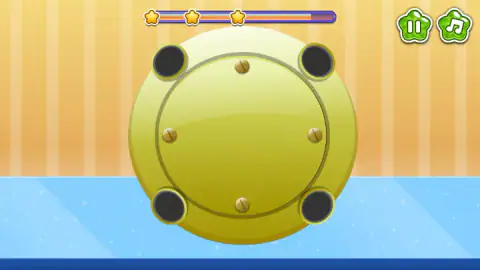
The underside of the food processor is the clearest screen in the game. The plate is a yellow disc with a foot in each corner and a slotted brass screw at the top, right, bottom and left of an inner ring.
Once we had clicked the screwdriver, it went to the top screw and left an empty hole behind. The hand was already on the left screw. Then came the bottom one, then the right. Each screw we clicked in that order came out, and we never tested another order, so we cannot say whether the game insists on it.
When the fourth was gone, the plate gave way to the inside of the machine.
The star bar is a clock, and it only cost us stars
Across the top of the task runs a bar with three gold stars on it. It starts full and shrinks from the right the whole time you work.
It is quick. The third star went dark after about a minute. The second followed at about a minute and a half, and the bar was empty in just under two minutes. Our lost minute with the screws cost us two stars before the cover was even off.
What it did not do is end the task. With the bar empty and one star still lit, we went on working for another minute and no fail screen appeared. So the clock here measures how well you did, not whether you may continue. What the stars are worth at the end of a task we cannot tell you, because we never ended one.
Inside the machine: three wires and a panel of sockets
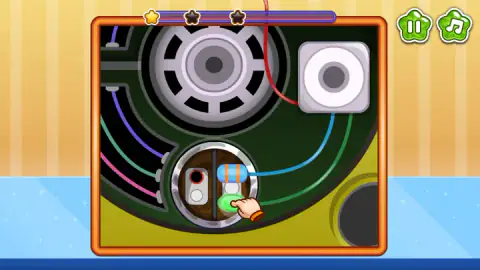
The close-up shows a big grey grille, a square white part and three wires in red, blue and green. At the bottom is a round panel with two plates full of holes: some ringed in blue, one in red, and a slot rimmed in green.
We saw this screen in two states. In the first, a blue plug and a green plug were seated on the right-hand plate, with the hand resting on the green one. In the second, both plugs hung loose at the bottom of the frame and the sockets were empty.
We clicked plugs and sockets and nothing seated. The colours suggest the answer, a green plug for the green-rimmed slot and a blue plug for the blue-ringed holes, but we never held a plug and pulled it to its socket. That is the move we would try first, and it is where our session stopped.
Five cards, and what the other four picture
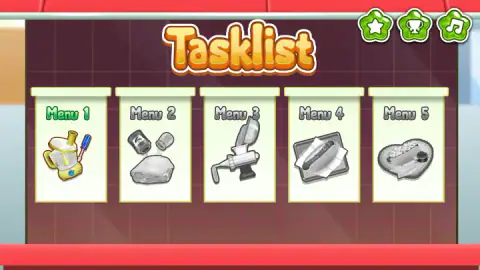
The Tasklist is the map of the whole game. Its cards are:
- Menu 1: a food processor and a screwdriver, the repair described above.
- Menu 2: a piece of meat under two shakers.
- Menu 3: a meat grinder.
- Menu 4: a hot dog in a bun, on a tray lined with paper.
- Menu 5: a hot dog served on a heart-shaped plate.
Read in a row, the cards run from fixing the equipment to seasoning, grinding, assembling and serving. We only opened the first, so the other four are the cards' own pictures and not a report.
Three round green buttons sit above the cards: a star, a trophy and a music note. We left the star and the trophy unopened.
Why a hot dog starts in a food processor
The first two machines on the cards are not there by accident. A hot dog sausage is what butchers call an emulsified sausage. The meat is ground, then chopped again with ice and seasoning until it stops looking like mince and becomes a smooth, pale paste. Sausage makers call that paste a batter.
At home, the tool for that second step is a food processor, and the tool for the first is a grinder. Menu 1 and Menu 3 show exactly those two. The game's own listing speaks of mixing a batter, which matches. The repair is the game's way of making you earn the machine before you use it.
Who it is for
Players who like to be shown each step and do it neatly. The tasks are short, there is no way to lose that we found, and the pressure comes only from a bar of stars.
It is a poor fit if you want a restaurant to run, with orders and customers. Nothing of that kind appeared in the Tasklist or in the first task.
More from Go Panda Games
Yummy Waffle Ice Cream is the sister game from the same studio, with waffles in place of sausages. Funny Hair Salon uses the same idea of a task list that opens one station at a time, in a barber's chair, and Funny Rescue Gardener comes from the same studio too. For a different kind of kitchen, Cook Soups: 3 in a Bowl turns soup recipes into a triple-match puzzle. The rest are under cooking games.
Screenshots
Taken by opening the game ourselves and letting it run — not supplied by the publisher, and not the same picture every other site shows.
How to play Yummy Hotdog
- On the Tasklist, click the Menu 1 card. It is the only card in colour. We clicked the grey Menu 2 first and nothing opened.
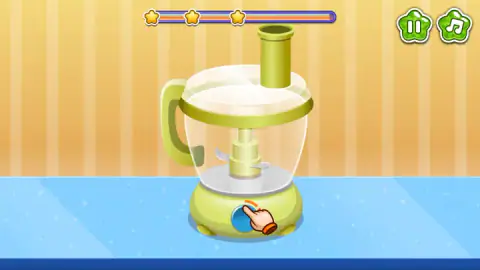
- A lime-green food processor stands on a blue counter, with a hand pointing at the blue button on its base. Click the button. The view changes to the underside of the machine: a round yellow plate, four black rubber feet and four brass screws.
- Click the screwdriver with the blue handle, to the right of the plate. Then click the screws one at a time.
- With the last screw out, a framed close-up of the inside opens, with coloured wires, plugs and a round panel of sockets.
What one session taught us:
- Tool first, then the screw. We clicked screws and rubber feet for about a minute and nothing moved. One click on the screwdriver changed that.
- The hand rests on the thing to use, not on the place to use it. All through that lost minute it was sitting on the screwdriver's handle. We read it as pointing at a screw.
- One click per screw. After the tool was picked up, each screw came out with a single click, and the hand moved on to the next one.
- Leave the keyboard alone. Arrow keys, Space and Enter did nothing we could see. Everything is done with the mouse.
Controls
| Click (left mouse button) | Everything we did was a click on a card, a button, a tool or a screw |
|---|---|
| Menu 1 card on the Tasklist | Opens the first task; the grey Menu 2 card did not open when we clicked it |
| Blue button on the base of the food processor | Turns the machine over to show the four screws underneath |
| Screwdriver (blue handle, right of the plate) | Has to be clicked before any screw will come out |
| Pause button (top right, two bars) | Pauses the task |
| Music button (top right, note) | On screen throughout; we did not press it |
| Arrow keys, Space and Enter | Tried, with no result we could make out |
Features
- A Tasklist of five cards, Menu 1 to Menu 5, with only the first one in colour at the start
- A first task that is a repair, with a screwdriver, four brass screws and a set of coloured plugs
- A pointing hand that sits on the object you are meant to use next
- A three-star bar that drains while you work and was empty in just under two minutes
- No fail screen when the bar ran out; the task carried on with one star lit
- Cards for the later steps that picture seasoning meat, a meat grinder and a finished hot dog
- Star and trophy buttons on the Tasklist, next to the music button
Game details
- Developer
- Go Panda Games
- Release date
- June 2026
- Last updated
- June 11, 2026
- Added here
- April 2026
- Technology
- HTML5 (2D)
- Platforms
- Browser (desktop, mouse), Browser (mobile & tablet)
- Classification
- Cooking , Simulation
- Saved progress
- Saving, when available, is managed by this game. Mava cannot confirm your level.
FAQ
How do you play Yummy Hotdog?
You work through a Tasklist of five cards, one task at a time, by clicking the tool or part that a pointing hand shows you. The first card, Menu 1, is not cooking. You press the blue button on a food processor, take four screws out of its base with a screwdriver and then deal with the plugs inside.
Why do the screws not come out in Yummy Hotdog?
Because you have to click the screwdriver first. We clicked the screws themselves for about a minute and nothing moved. After one click on the screwdriver's blue handle, each screw came out with a single click, in the order top, left, bottom, right.
Is there a time limit in Yummy Hotdog?
There is a bar with three stars at the top of each task, and it drains as you work. In our run the third star went dark after about a minute and the bar was empty in just under two minutes. Nothing stopped us when it ran out. The task went on with one star still lit.
Can you start with any menu in Yummy Hotdog?
Not in what we saw. On a fresh start only Menu 1 was in colour and the other four cards were grey. We clicked Menu 2 first and nothing opened. Menu 1 opened at once.
Do you actually cook a hot dog in Yummy Hotdog?
The cards say so, and we cannot confirm it first hand. Menus 2 to 5 picture a piece of meat under two shakers, a meat grinder, a hot dog on a tray and a hot dog on a heart-shaped plate. Our session ended inside Menu 1, the repair, so we did not get to the food.
Can you play Yummy Hotdog on a phone?
It is listed for PC, Android and iOS, in landscape. Our own time with it was on a desktop with a mouse, so the phone side is the listing's word and not ours.
Who made Yummy Hotdog?
The game is credited to Go Panda Games, the studio behind Yummy Waffle Ice Cream and the Funny series of salon and rescue games. The game was published in June 2026.