
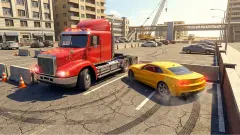


About Hungry Cars
We reached the end of the first level at 10, the same number we started with. In most games built on eating smaller things, that would be a poor result or a dead one. Hungry Cars simply showed us the words Level Complete.
That is the first thing to understand. Level 1 does not ask you to reach a size. A dark red bar creeps across the top of the screen, and when it is full the level is over, however much or little you ate. What your number seems to change is what you take away from the end, and that part we did badly.
We should say how far we got, because it is not far. We finished level 1 on a computer and then got stuck in the garage that follows, so we never drove level 2. We also did not steer: through the whole level we pressed Enter rather than the arrow keys, and everything we ate or hit came from traffic meeting us in our lane. So this page can tell you exactly what the screens show, and very little about how the car handles.
The game comes from Robot Wizard Games, according to the game's listing, and it has been available since August 2026.
What a hit looks like
Touching a car throws it aside, tumbling, with its number gone. A figure then floats off your own car.
Every gain we saw read +1, and two quick ones stacked up into a blurred pair of them. Losses read -1 and -2, and your car flashes white when it happens. That white flash is the quickest way to know you hit the wrong one, since the car you struck has already lost its number.
We could not work out why one hit cost 1 and another 2. Our car also ended up tilted and several lanes over without any steering from us, and being struck is our best guess for that.
Across the level our number bounced between 10 and 13, and it was back at 10 when the bar filled. This is why the arithmetic feels gentle. One mistake undoes one or two meals, not the whole level.
The bar, and the last stretch nobody explains
The bar takes about a minute to fill, at a steady pace, whatever you do. Then three things change at once. A ruby counter appears at the top, a flame shoots out behind your car, and the camera drops down to a long straight view of the bridge with rubies scattered ahead.
Our number fell fast here, from 10 to 2 in moments. Shortly after that the level ended, with the counter still at 0.
Our reading is that your number is the fuel for this run: the more you ate, the further you go, and the more rubies you can reach. We have one attempt behind that, so treat it as a likely explanation and not a rule. If it holds, it answers the question the bar raises. Eating does not decide whether you finish. It decides what you are paid.
The results screen and the garage
Level Complete shows a row of circles marked 1 to 4, then a fifth with a crowned skull, which may well be a boss. A little car moves along them, and the label rolled from Level 1 to Level 2 while we watched.
Under that sits a strip of multipliers, x2 to x5 and back to x2, with a pointer sliding along it. Below are two buttons, Watch Ad and Continue, each showing a ruby amount. Both said +0 for us, since any multiplier on nothing is still nothing. We pressed Continue, and we cannot tell you what the other one pays.
The next screen announced a new colour, a plain red square. Behind it was the garage, an orange floor with the car in the middle and a counter reading 200 rubies, which the results screen had not promised. Our car stayed tan.
- Twelve colour tiles. White and red are open, and the other ten carry padlocks in their own colours.
- A row of five pads along the bottom: a yellow one with circling arrows, a dark red one marked with a ruby and 200, and three blank grey ones.
- Three red arrows that pulse and point at the 200 pad.
- A road icon at the top left and a gear at the top right.
This is where we stopped. We clicked the 200 pad and the circling-arrows pad again and again, and tried dragging them. Nothing moved and the count stayed at 200.
We can tell you what we did not try, which is probably more useful. We never pressed the road icon, which looks like the way back out to the next level. We also never used the arrow keys in this room. The pads lie flat on the floor at the same angle as the tiles, and the arrows start from around the car, so our guess is that you drive onto them rather than click them. If you get stuck where we did, try those two first.
An old rule with the sums done for you
Eat what is smaller and avoid what is bigger is the rule that Agar.io made famous in 2015, and it is why games like this tend to be sorted with .io titles. The difference is what you have to judge. In those games you compare sizes by eye, and that is half the tension. Here every car wears the answer as a coloured number that updates as you grow.
Hungry Cars is also not an online game as far as we could see. There were no player names and no leaderboard, only traffic.
Who it is for
The colour rule needs almost no reading, so a young player can pick it up on the first go, and the crashes are toy-like. Cars tumble and nothing worse happens.
It is less suited to anyone after a long stay on one road, since a level is short. We also cannot vouch for what comes later, as we saw one level of it. The garage needs either more patience or better guesses than we brought.
More traffic to compare
Highway Traffic keeps the busy road and asks you to miss the cars instead of hitting them, while Driver Club: Highway Racing and TRAFFIC Rush Online also turn on changing lanes between moving cars. For eating without the road, try Black Hole: Eat the Universe. More in our driving games.
Screenshots
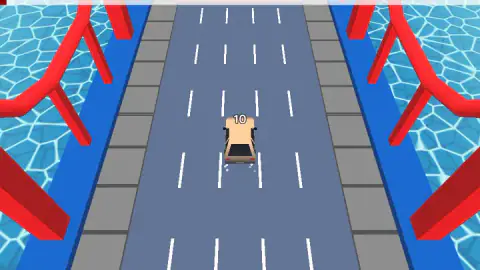
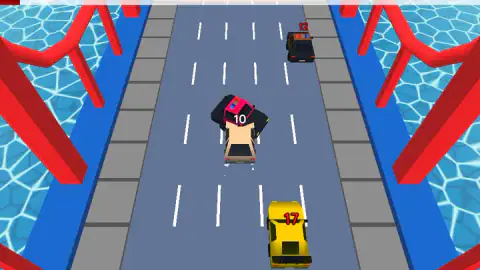
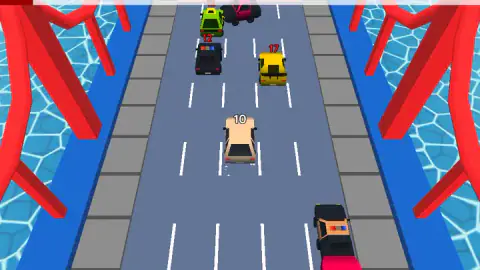
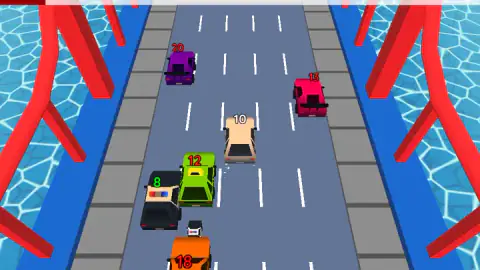
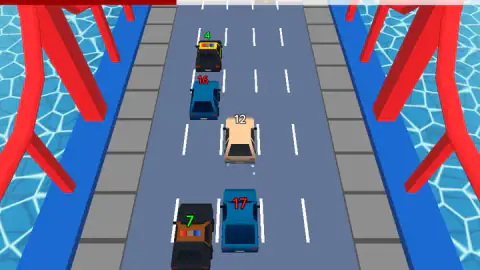
Taken by opening the game ourselves and letting it run — not supplied by the publisher, and not the same picture every other site shows.
How to play Hungry Cars
- Click or tap the text on the title screen. Your tan car starts rolling with a white 10 over its roof.
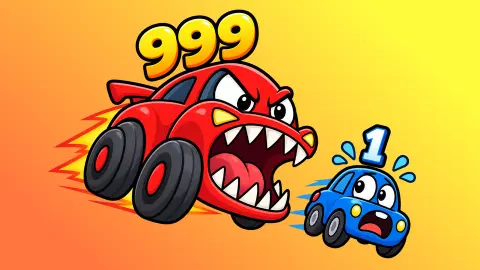
- Read the colours. A green number on another car means it is yours to eat. A red one means it is stronger than you.
- Move into the green ones. Its listing gives the arrow keys on a computer and a joystick on a touch screen, in all four directions.
- Keep an eye on the bar. When it fills, the camera drops low, a flame appears behind your car and rubies show up on the road.
- Press Continue on the results screen, and you arrive in the garage.
Tips from our run:
- Trust the colour, not the size. A big green car is food and a small red one is not. Nothing about the shape of a car tells you its strength.
- Recheck as you grow. Colours are worked out against your current number. A car marked 12 was red when we had 11 and green when we had 12, so a hit can turn a meal into a threat.
- Equal counts as green. Cars with our exact number showed green every time. We cannot say for certain that eating one always pays, because cars pass too quickly to pair each gain with a number.
- Go after the green ones. Waiting for traffic to come to us fed us too slowly: over the whole level we never passed 13, on a road where numbers ran from 4 to 24.
Controls
| Arrow keys | Move the car up, down, left and right, according to the game's listing. We did not use them during our level |
|---|---|
| On-screen joystick | Moves the car on phones and tablets, according to the listing. Not tried |
| Click or tap the start text | Starts the game from the title screen |
| Continue | Leaves the results screen and goes on to the garage |
Features
- Every car on the bridge carries a number, and its colour tells you whether you can eat it
- Five lanes of traffic, with numbers from 4 to 24 in our level
- A bar across the top of the screen ends the level when full, about a minute in
- A last stretch with a flame behind the car, a lower camera and rubies on the road
- A level track of four numbered circles and a fifth with a crowned skull
- A garage floor with twelve colour tiles, two open and ten padlocked
Game details
- Developer
- Robot Wizard Games
- Release date
- August 2026
- Last updated
- October 1, 2026
- Added here
- July 2026
- Technology
- HTML5 (3D)
- Platforms
- Browser (desktop), Browser (mobile & tablet, touch)
- Saved progress
- Saving, when available, is managed by this game. Mava cannot confirm your level.
FAQ
How do you play Hungry Cars?
You drive along a five-lane bridge full of numbered traffic. Touch a car with a green number and your own number goes up. Touch one with a red number and it can go down. A bar at the top of the screen fills as you go, and the level ends when it is full.
What do the numbers and colours mean in Hungry Cars?
The white number over your car is your strength. Other cars show a green number when theirs is equal to or lower than yours, and a red one when it is higher. The colour changes as you grow: a 12 was red when we had 11 and green when we had 12.
Can you lose in Hungry Cars?
We did not lose, and we did not see a game over screen. Hits took 1 or 2 from our number, which stayed between 10 and 13 through the first level. The level finished anyway when the bar filled. We never saw what happens if your number reaches zero in traffic.
How do you get rubies in Hungry Cars?
Rubies lay on the road in the final stretch of the level, after the bar filled. We collected none, and the results screen offered +0. We then had 200 in the garage alongside a new colour, and we cannot explain where those came from.
What is the 200 ruby button in the Hungry Cars garage?
It is a pad on the garage floor showing a ruby and the number 200, with red arrows pointing at it from around the car. It looks like the price of a new colour, though that is our reading. Clicking it did nothing for us and the count stayed at 200. Because it lies on the floor beside the car, we would next try driving onto it, which we did not test.
How many levels does Hungry Cars have?
We do not know. The results screen shows four numbered circles and a fifth with a crowned skull, which may be a boss, and may repeat. We finished level 1 and were never able to start level 2.
Is Hungry Cars an online .io game?
It uses the eat-the-smaller rule that many .io games made famous, but in our level we saw no player names, no leaderboard and nothing to suggest other people on the road. Every rival was traffic.
Who made Hungry Cars, and can you play it on a phone?
The game is credited to Robot Wizard Games and lists the game for PC, Android and iOS, in landscape and portrait, with a release in August 2026. We played on a computer; its listing describes a joystick for touch screens, which we did not try.