







About Turbo Racer Extreme
Most highway racers hand you a score that climbs every second you stay alive. Turbo Racer Extreme does not. We drove almost a kilometre through traffic, passed a tow truck and a string of white cars, and the score in the top left corner still read 0.
Distance is free here; points are not. The listing says they come from passing close to other cars, and our clean, careful driving earned exactly nothing. The game never says so in words. The zero says it for you.
The rest is simple to pick up. You drive a car down a six-lane highway, hold the up arrow to go faster and slide left and right to get round slower traffic. A run lasts until something stops it. A green readout at the bottom right counts your speed and the kilometres behind you.
We played for about four minutes on a desktop, with the keyboard and the mouse, and made two runs in the one way mode. The first ended a little under a kilometre in, the second at about half that. We did not try the other two modes, the other stages or a second car.
The game is credited to Studd. It has been available since March 2025.
One way, two way, time attack: three ways to use the same road
The mode screen shows three tiles side by side: a single arrow for one way, two opposed arrows for two way and a stopwatch for time attack. Each has its own "Best score" box, so a good run in one mode does not count for another.
Time attack has one extra setting. Under its tile sit two arrow buttons around a time, 30 seconds when we opened the screen. You decide how long the clock runs before you start.
We chose one way. The road is a wide highway, three lanes on each side of a double line, with guardrails along both edges. The double line looks as if it marks oncoming traffic. In this mode it does not. When we zoomed in on the cars to our left, they were showing us their tail lights, the same as the ones on our right. Every car on the road was going our way.
That makes one way the gentle mode. Everything ahead of you is moving in your direction, only slower, so each car closes on you at the difference between the two speeds. Two way, by its name, sends cars at you on one side; there the closing speed adds up instead. We did not play it, so we cannot tell you how the game handles it.
The listing names three stages, sunny, night and rainy. We drove in daylight, past dry hills, bare trees, telegraph poles and one two-storey house, and later between grey rock walls.
Traffic, and why the score stayed at zero
The highway starts empty. On our first run the first traffic showed up a little over half a kilometre in: a tow truck with an amber light bar on its roof, two white cars ahead of it and more beyond. A little further on there was a white saloon in the left lanes and a green truck far ahead.
We passed them by changing lanes in good time, leaving at least a lane of room between us and them. That is what a driving instructor would want. It is also why we scored nothing. The listing describes the reward as points for passing close, and the score box stayed at 0 through every capture we took, including one with a white car right alongside us at 46 km/h.
We never found out how close counts as close, or whether speed matters too. What we can say is that a lane's width of room earns no points at all.
Each run ended before the first kilometre. The listing says that getting hit or bumped by other cars ends a run. We did not catch either moment on screen, so we cannot tell you for certain what stopped us or show you what it looks like.
The dial is a rev counter, not a speedometer
The round dial in the bottom right corner is the first thing your eye goes to, and it is easy to read it wrong. It runs from 0 to 10, and it does not show your speed.
The proof is in three moments from our run. At 46 km/h the needle sat just past 2. At 68 km/h it sat in nearly the same place. At 59 km/h, on the second run, it was close to 4. A needle that tracked speed could not do that.
What it does track is how fast the engine is turning. On a real car that dial is the tachometer, and its numbers are thousands of engine turns a minute. The needle climbs as you speed up in one gear, then drops back when the car shifts up, even though you keep getting faster. With the car standing still at the start, our needle was already above 1, which is the engine idling.
So use the green numbers for speed and distance. The dial tells you the car is changing gear, and nothing you need for steering.
Who it is for
Players who like short runs on a straight road and want something to do with their hands right away. There are no tracks to learn and no rivals to beat, only traffic and the distance counter. The listing adds a leaderboard and cars you can buy with points turned into coins; we earned neither points nor coins, so we never saw the shop.
It suits a child who knows the arrow keys, with one warning: the reward is for risky driving, and the safe player is the one who scores nothing. If you want a race against other drivers on a circuit, this is not that game.
More traffic racers, and more from Studd
Highway Traffic is another four-lane run where the money is in the near miss rather than the distance. Driver Club: Highway Racing turns the same kind of road into a career of timed challenges. From the same studio, Gunner Pursuit puts you on the gun at the back of a moving pickup instead of at the wheel, and Agent Sniper City trades the highway for a rifle and a crowded street. The rest are under driving games.
Screenshots
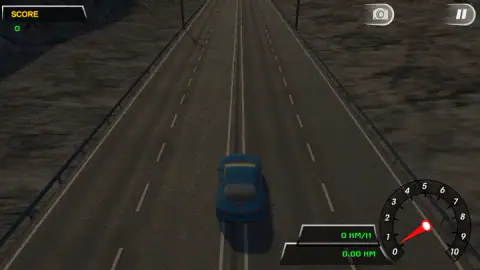
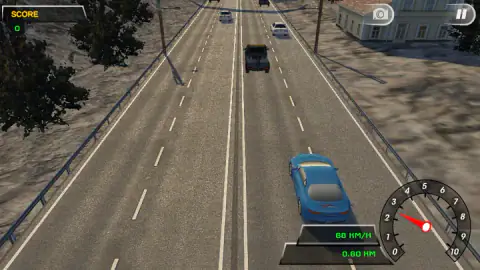
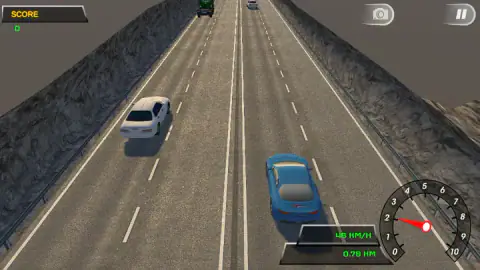
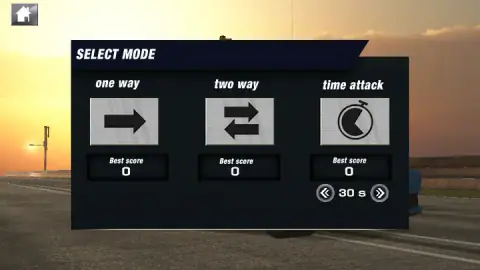
Taken by opening the game ourselves and letting it run — not supplied by the publisher, and not the same picture every other site shows.
How to play Turbo Racer Extreme
- Click Play. An ad may cover the next screen for a moment; ours did.
- Pick your car and click Next. The first one is the Speedster, a blue coupe rated on three bars for speed, handling and brake.
- Choose a mode on the SELECT MODE screen, then a stage.
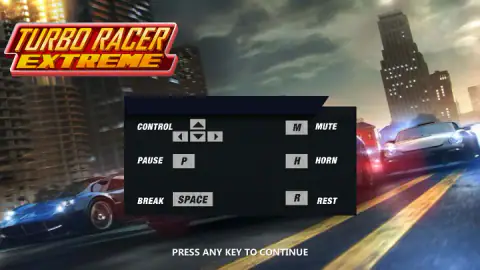
- A card lists the keys. Press any key to close it and start.
- Hold the up arrow to build speed. Use left and right to change lanes and get round the traffic.
What two runs taught us:
- Keep the throttle down. We pressed the up arrow in short bursts, and between bursts the speed fell back. Our best was 68 km/h, and a few seconds later we were at 46 again.
- Read the green number. The big dial at the bottom right is not your speed. More on that below.
- The zero is not a bug. If your score stays at 0, you are driving too safely for this game.
- Expect the controls card every time. It came back after our first run ended, and the next start was from a standstill at 0.00 km.
- Look up the road. The camera sits high behind the car, so you can see traffic coming a long way ahead. Pick your lane early.
Controls
| Arrow Up (hold) | Accelerates; let go and the speed starts to fall |
|---|---|
| Arrow Left / Arrow Right | Moves the car across the lanes |
| Space | Brake, written "BREAK" on the controls card; we did not test it |
| P / M / H / R | Pause, mute, horn and restart, as listed on the controls card; we did not test them |
| Any key on the controls card | Starts the run; the card comes back before every run |
| Mouse | Every menu, from the car screen to the mode and stage choice |
Features
- Three modes on one screen, one way, two way and time attack, each with its own best score
- A time attack length you set yourself with two arrows, starting from 30 seconds
- A six-lane highway split by a double line, with cars, vans and a tow truck in the way
- A green digital readout for speed and distance, beside a dial that counts engine revs
- A starting car called Speedster, rated on three bars for speed, handling and brake
- Pause and camera buttons in the top right corner during a run
Game details
- Developer
- Studd
- Release date
- March 2025
- Added here
- May 2025
- Technology
- HTML5 (Unity WebGL)
- Platforms
- Browser (desktop)
- Saved progress
- Saving, when available, is managed by this game. Mava cannot confirm your level.
FAQ
How do you play Turbo Racer Extreme?
Click Play, pick a car, pick a mode and a stage, then press any key on the controls card. Hold the up arrow to accelerate and use left and right to change lane. The run goes on until something stops it, and the distance in kilometres is shown in green at the bottom right.
What are the modes in Turbo Racer Extreme?
There are three on the SELECT MODE screen, one way, two way and time attack, and each keeps its own best score. Time attack has a length you can change with two arrows, set to 30 seconds when we opened it. We played one way only.
What is the difference between one way and two way in Turbo Racer Extreme?
In one way every car on the road travels in your direction, on both sides of the double line down the middle. We checked the cars on the left side and they were showing us their tail lights. Two way, by its name, puts oncoming traffic on one side; we did not play it.
How do you score points in Turbo Racer Extreme?
The listing says points come from passing close to other cars. In our two runs, at speeds up to 68 km/h and with several cars passed, the score never left zero, so the passes have to be closer or faster than ours were.
What are the controls of Turbo Racer Extreme?
The arrow keys steer and accelerate. The card before each run also lists Space for the brake, P for pause, M for mute, H for the horn and R for restart. We used the arrows and the mouse; the other keys we did not test.
Is the big dial in Turbo Racer Extreme the speedometer?
No. Your speed is the green number in km/h under it. The dial runs from 0 to 10 and showed almost the same reading at 46 and 68 km/h, then a much higher one at 59 km/h, which is how a rev counter behaves when the car changes gear.
Can you play Turbo Racer Extreme on a phone?
It is listed for PC only, and the controls are keyboard keys. We played on a desktop and did not try a phone or tablet.
Who made Turbo Racer Extreme?
The game's listing credits Studd, a studio that also has the chase shooter Gunner Pursuit and the sniper game Agent Sniper City there. It was published in March 2025.