







About Shopping Simulator
Most clicker games hide what the money is for. You tap, a number grows, and the number buys a bigger number. Shopping Simulator says it out loud: the cash you earn tapping a cartoon hamster goes on burgers, trench coats and smart watches, each one shown with a star rating and thousands of reviews like a page from an online shop.
That is the loop, and there is no other. You start with 1000$ and a shelf labelled BUY SOMETHING. When the money runs out, you go back to the hamster, or to a picture puzzle, and earn it again. There is no timer, no score to beat and no way to lose. The header at the top of the screen keeps giving you small tasks, such as EARN 100$ IN ANY GAME or TIME TO WASTE!.
The game is by farenlait, according to the game's listing, and it was published in June 2025. We spent our starting money, tapped the hamster, opened the puzzle and checked what survives a page reload. This page explains what each screen does and what nobody tells you at the start.
A tap is worth one dollar, and that is the point
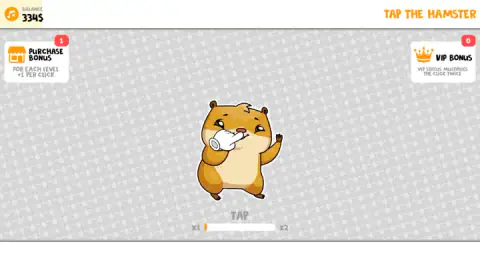
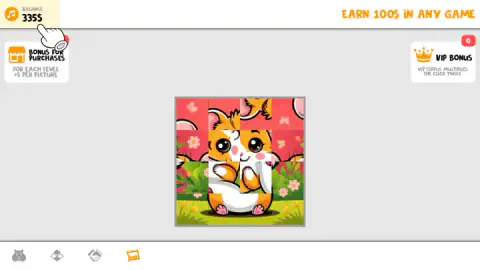
Here is the number that shapes the whole game. When we reached the hamster, the Purchase Bonus card read 1 and each tap moved the balance up by exactly one dollar, from 334$ to 335$. Our earlier sessions showed the same thing: a dozen taps, a dozen dollars.
So the cheapest item on the shelf costs 107 taps. The jewellery and clothing further along cost close to a thousand taps or more. The starting 1000$ is a generous gift by comparison, and how you spend it decides how long you tap before the next purchase.
The two bonus cards on the hamster screen are the way out of that. Purchase Bonus says "for each level +1 per click": as your customer level rises, every tap is worth more. VIP Bonus says VIP status doubles the click. Ours stayed at 0, and pressing either card did nothing in our sessions. Under the hamster, a bar runs from x1 to x2; we never filled it, so we cannot say what it takes.
The picture puzzle pays differently
The frame icon opens a puzzle: a picture of a smiling cartoon hamster in a flower meadow, cut into a four-by-four grid and shuffled. Its bonus card reads "+5 per picture" for each level, which tells you it pays per finished picture rather than per click.
We opened it and looked, but did not finish a picture, so we cannot give you its payout. If you are tired of tapping, it is the other door, and the header's EARN 100$ IN ANY GAME treats both games as equal. The diamond and handshake icons are two more games we did not open.
Why a hamster, and why tapping pays
Clicker games, also called incremental games, took shape in the browser. Cookie Clicker, released in 2013, set the pattern most of them still use: click to earn, buy things that make each click worth more, repeat. The pleasure is watching your own effort turn into a faster rate of earning.
In 2024 the idea moved to phones in a new form. Hamster Kombat, a Telegram game, asked players to tap a cartoon hamster for coins and drew a huge audience in a few months.
Shopping Simulator borrows both. The hamster is the tap target, and the upgrade sits in the shop: the bonus card is called Purchase Bonus and ties the value of each tap to your level. We did not see a level-up screen, so we cannot say how many purchases one level takes. The difference from Cookie Clicker is that the things you buy are the reward themselves. There are no factories or grandmas working for you; you are the only source of income.
What the shelf holds
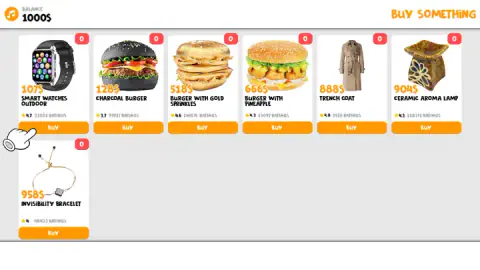
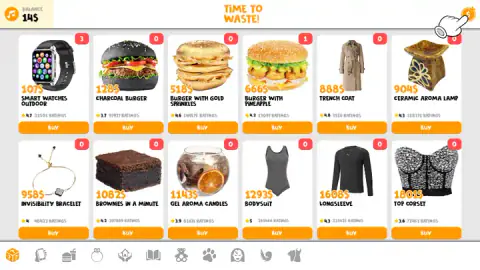
The main shelf showed seven items at the start of our session: the smart watch, three burgers (charcoal, gold sprinkles and pineapple), a trench coat, a ceramic aroma lamp and an "invisibility bracelet". By the end it showed twelve, adding a brownie, gel candles, a bodysuit, a long-sleeve top and a top corset at 1,801$.
Each card has a star rating and a ratings count. They are part of the comedy: a 128$ charcoal burger rated 3.7 by tens of thousands of shoppers. None of the items do anything once bought. What changes is the counter, and, through the Purchase Bonus, how fast you earn.
Who Shopping Simulator is for
It suits younger players and anyone who likes an idle game with something to show for it. There is no timer, no way to lose and very little to read. It plays with a mouse; the game's listing also lists phones and tablets, which we did not try.
It is not a shop-management game. You do not run a store, set prices or serve customers. If that is what you want, Idle Supermarket Tycoon has you build one, and Shop Cashier Simulator 3D puts you behind the till.
More from farenlait
The same studio made Geometry Open World and Palkovil The Way Home, both very different from this one. More tapping games are in clicker games.
Screenshots
Taken by opening the game ourselves and letting it run — not supplied by the publisher, and not the same picture every other site shows.
How to play Shopping Simulator
- Spend first. The game opens on the shop with 1000$. Our first buy was a Burger with Pineapple at 666$, which left 334$.
- Go and earn. In the shop, the coin icon in the top right corner leads to the money-making games. A pointing hand on screen keeps showing you where it is.
- Pick a game from the bottom bar. There are four icons: the hamster, a diamond, a handshake and a picture frame. The hamster pays per tap; the frame opens a picture puzzle.
- Come back and buy. Each BUY takes the price off your balance and adds one to the red counter on the item.
Tips from our session:
- The first purchase decides your pace. At 1$ a tap, our 666$ burger was 666 taps of work. The smart watch is the cheap way to see how buying works.
- Buy the same thing again if you like. Items stay on the shelf after you buy them. We bought the watch three times and its counter read 3.
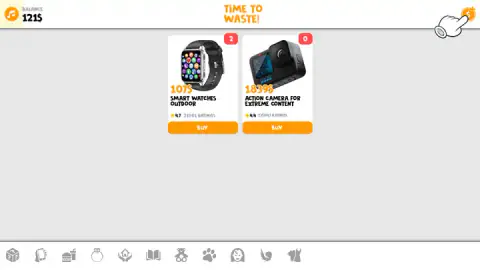
- Use the categories. The shop has eleven icons along the bottom. The phone icon showed only two electronics: the watch and an Action Camera at 1,839$.
- Do not worry about closing the tab. After we reloaded the page, the balance and every counter were exactly as we left them.
Controls
| Click or tap the hamster | Adds money to the balance in the top left corner. In our session each tap was worth 1$ |
|---|---|
| Click the coin icon (top right, in the shop) | Leaves the shop for the money-making games |
| Click a game icon in the bottom bar (games screen) | Switches between the hamster, the picture puzzle and two more games |
| Click a category icon in the bottom bar (shop screen) | Filters the shelf, for example to electronics |
| BUY under an item | Spends its price and adds one to the red counter on the item card |
Features
- A starting balance of 1000$ and a shelf of items priced from 107$ for a smart watch upwards
- Every item card carries a star rating and a ratings count, like a real online store listing
- A red counter on each card shows how many you own, and you can buy the same item again
- Four money-making games, among them TAP THE HAMSTER and a sliding-tile picture of a hamster
- A Purchase Bonus card that raises the value of each tap level by level
- Eleven shop categories along the bottom, from food and jewellery to toys and clothes
- Balance and purchases were still there after we reloaded the page
Game details
- Developer
- farenlait
- Release date
- June 2025
- Last updated
- August 10, 2026
- Added here
- June 2025
- Technology
- HTML5 (Unity WebGL)
- Platforms
- Browser (desktop, mouse), Browser (mobile & tablet, touch)
- Classification
- Clicker
- Saved progress
- Saving, when available, is managed by this game. Mava cannot confirm your level.
FAQ
How do you play Shopping Simulator?
You start with 1000$ and a shop full of items. Spend it, then earn more in the mini-games: tap the cartoon hamster for money or solve a scrambled picture puzzle. Every purchase adds to a counter on the item card, and the cycle of earning and buying is the whole game.
How do you make money fast in Shopping Simulator?
In our session each tap on the hamster added 1$, so the cheapest item, a 107$ smart watch, took 107 taps to earn back. The picture puzzle pays per finished picture, with a bonus that grows with your level. Spending the starting 1000$ slowly is the easiest way to keep options open.
What do the Purchase Bonus and VIP Bonus do in Shopping Simulator?
The Purchase Bonus card says each level adds +1 to the value of a click, and on the puzzle screen +5 per picture. Our card read 1 and each tap was worth 1$. The VIP Bonus card says VIP status doubles each click; it stayed at 0 in our session and pressing it did nothing.
Can you buy the same item twice in Shopping Simulator?
Yes. We bought the smart watch three times in a row, and the red counter on its card went from 1 to 3 while the balance dropped by 107$ each time. Items do not vanish from the shelf once bought.
Does Shopping Simulator save your progress?
It did for us. After a page reload our balance of 14$, our three watches and our burger were all still there. We played in one browser on one computer, so we cannot say whether progress follows you to another device.
Who made Shopping Simulator?
The developer is listed as farenlait, the same studio behind Geometry Open World and Palkovil The Way Home. The game was published in June 2025 and was last updated in August 2026.
Is Shopping Simulator good for kids?
It is gentle: no timer, no way to lose and very little to read. A child who can click or tap can play it. The items are everyday things such as burgers, clothes and gadgets, and the store ratings on each card are part of the joke rather than real reviews.