









About Shop Cashier Simulator 3D
Most shop games put you in the owner's chair: you buy shelves, set prices and watch the money come in by itself. Shop Cashier Simulator 3D gives you the one job those games skip. You stand behind the counter, a customer walks up, and the sale does not happen until you have scanned, typed and counted it yourself.
It is a game about small, exact amounts. Our whole first day was worth $8.00. Our second turned on a dollar note and a 50c coin. There are no shelves to buy in the part we saw, and nothing to drive or build: just the monitor, the keypad, the belt and the till.
The game is credited to a developer listed as Bravestars. It was published in June 2026.
Now the honest part. We played for about four minutes. We finished Day 1 and reached the change step of Day 2, where we handed out far too much money and never got the sale closed. So this page explains the checkout routine well and the long run of the game not at all.
Day 1 is two clicks and one number
The first day is a lesson with a single shopper: a figure in a yellow jacket, a hat and a face mask, holding an item up in front of the counter. A white hand points at it and the word "Tap" hangs underneath, with the price floating by it. Ours was $4.00.
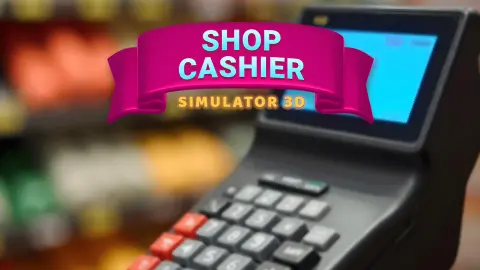
Then the view moves in on the keypad. It looks like the pad of a card terminal: digits, a decimal point, a backspace key, a red C and a green OK. The monitor beside it showed a total of $8.00, and that is the number the game wants typed. You do no adding here. The machine has the answer and you copy it.
That sounds like nothing, and on Day 1 it is. But it sets the rule for everything after: the screen tells you a number and you are trusted to reproduce it exactly. A slip of the finger is the only way to fail, and we managed one.
The day ends on a panel headed Completed, with the day, the customers served and the revenue. Under it runs a strip of multipliers and a bonus button that asks for an ad, with a small "No Thanks" below. We took No Thanks. The money counter in the top right corner, which had read $0.00 all day, showed $8.00 when Day 2 began. So revenue is banked at the end of the day, and skipping the bonus costs you none of it.
Day 2 opens the drawer, and the drawer only goes up
The second day brought a new shopper and two cartons on the belt. Scanned, they came to $8.98. By our notes the two prices were $3.99 and $4.99, which is the right sum.
This time the view moves to the till. Its display has three lines. Total is the sale. Change is what you owe, $1.50 for us. Giving starts at zero and is yours to fill. The till has already done the subtraction; what it leaves to you is the counting.
The drawer under it holds a row of notes from $1 to $50 along the top and a row of coins from a cent to 50c along the bottom. The game showed the answer with its badges: the dollar note first, the 50c coin second, OK third.
We got it wrong at once. A click on the wrong slot and Giving jumped past fifty dollars. From there every further click made it worse, because nothing in the drawer subtracts. A real cashier who pulled a fifty by mistake would put it back; here that job belongs to the two buttons we never pressed.
One detail for anyone who has worked a till in the United States: the drawer includes a 50c coin, which is rare in everyday change there. In this game it is one of the first coins you are asked for.
The checkout it copies was invented to stop the staff stealing
The machine on your counter has a clear origin. James Ritty ran a saloon in Dayton, Ohio, and believed his staff were pocketing the takings. In 1879 he patented a device that recorded every sale so the cash could be checked against it. One of his later models was sold as the "Incorruptible Cashier". The business passed on, and in 1884 John H. Patterson renamed it the National Cash Register Company.
That is Day 1 of this game exactly. Typing the total is not a sum, it is a record: the number goes into the machine so that it can be compared with what ends up in the drawer.
The scanning step is much younger. The first item with a barcode went through a supermarket checkout on 26 June 1974 in Troy, Ohio, the same state where Ritty kept his saloon. It was a ten-pack of Wrigley's Juicy Fruit gum, and the register rang up 67 cents.
Between them, those two inventions took the arithmetic away from the cashier. What they never took away is the last step, the one this game saves for Day 2: picking the right notes and coins out of a drawer with someone waiting.
Who it is for
It suits children who are learning to count money, and anyone who likes simulators where a routine has to be done cleanly rather than fast. We saw no clock on either day, and no reading is needed beyond a few words.
It is not a management game. If you want to stock shelves and grow a shop, look elsewhere. And it is slow to start: two days gave us two customers.
More shop games to try next
Idle Supermarket Tycoon is the owner's side of the same counter, where the mall grows and nobody asks you for change. Raccoon Retail hands you the cleaning machine in a supermarket instead of the till. Supermarket Management Simulator is about building a store from nothing, and Loose Change: Cashier Simulator is, despite the name, a coin-sorting puzzle. The rest are under 3D games.
Screenshots
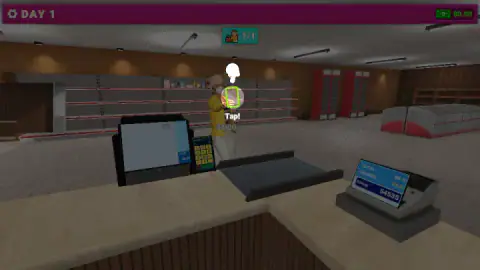
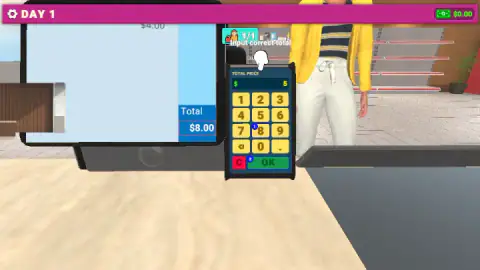
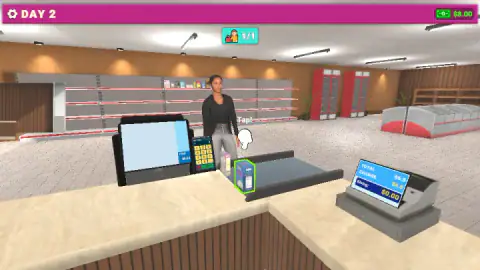
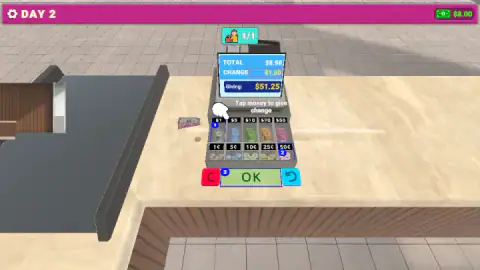
Taken by opening the game ourselves and letting it run — not supplied by the publisher, and not the same picture every other site shows.
How to play Shop Cashier Simulator 3D
- Wait for the customer. A counter at the top of the screen shows how many shoppers the day holds. Ours read 1/1 on both days.
- Scan what is ringed in green. On Day 1 the shopper held the item up; on Day 2 two cartons sat on the belt. Click the ringed one and its price joins the list on the monitor.
- Type the total. A keypad opens with the words "Input correct total". Read the total off the monitor, type it and press the green OK.
- Give the change. From Day 2 the till drawer opens. Click notes and coins until the Giving line matches the Change line, then press OK.
- Close the day. A panel sums up customers and revenue and sends you on to the next day.
What our session taught us:
- Follow the blue badges. While a step is new, small numbered circles sit on the buttons. They are the order of the taps: 1 on the 8 key and 2 on OK for an $8.00 sale. We ignored them once and typed a 5 first.
- The red C is your eraser on the keypad. Our wrong digits vanished and the display went back to 0. Nothing was taken from us for it.
- In the drawer, every click adds. Clicking a note does not select it; it puts that note in the customer's hand, on the Giving line. A couple of careless clicks and we were more than fifty dollars over.
- OK will not rescue a wrong amount. We pressed it several times with Giving far above Change and the sale stayed open. Beside OK there is a red C and a blue arrow that curls back. We did not try them, and that is why we stayed stuck. Try them before anything else.
Controls
| Click an item ringed in green | Scans it; its price is added to the total on the monitor |
|---|---|
| Click the keypad digits, then the green OK | Types the total of the sale and confirms it |
| Red C on the keypad | Clears what you typed, back to 0 |
| Click a note or a coin in the open drawer | Adds its value to the "Giving" line on the till |
| Red C and blue arrow beside the drawer's OK | We did not press either of them |
| Gear (top left) | We did not open it |
Features
- A checkout seen from behind the counter, with a touch monitor, a keypad, a conveyor belt and a till
- Working days as levels; each of our two days brought a single customer
- A first day that teaches scanning and typing the total, and a second that adds giving change
- A till drawer with five notes from $1 to $50 and five coins from 1c to 50c
- A white hand and blue numbered badges that show the order of the taps on a new step
- An end-of-day panel with customers served and revenue, plus an optional bonus tied to an ad
- Made by Bravestars
Game details
- Developer
- Bravestars
- Release date
- June 2026
- Last updated
- June 29, 2026
- Added here
- May 2026
- Technology
- HTML5 (3D)
- Platforms
- Browser (desktop, mouse), Browser (mobile & tablet)
- Classification
- 3D , Simulation , Strategy
- Saved progress
- Saving, when available, is managed by this game. Mava cannot confirm your level.
FAQ
How do you play Shop Cashier Simulator 3D?
You stand behind a shop counter and serve one customer at a time. Click each item ringed in green to scan it, type the total on the keypad and press OK. From the second day you also open the till drawer and click notes and coins until they add up to the change shown.
How do you give change in Shop Cashier Simulator 3D?
The till shows three lines: Total, Change and Giving. Change is what you owe the customer and Giving is what you have picked so far. Click notes and coins in the drawer until Giving equals Change, then press the green OK. Every click adds money, so pick carefully.
Do you have to work out the change yourself in Shop Cashier Simulator 3D?
Not in the two days we played. The till did the subtraction and showed the amount owed, $1.50 in our case. Your job is to build that amount from the notes and coins in the drawer.
What do the blue numbers on the buttons mean in Shop Cashier Simulator 3D?
They are the order of the taps while the game teaches a new step. On the first day a 1 sat on the 8 key and a 2 on OK, for a total of $8.00. On the second day the 1 was on the $1 note, the 2 on the 50c coin and the 3 on OK.
What happens if you make a mistake in Shop Cashier Simulator 3D?
When we typed the wrong total, the red C key wiped it and we typed it again with no penalty. When we gave far too much change, the green OK did not close the sale and the customer stayed put. We did not see an angry customer or money taken away, so we cannot say whether later days punish errors.
Do you have to watch ads in Shop Cashier Simulator 3D?
The end-of-day panel offers a bonus button that asks for an ad, with a No Thanks link under it. We took No Thanks and still kept the full $8.00 of the day's revenue.
How many days does Shop Cashier Simulator 3D have?
We finished Day 1 and got stuck on the change step of Day 2, so we cannot count them. Each of those days had one customer. The developer describes credit card payments as well, which we did not reach.
Who made Shop Cashier Simulator 3D?
It is credited to a developer listed as Bravestars. It was published on 28 June 2026.