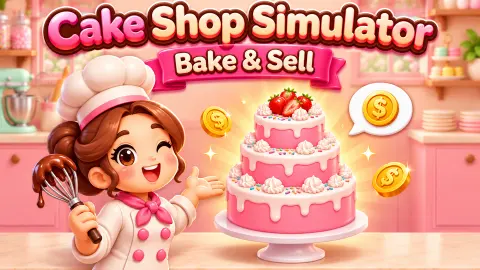







About Cake Shop Simulator: Bake & Sell
Most cake games hand you a blank sponge and let you decorate it however you like. Cake Shop Simulator: Bake & Sell starts with someone else's wish list. Every cake is an order typed into a chat, and the game checks your work against it, tag by tag, before you ever talk about money.
It is a bakery simulator by Nas Games, published in November 2026. You read an order, build the cake in five steps, and then, according to the game's description, send the customer a photo and haggle over the price.
We played day 1 on a computer with the mouse, through the tutorial and the first order up to its cream step. That stretch is what this page explains in detail. Selling, haggling and later levels are credited to the game's own instructions.
The order card is your checklist
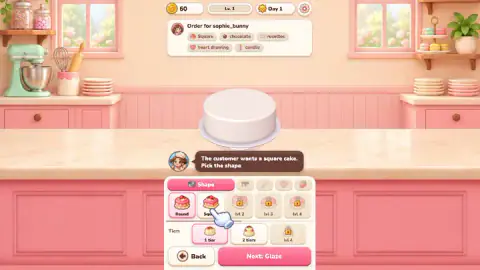
The first customer is sophie_bunny, labelled Schoolkid. Her message asks for a square chocolate cake with cream rosettes around the edge, a heart drawing on top and candles. Once you take the order, that sentence becomes five tags on a card above the cake: Square, chocolate, rosettes, heart drawing, candle.
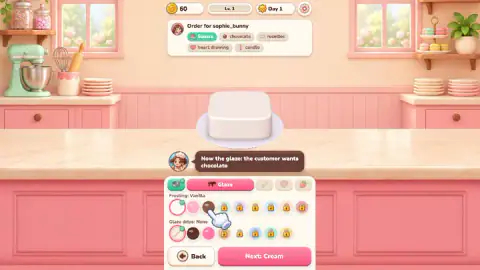
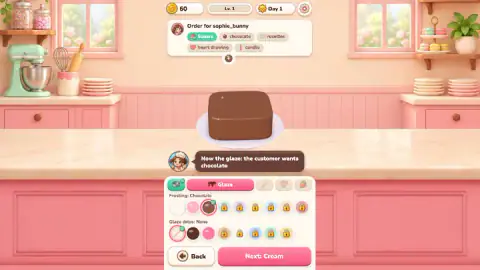
The cake you are given matches none of them. It starts round, with vanilla frosting, no drips and no cream, so all five tags start grey. When we picked Square, its tag turned green and the baker said so: "The tag turned green. Tap Next". After the chocolate frosting went on, the chocolate tag was green too.
That is the habit to build. The card does not wait for you to finish; it tells you after each step whether the cake still matches. The game's instructions add that matching items raise the price, so a grey tag left behind is money you are leaving on the counter.
Level 1 locks most of the menu
The panels look generous until you count the padlocks. On the shape step, only Round and Square are open; the next three shapes are locked until levels 2, 3 and 4.
The glaze step is the same story. Vanilla, pink and chocolate frosting are open, and six more colours wait behind padlocks. The drips row offers chocolate or pink, and the rest are locked too. On the cream step, one of the four options is locked.
The padlocks on shapes, tiers and cream show the level that opens them, so you can see what you are working towards. The tiers row matters most: one or two tiers are open, and the third option is locked until level 4. The description says some customers want more than that, such as a bride who asks for a three-tier cake.
The cream step, where our run stopped
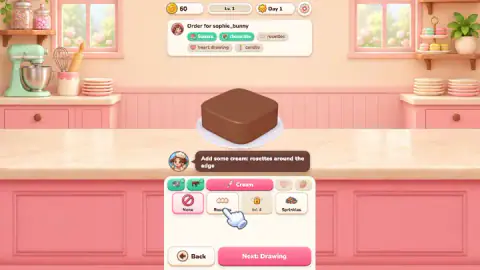
The tutorial asks for "rosettes around the edge". The cream panel shows None highlighted, with Rosettes right next to it, and a tutorial hand pointing at it.
This is where we spent the rest of our session. We pressed Next: Drawing twice and Back once while None was still selected, and the screen did not change. We then tried dragging from the Rosettes button onto the cake, several times. Each drag turned the cake to a new angle instead of adding cream, and None stayed highlighted. We never tapped Rosettes on its own, so we cannot show what happens next.
What the screen does show is enough to save you the same detour. The tutorial seems to hold you on a step until the highlighted option matches the order. Tap the option first and look for it to replace None as the selected one. Drag the cake only when you want to turn it.
What the game says comes after the cake
The rest of a day is in the game's instructions. You send the cake and choose a friendly, fair or pricey ask, then accept the buyer's counteroffer, meet halfway or hold your price. Each hold costs a heart of patience, and when the hearts run out the buyer leaves. The description says buyers have their own characters: the schoolkid counts every coin, the reseller buys in bulk. Sold cakes can be posted on Cakegram, where likes and followers raise your prices, and coins go on kitchen upgrades, cake stands and interiors across 20 levels. We did not reach any of this, so we cannot say how hard the haggling is.
A note on the name: an older game called Cake Shop Simulator sells on Steam from a different developer. This is a separate browser game.
More from Nas Games and other bakeries
Weird Pet Shop is by the same studio and, by its description, also ends each sale with haggling, this time over pets. Squishy Clicker, also by Nas Games, is a calmer idle game. For more cakes, My Bakery puts you in charge of a café, and Cake Maker: Girls Cooking Games is about decorating. The rest are in our cooking games.
Screenshots
How to play Cake Shop Simulator: Bake & Sell
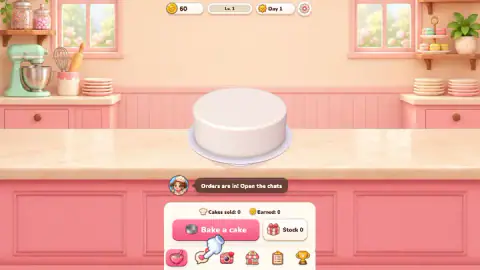
- Open the chats with the speech-bubble icon in the bottom bar and tap the customer's card.
- Read the order in the chat, then press the button that reads "Take the order!"
- Build the cake step by step: shape and tiers, glaze and drips, cream, a drawing on top, decorations. Use Next to move on.
- Watch the order card at the top. Each item turns green when the cake matches it.
- Send the cake and agree a price, as the game's instructions describe.
Tips from our run
- Ignore the big Bake a cake button on your first visit. We pressed it and nothing changed; the tutorial hand was pointing at the chats.
- Check the card after every choice, not at the end. A tag that stays grey means the cake does not match yet.
- On the cream step, tap Rosettes as a button. Dragging from it onto the cake only turns the cake.
Controls
| Click | Open the chats, pick an order and choose each option for the cake |
|---|---|
| Drag on the cake | Turn the cake to see it from another side |
| Mouse wheel | Zoom on the cake, according to the listing's instructions |
| Next and Back | Move between the five steps of a cake |
Features
- Orders arrive as chat messages from customers, each with a name and a type, such as a schoolkid
- An order card at the top lists what the customer wants, and each tag turns green when the cake matches it
- Five steps per cake: shape and tiers, glaze and drips, cream, a drawing on top and decorations
- On level 1 most of the menu is padlocked: three of five shapes, the third tier and six of nine frostings
- Haggling over the price, with a patience meter of hearts, according to the game's description
- Cakegram posts, daily quests and 20 levels of upgrades, according to the game's description
Game details
- Developer
- Nas Games
- Release date
- November 2026
- Last updated
- November 10, 2026
- Added here
- November 2026
- Technology
- HTML5
- Platforms
- Browser (desktop, mouse)
- Classification
- Casual , Cooking , Simulation , Strategy
- Saved progress
- Saving, when available, is managed by this game. Mava cannot confirm your level.
FAQ
How do you start an order in Cake Shop Simulator: Bake & Sell?
Open the chats with the speech-bubble icon in the bottom bar, tap the customer's card and press Take the order. On the first screen the big Bake a cake button did nothing for us; the tutorial wants you to go through the chats.
What do the green tags mean in Cake Shop Simulator: Bake & Sell?
The card at the top of the screen lists everything the customer asked for. When the cake matches one item, that tag turns green. The cake starts round, vanilla and bare, so every tag starts grey. According to the game's instructions, matching items raise the price.
Why can't I pick some shapes and colours in Cake Shop Simulator?
They unlock with your bakery level. On level 1 three of the five shapes, the third tier, six of the nine frostings and one cream type carry a padlock. On shapes, tiers and cream the padlock shows the level that opens it, such as level 4.
How do you add cream rosettes in Cake Shop Simulator: Bake & Sell?
We did not get that far. On the cream step, try tapping the Rosettes button so it replaces None as the selected option. Dragging from the button onto the cake only turned the cake for us, and while None stayed selected the Next and Back buttons did not leave the step.
How does haggling work in Cake Shop Simulator: Bake & Sell?
According to the game's instructions, you send a photo of the cake, choose a friendly, fair or pricey ask, then accept the counteroffer, meet halfway or hold your price. Each hold costs one heart of the buyer's patience. We did not reach this stage in our run.
Who made Cake Shop Simulator: Bake & Sell?
It is credited to Nas Games, the studio behind Weird Pet Shop, and was published in November 2026. It is not the older Steam game called Cake Shop Simulator, which is by a different developer.