












About Squishy Clicker
Most clicker games keep their arithmetic out of sight. Squishy Clicker prints it on every row: what one squishy earns per second, what your whole stack of them earns, and how close you are to the milestone that doubles it. That makes it a calm game to sit with. It also makes it easy to see, afterwards, exactly where you played it badly.
In the middle of the screen sits a steamed Dumpling with blushing cheeks and a tiny mouth. Press it and it dents, a small number floats up, and the coin counter at the top ticks over. Buy a pink Mochi and coins start arriving without you, a third of a coin each second. From then on the game is about what you buy next, and the honest lesson of our session is that the button the tutorial hand points at is not always the right one.
Nas Games put Squishy Clicker on 26 October 2026 and updated it a day later. We played it on 28 October on a computer with a mouse, twice, for roughly ten minutes each time. That covers the opening stretch: the first squishies, the first upgrades and the first daily gift. The rebirth tab and the leaderboard lie further on.
The Mochi habit, and why the cheapest squishy is the worst buy
The tutorial points you at the Mochi, and its price stays low enough that you can keep pressing it. We did, and finished the session with fourteen of them. It was the wrong habit, and the game's own numbers show why.
Near the end, one more Mochi would have cost 106 coins and added 0.6 coins a second. Sitting one row lower the whole time was the Strawberry: a flat 100 coins for 1.9 a second. That is roughly three times as much income for the same money, and its price had never moved because we never bought one.
Then there is the Kitty. At 1.1K it looks like a late purchase, but one Kitty earns 14.8 coins a second, more than our whole stack of Mochis earned at the end. Our counter peaked a little over a hundred coins short of it, and we kept spending that difference on Mochis.
So here is the rule we wish we had used from the start: divide the price by the income printed on the row, and buy whatever gives the smallest answer. The size of the number on the button tells you nothing on its own. A younger player can do the same thing by eye: if one row earns three times as much and costs about the same, buy that one.
New rows only appear as you earn. Before you can buy them, the locked rows read Unlocks when you earn 60 for the Strawberry, 660 for the Kitty and 7.2K for the Bun, so early spending is never wasted on the way to the next one.
What the upgrade cards actually double
At first the Upgrades tab is empty apart from one line: upgrades appear as you buy squishies and earn more. With ten Mochis in our collection, four cards had arrived.
Two of them were Strong fingers I and Strong fingers II, at 100 and 500 coins. Each doubles your tap power. They matter most early, when tapping is most of your income, and they matter less with every squishy you add.
The other two were named after the Mochi. Mochi I cost 150 coins and doubles what every Mochi earns. We bought it with ten Mochis working, and our income went from 3.1 to 6.3 coins a second in one press. That is the best purchase we made all session, and it shows how these cards work: a squishy's upgrade is worth exactly what that squishy's stack is already earning.
Mochi II, at 750, doubles them again. We never bought it, which in hindsight was another mistake. Each card disappears once bought, so the tab works as a short to-do list.
Gifts, time away and the thirteen squishies in the Album
Halfway through our session we reloaded the game. A card titled While you were away paid 66 coins, with the line that the squishies had squeezed themselves for a minute. Our Mochis were all still there.
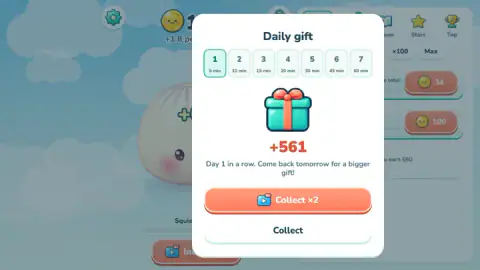
Right after it came the Daily gift: day one of seven, worth 561 coins, with a note to come back tomorrow for a bigger gift. Under each day number is a time, from 5 min on day one to 60 min on day seven. Our day-one gift came close to five minutes of what our squishies were earning at that moment, so we read those labels as minutes of income, though the game does not spell it out.
Both cards offer an orange Collect ×2 button with a small video icon and a plain white Collect button underneath. We took the plain one each time.
The Album tab keeps your collection. It counted one of thirteen when we opened it: the Dumpling, marked In the center, with the rest under question marks and the words Not found yet. The names are visible even while locked, and they include Bunny, Cloud, Donut and Cheese. The Album also has Decor and Achievements sections. Buying our first Mochi raised a banner reading Achievement: New friend: Mochi.
What is still ahead of a first visit
We never opened the Stars tab. The game's instructions describe it as the rebirth: start over in exchange for stars, each adding 10% to your income for good. The Top tab is a leaderboard ranked by total squeezes, also by the game's own account; we did not look at it.
The instructions also mention a golden squishy that floats by and brings a rain of coins, and a mega squeeze when you fill the "Squish faster!" bar under the Dumpling by tapping fast. We never filled the bar, and no golden squishy crossed our screen. Swiping across the squishy is said to make it spin; our one try showed nothing we could point to.
We did not buy a Strawberry, a Kitty or a Bun, and we did not play on a phone or tablet, although the game is listed for touch screens and says you can squeeze with several fingers at once.
Who it suits
It suits anyone who likes a number that keeps climbing while they do something else, and it is gentle enough for young players: there is no timer, no enemy and no way to lose. It quietly teaches something useful too, that the cheapest thing on the shelf is rarely the best value. If you want a goal with an ending, or anything you can win or fail, this is not that kind of game.
For the same tap-and-collect loop with a different cast, try Slime Clicker or Click Kitty Idle. If you would rather spend your coins on rooms than on creatures, Home Decor Clicker does that. Everything else that grows while you wait is in our clicker games.
Screenshots


Taken by opening the game ourselves and letting it run — not supplied by the publisher, and not the same picture every other site shows.
How to play Squishy Clicker
- Press Let's Play on the start card, then tap the Dumpling. Each press adds coins to the counter at the top of the screen.
- Open the Squishies tab on the right. A hand points at the Mochi, which costs 15 coins the first time; buy it.
- Keep buying squishies. Each one earns every second, and the line under your coins (+0.3 per second, then +1.8, then +6.3) is your total income.
- When cards appear on the Upgrades tab, buy them. Strong fingers doubles what a tap is worth; a card named after a squishy doubles that squishy's income.
- Come back later. The game pays you for time away and gives a gift each day.
Tips we learned the slow way:
- Every copy of a squishy costs more than the last. Our Mochi went from 15 coins to 106 by the fifteenth.
- Under each row, a thin bar marked Milestone ×2 counts towards 25 of that kind; the game's instructions say owning 25, 50 or 100 doubles that squishy's income.
- The x1, x10, x100 and Max buttons above the list decide how many you buy with one press. Check which one is lit before you tap a price.
- A small number sometimes sits on the Upgrades tab icon. Each time we saw it, there were cards waiting that we could afford.
- On the gift cards, the plain white Collect button takes the full amount shown.
Controls
| Click or tap the Dumpling | Squeezes it and adds coins to the counter at the top |
|---|---|
| Squishies tab | Buys squishies that earn coins every second; the x1, x10, x100 and Max buttons set how many you buy at once |
| Upgrades tab | One-off upgrades that double tap power or one squishy's income |
| Album, Stars and Top tabs | Your collection, rebirth and the leaderboard; we only opened the Album |
| Swipe across the squishy | Spins it, according to the game's instructions; we could not confirm it |
| Several fingers (touch screens) | Squeeze with more than one finger at once, according to the game's instructions; not tested by us |
Features
- A big 3D Dumpling in the middle of the screen that dents when you press it
- Thirteen squishies in the Album, from Dumpling and Mochi to Bunny, Cloud, Donut and Cheese
- Every row shows income per squishy, income for the whole stack and a Milestone ×2 bar that fills at 25
- New squishies appear once your lifetime earnings pass a threshold: Strawberry at 60, Kitty at 660, Bun at 7.2K
- One-off upgrades: Strong fingers doubles tap power, and each squishy has its own income doublers
- Coins for time away, and a seven-day daily gift
- Stars (rebirth) and Top (leaderboard) tabs for the long game
Game details
- Developer
- Nas Games
- Release date
- October 2026
- Last updated
- October 27, 2026
- Added here
- October 2026
- Technology
- HTML5 (3D)
- Platforms
- Browser (desktop, mouse), Browser (mobile & tablet, touch)
- Saved progress
- Saving, when available, is managed by this game. Mava cannot confirm your level.
FAQ
How do you play Squishy Clicker?
Tap or click the smiling Dumpling in the middle of the screen to earn coins, then spend them on the Squishies tab. Every squishy you own earns coins each second, even when you stop tapping, and the Upgrades tab doubles what your taps or your squishies are worth. The line under the coin counter shows your income per second.
What is the best squishy to buy in Squishy Clicker?
Not the cheapest one. Divide each price by the income printed on its row and buy the lowest result. In our session a Strawberry cost 100 coins for 1.9 coins a second, about three times better value than another Mochi, and the Kitty at 1.1K earns 14.8 a second on its own.
How do upgrades work in Squishy Clicker?
The Upgrades tab stays empty until you own some squishies and have earned more coins. Then it offers one-off cards: Strong fingers I and II each double your tap power, and Mochi I and II each double what every Mochi earns. Buying Mochi I with ten Mochis took our income from 3.1 to 6.3 coins a second.
Does Squishy Clicker earn coins while you are offline?
Yes. When we reloaded the game after about a minute away, a card titled While you were away paid 66 coins with the line that the squishies had squeezed themselves. Our squishies were still there after the reload. Collect takes the amount shown on the card.
How many squishies are there in Squishy Clicker?
The Album counts thirteen. The ones we could see named are Dumpling, Mochi, Strawberry, Kitty, Bun, Bunny, Cloud, Donut and Cheese. In the shop, each new one stays hidden until your total earnings reach a threshold, such as 60 coins for the Strawberry and 7.2K for the Bun.
How does the daily gift work in Squishy Clicker?
A Daily gift card shows a seven-day row, from 5 min on day one to 60 min on day seven, and says to come back tomorrow for a bigger gift. Our day-one gift was 561 coins. The plain Collect button takes it as shown.
Who made Squishy Clicker and when was it released?
Squishy Clicker is by Nas Games. It was published on 26 October 2026 and updated on 27 October 2026, and it runs in the browser with nothing to install.
How do you rebirth in Squishy Clicker?
The game's instructions say to rebirth on the Stars tab when progress slows down, and that each star adds 10% to your income for good. We did not reach that point or open the Stars tab, so we cannot say what a rebirth resets.