











About Cozy idle village
The word idle in the name suggests a game that plays itself while you watch numbers grow. The first few minutes of Cozy idle village are the opposite. Nothing happens until you put a building on the ground, and the game is fussy about where.
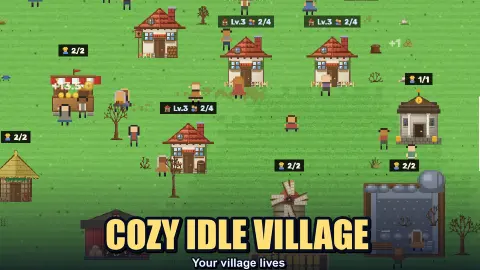
It is a village builder drawn in pixels and seen from above. You start with two small houses in a fenced meadow, a handful of trees and rocks, and villagers who wander about with nothing to do. They tell you so. One speech bubble we saw read "Hey, I am idle here!" and another, "Maybe I am not needed here?"
Your job is to fix that. You pick a building, find it a spot, and hire one of those villagers into it.
The game is by Game Factory. It was published in September 2026. We played for about four minutes and did not get past the guided opening. This page covers that opening closely and says plainly where our session stopped.
The mill is bigger than its picture
This is the part that is not obvious, and it cost us most of our session.
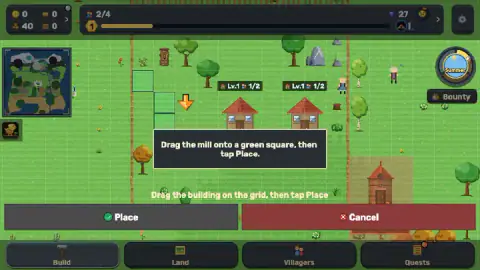
The tutorial marks green squares on the grass and asks you to drag the mill onto one. For the mill it offered three, set like a small staircase to the left of the houses. We dragged the mill there and elsewhere several times, and twice the game answered with a notice: "Can't build here — need clear ground and a path to the door".
The reason was under the building, not on it. A shaded area travels with the mill as you drag, and it is several squares wide and tall. Both times we got the notice, that area was touching a tree with orange leaves, even though the little house itself sat on open grass.
When the mill finally went down, the extra ground made sense. A fenced plot of wheat appeared right below it. The Construction list had said as much: reapers harvest wheat from the plots and carry the grain to the mill.
The second half of the notice, the path to the door, we cannot explain further. We never saw a spot refused for that reason alone.
A building does nothing until someone works in it
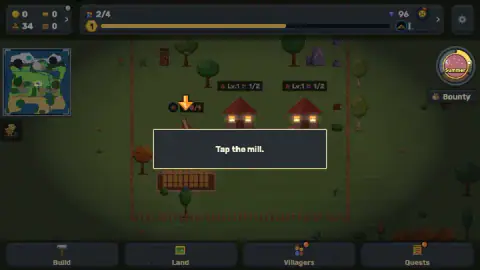
The mill stood there with a small badge reading 0/1. No worker, one place.
By then the meadow had gone dark. The windows of the two houses were lit, and the round dial in the corner, which reads Summer, had swapped its sun for a moon. Night falls while you are busy, and the game does not stop for it.
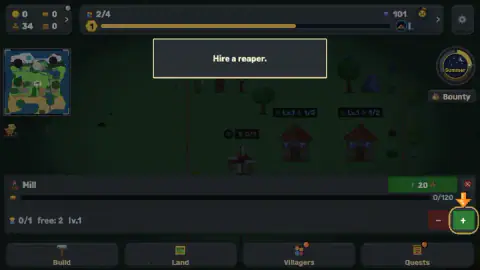
The tutorial asked us to click the mill. Its panel showed a storage bar from 0 to 120, a line with the worker count and the free villagers, and a minus and a plus. One press of the plus hired a reaper. A green button with an upward arrow and the number 20 sat on the same panel. We read it as an upgrade and did not press it.
What it costs, as far as we saw
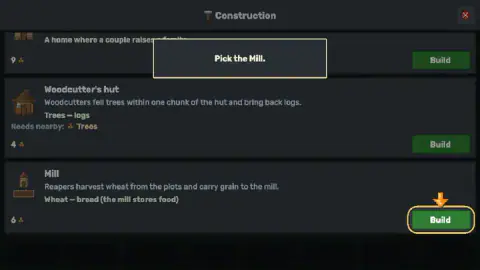
Three rows were visible in the Construction list. The mill was priced at 6 and the woodcutter's hut at 4. A third row, a home where a couple raises a family, was priced at 9.
Our stock in the corner read 40 at the start and 34 once the mill was built, which matches the price. Later another counter had gone from 0 to 11. We could not tell from the icon alone what it counts.
Where our session stopped
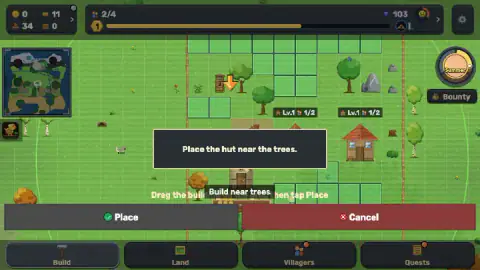
After the reaper, the game handed us the woodcutter's hut and asked us to place it near the trees. This time well over a dozen green squares lit up, most of them along the tree line. We were still carrying the hut when we stopped.
So we cannot tell you what a working woodcutter looks like, or how fast anything is produced. We did not open the Land, Villagers or Quests tabs, nor the Bounty button under the season dial.
A purple counter on the top bar climbed from 27 to 103 while we played, without our doing anything to it. The game did not say what it is.
The store page promises far more than this: villagers with families who grow old, seasons that change the landscape, a tech tree, and a village that keeps producing while you are away. None of that came up in four minutes. The one name we saw was in a speech bubble, "Milana is not one to loaf".
Who it is for
It suits players who like arranging a small place and watching it settle into a routine. Nothing in the opening can be lost, and nothing asks for fast hands.
It is not a clicker in the usual sense. If you want a number that goes up each time you press, look elsewhere. Expect a slow first few minutes too, because the game will not move on until the mill is standing.
More games about building something up
Craftsman Land is another one about putting a farm and a town back on their feet. Your Majesty - Build & Conquer trades the meadow for a kingdom to restore. For the idle side of the name, Idle Chicken Farm grows an egg business from a single hen, and Idle Zoo Tycoon does the same with a small park. The rest are in the clicker games category.
Screenshots
Taken by opening the game ourselves and letting it run — not supplied by the publisher, and not the same picture every other site shows.
How to play Cozy idle village
- Open Build at the bottom of the screen. A list called Construction comes up, with a short description and a price on each row.
- Press the Build button on a row. The building appears on the map with a shaded area under it.
- Drag it onto one of the green squares and press Place.
- Click the finished building. A panel opens at the bottom.
- Press the plus button to hire a free villager into it.
Tips from our session:
- Read the shaded area, not the building. The picture of the mill is one small house. What you are placing is the house plus a fenced plot at its foot.
- Read the row before you build. The woodcutter's hut row says "Needs nearby: Trees". The game repeats it when you carry the hut around: "Build near trees".
- Check who is free. The mill's panel showed "free: 2" beside its worker count, so you know before pressing whether anyone is left to hire.
- Do not wait for the game to move on. We spent well over a minute nudging the mill around. Nothing else advanced until it stood.
Controls
| Build tab, then the Build button on a row | Opens the Construction list and picks up the building on that row |
|---|---|
| Drag the building | Moves it over the grid; the shaded area under it is the ground it needs |
| Place / Cancel | Place sets the building down on a valid spot; Cancel drops the idea |
| Click a finished building | Opens its panel, with the workers it has and the villagers still free |
| Plus and minus on the panel | Plus hires a free villager into the building; we did not press minus |
| Land, Villagers, Quests, Bounty | Not opened in our session |
Features
- A guided opening that walks you through a mill, its first worker and a woodcutter's hut
- Buildings placed by dragging them over a grid and confirming with Place
- A mill that arrives with its own fenced wheat plot, so it needs more ground than its picture suggests
- A refusal notice that says why a spot fails, clear ground and a path to the door
- Villagers who say out loud that they have nothing to do until you give them a job
- Day that turns to night while you play, with lit windows and a moon on the season dial
Game details
- Developer
- Game Factory
- Release date
- September 2026
- Last updated
- September 7, 2026
- Added here
- August 2026
- Technology
- HTML5 (2D pixel art)
- Platforms
- Browser (desktop, mouse), Browser (mobile & tablet)
- Classification
- Casual , Clicker , Simulation , Strategy
- Saved progress
- Saving, when available, is managed by this game. Mava cannot confirm your level.
FAQ
How do you play Cozy idle village?
You open the Build tab, pick a building from the Construction list, drag it over the grid and press Place. Then you click the finished building and use the plus button to give it a worker from the villagers who are free. In our session the game guided us through a mill and its first reaper, then handed us a woodcutter's hut.
Why does Cozy idle village say I can't build here?
The notice reads "Can't build here — need clear ground and a path to the door". A building needs every square under it to be empty, and the mill needs more of them than its picture suggests because a fenced wheat plot comes attached. Both times we saw the notice, the shaded area under our mill was touching a tree.
How do you give a villager a job in Cozy idle village?
Click the building once it stands. A panel opens with a line that shows how many workers it has and how many villagers are free, and a plus button next to it. One press of the plus hired our reaper for the mill.
What does the mill do in Cozy idle village?
The Construction list says reapers harvest wheat from the plots and carry the grain to the mill, which turns it into bread and stores the food. It was priced at 6 when we played, and our stock went from 40 to 34 when it went down. Its panel shows a storage bar that tops out at 120.
Is Cozy idle village a clicker?
Not in the part we played. Nothing asked us to click fast or often. The opening is about choosing where a building goes and who works in it, and then leaving them to it.
Can you play Cozy idle village on a phone?
It is listed for PC, Android and iOS, in landscape and portrait, and the game's instructions say everything works with one finger. We played on a desktop with a mouse and did not try a phone ourselves.
Who made Cozy idle village?
The game is credited to Game Factory. It was published in September 2026 and updated the same month.