













About Idle Vlogger Simulator
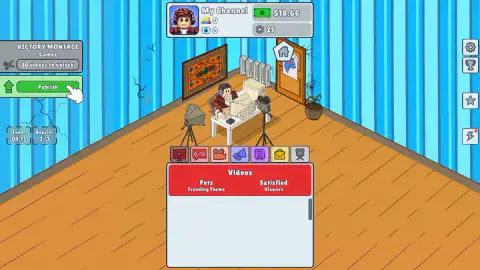
Most games about internet fame start with the fame. Idle Vlogger Simulator starts with a room whose blue striped wallpaper is cracking, a cobweb in the corner, a beige computer from another decade, and a balance of three dollars. Then, before you have recorded anything at all, a sponsor turns up and offers you five times that.
That is the rhythm of the whole game. You make a video in four presses, it goes into a list, and it brings in views, subscribers and money without further help. While it does, a clock on the left counts down from two minutes, and when it reaches zero somebody wants to give you cash. The work is in the videos. The money, at least early on, is in the interruptions.
It is a patient management game, the kind where numbers climb on their own and your job is to decide what to make next. Nothing chases you and we saw no way to lose.
Idle Vlogger Simulator is by PlayCroc. It was published in June 2026.
Four subscribers, 74 views and 89 cents: what one video is worth
We will be straight about how far we got: about four minutes, one video published for certain and a second one recorded.
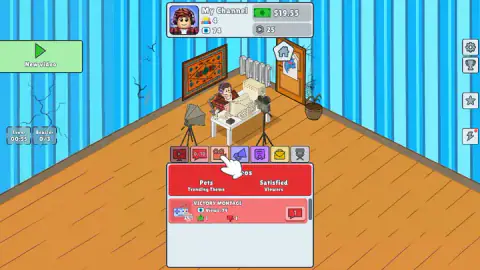
The first video was Victory Montage, theme Games. A little after we pressed Publish, the counters at the top of the screen read 4 subscribers and 74 views, and the video sat in the list with a thumbs up, a thumbs down and a single comment.
The balance had moved from $18.66 to $19.55. That is 89 cents for the upload.
Compare that with what happened before we had made anything. The opening event, a graphics card maker wanting a mention in our next video, had two buttons. The blue one, GET MONEY, paid $15.66. We took it, and the balance jumped from $3 to $18.66 in one press.
So in our session a single sponsor was worth more than seventeen first videos. That is the part that is not obvious at the start: the event window looks like an interruption, and it is the best payer on the screen. A new one arrives every two minutes, and a small clock on the left labelled Event shows how long is left.
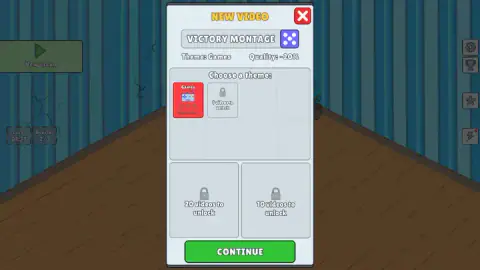
The window where you make a video also showed "Quality: -20%" both times. We do not know what causes it. The published video carried a 20% mark in the list, and the audience line above it read "Satisfied Viewers", so a first effort with old equipment is evidently tolerated.
The gold button pays five times the blue one
Each event comes with two answers. Blue is GET MONEY. Gold is GET LOTS OF MONEY, and it has a clapperboard icon beside it.
In both events we saw, the gold amount was exactly five times the blue one. The sponsorship offered $15.66 or $78.3.
The second event was a viewer sending a donation after a video with quality problems, and it offered $16.26 or $81.3. The amounts creep up a little; the ratio does not move.
The clapperboard means an ad: the larger prize asks you to watch one. We pressed gold on the second event and did not come away with the money, so we can only vouch for the blue button. With a balance under twenty dollars, though, the arithmetic is plain. One gold prize would have been four times everything we owned.
One curiosity. Our first event was numbered 10 and our second was numbered 7, so the number is not a count of how many you have seen. It reads more like the event's own label in a longer deck.
Every padlock counts down in videos
Almost everything in the New Video window is locked when you begin, and every lock tells you its price in the same currency: videos published.
The second theme tile read "5 videos to unlock". After our first upload it read 4, and the two larger boxes below it had each dropped by one at the same moment.
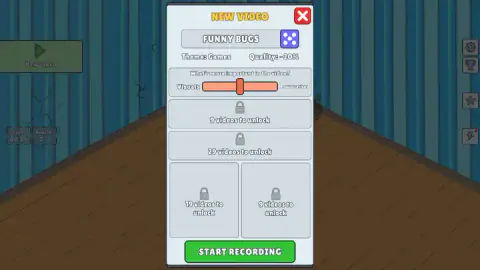
The waits are not short. The slider screen has two more locked rows, and the longest count we saw anywhere was 29 videos. The panel on the left, where Publish lives, shows a pair of scissors with a lock of its own; the game's description talks about an editing step, and this looks like where it will go.
That gives the early game a clear shape. Money comes from events, but progress comes from uploads, and no amount of sponsor cash shortens a padlock. The quickest way forward is to keep the four presses going and answer the events as they come.
There is more on the screen than we opened. Above the video list runs a row of seven tabs. On the right edge sit a gear, a trophy, a star and a lightning bolt. A second currency, hexagonal coins, stood at 25 from the start and never moved, and a small counter labelled Booster sits beside the event clock.
According to the game's description, money upgrades your equipment, the coins upgrade a team you hire, and the room can be traded for better homes. We did not get to any of it, so we cannot tell you what it costs.
A video blog, and the rule the game skips
Vlog is short for video blog: a diary kept on camera instead of in writing. The longest-running one on record began in January 2000.
The slider in the New Video window is a neat summary of the form. It asks what matters more, the visuals or the talking, and that is the real choice every person with a camera and an opinion makes.
The sponsorship event has a real counterpart too. In the United States the Federal Trade Commission published a plain-language guide for influencers in November 2019, and its core rule is short: if a brand pays you or gives you something, you say so, clearly, in the video itself. The game hands you the graphics card money and asks for nothing. Real creators do not get off that lightly.
Who it suits
Someone who likes a list that grows and a number that goes up, in short sessions. It is less suited to anyone who wants to steer a character or beat a clock: here you press buttons in tidy windows and wait.
It is listed for phones as well as computers. On a computer the game plays as a narrow column in the middle of a wide room.
More idle and tycoon games on Mava Games
Idle Airport Tycoon and Idle Zoo Tycoon grow a business with the same patience, with planes and animals in place of videos. The MachinEGG starts even smaller, with one hen and an empty bank. Juice Tycoon puts you behind a counter if you would rather serve customers than an audience. More are filed under clicker games.
Screenshots
Taken by opening the game ourselves and letting it run — not supplied by the publisher, and not the same picture every other site shows.
How to play Idle Vlogger Simulator
- Press the green New video button at the top left.
- In the window that opens, tap a theme tile. At the start there is only one, Games.
- Press Continue. The next screen has a slider asking what matters more in the video, with visuals at one end. Leave it or move it.
- Press Start Recording. The window closes and a panel on the left shows the video's title with a Publish button under it.
- Press Publish. The video appears in the Videos list at the bottom, with its own view count.
A few things we would have liked to know before we began:
- Tap the theme every time. Each new video opens with the theme line reading "Empty" and the Continue button dimmed. It stays dimmed until you tap the Games tile, even though Games is the only choice you have. We pressed a dead Continue for well over a minute before noticing.
- The game names your videos for you. Ours were called Victory Montage and Funny Bugs. A dice button sits next to the title.
- The blue event button is the safe one. It pays at once. The gold one pays more but wants you to watch an ad first.
- Leave the keyboard alone. The keys we tried did nothing we could notice. Everything is a button.
Controls
| Left click | Press New video, pick a theme tile, then Continue, Start Recording and Publish; choose an option in each event window |
|---|---|
| Click and drag | Move the slider that sets what matters more in the video (not moved in our run) |
| Tap | Phones and tablets play by touch, according to the game's listing (not tried by us) |
| Keyboard | The keys we tried did nothing we could notice; the game is played with the pointer |
Features
- A video is made in four presses (theme, Continue, Start Recording, Publish) and then earns views, subscribers and money on its own
- An event window every two minutes with two payouts, the larger one exactly five times the smaller
- Padlocks that count down in videos, so every upload brings each locked box one step closer
- A second currency of hexagonal coins, 25 of them in the bank when you begin
- A trending theme and an audience mood shown above your list of published videos
- A first room with cracked walls and cobwebs, and a house icon over the door
- Made by PlayCroc, in English and Russian according to the game's listing
Game details
- Developer
- PlayCroc
- Release date
- June 2026
- Last updated
- June 30, 2026
- Added here
- April 2026
- Technology
- HTML5 (2D)
- Platforms
- Browser (desktop, mouse), Browser (mobile & tablet, touch)
- Saved progress
- Saving, when available, is managed by this game. Mava cannot confirm your level.
FAQ
How do you play Idle Vlogger Simulator?
Press the green New video button, tap a theme tile, press Continue, then Start Recording, and finally Publish in the panel on the left. The video joins your list and starts collecting views, subscribers and money by itself. Every two minutes an event window offers extra cash, and each published video brings the locked options one step closer.
Why is the Continue button not working in the New Video window?
Because no theme is selected yet. Each new video opens with the theme line reading Empty and the Continue button dimmed, even when Games is the only theme you own. Tap the Games tile first; the button turns bright green and works. We lost more than a minute pressing a dimmed Continue before we saw it.
How do you earn money in Idle Vlogger Simulator?
Two ways that we saw. Published videos pay small amounts: our first one took the balance from $18.66 to $19.55 while reaching 74 views. Events pay far more: a sponsorship offer gave us $15.66 in one press, which was most of what we earned in the whole session.
What is the difference between GET MONEY and GET LOTS OF MONEY?
GET MONEY pays the smaller amount at once. GET LOTS OF MONEY pays five times as much, $78.3 against $15.66 in our first event, and carries a clapperboard icon: it asks you to watch a video ad first. We collected the smaller prize once; the larger one we did not manage to collect.
How do you unlock new themes in Idle Vlogger Simulator?
By publishing videos. The second theme tile read 5 videos to unlock at the start and 4 after our first upload. The other locked boxes in the New Video window count down the same way, one step per upload. Games is the only theme open at the beginning.
Do you have to watch ads in Idle Vlogger Simulator?
Not to play. The ad is tied to the larger prize in each event window, the gold button with the clapperboard. The blue button next to it pays a smaller sum with nothing to watch, and recording and publishing videos never asked us for one.
Who made Idle Vlogger Simulator?
Idle Vlogger Simulator is by PlayCroc. It was published in June 2026.
Can you play Idle Vlogger Simulator on a phone?
It is listed for PC, Android and iOS, in both landscape and portrait. Every window in the game is a tall, narrow column that would fit an upright phone. We played on a computer with the mouse, so we cannot tell you how it handles by touch.