










About My Arcade Center
Most tycoon games open by handing you a working business and asking you to make it bigger. There is already a shop, a queue and a number going up. My Arcade Center opens with a floor. You get a dark carpet with a pink border, a red arch that says GAME CENTER, one yellow counter and not a single machine. The arcade in the title is a thing you have to earn before you can run it.
What you do have is legs. Your character, a small figure in an orange cap, walks wherever you drag, and everything in the game happens by standing on it. Red discs lie around the carpet; walk over one and it jumps onto a stack on your back. A shopping cart painted on the floor shows the price of your first cabinet. Nothing is clicked and nothing is opened from a menu. The lot is the menu.
The game comes from GamesMrkt. It has been available since 7 April 2026. We played the opening four minutes, all of them on Day 1, and this page is clear about where our knowledge stops.
An empty lot and a cart marked 100
The whole first screen fits in one look. The lot sits on a grey street at dusk, with rows of houses behind it and their windows lit. A rope line leads in under the arch. To the right of the arch is the counter, yellow on top and blue below, with GAME written across the front and an attendant in a blue cap standing behind it.
The rest of the carpet is a plan of what will be there later. Dotted white brackets mark empty plots: one to the left of the entrance, one right in front of the counter, one beside it with a banknote drawn inside. They are places where something goes, and at the start nothing is in them.
The clearest of these plans is the cabinet. Near the bottom edge stands the grey ghost of a cabinet, the shape of an upright arcade machine with a screen and a control panel, drawn as if made of glass. Next to it a green-bracketed circle holds a shopping cart and the number 100. Top left, the cash counter reads 0. That gap is the first job the game gives you.
We did not close it. In four minutes our cash, our gold tickets and the smiley-face counter under them all stayed at 0, so we never saw the ghost turn into a real machine or a customer walk in under the arch.
The red discs on your back
The part we can describe from our own hands is the carrying. At the start about seven red discs lay loose on the carpet, most of them near the middle. Our character already had a short stack on its back, like a roll of coins standing on end.
Every disc we walked over left the floor and joined the stack. By the end of the session two were left on the carpet and the pile on our back stood nearly as tall as the character. The pick-up is automatic and forgiving: you only need to pass close.
What we did not work out is where the stack goes. We walked it around the middle of the lot and up towards the counter, and it stayed on our back. The bracket in front of the GAME counter is our best guess for a drop-off, because that is where the attendant stands, but it is a guess. If you play and the stack empties somewhere, you have got further than we did.
The discs look like the tokens a real arcade sells at its front desk, and the counter with an attendant fits that reading. The game never puts a name on them in the screens we saw, so we call them discs.
The magnet, the Level Pass and the 0/5 star
Three things on screen ask for your attention before you have earned anything.
Two round pads on the floor each hold an item with a small play-button badge under it. One is a red horseshoe magnet; the other holds a blue item we could not make out. On web games that badge usually means a boost in exchange for watching a video ad, and a magnet in a game about picking things up usually pulls them towards you. We did not trigger either pad.
On the right edge of the screen sits a Level Pass badge with a red alert mark. We did not open it. A badge like that normally leads to a ladder of rewards for playing more.
At the top, a blue star marked 1 stands next to a bar reading 0/5, also with a red alert. Five steps of something make up the first goal. It did not move while we collected discs, so discs alone are not what it counts.
Tokens and tickets: how a real arcade earns
The two currencies in the corner of the screen, banknotes and gold tickets, are borrowed from real arcades, and they explain what kind of business you are building.
A real arcade earns in very small amounts, one play at a time. Many of them do not take coins at the machine at all. You change money for the house's own tokens at a desk, and the machines only accept those. Money changed into tokens is money that will be spent inside the building.
Tickets run the other way. In what the trade calls redemption games, a machine pays out paper tickets according to your score, and you swap them for prizes at a counter. The prize is the reason to keep playing after the first go.
Both ideas make the owner's work physical. Somebody has to empty the machines, keep them running and staff the desk. That is the job this game gives your character, which is why you walk and carry here and do not just watch a number grow.
What we did not see
The game's description promises a good deal more than one lot: nine maps, staff you can hire, coin bots that collect for you, and customers who play without paying or damage the machines. All of that comes from the game's own description. In four minutes on Day 1 we saw none of it, and we would rather say so than repeat a list.
We also never saw a day end, so we cannot tell you how the night and its upgrades work. And we played on a computer with the mouse only.
So this is a slow opening, by design. If you want a business that already hums, the first minutes will feel empty. If you like the stretch where there is one counter, one price and a carpet to walk, that stretch is exactly what My Arcade Center starts with.
More games like My Arcade Center
Juice Tycoon is the closest match: another business you run on foot, carrying fruit to a juicer. Idle Airport Tycoon does the managing from above, with rooms, counters and an electricity bill. Raccoon Retail turns a supermarket into a place you clean and grow by driving around it. More are filed under clicker and idle games.
Screenshots
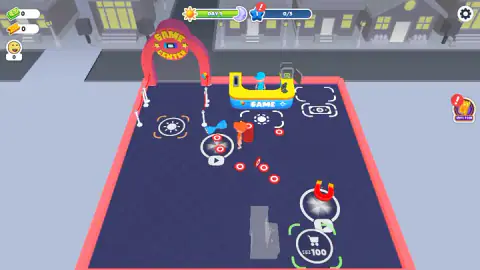
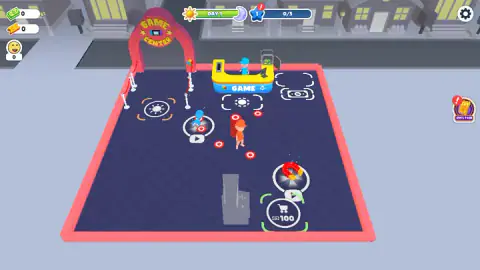
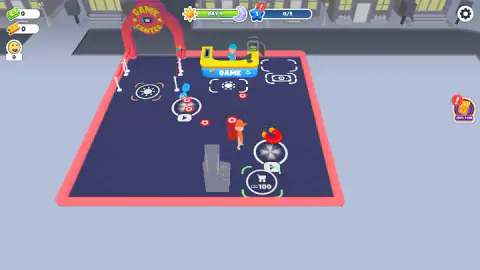
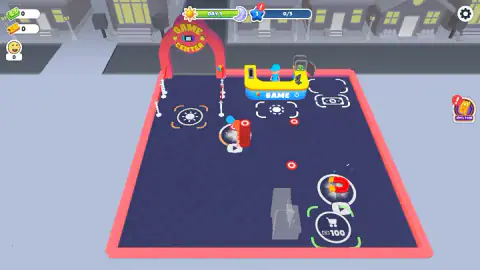
Taken by opening the game ourselves and letting it run — not supplied by the publisher, and not the same picture every other site shows.
How to play My Arcade Center
- Move by dragging. Hold the left mouse button and drag in the direction you want to go. The game's instructions also list W A S D and the arrow keys.
- Walk over the red discs. They are scattered across the carpet, red with a white ring. Each one you touch joins the stack on your back.
- Find the shopping cart. On the lower part of the lot a grey, see-through cabinet stands beside a circle with a cart and the number 100. By every sign that is your first machine and its price.
- Watch the top of the screen. The bar from sun to moon is the day. The blue star beside it is a goal that reads 0/5 at the start.
- Let the day run. According to the game's description you earn during the day and spend on upgrades at night.
A few things we learned the slow way:
- There is no button to press. Nothing we did involved clicking on an object. Walking onto a spot is how you use it.
- The stack on your back is your progress bar. When ours grew, the floor emptied. If the carpet still has discs on it, you have walking left to do.
- The cart is a price tag. Ours read 100 from the first second to the last while our cash read 0, so plan on earning before you head for it.
- The play-button badge is a warning label. Pads with that badge are extras, not steps you need.
Controls
| Hold and drag the left mouse button | Walk in the direction you drag (this is how we moved in our run) |
|---|---|
| W A S D / Arrow keys | Walk, according to the game's instructions |
| Walk over an item or a floor circle | Picks up loose red discs; there is no separate action key |
| Tap and hold, then drag | Phones and tablets move the same way, according to the game's instructions |
Features
- You start with an empty carpeted lot, a Game Center arch, one counter labelled GAME and no machines at all
- The first arcade cabinet stands as a grey outline next to a shopping cart circle marked 100
- Walking over the red discs on the floor adds them to a stack on your character's back
- Three counters sit top left, for cash, gold tickets and a smiley face, and all three start at 0
- A day bar runs from a sun to a moon, and a blue star beside it tracks a goal out of 5
- Two floor circles, one holding a red magnet, carry a small play-button badge
- Made by GamesMrkt
Game details
- Developer
- GamesMrkt
- Release date
- April 2026
- Last updated
- July 3, 2026
- Added here
- February 2026
- Technology
- HTML5 (3D)
- Platforms
- Browser (desktop, keyboard and mouse), Browser (mobile & tablet, touch)
- Classification
- Arcade , Clicker , Simulation , Strategy
- Download size
- 14 MB
- Ad requests
- 2 (few)
- Has a save
- Yes
- Saved progress
- Saving, when available, is managed by this game. Mava cannot confirm your level.
Measured by opening the game ourselves on 2026-09-11, not taken from the feed. Twelve seconds on a phone-sized screen, with ad requests counted and blocked rather than loaded.
FAQ
How do you play My Arcade Center?
You walk a small character around an arcade lot seen from above and build the business by stepping on things. Loose red discs join a stack on your back when you walk over them, and the first machine is bought at a floor circle with a shopping cart and the number 100. The game's description says customers then play the machines and you collect what they pay.
What are the controls in My Arcade Center?
On a computer we moved by holding the left mouse button and dragging in the direction we wanted to walk. The game's instructions also list W A S D and the arrow keys. There is no action button: things happen when your character stands on them.
How do you buy the first machine in My Arcade Center?
A grey, see-through arcade cabinet stands on the lower part of the lot, next to a circle with a shopping cart and the number 100. That is the price of the first machine. We started with 0 cash and had not reached 100 when our session ended, so we cannot tell you yet what the machine does once it is built.
What does the 0/5 star mean in My Arcade Center?
At the top of the screen a blue star with the number 1 sits next to a bar that reads 0/5, with a red alert badge on it. It is a goal with five steps, and it stayed at 0/5 through the four minutes we played. We did not find out which five things it counts.
What are the magnet and the play-button circles for?
Two round pads on the floor each hold an item, one of them a red magnet, with a small play-button badge underneath. On web games that badge usually marks a boost you get in exchange for watching a video ad. We walked past them and did not trigger either one.
Who made My Arcade Center?
A developer under the name GamesMrkt. The game has been available since 7 April 2026, with an update on 3 July 2026.
How many maps does My Arcade Center have?
The game's own description says nine, along with staff to hire and customers who misbehave. We played only the first few minutes of the first map, so we have not seen the other eight ourselves.
Can you play My Arcade Center on a phone?
It is listed for PC, Android and iOS, in both landscape and portrait, and the instructions say you tap, hold and drag to move. We played it on a computer with the mouse, so we cannot tell you how it feels on a touch screen.