





About Stickman Clicker
Most clicker games hide their maths behind a cookie, a slime or a factory. Stickman Clicker puts it in a list down the left side of the screen, where you can read the whole plan before you have earned a dollar.
The list is the shop. CLICK costs $25 and adds a dollar to each click. AUTO CLICKER costs $100 and pays a dollar a second whether you click or not. Below them come MR. STICKMAN, STICKMAN, MINER, FARMER and a VIP MAN, each one dearer than the last. Two kinds of upgrade, taking turns: one makes your finger worth more, the other makes money while your finger rests.
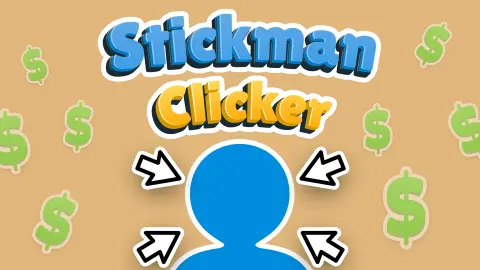
That split is the whole game. You click a blue stickman standing on a round white pedestal, the money counter at the top goes up, and you choose which half of the list to feed. The game is by Maxy, and it has been online in browsers since July 2024. We played the opening minutes, up to our first purchase and a little past it, and this page says where that stops.
Per click or per second: the choice every clicker is built on
Idle games, also called incremental games, all run on the same trade. Money you earn by clicking is fast but stops when you stop. Money you earn per second is slow at first but keeps coming while you do something else. The fun is in the switch from one to the other, when your own clicks start to look small next to what the machine makes alone.
Stickman Clicker lays that trade out in the order you meet it. Look at the shop as pairs. The first pair is a dollar a click for $25 against a dollar a second for $100. In the next pair, MR. STICKMAN pays $10 a second for $500.
Then the STICKMAN upgrade answers on the click side, with $50 a click for $3,000. Further down, the MINER pays by the second and the FARMER by the click again.
The per second upgrades are the better deal once you count time. A dollar a second is sixty dollars a minute without touching anything, which is why AUTO CLICKER costs four times as much as CLICK. The per click ones matter when you are actively playing, and the game keeps offering both so that neither stops being worth buying.
The rising prices are the other half of the design. When we bought CLICK, the next one cost more, so no single row can carry you forever. Sooner or later a row further down becomes the better deal, and that is how the game moves you down the list from CLICK towards the MINER and the FARMER.
The icons down the right side
A column of buttons runs down the right edge: a gear, a bar chart, a trophy, a T-shirt, a hat, a cursor marked 2x, and a stickman with a dollar sign.
The gear opens the settings. There are two sliders, one for sound effects and one for music, a green SAVE button and a red RESET button, with a small note that the game autosaves every 30 seconds. We did not press RESET.
We did not open the bar chart, trophy, T-shirt or hat panels. The game's descriptions on its listings say you can unlock achievements and dress your stickman in accessories, so the trophy and the two clothing icons are most likely where those live.
Under the pedestal sits a pale blue bar that reads 3x Clicks the whole time. We never found out what it does: every click in our session paid exactly what the shop said, no more.
Free Money and ads
From time to time a window called Free Money appears over the game. It asks whether you want to watch a short video in exchange for some cash, with a green tick to accept and a red cross to say no. In our session the offer was $3.15, at a moment when we had $9, so it is worth a handful of clicks, not a shortcut. You can ignore it and keep clicking.
What we saw, and what we did not
We played Stickman Clicker for about four minutes in a desktop browser. We reached $28, bought the first CLICK upgrade and clicked on to $9 after it. We did not reach AUTO CLICKER, so we never saw the per second counter move, and everything from AUTO CLICKER down comes from reading the list, not from owning it. How rich the stickman can get, and what the achievements and accessories look like, we did not see.
Who it is for
This is a game to leave open in a corner of the screen, not one to finish. There is nothing to lose, nothing to read beyond the shop, and no timer, so it suits younger players and anyone who likes watching a number grow. If you want a stickman who fights, jumps or races, this is not that game.
More clicker games
For the same idea with buttons instead of a stickman, try Click Click Clicker. Slime Clicker swaps the stickman for a slime, and Millionaire Factory turns the clicks into metal before they become money. Money Maker builds its income from a banknote machine instead. More are in our clicker category.
Screenshots
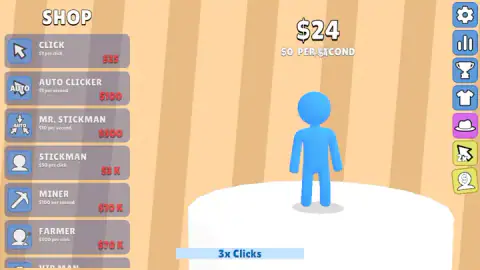
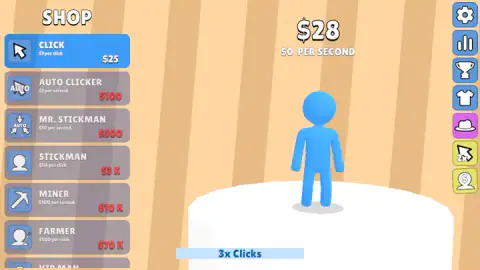
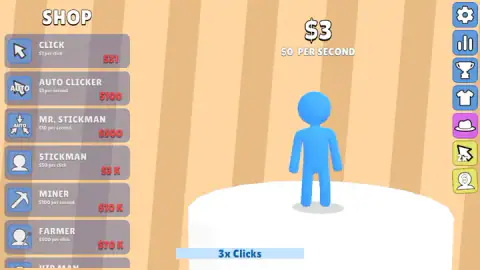
Taken by opening the game ourselves and letting it run — not supplied by the publisher, and not the same picture every other site shows.
How to play Stickman Clicker
- Click, or tap, on the blue stickman in the middle of the screen. Each click adds to the money at the top.
- Watch the shop on the left. A row stays grey while you cannot afford it and turns blue when you can.
- Click a blue row to buy it. The money is taken off the total and the upgrade starts working at once.
- Keep going. Upgrades paid per click make each click bigger; upgrades paid per second fill the line under the total, which reads "$0 PER SECOND" until you buy one.
Tips from our session:
- Buy CLICK first. It is the only thing you can reach early. Our clicks paid $1 each before it and $2 each after.
- Prices go up after each purchase. CLICK cost $25 the first time and $31 the second, so the next one always takes a few more clicks than the last.
- Aim for AUTO CLICKER next. At $100 it is the first upgrade that pays you when you stop clicking, and until you own one, the per second line stays at zero.
- Click the stickman, not the shop. Clicking a grey row does nothing. Every dollar at the start comes from him.
Controls
| Left click or tap on the stickman | Earn money, as much per click as your upgrades say |
|---|---|
| Click a row in the shop | Buy that upgrade, if the row has turned blue |
| Gear (top right) | Settings - sound and music volume, SAVE and RESET |
| Icons down the right side | Stats, achievements, outfits, hats and bonus offers |
Features
- One blue stickman on a pedestal, and every dollar starts with a click on him
- A shop of upgrades that take turns between paying per click and paying every second
- Rows that light up blue the moment you can afford them
- Prices that rise each time you buy - the first click upgrade went from $25 to $31
- Autosave every 30 seconds, plus a SAVE button for when you want to leave now
- Outfits, hats and achievements behind the icons on the right, according to the portals
Game details
- Developer
- Maxy
- Release date
- July 2024
- Added here
- June 2025
- Technology
- HTML5 (Unity WebGL)
- Platforms
- Browser (desktop, mouse), Browser (mobile & tablet, touch)
- Saved progress
- Saving, when available, is managed by this game. Mava cannot confirm your level.
FAQ
What is Stickman Clicker?
Stickman Clicker is a free idle clicker game by the developer Maxy, playable in the browser. You click a blue stickman standing on a pedestal to earn money, and spend it in a shop on upgrades that either raise what each click pays or add money every second without clicking.
How do you play Stickman Clicker?
Click or tap on the stickman in the middle of the screen. Each click adds money to the total at the top. When a row in the shop on the left turns blue, you can afford it; click it to buy that upgrade, then keep clicking.
What should you buy first in Stickman Clicker?
The first row, CLICK, which costs $25 and adds $1 to every click. In our game it doubled our pay per click from $1 to $2. The first upgrade that earns money on its own is AUTO CLICKER, at $100, and it is the one that makes the game idle.
Does Stickman Clicker save your progress?
Yes. The settings screen, behind the gear icon, says the game autosaves every 30 seconds, and it has a green SAVE button to save straight away. Next to it is a red RESET button.
Is Stickman Clicker the same as Stickman RPG - Idle Clicker?
No. Stickman RPG - Idle Clicker is a different game with a different name. Stickman Clicker by Maxy has no fighting or levels to clear; it is about earning money and spending it on upgrades.
Who made Stickman Clicker and when did it come out?
The game's listings credit Maxy. It went online in browsers in July 2024, and the browser version here has been available since July 2025.
Does Stickman Clicker have ads?
It has optional ones. A Free Money window offers a small amount of cash for watching a short video, and you can close it with the red cross. In our session it offered $3.15 when we had $9.
Can you play Stickman Clicker on a phone?
Yes. It is listed for PC, Android and iOS, and another big games site lists it for desktop, mobile and tablet browsers. On a touch screen you tap the stickman instead of clicking. We played it in a desktop browser with the mouse.