










About Deepstone: Idle Miner Clicker
Idle games usually ask you to do the sums after the first hour. This one puts them on the first screen. Every card in the shop states what it changes and what the next step will cost, and if you read them before spending, as we did not, the opening of the game looks quite different.
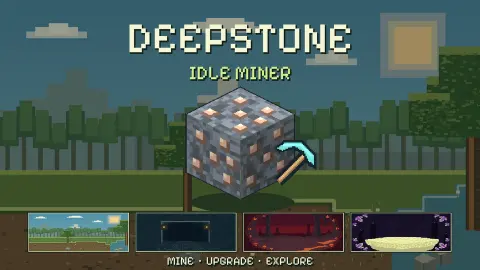
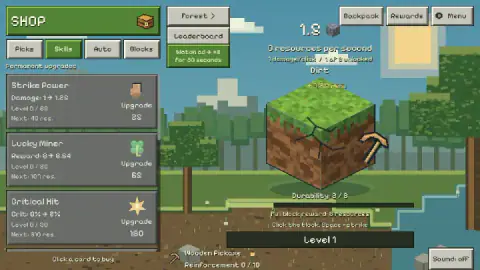
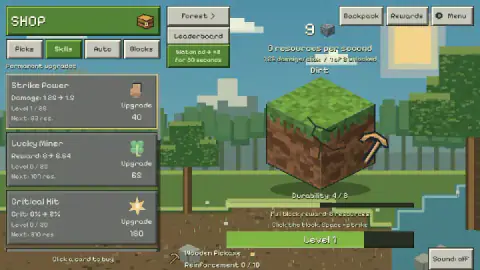
You begin in a pixel-art forest, facing one dirt block with a wooden pickaxe beside it. A click takes one point off the block's durability. That number starts at 8, so the first block is eight strikes of work, and each strike pays a sliver of a resource.
Our account is short, and you should know how short. We played for about ten minutes on a computer and broke one block, started a second and bought one upgrade. We never left the Forest, bought a new pickaxe or hired a helper, and the bar at the bottom never got past Level 1. Everything beyond that comes from what the game's windows say, and we mark it as such.
GameLine made it, according to the game's listing, where it dates from October 2026.
Your first block pays far more than the block
The counter jumps in a way that puzzles you if you are not watching for it. Single strikes paid fractions of a resource, then the first broken block left us on 33.
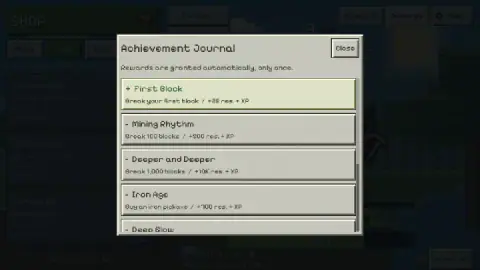
The sums explain it. The block is worth 8, and the journal's first entry, First Block, adds 25 and some experience. That entry is granted automatically and only once, so your second block goes back to paying 8. The level bar behaved the same way: empty until that moment, then nearly three quarters full, and it stayed there for the remaining strikes we played.
The next journal goals are much further off. Mining Rhythm wants 100 blocks and Deeper and Deeper wants 1,000, which pays 10K resources. Iron Age asks you to buy an iron pickaxe. We only completed the first, so we can say nothing about what the experience finally buys you.
Why the Stone Pickaxe should come before Strike Power
We got this wrong, and it is the most useful thing we can pass on. On 34 resources, we bought Strike Power and dropped to 9.
Strike Power costs 25 and lifts damage from 1 to 1.25, with the next level at 40. The Stone Pickaxe costs 55 resources and lifts damage from 1 to 4. It also strikes slightly faster and adds a little to the block reward. By the card's numbers, an 8-durability block would then take two strikes instead of eight.
From 33 resources you are about three blocks short of it, and it is also your ticket to the next world. We did not get there, so this is arithmetic from the cards and not something we felt in play.
The other two Skills cards are slower bets for now. Lucky Miner costs 65 and takes the reward from 8 to 8.64. Critical Hit is the dearest at well over 150 and starts at a 2% chance. Pickaxe Boost, on the Picks tab, costs 25 and gives a smaller damage gain than Strike Power's first level. Its card also tracks Reinforcement, up to 10 steps for each pickaxe.
Better pickaxes are the keys to four worlds
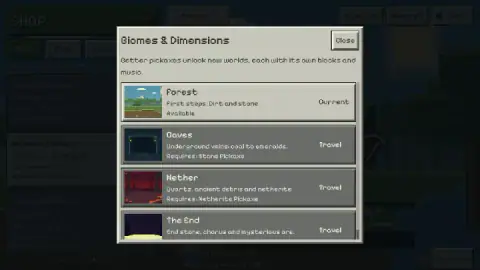
The window is headed Biomes & Dimensions, and it sets out the structure more clearly than anything else in the game. You start in Forest, described as dirt and stone. Caves promises underground veins from coal to emeralds and needs the Stone Pickaxe. Nether promises quartz, ancient debris and netherite and needs a Netherite Pickaxe. The End lists end stone, chorus and a mysterious ore.
So the gap between the second world and the third is wide, since the Stone card already prices the following pickaxe at over a thousand resources. The window also promises that each world has its own blocks and music. We saw only the first of them, so we cannot tell you how long the climb takes.
The idle part arrives later than the name suggests
For all of our session the counter read 0 resources per second. Nothing happened unless we clicked. The Auto tab is where that should change, as the instructions speak of hiring helpers, but we did not buy any.
The settings window says the rest: offline mining for up to 8 hours, a magnet that improves it, and progress saved on exit through the platform. There are also Save, Load and Reset progress buttons, and sliders for music and action sounds. If you expect numbers to climb from the first minute, plan on some clicking first.
The ad boost is optional, and its rules are spelled out
The green button at the top offers Miner Overdrive: watch an ad and you strike twice as often for 30 seconds, with auto-mining and helper income doubled. The window states the limits itself. It does not stack, gives no offline bonus, and the timer only runs during active play.
We closed it each time, so we cannot judge it. With no helpers, half a minute of doubled clicking is worth little. It should matter more once auto-mining is doing the work.
How it compares, and who it suits
Other miners in our catalogue take different routes, judging by their listings. Deep Drill is described as a game that plays itself from the moment it loads, the opposite of this slow manual start. Mole Dig Clicker keeps the tapping but gives you a mole digging towards the centre of the world, and SWARM MINERS adds collectible pets that mine alongside you.
Deepstone suits players who like reading a price list and working out the best order to buy things. It is a poor fit for anyone who wants instant automation, since the first stretch is all manual and there is very little spectacle. Younger players can manage the clicking, though the small text on the cards takes some reading.
More in our clicker games.
Screenshots
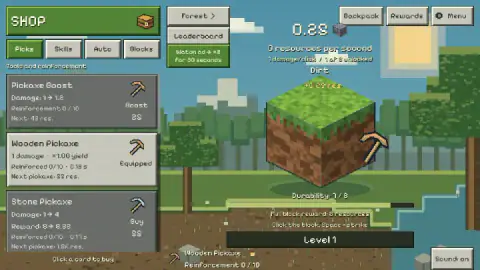
Taken by opening the game ourselves and letting it run — not supplied by the publisher, and not the same picture every other site shows.
How to play Deepstone: Idle Miner Clicker
- Start the expedition. A window called Expedition ready sums up the game and warns that an ad may appear. Its green button takes you in.
- Strike the block. Click it, or press Space as the hint below it says. Durability counts down, and the block breaks at zero.
- Spend in the shop. The Picks tab holds pickaxes, Skills holds permanent upgrades, and Auto and Blocks sit beside them. Click a card to buy it.
- Travel when you qualify. The Forest button at the top opens the list of worlds, each with its pickaxe requirement.
- Check Rewards. That button opens the Achievement Journal, where goals pay out by themselves.
Tips from our run:
- Click the card, not the word. The line under the list reads "Click a card to buy". A card you can afford turns pale and its price goes green, while the others stay grey.
- Tick the hold option. The Menu window has a box for mining while holding the mouse button, which should spare your finger. We saw the box but did not try it.
- Close Miner Overdrive with Play without boost if you do not want the ad. The lower button is the one without it.
Controls
| Left click on the block | Strikes it. Each strike takes durability off the block and pays a small part of its reward |
|---|---|
| Space | Also strikes, according to the hint under the block |
| Click a shop card | Buys it. The whole card is the button, as the line under the list says |
| Hold the mouse button | Keeps mining, once you tick that box in the Menu window |
| Tap | Replaces the mouse on phones, according to the game's instructions. We played on a computer |
Features
- Dirt in the Forest has a durability of 8, so a Wooden Pickaxe needs eight strikes per block
- Four tabs in the shop: Picks, Skills, Auto and Blocks
- Four worlds behind pickaxe requirements: Forest, Caves, Nether and The End, each with its own blocks and music
- An Achievement Journal pays resources and experience once and automatically
- Offline mining of up to 8 hours, according to the game's settings window
- An optional ad doubles mining speed for 30 seconds, and the timer only runs during active play
Game details
- Developer
- GameLine
- Release date
- October 2026
- Last updated
- October 1, 2026
- Added here
- October 2026
- Technology
- HTML5 (2D pixel art)
- Platforms
- Browser (desktop), Browser (mobile & tablet, touch)
- Classification
- Arcade , Clicker , Simulation
- Saved progress
- Saving, when available, is managed by this game. Mava cannot confirm your level.
FAQ
How do you play Deepstone: Idle Miner Clicker?
Click the block in the middle of the screen to take durability off it. When it breaks you collect its full reward, and you spend resources by clicking cards in the shop on the left. Better pickaxes hit harder and unlock new worlds. The game's instructions add that helpers mine for you later on.
What should you buy first in Deepstone: Idle Miner Clicker?
Going by the numbers on the cards, save for the Stone Pickaxe. It costs 55 resources, takes damage from 1 to 4 and is the requirement for Caves. Strike Power costs 25 and only takes damage from 1 to 1.25. We bought Strike Power first and fell behind on the pickaxe, so treat this as a lesson from our mistake, not a route we completed.
How do you unlock Caves and the other biomes in Deepstone?
With pickaxes. The Biomes & Dimensions window, opened from the Forest button, says Caves requires a Stone Pickaxe and Nether a Netherite Pickaxe. The End sits further down the list, and its requirement was cut off in the view we captured. We stayed in Forest, so we have not seen the other worlds in play.
Do you have to watch ads to play Deepstone: Idle Miner Clicker?
No. The Miner Overdrive window says the boost is optional and that normal mining works without ads, and it offers a Play without boost button. A notice on the opening window also warns that an ad may appear when you enter. In our session the platform supplied no ad and a message told us to keep playing, so we cannot say how often they come.
Does Deepstone: Idle Miner Clicker keep mining while you are away?
The settings window says offline mining runs for up to 8 hours and that a magnet improves its efficiency. Our counter read 0 resources per second the whole time, because we never bought a helper or auto-miner, so we did not test it. The same window says progress is saved on exit through the platform.
Does Deepstone: Idle Miner Clicker have an ending?
The game's own instructions say there is no final victory screen, and that the aim is to keep improving and climb the leaderboard. We played about ten minutes, far too little to check that. The Achievement Journal does list goals as long as breaking 1,000 blocks.
Can you play Deepstone: Idle Miner Clicker on a phone?
The game's listing gives PC and Android, in landscape, and the game's instructions say you tap the block and the buttons. We played on a computer, so we have not tried it by touch. The shop cards hold a lot of small text, which is worth bearing in mind on a small screen.
Who made Deepstone: Idle Miner Clicker?
The game is credited to GameLine and dates it October 2026, the same month as its last update. The listing gives English, Spanish, French and Russian as its languages.