













About Money Cutter Idle
Idle games usually hand you a mine, a farm or a factory and let you imagine the money. Money Cutter Idle skips the pretence. The thing on the belt is the money: long sheets of green banknotes, printed side by side and still joined, sliding toward a blade that cuts them apart.
Each cut note flips off the end of the belt and counts toward your total. That is the whole engine. What turns it into a game is the bar of three buttons underneath, because every note you earn can go back into the machine to make it cut faster, carry more sheets or pay more per note.
The listing on the game is credited to CTT production. It has been there since April 2026.
What follows comes from one sitting of just over four minutes with a mouse. We bought upgrades in all three slots and watched the dollar bar climb, but we never reached the second character, a new level or the next map. Treat it as a close look at the first stretch.
Two counters, and only one of them is for shopping
The screen shows money twice, and it took us a moment to see why. At the top centre sits a portrait of a scruffy man labelled NEEDY, with a bar beside him that reads in dollars. In our run it went 91, then 252, then 480 dollars, crawling toward a chequered flag at the far end.
At the top right sits a stack of green notes with a number beside it. That is the pile the upgrade buttons charge, and it rises and drops as you spend. We had 14 notes at one point and 140 later on.
Under the green pile there is a third counter with a yellow ticket on it. It read zero for the whole session, and nothing we did changed it. Below that, a small line shows income per second, which grew from 2 dollars to 8.7 while we played.
The split matters for how you think about spending. Notes are the means, dollars are the goal.
Where the notes go: Speed, Add Sheet and Profit
The three open upgrades each change a different part of the machine, and each gets dearer after every purchase. These are the prices we saw on the buttons.
| Upgrade | What it does | Prices we saw |
|---|---|---|
| Add Sheet | Puts more sheets of notes on the belt | 10, 50, 92 |
| Profit | Raises what each cut note is worth | 40, 80, 136 |
| Speed | Makes the blade and belt work faster | 94, 174 |
A fourth slot, Add Row, sits on the left with a padlock and the words "Reach Lvl 3". On the right edge, a locked Next Map button carries a price of 2M. Both were out of reach in our run.
Add Sheet is the obvious opener because it is cheap and the game points a green arrow at it. Profit was the second thing we could afford. Speed doubled in price after one purchase, so it is the upgrade to save for, not the one to buy on reflex.
The notes change colour as you go
Just under the NEEDY bar there is a short strip of note icons: a green note with a tick on it, then a blue one, a pink one, and a question mark. It is a collection, and the tick shows which you have.
The blue note turned up first. Partway through, the belt was carrying pale blue sheets instead of green ones, and a cut note flew off with +5$ floating over it. Around the same moment a pop-up titled New Notes Found offered one extra $5 note in return for a video.
We never saw the pink note on the belt, and the question mark stayed a question mark. Our guess is that each new design pays more than the last, but we did not stay long enough to check.
Real money is made the same way, by the way. Banknotes are printed many to a sheet and cut apart only at the end, which is why the US Bureau of Engraving and Printing can sell uncut sheets to collectors. The game simply lets you run the cutter.
What we did not get to see
We never filled the NEEDY bar, so we cannot say who the second character is or what changes when they arrive. Add Row, level 3 and the Next Map all stayed locked.
The listing talks about merging identical notes into more valuable ones. We saw no merge button and nothing that looked like merging in four minutes. It also says a tap anywhere speeds production up; we tapped the belt plenty and could not see a difference in the counters. Small "X2" labels drifted across the screen several times, and we could not tie them to anything.
Who it is for
Anyone who likes idle games where the numbers do the talking. There is nothing to read beyond button names, nothing violent and no way to lose, so a child can play it as easily as an adult.
If you want strategy, it is thin. Three buttons and one belt is the whole first stretch, and the main decision is whether to buy now or wait.
More idle games
For another conveyor to keep fed, The MachinEGG moves eggs through a basement of belts. Idle Chicken Farm runs on the same buy-and-wait rhythm with a coop of hens, and Idle Supermarket Tycoon builds a shop one fridge and till at a time. The rest are in clicker games.
Screenshots
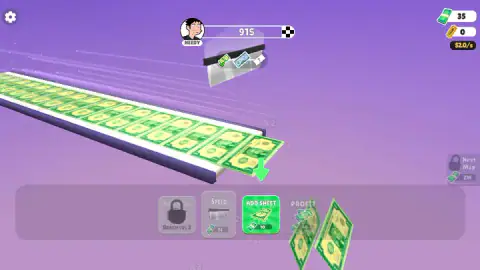


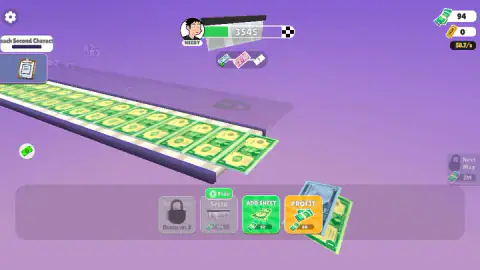
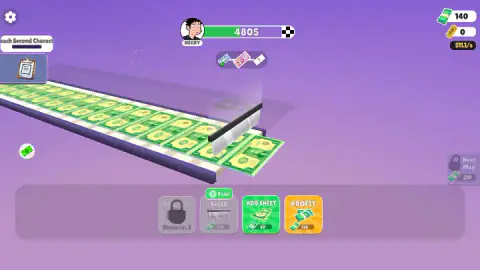
Taken by opening the game ourselves and letting it run — not supplied by the publisher, and not the same picture every other site shows.
How to play Money Cutter Idle
- Press play and close any notice from the portal. The belt starts moving on its own.
- Watch the counter at the top right. That green pile of notes is your spending money.
- When a button in the bottom bar turns bright, click it. Add Sheet is the first one you can afford.
- Keep an eye on the dollar bar next to NEEDY at the top. When it reaches the chequered flag, the next character comes up.
- Claim the task on the left whenever its button appears. The first one asks you to reach the second character.
What the first few minutes taught us:
- Grey means not yet. A button stays grey until you hold enough notes, then turns green or orange. You never need to compare prices by hand.
- Speed gets expensive quickly. It cost 94 notes the first time and 174 the second, while Add Sheet stayed under 100.
- The video icon means an advert. Free tags on the upgrades and the New Notes Found pop-up both want you to watch one. The red X closes the pop-up and nothing is lost.
- The keyboard does nothing. We tried the arrows, Space, Enter and Escape. Everything that matters is a click.
Controls
| Click an upgrade button (bottom bar) | Buys Speed, Add Sheet or Profit; a button lights up green or orange once you can afford it |
|---|---|
| Click a task's Claim button (left side) | Collects the reward of the current task; a pointing hand shows it the first time |
| Red X on a pop-up | Closes offers such as New Notes Found without watching anything |
| Gear (top left) | Settings; we did not need it |
| Arrow keys, Space, Enter and Escape | Tried, with no effect we could see |
Features
- A conveyor belt carrying whole sheets of uncut banknotes into a blade that slices them into single notes
- Two counters that do different jobs, a dollar bar that fills toward the next character and a pile of notes you spend on upgrades
- Three upgrades from the start, Speed, Add Sheet and Profit, each one dearer after every purchase
- A fourth upgrade, Add Row, locked until level 3, and a Next Map priced at 2M
- A row of note designs to discover, from the green note to a blue $5 note and a pink one after it
- A task list on the left, starting with Reach Second Character
Game details
- Developer
- CTT production
- Release date
- April 2026
- Added here
- February 2026
- Technology
- HTML5 (3D)
- Platforms
- Browser (desktop)
- Classification
- Casual , Clicker , Puzzle , Simulation , Strategy
- Saved progress
- Saving, when available, is managed by this game. Mava cannot confirm your level.
FAQ
How do you play Money Cutter Idle?
You watch a belt feed sheets of banknotes into a blade, and every note it cuts adds to your money. Spend the notes you collect on the three upgrade buttons at the bottom, Speed, Add Sheet and Profit, and the money comes in faster. The game keeps running between clicks, so most of the play is deciding what to buy next.
What is the difference between the two money counters in Money Cutter Idle?
The bar at the top, next to a character called NEEDY, counts dollars toward the next character. The green note counter at the top right is what the upgrade buttons charge. In our run the bar climbed from 91 to 480 dollars while the note pile went up and down as we spent it.
Which upgrade should you buy first in Money Cutter Idle?
Add Sheet is the cheap one at the start, 10 notes against 40 for Profit and 94 for Speed. More sheets on the belt means more notes per pass, and its price rose more slowly than Speed's in our session, which nearly doubled after one purchase. We saved Speed for later.
What do the Free buttons do in Money Cutter Idle?
Some upgrades show a green Free or Free x2 tag with a small video icon, and the New Notes Found pop-up offers an extra $5 note the same way. They are offers to watch an advert in exchange for the reward. We closed them and paid with notes instead, and the game carried on normally.
Can you lose in Money Cutter Idle?
No. There is no timer, no enemy and no fail screen, and the belt never stopped in the four minutes we played. The only thing you can get wrong is spending notes on a slow upgrade and waiting longer for the next one.
Can you play Money Cutter Idle on a phone?
It is listed for PC, Android and iOS, in both landscape and portrait. Everything we did was a single click on a button, which should work the same with a finger. Our own session was on a desktop with a mouse, so the phone version is the listing's word, not ours.
Who made Money Cutter Idle?
The game is credited to CTT production and has been available from April 2026.