










About Idle Pong
Pong, the arcade game from 1972, was a ball and two paddles. Idle Pong keeps the ball and throws away both paddles. Nobody hits anything here, not you and not an opponent, and the single ball on the board drifts past the scoring chips at least as often as it touches them. Your only job is to decide what to buy.
That makes it an idle clicker: a game where the numbers climb while you watch, and the decisions are all about spending. Idle Pong starts climbing before you touch anything. Your balance rises by one coin a second, shown as +1/s next to the counter, with or without a ball in play.
We have now played it twice on a computer with a mouse, most recently for ten minutes in October 2026. That session ended with more than a hundred thousand coins, the game still on level 1, and the experience bar sitting exactly where it had started. The gap between those two numbers is the most useful thing we can tell you about Idle Pong, and most of this page is about it.
The game is by kunigames, who put it in August 2025 and last updated it a year later.
Coins are not what is stopping you
This is the trap, and it is worth knowing before you start. Idle Pong puts two meters in front of you that look like two halves of one progress bar. They are not connected.
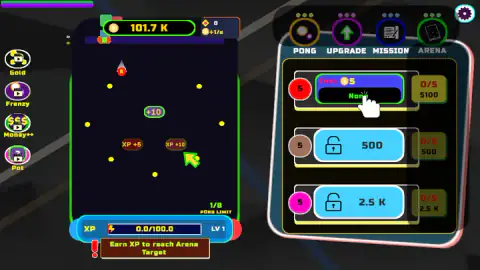
Coins are the loud one. Ours went from 327 on the opening screen to 101.7K ten minutes later, a climb of roughly three hundredfold.
Experience is the quiet one, and it is the one that matters. The bar under the board read 0.0 out of 100.0 in our first screenshot of that session and 0.0 out of 100.0 in the last. The level stayed at 1. Underneath, in a red box, the game repeated the same sentence all the way through: "Earn XP to reach Arena Target".
So money is not the gate. You can finish a session richer than anything in the shop costs and be precisely where you began, because the Arena is priced in experience and experience is not for sale. We cannot tell you what fills the bar. On our earlier visit it did climb; this time, with far more money, it never moved at all.
The hand, the 0/5 counter, and a board that barely moves
The panel on the right opens with three rows, one per kind of ball: a red one at Cost 5, a brown one locked behind 500 coins, a magenta one locked behind 2.5K. Each row also carries a small counter, reading 0/5, with a price under it. We have never seen that counter move, in either session.
The first row's button is where the game points you, and where our whole second session went. Clicking it changed nothing we could see: not the balance, not the ball counter, not the 0/5. Meanwhile the board behind it sat still. The chips reading +10, XP +5 and XP +10, and the loose yellow dots around them, are in identical positions in two screenshots taken ten minutes apart. The only thing that moved was the ball.
The counter under the board explains part of that. PONG LIMIT showed one ball out of eight at the start, none in the middle — the board was genuinely empty, chips and all — and one again at the end. One ball, in a game built for eight.
One more thing, honestly reported: when we came back for the second session, the game opened exactly as it had the first time. Same few hundred coins, same hand on the same button, both lower rows locked again. Nothing we had opened before was waiting for us.
The Fortune Wheel, and four buttons that are adverts
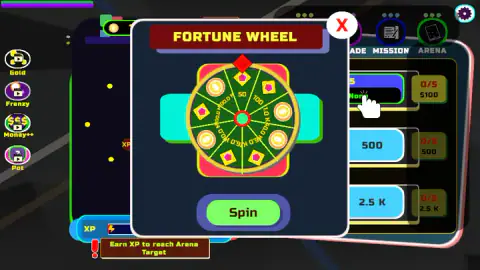
A red-and-gold FORTUNE WHEEL panel drops over the middle of the screen, covering the ball rows and the tab labels behind them. It has eight wedges, alternating coins and gems, a green Spin button, and a red X in the corner. While it is up, clicks on anything behind it do nothing, which we worked out the slow way.
We spun it. The panel turned into a result card: Coin 1K, a large coin, a Reward Multiplier of X1, and a green Claim button. Claiming closed the panel and the money landed in the balance. The wheel is the clearest route to coins we found, and the game opens it for you, repeatedly, without being asked.
Down the left edge sit four round buttons: Gold, Frenzy, Money++ and Pot. Every one of them carries a small video icon, the standard mark for a reward you pay for by watching a short advert. They are there from the first second, before you have earned anything, and nothing is hidden about them: the game is offering a trade, not interrupting you with one. We did not take it, so we cannot tell you what the four of them give. There is also a gem counter beside the coins, which stayed at zero for us, and a gear for settings in the top corner.
There is no paddle: where the name comes from
Pong was the first hit arcade game. Atari released it in 1972: a white square bounced between two paddles on a black screen, and each player tried to make the other miss. Allan Alcorn built it as a practice exercise set by the company's founder, and it became the machine that made Atari.
Idle Pong borrows the famous half of that, a ball that bounces off walls and never stops, and removes the half that made it a contest. Nothing can miss, so nothing can be lost. The dark upright board with its bright chips looks far more like a brick-breaker than a tennis court, and the ball even trails a small flame.
That is the right way to arrive. If you come for reflexes, there is nothing to react to. The name points at an arcade machine from half a century ago; what you get is a shop with a screensaver attached to it.
Who it is for
Idle Pong suits people who like watching a number climb and who want something quiet on screen while they do something else. There is no violence, almost nothing to read and no way to lose. If you want a game of skill, or just a clear sign that your clicks are landing, look elsewhere: we spent ten minutes pressing the button the game pointed at and finished on level 1.
More ball games that play themselves
Money Ping Pong has the same kind of name and the same missing paddle: there you place money blocks in the path of a ball you cannot steer. Idle Gravity Breakout 2 is the nearest relative, with balls that keep hitting while you plan the next purchase, and a shop that answers when you press it. For a brick-breaker where you aim every shot yourself, try Bricks Buster. The rest are in clicker games.
Screenshots
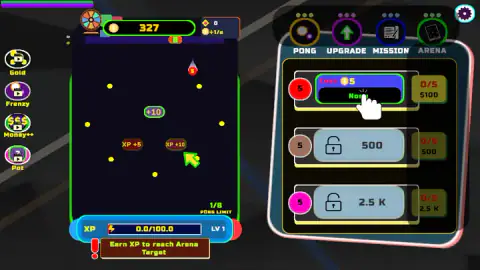
Taken by opening the game ourselves and letting it run — not supplied by the publisher, and not the same picture every other site shows.
How to play Idle Pong
- The screen opens with the board on the left and a panel of ball rows on the right. A white hand points at the first row's buy button, marked Cost 5.
- Click that button. It is what the game asks for, and the counter beside it is where you look to see whether anything happened.
- Watch the PONG LIMIT counter under the board. It tells you how many balls are flying, out of a maximum of eight.
- Deal with the Fortune Wheel when it drops over the panel: spin it and take the prize, or close it with the red X. Nothing behind it responds while it is up.
- Fill the experience bar, 100 points at level 1, to move towards what the game calls the Arena target.
What our sessions taught us:
- Read the colour, not the price. A locked row's button is pale grey while you cannot afford it and bright blue the moment you can. We clicked the 500-coin row when it turned blue, the coins went, and the row opened with an effect line reading Duplicate.
- The tutorial hand is not a promise. It pointed at the first buy button for ten unbroken minutes. We clicked that button around forty times. The small 0/5 counter beside it read the same at the end as at the start, and so did the balance.
- Do not read the balance as a progress bar. Coins and experience are separate, and only one of them opens anything.
- Expect the wheel. It interrupted us more often than anything else on screen did.
Controls
| Click or tap the buy button on the first ball row (Cost 5) | Where the tutorial hand points from the first second. In our longest session it never produced a visible change |
|---|---|
| Click a locked row once its button turns from grey to bright blue | Bright blue means you can afford it. Clicking the 500-coin row took the coins and opened it |
| PONG, UPGRADE, MISSION and ARENA tabs (top right) | Switch the right-hand panel between the ball rows and the game's other sections |
| Spin, then Claim (Fortune Wheel pop-up) | Spins the wheel and pays the prize. The red X in the corner closes the pop-up instead |
| Gold, Frenzy, Money++ and Pot (left edge) | Optional boosts. All four carry a small video icon, so they are paid for by watching an advert |
| Gear (top right) | Settings |
| Keyboard | Not needed. The arrow keys and the space bar gave no response we could notice |
Features
- A board with no paddle and no opponent: a single ball marked 5 drifts around while chips reading +10, XP +5 and XP +10 sit in fixed places
- A coin counter that climbed from 327 to over 101K in ten minutes, next to an experience bar that did not move once
- A floor income of one coin a second, shown as +1/s, that keeps running with no ball on the board
- A PONG LIMIT counter under the board with room for eight balls; ours showed one, then none, then one
- Three ball rows: the first at 5 coins, the second locked at 500 and the third at 2.5K, each with a 0/5 counter beside it
- A Fortune Wheel pop-up with eight wedges, a Spin button and a Claim card; ours paid Coin 1K at a Reward Multiplier of X1
- Four boosts down the left edge, Gold, Frenzy, Money++ and Pot, every one of them marked with a video icon
Game details
- Developer
- kunigames
- Release date
- August 2025
- Last updated
- August 10, 2026
- Added here
- July 2025
- Technology
- HTML5
- Platforms
- Browser (desktop), Browser (mobile & tablet, touch)
- Saved progress
- Saving, when available, is managed by this game. Mava cannot confirm your level.
FAQ
How do you play Idle Pong?
You buy balls from the rows on the right and they move around the board by themselves, past chips that pay coins and experience. There is no paddle and nothing to aim. The only decisions are what to buy and when to save up for the next kind of ball.
Is there a paddle in Idle Pong?
No. Despite the name, Idle Pong has no paddle, no opponent and no way to lose. The ball moves on its own inside a closed board and you only touch the shop, the tabs and the pop-ups. The name points at the bouncing ball of the 1972 arcade game Pong, not at its rules.
Why is the XP bar stuck at zero in Idle Pong?
Experience and coins are separate currencies, and the coin timer does nothing for the bar. In our longest session the bar read 0.0 out of 100.0 in the first screenshot and 0.0 out of 100.0 in the last, ten minutes later, with over 101K coins in the bank. The red notice under the board, Earn XP to reach Arena Target, stays up the whole time.
How do you unlock new balls in Idle Pong?
The locked rows show their price, 500 coins for the second ball and 2.5K for the third, and their button turns from pale grey to bright blue the moment you can afford it. Clicking a blue button takes the coins and opens the row. The second ball's effect line reads Duplicate.
How do you get coins fast in Idle Pong?
The timer alone is slow: coins arrive at one a second, shown as +1/s, whether or not a ball is in play. The Fortune Wheel pop-up is the game's own shortcut, and ours paid out a prize of 1K coins in one spin. The four boosts on the left edge, Gold, Frenzy, Money++ and Pot, are the other offered route, and each is paid for with an advert.
Does Idle Pong have ads?
Yes, and they are offered rather than forced. Four round buttons down the left edge, Gold, Frenzy, Money++ and Pot, each carry a small video icon, which is the usual sign that the reward is paid for by watching a short advert. They are on screen from the first second. We did not use them, so we cannot say what they give.
Who made Idle Pong?
Idle Pong is by kunigames. It was published in August 2025 and was last updated in August 2026.
Can you play Idle Pong on a phone?
It is listed for Android and iOS browsers in both landscape and portrait. The layout is built for it: the board is a tall rectangle and everything you press is a large button. We played only on a computer with a mouse, so we have not tried the touch version ourselves.