





About Crusher Block
Most idle games open with one thing you cannot possibly miss. A cookie the size of your head. A planet. A rock with a crack in it. Crusher Block opens with a shop.
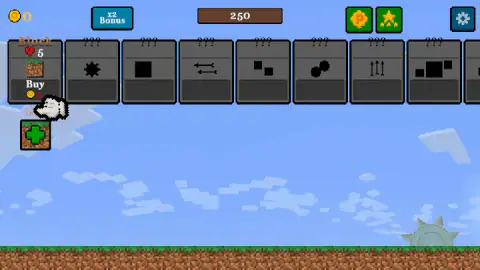
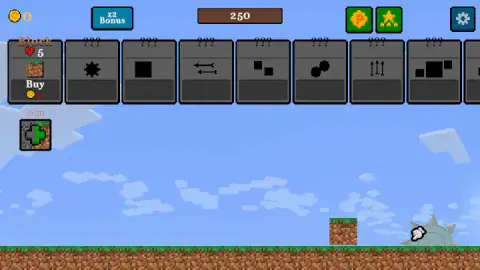
Nine grey cards sit across the top of the screen before anything else happens, and eight of them are question marks — no name, no price, just a black symbol. The ninth is called Block, and under it is a band marked Buy with a gold coin and a price written in red. Red because you cannot afford it. The coin counter in the corner reads zero.
We spent ten minutes in that opening state and left it almost exactly as we found it. The coin counter never moved. The Block card never left level zero. The only figure that changed in the entire run was a small counter above a tile marked with a green cross, which read one of fifty when we started and two of fifty when we stopped. That is the honest shape of our session, and it is worth saying up front, because the reason it happened is the most useful thing we can tell you about this game.
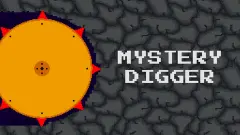
Neko_puf made it, an alias rather than a studio. Crusher Block was published in January 2026, was last touched that August.
What is on the screen before anything moves
The top bar is the whole interface. Left to right: the coin counter, a teal button marked x2 Bonus, a brown bar with that central number in it, two green buttons carrying a gold coin and a gold star, and a cog for settings at the far end.
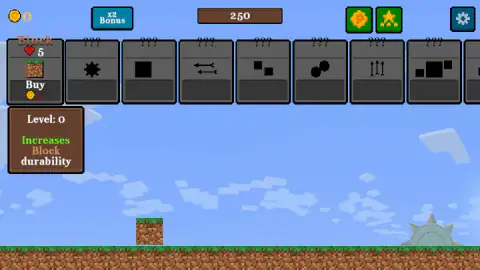
Under the bar runs the card row. The Block card is the only one with a face: a title, a red heart with a five next to it, a picture of a grass-topped cube of soil, and the Buy band. Hover it and a brown panel unfolds underneath reading Level: 0 over Increases Block durability. That tells you two useful things at once. The five is durability, and the number in the panel belongs to the upgrade rather than to any stage of the game. Ours stayed at zero all session, which is simply what happens when you never buy anything.
Below all of that is the field, and it is nearly empty: blue sky with blocky clouds, a strip of grass over brown earth, a single loose cube of soil sitting on the ground, and a grey spiked wheel half-buried to the right like something left behind by a bigger machine. A small tile marked with a green cross sits under the cards with that one-of-fifty counter above it. The game is quiet, too — one sound in ten minutes, the cue when it opens.
Ten minutes, zero coins
Here is what we did, so you can judge it. We hovered the card and read its panel. We pressed the Buy band, over and over, in several different spots. We clicked the cube of earth. We clicked the wheel. We clicked each of the locked cards. We pressed the arrow keys and Enter. At one point the game stuck badly enough that we reloaded it, and it came back on a title card with its name on it and a single button to go again.
Nothing in that list earns a coin, and the game never tells you so. It is a particular kind of failure that idle games are prone to: every piece of the shop is visible from the first second, including the parts you cannot have yet, so the screen looks like the thing you are supposed to be doing. It is not. The shop is where the money goes. The money has to come from somewhere else.
The published controls say where. Alongside the plain left click for buttons and cards, there is a second line: hold the mouse over the pickaxe and move the cursor. That is a drag, not a click — you swing the tool by moving the pointer with it, the way you would scrub a stubborn mark off a window. We never got that going, so we will not dress it up as our own finding; it is the game's word, and it is the most likely answer to why our counter sat at zero while the shop sat there waiting.
Why an idle game lives or dies in its first ten seconds
This genre has a founding gesture, and it is worth knowing why. When Julien Thiennot — Orteil — put Cookie Clicker online in 2013, the design was almost rude in its clarity: a cookie, enormous, in the middle of an otherwise empty page. You click it. A number goes up. Only then does the shop on the right mean anything, because now you have something to spend.
Everything that followed inherited that shape. The shop is the game, but the shop is useless until the player has made the first coin by hand, so the first coin has to be impossible to miss. The screen earns its complexity gradually.
Crusher Block has the second half of that design and hides the first. The shop is complete and prominent from the opening frame, while the earning gesture is a hover-and-drag with no prompt, no arrow and no tutorial hand pointing at it. For a player who already knows the genre, that is thirty seconds of confusion. For one who does not, it is a game that appears to be broken — which is a shame, because the parts that work are perfectly clear once the coins start arriving.
Neko_puf builds every game out of the same parts
Play this developer's other games and you keep meeting the same furniture, which is useful to know before you start.
The blue x2 Bonus button sits in the corner of Planet Destroy Idle, Pickaxe Crusher Idle and Sky Blocks Falling exactly as it does here. The row of locked cards marked with question marks is in all of them. So are the two little green buttons at the top right: a gold coin stamped with a P and a gold star standing over three smaller ones. The pixel font is the same font.
One thing that transfers is genuinely encouraging. In Planet Destroy Idle we watched a locked row open the moment we bought the one above it — buying the hammer is what put a sword on the list. If Crusher Block works the same way, and the layout strongly suggests it does, then those eight question marks are a queue rather than a wall, and the first purchase starts moving it. We never made that purchase here, so take it as a reasonable expectation rather than something we saw.
More from Neko_puf
Pickaxe Crusher Idle is the one to try if this loop appeals and you want it to start working immediately: a single pickaxe chewing down through a cave, with the same shop of tool levels. Planet Destroy Idle scales the idea up to a world you strip layer by layer, and it is the clearest demonstration of how this developer's shops unlock. Sky Blocks Falling is the gentle one, where cubes drop out of a pixel sky and you catch them rather than smash them, and Gun Bounce Idle keeps the structure while throwing out the mining altogether. Everything else that grows while you watch it lives under clicker games.
Screenshots
How to play Crusher Block
- Let the title card through and you land straight on the playfield. There is no menu, no level select and no difficulty.
- Hover any card in the top row. A panel opens beneath it naming the upgrade's level and what it does — the first one reads Increases Block durability.
- Smash blocks to earn coins. The game's own control note is specific about how: hold the mouse over the pickaxe and move the cursor.
- Press the Buy band under a card to spend what you have earned. It stays dark while you are broke and lights up when you can pay.
- Keep going. Each upgrade makes the next block cheaper to break, and the row of question marks is what you are working towards.
What sitting in front of it actually teaches:
- Red means no. The price under the Buy band is red while you cannot afford it, and the whole button is dimmed. It is the clearest thing on the screen and the easiest to misread as decoration.
- Clicking the scenery does nothing. We clicked the loose cube of earth on the grass and the spiked wheel sunk into the ground beside it, repeatedly, and neither answered.
- Clicking a locked card does nothing either. The question marks are not buttons waiting to be pressed.
- The keyboard is not involved. All four arrow keys gave us nothing back.
- The big number is not your money. Your money is the small figure beside the gold coin at the top left. The large 250 in the middle of the bar is something else, and it did not change once in ten minutes.
Controls
| Left mouse button | Everything on the screen answers to it — the cards, the Buy band, the buttons along the top. The game's own control note says so too |
|---|---|
| Hover a card | Opens a panel under it naming the upgrade's level and what it does. The first reads "Increases Block durability" |
| Buy, the band under a card | Buys a level of that upgrade. It stays dark with the price in red while you have no coins and lights up once you have them |
| Hold the mouse over the pickaxe and move the cursor | The game's published control for the pickaxe itself. We never found it on screen, so this one is the game's word and not ours |
| Arrow keys | We pressed all four and got no answer we could confirm. This is a pointer game |
Features
- Nine upgrade cards sit across the top from the first second, and eight of them are still question marks with no name and no price
- The first card, Block, carries a red heart and the figure five, and its panel says plainly what the money does: it increases block durability
- A Buy band that doubles as a wallet check — the price shows in red and the button stays dark until you can actually pay it
- A playfield with almost nothing in it: pixel sky, a strip of grass over earth, a loose cube of soil and a spiked wheel half-sunk in the ground
- A counter over a green-cross tile that crept from one of fifty to two of fifty across our whole session
- A blue x2 Bonus button in the corner, the same one this studio puts in every game it makes
- Free in the browser with nothing to install, credited to Neko_puf
Game details
- Developer
- Neko_puf
- Release date
- January 2026
- Last updated
- August 10, 2026
- Added here
- November 2025
- Technology
- HTML5 (2D)
- Platforms
- Browser (desktop, mouse), Browser (mobile & tablet)
- Classification
- Clicker
- Saved progress
- Saving, when available, is managed by this game. Mava cannot confirm your level.
FAQ
How do you play Crusher Block?
It is an idle game about smashing blocks for money and spending the money on better tools. Everything on screen answers to the left mouse button. The row of cards along the top is the shop: hover one to read what it does, then press the Buy band under it to take a level. The game's own control note adds a second gesture, holding the mouse over the pickaxe and moving the cursor, which is how the digging itself is meant to work.
How do you earn coins in Crusher Block?
By breaking blocks, which the game expects you to do with the pickaxe rather than by clicking the scenery. We clicked the loose cube of earth, the spiked wheel and the locked cards for ten minutes and the coin counter never left zero, so we can tell you what does not work far more confidently than what does. The published control for the pickaxe is to hold the mouse over it and move the cursor.
What does the Block card do in Crusher Block?
It is the only upgrade open at the start. Hover it and a panel appears under the card reading Level: 0 over the line Increases Block durability, so the number is the level of that upgrade and not a stage of the game. The card also shows a red heart with a five beside it, which is the durability the upgrade is there to raise.
What are the question marks in Crusher Block?
Eight of the nine cards in the top row are headed with question marks instead of names, each showing only a black symbol — a cog, a double arrow, two small squares, a pair of upward arrows. They carry no price either. In another of this studio's games the locked rows open one at a time as you buy the one before, which makes the row a queue rather than a wall, but we bought nothing here, so for Crusher Block that is a reasonable guess and not something we saw.
What is the x2 Bonus button in Crusher Block?
A blue button in the top bar, next to the coin counter, present from the first frame. It is this developer's house furniture: the same button sits in the corner of their other idle games. We never pressed it in any of them, so what it doubles and for how long is something we cannot honestly tell you.
Is Crusher Block free and who made it?
It is free and runs in a browser with nothing to install. It is credited to Neko_puf, a developer alias rather than a studio name. It went up in January 2026, was last updated in August of that year. No other portal we checked carries it, so the game's listing is the only source for any of that.
Can you play Crusher Block on a phone?
It is listed for PC and Android, so a phone is supported in principle, and it runs in landscape. We played it with a mouse on a desktop and have not tried it on a touchscreen, which matters more than usual here: the pickaxe is worked by holding the pointer over it and moving, and that gesture has no obvious equivalent on glass.
How long does Crusher Block take?
There is no clock, no stage counter and no end screen that we reached. We played for ten minutes, bought nothing, lost nothing and saw no fail state at all — the only figure that changed was a small counter that went from one of fifty to two of fifty. An idle game of this shape is usually built to be left open rather than finished.