






About Block Sculptor
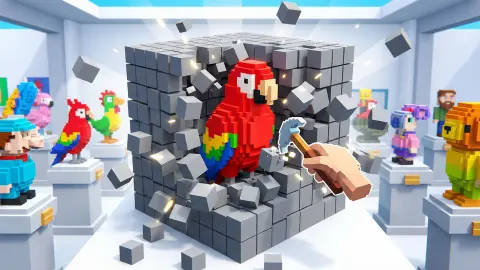
Nearly every block puzzle in a browser asks you to put something together. Block Sculptor begins with everything already in place: a block of pale stone cubes, five wide, five high and five deep, turning slowly in an olive-brown room. Nothing is missing from it. Your job is to take it apart.
Somewhere inside those 125 cubes there is a coloured figure, and the game will not tell you where. The card it shows before the first level puts the whole thing in four lines: a colored figure is hidden inside the block, tap gray blocks to remove them, "Don't tap colored blocks — that's a mistake!", drag to rotate the view. Then a blue button reading "GOT IT!", and you are alone with the stone.
What turns that into a game is the absence of an undo. A cube you take off does not come back, and a cube you take off by accident costs you one of the four hearts in the top right corner. There is no timer, no coin counter and no pause. The play screen holds a progress bar, a percentage, those four hearts and two round buttons: an arrow to leave and a speaker.
The game is credited to Flagwin Studio and has been available since March 2026, with an update in August. Our own session lasted about four minutes on a desktop, mouse in hand. We played the level titled 1. Cube, took the bar from nothing to 17 per cent, lost two hearts on the way and never saw the figure whole. Read what follows as a close look at the first block.
The figure leaks out through the seams
This is the part nobody tells you, and it changes how the game plays. The cubes do not sit perfectly flush. Between them run hairline gaps, and when a coloured cube sits behind a stone one, its edge glows through that gap as a thin purple line.
We saw it at nought per cent, before the first cube came off: two faint purple seams ran along the middle of the block, right across the join between layers. By 15 per cent, with the block turned on its corner, one of them had become a clear purple bar cutting diagonally across the stone.
That turns the whole puzzle from guesswork into reading. You are not hunting blindly for the figure; you are looking for where its outline bleeds out through the joints and then working inwards from the opposite side. The first level hides something small and central, because the earliest hole we opened showed a single purple face sitting exactly in the middle of a five by five grid, with stone on every side of it.
The practical version is simple. Turn the block until a seam lights up, then take your cubes from somewhere else.
Four hearts, one bar, and nothing else
The top of the screen is almost empty, and that tells you what this game wants from you. On the left, a round arrow that leaves the level. Across the middle, a blue progress bar with a percentage beside it. On the right, four hearts and a speaker. No clock, no score, no coins, no stars, no hint button.
So the only thing that can go wrong is you, and the only thing counted is how often. Ours went from four full hearts to two by the time the bar hit 15 per cent, which is a sobering rate; the stone layer in front of a figure is thin, and it is easy to clear one cube too many in a tidy row.
The bar is worth watching for a different reason. It moves one or two points per cube, which means a finished level is something like seventy or eighty deliberate taps, each of them a small decision. Four minutes of steady play took us a sixth of the way. This is a slow game, and it is better for it.
Sculptors have always worked by taking away
There is a real craft behind the idea, and it is older than any puzzle game. Carving is the one kind of sculpture that only subtracts. A modeller in clay can add a handful back when a shoulder comes out wrong; a carver in marble cannot. Every chip is final, which is why stone carvers spend far longer looking than cutting.
The clearest illustration of that sits in the Galleria dell'Accademia in Florence, in the corridor that leads to the David. Four unfinished figures by Michelangelo, known as the Prigioni, the Prisoners, were begun for the tomb of Pope Julius II and never completed. Each one is a half-emerged body still gripped by the raw block it was being cut from: an arm free, a face free, the rest still stone. A player of this game will recognise the picture immediately, because it is the screen at 40 per cent.
Giorgio Vasari, who wrote the first history of Italian art, described the method as lifting a figure out of a tub of water. The highest point appears first, then the shoulders, then the rest, as the level drops. That is a surprisingly exact account of what happens when you clear a layer of cubes off one face here and the shape underneath comes up to meet you.
And it explains the one design decision that defines this game: the mistake counter where an undo button would be. A carving tool has no undo, so the game does not give you one either. The hearts are the closest thing a browser puzzle can offer to the sound of a chisel going through something you meant to keep.
Turning the block is free on screen, and costly in your head
The drag control invites you to spin the block constantly, and up to a point that is the right instinct. The catch is not in the game: it is in you.
Rotating an object in your mind takes real time, and the time grows with the angle. The classic demonstration, published by Roger Shepard and Jacqueline Metzler in 1971, used drawings of figures made out of cubes, which is about as close to this game as a psychology experiment gets. People asked whether two such figures were the same took steadily longer the further one was turned from the other, at roughly a second for every sixty degrees.
The lesson for a block of stone with something hidden in it is to pick an orientation and stay there. Turn the block deliberately, note where the purple seams are, then come back to a face you already know and work on it. Spinning it a quarter turn between every tap means remaking your mental picture over and over, and that is where the careless clicks come from.
More by Flagwin Studio, and other puzzles of removal
Flagwin Studio has a long list of browser games, and one of them is already here: Fillblox is the opposite instinct, a grid you fill rather than empty, by the same hands.
If what caught you is deducing a hidden picture from partial information, Grid Odyssey: Nonograms is the flat ancestor of the idea: the figure is in the grid before you start, and the numbers tell you where. Mine Master shares the other half, the part where progress means taking material away. And Sand Blocks makes a useful contrast, because it gives you the blocks and asks you to place them, which is what almost every other game in puzzle games will ask of you too.
Screenshots
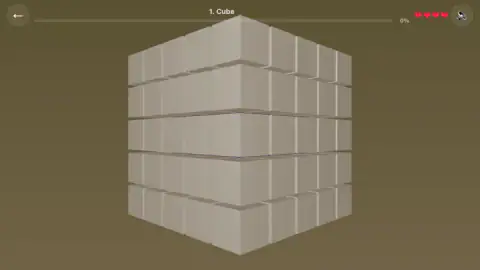
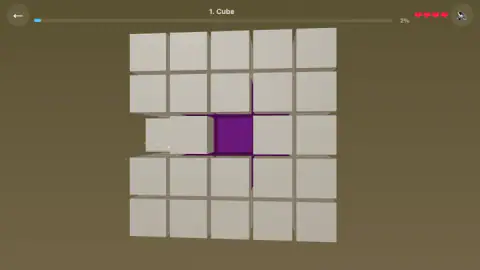
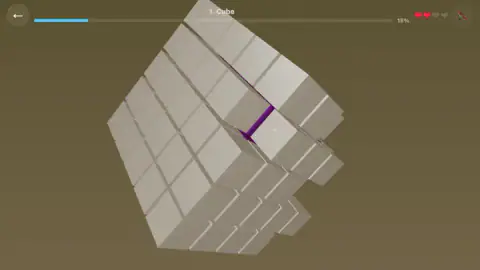
Taken by opening the game ourselves and letting it run — not supplied by the publisher, and not the same picture every other site shows.
How to play Block Sculptor
- Press the "GOT IT!" button on the card that opens the level. It is the only thing on screen until you do.
- Click or tap a stone cube to take it off. The progress bar at the top moves a point or two, and the gap it leaves lets you see one layer deeper.
- Drag across the screen to turn the block. The whole thing rotates with your hand, and nothing is removed while you drag, so you can look as long as you like.
- Keep clear of anything coloured. Every coloured cube you hit turns one of the four hearts grey, and the hearts do not come back on their own.
- Keep going until the bar reaches the end. Ours was at 17 per cent after four minutes, so settle in.
What our run taught us:
- Read the cracks before you tap. Thin purple lines show in the hairline gaps between cubes. They are the figure, seen edge-on through the joints, and they are there before you remove anything.
- Turn first, tap second. Rotating is free and tapping is not. A face that looks safe from straight on often has a purple seam running under it when you drop the camera by a few degrees.
- The background swallows clicks. Several of our thirty-three moves landed on empty room or on the top bar and did nothing at all. No penalty either, but no progress.
- There is no pause. We spent a good part of the session pressing the round button in the top right expecting the game to resume, and it is the sound toggle. Nothing was ever paused.
- The keyboard is not wired up. Arrow keys and letters did nothing we could see or hear. This is a game for one hand on a mouse, or one finger.
Controls
| Left click or tap on a stone cube | Takes that cube off the block for good |
|---|---|
| Left click or tap on a coloured cube | Counts as a mistake and costs you one of your four hearts |
| Drag with the mouse or a finger | Turns the whole block so you can look at another face |
| Round arrow, top left | Leaves the level |
| Round speaker, top right | Turns the sound on and off; it is the only other button on the play screen |
Features
- The first level is a block five cubes wide, five high and five deep, which is 125 cubes to work through
- A coloured figure is buried somewhere inside it, and the only way to find it is to take the stone off
- Four hearts in the top corner count your mistakes; there is no undo button anywhere
- Purple edges show through the hairline gaps between cubes before you have removed a single one
- The progress bar moves one or two points per cube, so the first level is far longer than it looks
- The play screen carries no timer, no coin counter and no pause, only a bar, four hearts and two round buttons
- Available since March 2026
Game details
- Developer
- Flagwin Studio
- Release date
- March 2026
- Last updated
- October 16, 2026
- Added here
- January 2026
- Technology
- HTML5 (3D)
- Platforms
- Browser (desktop, mouse), Browser (mobile & tablet, touch)
- Saved progress
- Saving, when available, is managed by this game. Mava cannot confirm your level.
FAQ
How do you play Block Sculptor?
You are given a solid block of stone-coloured cubes with a coloured figure hidden inside it. Click or tap a stone cube to take it off, and drag anywhere to turn the block and look at another face. Clicking a coloured cube counts as a mistake, so the game is really about working out where the figure is before you touch anything.
How many lives do you get in Block Sculptor?
Four. They are drawn as four hearts in the top right corner, and they start full. Every time you tap a coloured cube instead of a stone one, one heart goes grey. We had lost two of ours by the time the first level was 15 per cent done.
What happens if you tap a coloured block in Block Sculptor?
It counts as a mistake and costs you a heart. The card the game shows before the first level warns you about it in those words, and calls tapping a coloured block a mistake. We never ran out of hearts in our session, so we cannot tell you what the game does when the last one goes.
How do you rotate the block in Block Sculptor?
Drag across the screen with the mouse held down, or with a finger on a touch screen. The whole block turns with the drag, and nothing is removed while you are dragging. It costs you nothing, so it is worth turning the block a few times before each tap.
How many levels does Block Sculptor have?
We cannot say. The one we played is titled "1. Cube" at the top of the screen, and the numbering implies a list, but no level menu appeared during our session and we never finished the first level. Four minutes of play took the progress bar to 17 per cent.
Is there a time limit in Block Sculptor?
No. There is no clock anywhere on the play screen, and nothing hurried us during our run. The only counters are the progress bar along the top and the four hearts in the corner, so the pressure comes from your mistakes rather than from the time you take.
Who made Block Sculptor?
It is credited to Flagwin Studio. The game has been available since March 2026 and was updated in August 2026.
Can you play Block Sculptor on a phone?
It is listed for PC, Android and iOS, in landscape. The controls are a tap and a drag, which translate to a touch screen without changes, and the card in the game is written for tapping rather than clicking. We played it on a desktop with a mouse, so we have not tested the touch version ourselves.