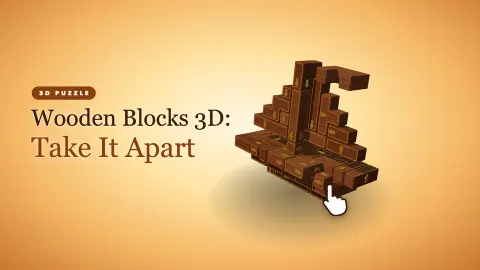





About Wooden Blocks 3D: Take It Apart
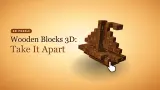
The first thing Wooden Blocks 3D: Take It Apart asks of you is the thing your hand will get wrong. A turquoise block glows at the foot of a wooden sculpture, with a fat white arrow pointing down. Every instinct says grab it and pull. Do that and the whole sculpture spins on the spot, and the piece stays where it is.
That is because the mouse has two jobs here, and they are split cleanly. Dragging turns the sculpture so you can look at it from every side. A single click, with the mouse held still, is what takes a piece out. The line of small print at the bottom of the screen says exactly this, "Drag to spin · wheel to zoom · right-drag to pan · click a free piece", but it is easy to read past it while the glowing block is begging to be pulled.
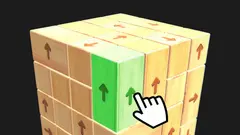
Once that clicks, so to speak, the game shows what it really is: a take-apart puzzle. Every piece carries a brass arrow, the only direction it can travel. It leaves only if nothing blocks that path. Your job is to find the order that empties the whole sculpture.
It comes from Qevlith, a developer whose other game there is a gem-themed block puzzle. It was published at the end of October 2026, with a first update the next day.
The first sculpture: a lantern in 21 pieces
The opening level is called Study 01, Lantern. It is a squat block of brown wood with a small cube perched on top, and the counter beside the title reads 0 / 21. Three panels sit under the title: the pieces counter with a percentage, ATTEMPTS and MASTER STREAK.
Each piece moves the counter on by one and nudges the percentage up, a little under 5% a time. MASTER STREAK climbed with each one too, which suggests it rewards pieces taken out without a misstep. We stopped there, so we cannot say what the streak earns you.
The sculpture changes shape as you go. With two pieces gone, a long plank on the bottom layer became the next obvious target, its arrow pointing out from the base. That is the rhythm of the game: each removal turns a buried piece into a reachable one.
Pinned pieces, and why the first study is forgiving
Click a blocked piece and the game answers with a message: "That piece is still pinned. Take the glowing one first – it slides out freely." Nothing falls apart and nothing resets.
On the Lantern, the ATTEMPTS panel shows an infinity sign, so a wrong click costs you nothing but a second. The game's own instructions describe a stricter rule for when attempts are counted: a pinned piece costs one, a repair kit gives two more, and the brass wedge button frees a pinned piece outright. We had one wedge waiting from the start and never needed it, so that part comes from the game's description, not from our play.
That makes the first study a good place to learn the gesture and the reading of arrows before mistakes start to count.
What the rest of the game promises
The game's listing promises far more than we saw: 240 levels in 20 chapters, with the lantern as the smallest of the sculptures, plus stars, timed rush orders, a daily order and a shelf for finished pieces.
We did not reach any of that. Our whole session was spent on the first sculpture, which has no timer and showed no stars while we played. A small counter with a zigzag icon sat at zero in the top-right corner the whole time; we never found out what fills it.
Wooden take-apart puzzles, before the screen
Puzzles you solve by taking a wooden object apart are far older than video games. The best known are burr puzzles: notched wooden sticks locked together so tightly that only one sequence of moves frees the first piece. In a real burr, finding that first move is most of the challenge, and the pieces give you no clue.
Wooden Blocks 3D keeps the wood, the workshop and the idea that order is everything, and changes one rule. Every piece tells you which way it moves. The puzzle stops being about guessing directions and becomes about reading which arrows are blocked right now. That is why it feels calmer than a real burr, and why you can turn the sculpture freely: the answer is always on the surface, as long as you look at the right side.
How far we took it
We played one session on a computer, with a mouse, all of it on the first sculpture. Our first tries did nothing, because we dragged the glowing piece the way its arrow pointed and only spun the sculpture. Once we clicked instead, two pieces came out cleanly, and we ended at 2 of 21. We did not finish the Lantern, see a star, open a chapter, try a rush order or use the wedge. The game is listed for phones and tablets, with swipes to turn and a pinch to zoom, but we did not try it on a touch screen.
Who it is for
It suits players who like a slow, quiet puzzle they can turn over in their hands, and anyone who enjoys the moment a hidden piece finally has a clear path. There is no timer on the first sculpture and no way to lose there, so younger players can learn it without pressure. If you want speed or action, this is not that game: progress comes from looking, not from reflexes.
More games like Wooden Blocks 3D
The developer's other game is Jewel Box: Block Puzzle, a block puzzle with gemstones instead of wood. For the same tap-it-out idea with wooden pieces, try Tap 3D Wood Block Away. Arrow Cube 3D and Arrow Free 3D put the arrows on a cube you turn in the same way. More are in our puzzle games.
Screenshots
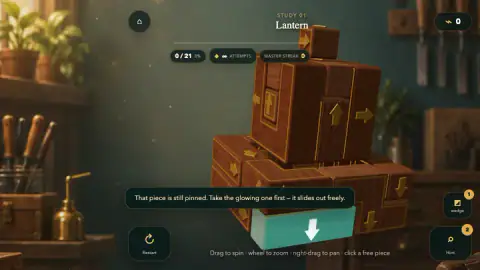
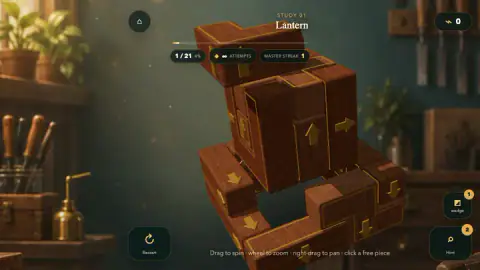
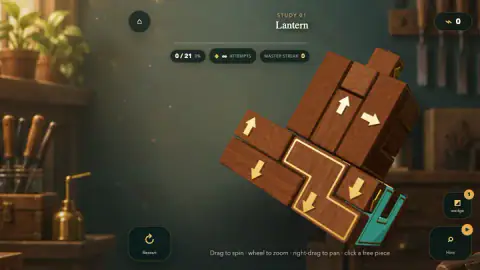
Taken by opening the game ourselves and letting it run — not supplied by the publisher, and not the same picture every other site shows.
How to play Wooden Blocks 3D: Take It Apart
- Look first. Drag with the left mouse button to turn the sculpture, use the wheel to zoom and drag with the right button to slide the view.
- Read the arrows. Each piece has a brass arrow. Follow it with your eye: if another block sits in the way, that piece is stuck for now.
- Click a free piece. One click, no drag. A free piece glides out along its arrow and the counter at the top goes up by one.
- Work inwards. Every piece you remove opens paths for the ones behind it. Turn the sculpture again after each move, because the next free piece is often on the side you cannot see.
- Empty it. The level is done when every piece is out.
Tips from our session. Start with the glowing turquoise piece: on the first sculpture it is the one free piece, and the game says so if you click anything else. If a click does nothing, check that the mouse did not move while you pressed; even a small drag counts as a spin. Hint, the magnifier in the bottom-right corner, picks a free piece for you and labels it "Tip: this piece can come out". Keep it for real dead ends, because the badge on the button showed two charges when we started.
Controls
| Left mouse button, drag | Turns the whole sculpture; it never moves a piece |
|---|---|
| Left click on a piece | Slides that piece out along its arrow if the path is clear; a pinned piece stays put and the game says so |
| Mouse wheel | Zooms in and out |
| Right mouse button, drag | Pans the view |
| Hint (magnifier, bottom right) | Marks a piece that can come out; we started with two |
| wedge (bottom right) | A helper for pinned pieces, according to the game's description; we started with one and did not use it |
| Restart (bottom left) | Starts the sculpture again from the first piece |
| Touch (phone and tablet) | Swipe to rotate, pinch to zoom, tap a piece, according to the game's instructions; not tested by us |
Features
- Each sculpture is a block of wooden pieces, and every piece carries a brass arrow: the one way it can leave
- The first sculpture, Study 01 Lantern, has 21 pieces, and a counter tracks how many are out with a percentage
- The first free piece glows turquoise with a white arrow, so the opening move is shown to you
- Click a blocked piece and nothing breaks: a message tells you it is still pinned and points you to the glowing one
- An ATTEMPTS counter that shows an infinity sign on the first sculpture, and a MASTER STREAK that rose with each clean piece
- Two helpers on screen from the start: Hint, which marks a free piece, and a brass wedge
- A quiet workshop setting, with chisels on the wall and plants on the shelf, and no timer on the first sculpture
Game details
- Developer
- Qevlith
- Release date
- October 2026
- Last updated
- October 27, 2026
- Added here
- October 2026
- Technology
- HTML5 (3D)
- Platforms
- Browser (desktop, mouse), Browser (mobile & tablet, touch)
- Saved progress
- Saving, when available, is managed by this game. Mava cannot confirm your level.
FAQ
How do you take pieces out in Wooden Blocks 3D: Take It Apart?
Click the piece once, with the mouse held still. If nothing stands in the way of its arrow, it slides out on its own. Dragging does not move pieces: it turns the whole sculpture, which is how many players lose their first minutes.
Why won't a piece move in Wooden Blocks 3D?
It is pinned: another block sits in the path of its arrow. The game tells you with a message, That piece is still pinned, and points you to the glowing piece instead. Turn the sculpture and look for a piece whose arrow points into open air.
What do the arrows on the blocks mean?
Each brass arrow shows the only direction that piece can slide. A piece comes out only when that direction is clear all the way to the edge of the sculpture, so the puzzle is about finding the right order, not the right angle.
How many pieces does the first level have?
The first sculpture, Study 01 Lantern, has 21 pieces. A counter at the top shows how many are out and the percentage done. We took two out before our session ended, so we cannot tell you how the Lantern finishes.
Can you lose in Wooden Blocks 3D: Take It Apart?
Not on the first sculpture, as far as we saw: its ATTEMPTS counter shows an infinity sign. The game's own instructions say that clicking a pinned piece costs an attempt, and that a repair kit adds two more, so other sculptures may count your mistakes.
What do Hint and the wedge do?
Hint, the magnifier button, marks a piece that can come out and labels it Tip: this piece can come out. The brass wedge frees a pinned piece, according to the game's description. We started with two hints and one wedge.
How many levels are there in Wooden Blocks 3D?
The game's description promises 240 levels in 20 chapters, from a small lantern up to castles, sailboats and towers, plus timed rush orders and a daily order. We only played the first sculpture, so we have not checked that count.
Who made Wooden Blocks 3D: Take It Apart?
It is by Qevlith, a developer whose other game there is Jewel Box: Block Puzzle. It was published on 26 October 2026 and updated the next day.