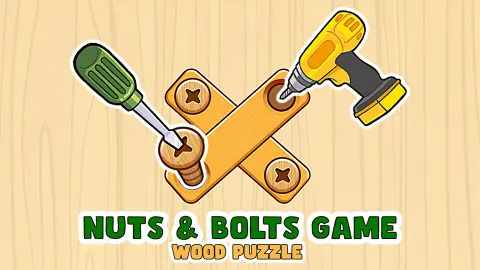


About Nuts & Bolts Game: Wood Puzzle
The first board in Nuts & Bolts Game: Wood Puzzle has one plank, one screw and one empty hole, and it still beat us twice. The clock ran down to zero while we clicked the screw again and again and waited for something to happen. Nothing does, because the screw is only half of the move.
The other half is the hole. You click a screw, and then you click an empty hole, and the screw goes there. Two clicks, no dragging. Once we played it that way, the lesson board was gone in seconds and the game answered with a red banner: WARNING HARD LEVEL.
The game is by Bravestars, according to the game's listing. It was published in October 2024.
This page is short because our visit was. We played two sessions of about four minutes each, on a desktop computer with a mouse. We cleared the lesson board, spent three minutes on the big board that follows it, and did not finish it. No win screen, no second level and no reward appear below.
Level 1 is a lesson, and then a warning
Both boards we saw carried the same label, LEVEL 1, and they have very little else in common.
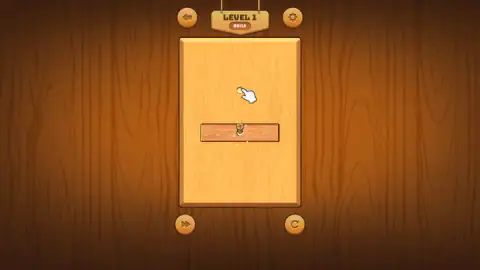
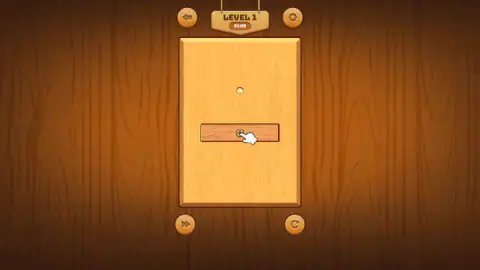
The lesson board is nearly empty. One brown plank lies across the middle with a cross-head screw through its centre, and one hole waits a little way above it. The clock read 01:55 when we first looked at it.
The second board arrives behind a panel. A red banner reads WARNING HARD LEVEL, and under it hang two wooden cards. The first, NOW BONUS, shows a stopwatch marked +10 S and a lightning bolt marked +1. The second asks MORE? and shows +30 S and another bolt, with a blue CLAIM button that carries a video icon: an ad. We chose the grey NO, THANKS underneath.
One detail is worth knowing. Behind that panel the clock was already running and read 04:55. When the board came into view it read 05:00. So the ten seconds on the first card seem to be yours whether or not you claim the second one, and the time you spend reading the panel is not free. We did not find out what the lightning bolt is for.
Nineteen screws, five places to put them
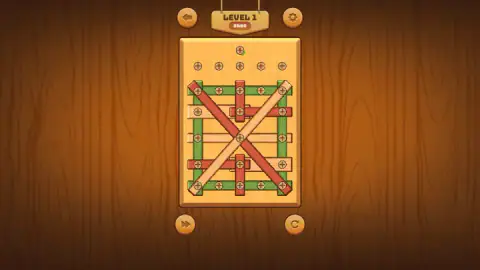
The big board is a lattice. We counted 13 planks: four green ones forming a frame, five red, four in pale wood, with two long ones crossing corner to corner over everything else. Nineteen screws hold them, set out in five neat rows.
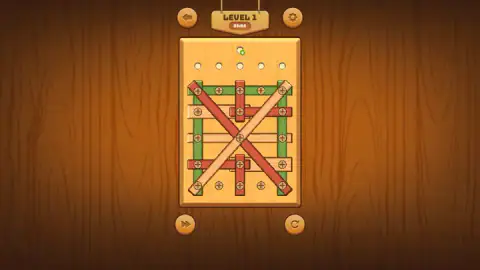
Above the planks runs a row of five holes. That is where a screw can go once you take it out, and the numbers do not match on purpose. Five parking places will not hold nineteen screws, so each one has to earn its space by letting a plank go.
Not all screws are worth the same. Some pass through a single plank: two of the five along the top of the green frame do. Others pin a whole stack. The screw in the dead centre goes through both long diagonals and the pale bar behind them, so pulling it frees none of the three while their other screws stay in.
We have to be straight about how we did here. Most of our clicks on this board went to that centre screw, and nothing we could see came of them. A click on the screw of the lower red upright did raise the same white sparks as on the lesson board. We stopped with about two minutes still on the clock and no screw parked by our own hand. If we went back, we would start at the edge, with a screw that holds one plank only.
Why the big board looks like a garden gate
Four boards joined at the corners make a poor frame. Push one corner and the rectangle leans over into a slanted shape, with every joint acting as a pivot. Carpenters cure that with a diagonal brace, which is why a wooden gate has a slanting bar across it. The brace splits the rectangle into triangles, and a triangle cannot change shape unless one of its sides changes length.
The hard board is that gate, built twice over: a green frame pinned at its four corners, and two braces crossing in the middle. It is drawn to look rigid, and it is a fair picture of the task. Every plank here is held at two points or more, so no single screw sets anything free. You are undoing a braced frame one fixing at a time, and the order matters more than the speed.
The clock, and what it sells
Time is the only thing this game charges for, and it sells it in three places.
The first is the hard level panel described above. The second is the TIME OUT panel, which appears when the countdown ends. It shows a stopwatch marked +60S, an orange RETRY button and a green CONTINUE button with a video icon. RETRY costs nothing: it took us out to the wooden title sign and back to the same board with a fresh clock.
The third is the round arrow under the board. It opens a window headed REPLAY with a green button priced at 50 coins and a blue FREE button with a video icon. Our coin counter read zero, and so did a second counter with a purple ticket on it. We closed the window with its red X. The clock behind it read 02:37 and was still falling when we got back to the board.
So restarting from that button is the one thing on screen that is not free, while running out of time and pressing RETRY is.
Three things we saw and cannot explain
The holes were full at the start. Our first clear look at the big board, at 05:00, shows a screw in every one of the five holes above the planks. Two minutes later the row was empty. We did not catch the change.
A plank went missing. In that same first look a fourth green plank runs along the bottom of the frame. At 03:02 it is gone, and the screws of its row are all still there, two of them sitting in bare board. We cannot tell you which click of ours, if any, did that.
The sixth hole. One more hole sits above the row of five, with a small green plus beside it. We do not know what it opens or what it costs.
Is it for you
Yes, if you like a puzzle you can read before you touch it. Everything is on screen from the first second: the planks, the screws, the spare holes and the time you have.
Less so if a countdown spoils your thinking. Five minutes for thirteen planks is not generous when you are also learning the rules, and each way out of a jam leads past a video button. The game is listed in portrait, and on a wide monitor the board takes up a narrow strip in the middle of the screen.
Other boards from Bravestars, and other screws
The closest relative on our site is Wood Nuts Master: Screw Puzzle, which uses the same two-click move and prints its goal above the board. Screw & Pin: Puzzle Levels trades the wood for metal plates, and Screw Out Jam Puzzle adds a hammer for the screw you cannot reach. From the same studio, Draw Bridge - Brain Game asks for one drawn line that a car can cross, and Sand Sorting Challenge is a pouring puzzle with no planks at all. The rest are under puzzle games.
Screenshots
Taken by opening the game ourselves and letting it run — not supplied by the publisher, and not the same picture every other site shows.
How to play Nuts & Bolts Game: Wood Puzzle
- Find the clock. It hangs under the words LEVEL 1 at the top of the screen, and it is already counting down.
- Click a screw once. On the lesson board it rises out of the plank and stays up, with a few white sparks around it.
- Click an empty hole. The raised screw moves to it. On the lesson board a white hand points at the hole for you.
- Carry on with the next screw. The game's own instructions say a plank falls once nothing pins it, and that the aim is to unscrew everything.
- If the clock reaches zero, choose RETRY on the TIME OUT panel and start the board again.
What two sessions taught us:
- A second click on the same screw is not a move. On our first try we lifted the screw and then kept clicking it. The hand kept pointing, the clock kept falling, and the plank stayed where it was.
- Dragging does nothing. We pressed on a screw and pulled it to the top of the board, more than once. The board did not react.
- The keyboard is not used. Enter, Escape and the arrow keys changed nothing we could see.
- The round arrow does not pause. It opens a window, and the countdown keeps going behind it.
Controls
| Click a screw | Selects it; on the lesson board it rises out of the plank and stays up |
|---|---|
| Click an empty hole | Sends the selected screw to that hole |
| Round arrow button (bottom right) | Opens the REPLAY window; the clock keeps running behind it |
| Red X | Closes the REPLAY window and returns to the board |
| RETRY (on the TIME OUT panel) | Leaves the panel; we came back in through the title sign to the same board |
| Double arrow button (bottom left) | Not pressed by us |
Features
- A two-click move: one click on a screw, one click on an empty hole, and no dragging
- A countdown under the level number: about two minutes on the lesson board, five on the board after it
- A second board with 13 crossed planks in green, red and pale wood, held by 19 screws
- A row of five spare holes above the planks, and a sixth marked with a green plus
- A WARNING HARD LEVEL panel that hands out 10 extra seconds and offers 30 more for a video ad
- A TIME OUT panel with RETRY and an ad-backed CONTINUE worth 60 seconds
Game details
- Developer
- Bravestars
- Release date
- October 2024
- Last updated
- August 10, 2026
- Added here
- March 2025
- Technology
- HTML5 (Unity WebGL)
- Platforms
- Browser (desktop, mouse), Browser (mobile & tablet, touch)
- Classification
- Puzzle
- Saved progress
- Saving, when available, is managed by this game. Mava cannot confirm your level.
FAQ
How do you play Nuts & Bolts Game: Wood Puzzle?
Planks are screwed to a wooden board. You click a screw to pick it, then click an empty hole to move it there. The lesson board has one plank, one screw and one hole; the board after it has 13 planks and a row of five spare holes, and both run against a countdown shown under the level number.
Why can't I drag the screws in Nuts & Bolts Game: Wood Puzzle?
Because the game moves screws with two separate clicks, not with a drag. In our sessions, pressing and pulling a screw towards a hole changed nothing. What cleared the lesson board was a single click on the screw followed by a single click on the empty hole above it.
Is there a time limit in Nuts & Bolts Game: Wood Puzzle?
Yes. A clock sits under the words LEVEL 1 and counts down from the moment the board appears. The one-plank lesson board showed just under two minutes when we first saw it, and the large board after it started at 05:00.
What happens when the time runs out?
A panel headed TIME OUT covers the board. It shows a stopwatch marked +60S and two buttons: an orange RETRY and a green CONTINUE that carries a video icon, which means an ad in exchange for the extra minute. RETRY took us out through the game's title sign and back to the same board.
What does WARNING HARD LEVEL mean in Nuts & Bolts Game: Wood Puzzle?
It is a red banner that appeared straight after the lesson board, before the 13-plank board. Under it, a card named NOW BONUS shows 10 extra seconds and one lightning token, and a second card offers 30 seconds and another token through a CLAIM button with a video icon. A NO, THANKS line below skips the second card.
How many levels does Nuts & Bolts Game: Wood Puzzle have?
We cannot say. Both boards we played were labelled LEVEL 1 and we did not finish the second one, so we never saw a level 2 or a level list. Neither the game nor its listing gave us a total.
Who made Nuts & Bolts Game: Wood Puzzle, and is it free?
It is credited to Bravestars and was published in October 2024. It runs free in the browser with nothing to install. It is listed for PC and Android in portrait; we played it on a desktop computer with a mouse.