



About Arrow Escape 3D
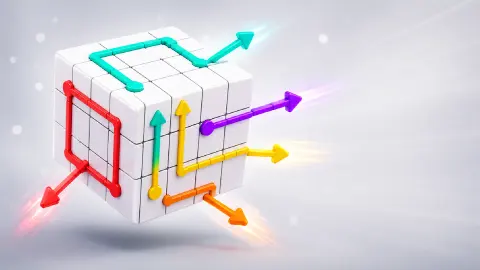
Most arrow puzzles lay the whole tangle flat in front of you. Every arrow is on screen from the first second, and the only question is which one to tap first. Arrow Escape 3D wraps the board around a cube, and a cube never shows you more than three of its six faces at once.
So the first move is not a tap. It is a drag, to find out what is on the sides you cannot see. In our first sitting the one arrow that came off was on the underside, out of sight in the opening view.
An honest note before the rules. We have played it twice, about fourteen minutes in all, and never got past level 1. The first sitting cost us a heart and took one arrow off the cube. The second was more than twice as long and ended with the counter still on 11, and it taught us more, because it is the sitting where the game kept saying no.
The game is credited to sublevelgames. It was published in June 2026.
Level 1 puts nine arrows on the five faces we have seen
Each arrow is a coloured line that runs along the grid, usually with a bend or two, and ends in a fat triangular head. The red one is a single square. The orange one turns three times and takes up half its face.
Here is what we found on level 1, face by face:
- Top: a lilac arrow with a bent line and a short light-blue one.
- First side: a short yellow arrow pointing straight down, and a long purple arrow whose line crosses the top, drops down and turns along the bottom row.
- Second side: a green arrow with one bend and a short red one.
- Third side: a pink arrow with two bends and a second yellow one.
- Underside: a single orange arrow with a three-part line.
That makes nine. The counter said 11, and we have never turned the fourth side towards us, so the missing two should be there. That is arithmetic, not something we saw.
The counter is worth a second look. It did not move when we wasted a tap, and dropped by one when an arrow left. It counts arrows still on the cube, not moves you have left.
A blocked tap costs a heart, and a line blocks as well as a head
Our first tap was on the short yellow arrow, which points straight down with a clear-looking row beneath it. It looked like the easy one. The heart broke instead, and the arrow did not move.
Turn that face flat towards you and the reason is plain. The purple arrow comes in at the top right, runs left, drops down the third column and turns along the bottom row, ending in a head that points out at the left edge. The yellow arrow is two squares long, and the square directly under its head is the one the purple head sits in.
So the order on that face is already fixed: the purple has to leave before the yellow has anywhere to go. That is the rule to take from level 1. An arrow is not only its head: its whole line sits on the grid, and any square of it can block something else.
The orange arrow on the underside was the opposite case. It had its face to itself. One click and it was gone, the counter read 10, and the hearts did not change.
Turning is free, and a drag will not move an arrow
Our second sitting was ten minutes of arguing with the opposite idea. We spent it dragging arrows: starting on a head, pulling along the line it is drawn on, aiming at the edge of the face. Nothing ever came off, and the counter sat on 11 from the first minute to the last.
What happened on every one of those drags was that the cube turned. A drag turns it wherever it starts, arrowhead included, which is why that sitting left us the same eleven arrows seen from a dozen angles.
The consolation is in the hearts. All that dragging cost nothing: three at the start, three at the end. Only the tap is priced. Look for as long as you like, from any angle you like, and spend the tap when you are sure.
The back button gives you the level again, and so does a reload
Two buttons sit in the top left corner. The triangle took us back to the title screen, which reads "Level 1 / 1000". Pressing PLAY brought level 1 back as new: three hearts, 11 on the counter, and the orange arrow we had removed back in place.
Reloading the page does the same. Partway through the second sitting we loaded the game again: a black card reading "the ad" came up, then the game's own start screen with a purple button reading "Let's Play!", and then level 1 — the same eleven arrows in the same squares we had seen ten days earlier. Whatever happens in the other thousand levels, the first one is fixed.
So a lost heart is not permanent, but neither is your progress on that cube: going back wipes both.
The second button shows a curved arrow. We have pressed it four times across the two sittings, always on a board where nothing had been removed, and nothing changed on screen. It did not send us back to the title the way the triangle does, but whether it undoes a move or restarts the level, we still cannot say.
Not the same game as the other two arrow cubes
Three puzzles in our catalogue put arrows on a cube, and liking one is no promise about the next.
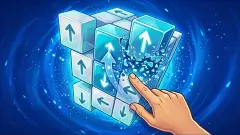
Arrow Cube 3D has no solid faces at all. The cube is drawn as bare edges, so you look straight through it at the arrows on the far side, and an arrow it refuses turns red until the way clears. No level number appears anywhere.
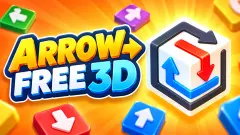
Arrow Free 3D cuts its arrows into a solid white block as grooves that fold over the edges. Its first level has four of them, a gem total in the corner and three helper buttons locked until level 10.
Arrow Escape 3D is the crowded one. Eleven arrows on the first level, a grid whose squares you can count, a counter for how many are left, and a title screen promising a thousand levels. It suits people who like order-of-moves puzzles and do not mind slow ones: no clock, nothing moves unless you move it, and the only thing that costs anything is a tap you have not thought through.
What we have not seen
A cleared level. We do not know what the game shows when the counter reaches zero, or what level 2 looks like. We never lost all three hearts either, and the fourth side of the cube has still never been turned to face us. Nothing here was tried on a phone, though it is listed for Android and iOS; on a computer it sits as a tall, narrow column in the middle of the window.
More arrow puzzles to try
For the flat version of the idea, Escaping Arrows puts the arrows on a plain grid with three lives, and ArrowGami: Arrow Puzzle winds long bent arrows across one board. Tap 3D Wood Block Away swaps drawn lines for wooden blocks that fly off along carved arrows. The rest are in the puzzle games category.
Screenshots
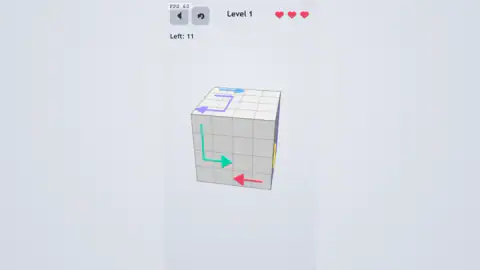
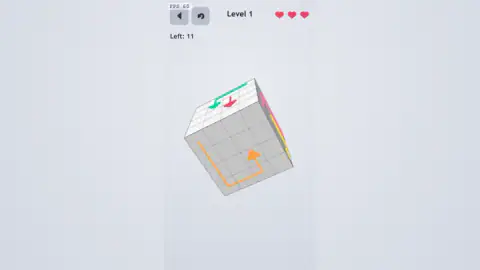
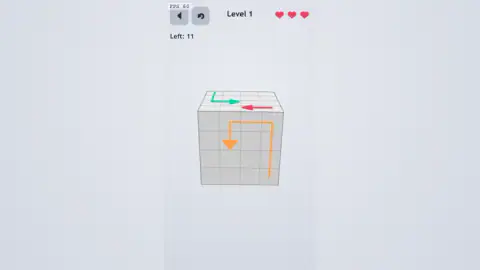
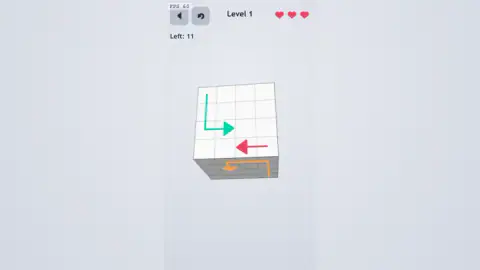
Taken by opening the game ourselves and letting it run — not supplied by the publisher, and not the same picture every other site shows.
How to play Arrow Escape 3D
- Press PLAY on the title screen. Level 1 opens on a cube with a four-by-four grid on each face and coloured arrows drawn across the squares.
- Drag anywhere to turn the cube. It follows the drag freely, and will keep going until a single face fills the screen with nothing else in view.
- Click an arrow to send it off. According to the game's instructions it slides away in the direction its head points, and only if nothing blocks its path.
- Watch the Left counter under the buttons. It started at 11 for us and dropped to 10 when our first arrow left.
- Keep an eye on the three hearts in the top right corner. A tap on a blocked arrow breaks one.
Tips from our sessions:
- Turn the cube all the way round before the first tap. The opening view showed us the top and two sides; the arrow that was free to go was underneath.
- Read the edges for colour. A face turned away still gives itself away: its arrows show as short stripes of colour along the shared edge. A yellow stripe and a purple one down the right-hand side were all we had of an entire face.
- Bring one face flat on. Turn far enough and the rest of the cube disappears behind a single square of grid. It is the only view in which a long, bent arrow can be followed square by square.
- Count what you can find against the counter. We found nine arrows and the counter said 11. If your count is short, there is a face you have not looked at.
- A restart does not shuffle. Every arrow comes back in the same place, so what you worked out the first time still holds.
Controls
| Drag (mouse or finger) | Turns the cube in any direction, including flat-on to a single face; it still turns if you start the drag on top of an arrow |
|---|---|
| Click or tap an arrow | Sends it off the cube if its way is clear; costs a heart if it is blocked |
| Back button (triangle, top left) | Returns to the title screen; pressing PLAY then started our level over |
| Curved-arrow button (top left) | Pressed four times across two sittings on levels where nothing had been removed, with no change we could see |
| Arrow keys, A, Enter, Escape | Nothing we could see or hear in either sitting |
Features
- A cube with a four-by-four grid on every face and bent, coloured arrows drawn across the squares
- Free rotation with a drag, so no more than three faces are ever in view at once, and one face can be turned until it fills the screen alone
- Arrows on the faces turned away show as short stripes of colour along the edges
- A "Left" counter that starts at 11 on level 1 and counts arrows still on the cube
- Three hearts per level; a tap on a blocked arrow breaks one, and turning the cube costs nothing
- The same eleven arrows in the same squares on level 1 across two sittings ten days apart
- A title screen that reads "Level 1 / 1000"; we played the first level only
Game details
- Developer
- sublevelgames
- Release date
- June 2026
- Last updated
- June 12, 2026
- Added here
- April 2026
- Technology
- HTML5 (3D)
- Platforms
- Browser (desktop, mouse), Browser (mobile & tablet)
- Saved progress
- Saving, when available, is managed by this game. Mava cannot confirm your level.
FAQ
How do you play Arrow Escape 3D?
You drag to turn a cube covered in coloured arrows and tap an arrow to send it off in the direction its head points. It only leaves if nothing lies in its way, so the puzzle is the order. A counter marked Left shows how many arrows are still on the cube, and the level is done when it is empty.
What are the controls of Arrow Escape 3D?
On a computer you drag with the mouse to turn the cube and click an arrow to send it off. A drag turns the cube wherever it begins, including on top of an arrow, so the two never get confused. The arrow keys, Enter and Escape did nothing we could see in either sitting.
What happens when you tap a blocked arrow in Arrow Escape 3D?
You lose a heart and the arrow stays where it was. In our first sitting a tap on a blocked yellow arrow turned the third heart grey, and the counter of arrows left did not move. You have three hearts on level 1; we did not lose all three, so we cannot say what happens at zero.
Why will an arrow not move in Arrow Escape 3D?
Either something is standing in its lane, or you dragged instead of tapping. An arrow is blocked by any square of another arrow's line, not just by a head, and a drag only turns the cube: we spent ten minutes pulling arrowheads along their lines and not one arrow came off.
How many levels does Arrow Escape 3D have?
The title screen reads Level 1 / 1000 and the game's description also says 1000 levels. We played only the first one, which has 11 arrows, and did not finish it, so we cannot say how the later cubes differ.
Can you restart a level in Arrow Escape 3D?
Yes. The back button in the top left corner returns you to the title screen, and pressing PLAY brought level 1 back with all three hearts and all 11 arrows in the same places. Reloading the page did the same thing, ten days later, down to the square each arrow sat on.
Does Arrow Escape 3D have ads?
It is free, runs in the browser and needs nothing installed. When we reloaded the game partway through our second sitting, a black card reading "the ad" came up before the start screen. No break interrupted a level while we were playing one, but our longest sitting was ten minutes, which is too short to promise there are none.
Who made Arrow Escape 3D?
The game is credited to sublevelgames. It was published in June 2026.