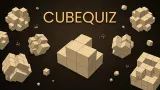




About Cube Quiz
Most block puzzles in a browser ask you to do something with the blocks. Drag this one here, turn that one, slide the row, fill the grid. Cube Quiz asks you to do nothing with them at all. A block of sandy cubes hangs at the top of the screen, a few smaller grey blocks wait underneath, and a single line of text sits between them: Tap the piece that fits. You look, you decide, you tap once. That is the whole game.
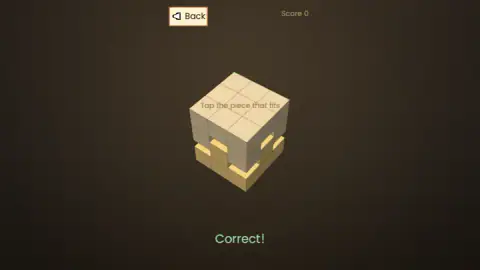
The judgement is the hard part, because you cannot move anything to check. The top block has a hollow cut into it, the candidates all look plausible from the angle you are given, and the only tool you have is your own head turning the shapes over. Get it right and the two blocks meet in the middle of the screen and slide into a single solid box while a green Correct! appears beneath them. Get it wrong and the piece you chose turns red and drops away, and the same level number is still waiting for you.
The game's listing gives the maker as sublevelgames and the title screen agrees: a line at the bottom reads sublevelgames v1.0.1, and three more credit the background music, the icon and the interface art to outside sources. We played it for about ten minutes on a computer. In that time we cleared four puzzles of the first pack and one round of Challenge, and lost most of the rest on the third level, so this is a page about a game we found harder than it looks.
Four packs, three padlocks and a Challenge run
The pack menu is honest about how it is organised. Under each locked pack is the condition for opening it: Fit or Not wants ten clears in Find the Piece, Find the Pair wants ten in Fit or Not, and Match All wants ten in Find the Pair. So the packs form a chain, and the first ten puzzles of each one are the key to the next. Find the Piece itself has 24 puzzles, according to the bar beneath its name.
The game's own listing says what the other packs ask. In Fit or Not you see two blocks and tap Fits or Don't fit. In Find the Pair you tap the two blocks that fit each other. In Match All you pair up every block on the screen. We cleared four puzzles in Find the Piece, so we never saw any of them; we pass them on as the game states them.
Challenge sits above the packs and is open from the start. We played one round of it. It looked exactly like Find the Piece with four candidates and a Score counter in the corner instead of a level number; the counter still read zero on our Correct! screen, but the pack menu read Score 1 when we returned to it, and the number next to the heart on the Challenge bar had dropped from 3 to 2. The listing says a single wrong answer ends a Challenge run, and we take the heart to be the stock of runs, but we did not play enough of it to be sure.
The cubes look like a psychology test, and that is the point
If the blocks in Cube Quiz feel familiar, it may be because you have seen them in a textbook. The classic experiments on mental rotation, run in the early 1970s, showed people pairs of figures built from exactly this kind of small cubes joined into arms and bends, and asked whether the two were the same object turned around. The finding that made them famous was that the time people needed grew steadily with the angle between the two figures, as if they were turning a real object in their heads at a fixed speed.
Cube Quiz is that task with the answer sheet removed. It does not ask whether two shapes match; it asks which of three or four shapes is the complement of another, which means rotating a hollow in your head and then rotating each candidate to see if it fills it. The listing calls it a workout for your mental rotation skills, and for once a blurb undersells its game. There is no clock in the corner and nothing counting down, so the only pressure is the one your own patience applies.
You get one fixed view of every block, which is why the game is harder than its soft colours suggest. The game's instructions say you can drag a block to rotate it and inspect it from every angle; we did not manage that in our run, and every answer we got came from the angle the game gave us.
What we did not reach
- Fit or Not, Find the Pair and Match All. All three stayed locked; we cleared four of the ten puzzles needed to open the first.
- The end of Find the Piece. Our counter stood at 3 / 24 the last time we saw the menu, with a fourth cleared after that.
- A full Challenge run. One correct answer, then we left with Back.
- Rank. The title screen has a Rank button beside BGM and Sound; we did not open it.
- Rotating a block by dragging. Described by the game, not seen by us.
- Sound. The title screen offers a BGM toggle and a Sound toggle. We heard one sound as the game opened and nothing we could attach to a right or wrong answer, so we say nothing more about it.
- A phone. The distributor serves the game in portrait for touchscreens. We played in a landscape window on a computer, and everything sat in a central column with empty brown space either side.
Who it is for, and more 3D block puzzles
This is a game for people who like to be right rather than quick. A child who enjoys fitting shapes into a sorter will get the idea from the first screen; an adult who has not thought in three dimensions since school will find level three humbling. Nothing moves until you tap, and nothing punishes a slow answer.
If you want the same cubes with more to do, Block Sculptor hides a coloured figure inside a block of grey cubes and asks you to chip the grey away without touching it. Cube Sort lets you spin a floating sculpture and tap away the tiles that match the open buckets, which is the rotation Cube Quiz keeps from you. Wooden Blocks 3D: Take It Apart is the slower cousin: wooden sculptures that come apart one arrowed block at a time. And Blocky Set goes the other way, giving you a finished model and asking you to rebuild it brick by brick.
More in our puzzle games.
Screenshots
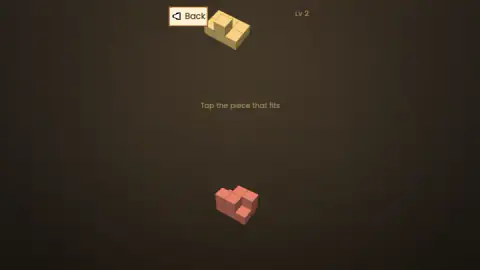
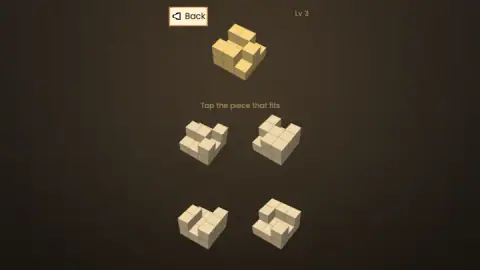
Taken by opening the game ourselves and letting it run — not supplied by the publisher, and not the same picture every other site shows.
How to play Cube Quiz
- Press Start and pick a pack. The menu, headed Select Pack, lists a Challenge bar with a heart and a number, then four packs: Find the Piece, Fit or Not, Find the Pair and Match All. Only Find the Piece is open at the start; the other three carry a padlock.
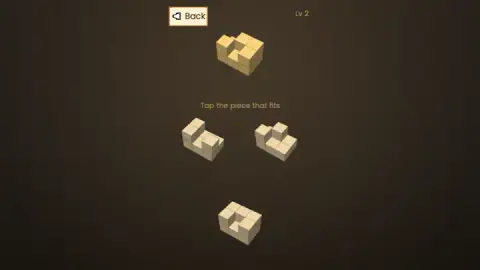
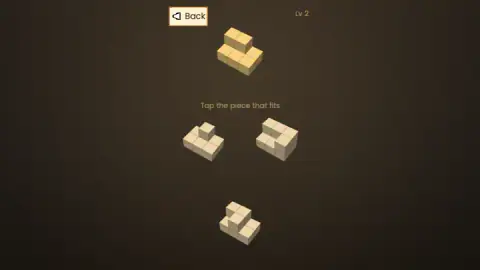
- Read the top block. It is the yellow one, and its missing cubes are the shape you are after. The candidates sit below it in grey: three in the first two levels, four from level three.
- Tap the one that fits. One tap, no dragging. If it is right the two blocks glide together into one solid box and Correct! appears in green. The next puzzle follows after a short pause.
- If you are wrong, look again. The piece you tapped turns red and drops off the screen. The level counter in the top-right corner does not change, and the candidates come back.
- Use Back whenever you like. The button in the top-left corner returns you to the pack menu, and the menu remembers how many you have cleared; ours read 1 / 24 cleared after the first level and three cleared after the third.
Tips from our run:
- Look for the negative, not the match. The candidate you want is the one shaped like the hole, so start from the top block's hollow and work out what would fill it, then look for that among the candidates. Looking for a piece that resembles the top block will lead you wrong, because they all do.
- Wait for the pieces to arrive. A new level draws the top block first, faint, and fades the candidates in a beat later. Several of our taps landed on an empty screen during that beat and did nothing, and we spent a while thinking the game had stalled.
- Count cubes if the shape will not resolve. Every solved puzzle we saw ended as a full rectangular box, so the candidate has to contain exactly the cubes the top block is missing. A piece with too many or too few is out before you think about rotation.
- Level three is where it bites. The first two levels gave us three candidates and simple notches. Level three brought four candidates and a hollow with more corners, and it took us several wrong taps and a lot of staring to get past it.
Controls
| Tap or click a grey block | Picks it as your answer; one tap, no dragging |
|---|---|
| Back (top-left corner) | Returns to the Select Pack menu; your cleared count is kept |
| Start | Takes you from the title screen to Select Pack |
| Rank, BGM, Sound (title screen) | A ranking button and two audio toggles; we opened none of them |
| Drag on a block | The game's instructions say it rotates the block so you can inspect it; not tried by us |
| Keyboard | Nothing we pressed did anything visible; Escape changed nothing |
Features
- One rule in the whole first pack: a yellow block with a hollow on top, three or four grey candidates below, and one tap to say which fits
- A right answer slides the two blocks into a single solid box with Correct! in green; a wrong one turns the piece red and drops it away without moving the level counter
- Four packs in a chain: Fit or Not, Find the Pair and Match All each open after ten clears in the pack before them, and Find the Piece holds 24 puzzles
- A Challenge run sits above the packs, open from the start, with a Score counter and a heart whose number fell from 3 to 2 after our one round
- No timer, no countdown and no lives on the puzzle screen; the only pressure is your own
- Progress is kept: Back returns you to the menu and the pack bar reads how many puzzles you have cleared
- The title screen names the maker, sublevelgames v1.0.1, beside Rank, BGM and Sound buttons
Game details
- Developer
- sublevelgames
- Release date
- July 2026
- Added here
- May 2026
- Technology
- HTML5 (3D)
- Platforms
- Browser (desktop), Browser (mobile & tablet, touch)
- Classification
- Arcade , Puzzle , Word & Trivia
- Saved progress
- Saving, when available, is managed by this game. Mava cannot confirm your level.
FAQ
How do you play Cube Quiz?
Press Start, choose a pack from the Select Pack menu, and each puzzle shows a yellow block of cubes at the top with a hollow in it and three or four grey blocks below. Tap the grey block that fills the hollow. A right answer slides the two together into one solid box and shows Correct! in green; a wrong one turns red and drops away so you can try again. Back in the top-left corner returns you to the menu.
How do you know which piece fits in Cube Quiz?
Start from the hole, not the pieces. The yellow block is missing some cubes, and the piece you want is shaped like that missing part, turned to whatever angle the game chose. Every solved puzzle we saw ended as a full rectangular box, so the right candidate contains exactly the cubes the top block lacks; a piece with too many or too few can be ruled out before you think about rotation. In our run the first two levels offered three candidates and simple notches, and level three brought four candidates and a more irregular hollow.
How do you unlock Fit or Not, Find the Pair and Match All in Cube Quiz?
By clearing ten puzzles in the pack before each one. The menu says so under every padlock: Fit or Not opens after ten clears in Find the Piece, Find the Pair after ten in Fit or Not, and Match All after ten in Find the Pair. Find the Piece itself holds 24 puzzles according to the bar under its name. We cleared four in ten minutes, so all three packs stayed locked for us.
What is Challenge mode in Cube Quiz?
A separate run above the four packs, open from the start, marked with a heart and a number. It looked exactly like Find the Piece with four candidates and a Score counter in the corner instead of a level number. The game's listing says one wrong answer ends a run. We answered one puzzle correctly and left with Back; the menu then read Score 1 and the number next to the heart had gone from 3 to 2, which we take to be a stock of runs.
What happens when you tap the wrong piece in Cube Quiz?
The piece you chose turns red and drops away, the yellow block is pushed aside, and after a moment the same level is back with its candidates. The level counter in the top-right corner does not move and nothing is taken from you on the puzzle screen; there are no lives there and no clock. In our run we tapped wrong several times on level three and simply kept going until the right piece slid home.
Does Cube Quiz have a timer or ads?
We saw neither in ten minutes. There is no clock on the puzzle screen, nothing counting down, and no lives beyond the heart on the Challenge bar. No ad appeared between our levels or when we returned to the menu, though a longer session may differ. The game's own listing promises no timers and no pressure, and that matched what we played.
Can you rotate the blocks in Cube Quiz?
The game's instructions say you can drag any block to rotate it and inspect it from every angle. We did not manage that in our run; every answer we got came from the single angle the game gave us. Treat it as a feature to try rather than one we can vouch for. Pieces also fade in a beat after a new level loads, so a tap in the first moment of a level does nothing.
Who made Cube Quiz?
The title screen credits a maker called sublevelgames, with the version number 1.0.1 beside it, and credits the background music, the icon and the interface art to three outside sources. The game's listing gives the same name and dates it to July 2026.